
2.1. Python Syntax#
Overview
Python fundamentals set the stage for everything that follows in this book. In this chapter, you will learn how to write simple Python statements, store values in variables, make decisions with conditional logic, repeat work with loops, organize values in lists and dictionaries, and define reusable functions.
The emphasis is practical fluency for data science and management work. You will use Python as a tool for representing business information, applying decision rules, summarizing repeated values, and preparing for NumPy and pandas in later chapters.
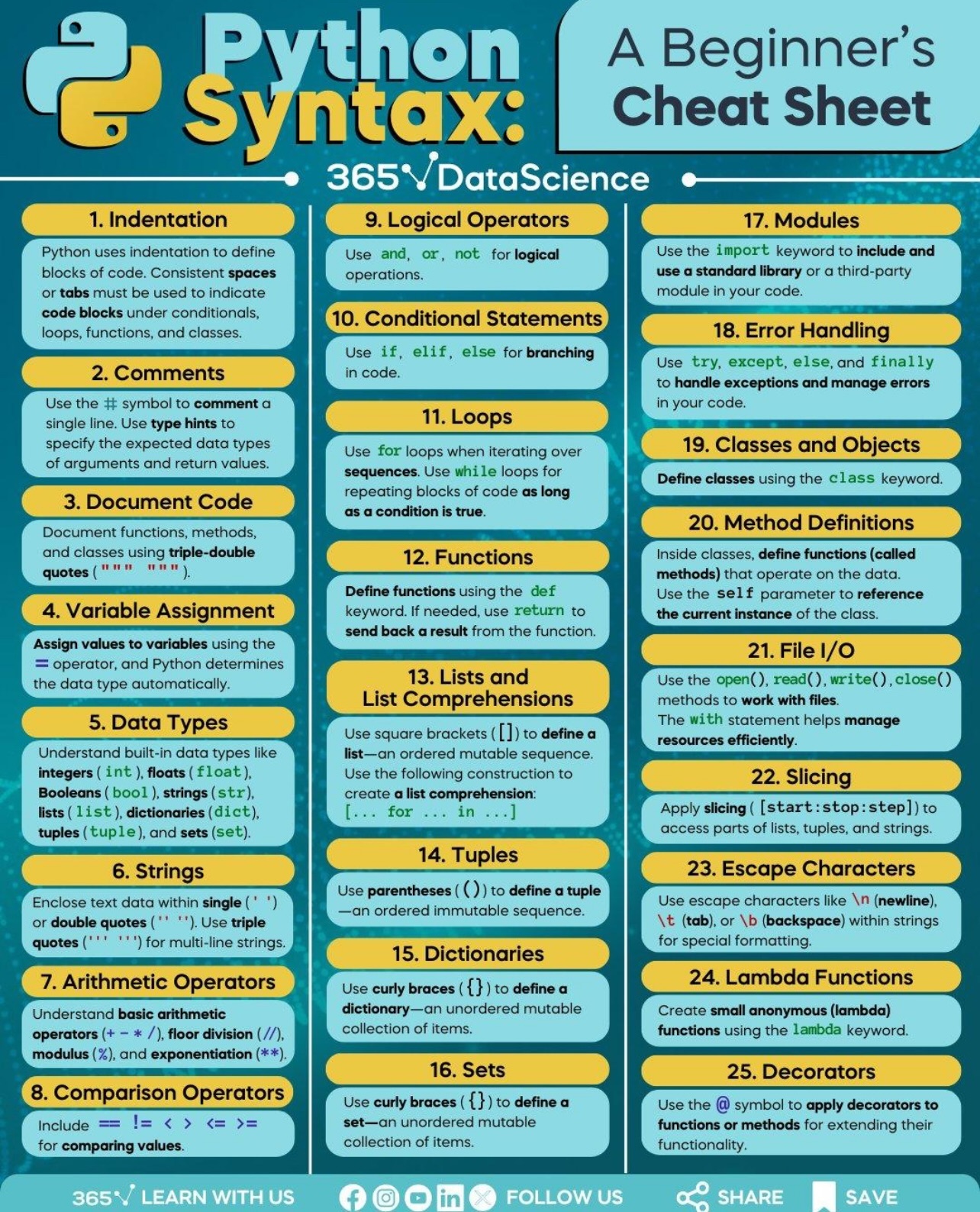
Fig. 2.1 Python cheat sheet (365 Data Science).#
2.1.1. Input and Output#
2.1.1.1. print() and F-Strings#
In Python, the print() function is used to display output to the screen. It’s one of the most commonly used functions for debugging, showing results, and interacting with users. When printing multiple values, a , can be used; or you may choose to concatenate the strings using the + operator.
The print() function displays values to the console/command line:
print("hello, world!") ### print a string
hello, world!
To print multiple values in one statement, you either comma-separate your values or concatenate the strings.
print("Name:", "Alice", "Age:", 25)       ### comma-separated
print("Name:" + " Alice" + " Age:", 25)   ### + concatenated
Name: Alice Age: 25
Name: Alice Age: 25
%%expect TypeError

print("I am " + 25 + " years old")        ### Error: can only concatenate string
TypeError: can only concatenate str (not "int") to str
2.1.1.2. F-Strings#
F-strings (formatted string literals) are more readable and efficient for formatting strings in Python (available since Python 3.6). F-string is the preferred output method because it is clean and allows expressions between {}, so you don’t need to worry about data types. Python f-strings use an f before the string and put expressions inside {}:
f"{expression}"
name = "Alice"
age = 25
print(f"My name is {name} and I am {age} years old.")   ### f-string with variables

x = 10
y = 20
print(f"The sum of {x} and {y} is {x + y}")             ### f-string with expressions
My name is Alice and I am 25 years old.
The sum of 10 and 20 is 30
2.1.1.3. sep and end Params#
The print() function has useful parameters:
sepfor changing separator string in between print() arguments (default is space)endfor changing what comes at the end (default is newline)
print("A", "B", "C", " (separator is space by default)")   ### Output: A B C (separator is space by default)
print("A", "B", "C", sep="-")   ### Output: A-B-C (separator changed to '-')
print(2026, 2, 7, sep="/")          ### Output: 2026/2/7
A B C  (separator is space by default)
A-B-C
2026/2/7
for num in range(1,4):
    print(num)                  ### print list with default end character (\n, new line)
for num in range(1,4):
    print(num, end=" ")         ### Print list space as end character
1
2
3
1 2 3
### Exercise: Print "hello, world"
### The output should look the same as the cell below
### Your code starts here


### Your code ends here
hello, world
2.1.1.4. Keyboard input#
Python provides a built-in function called input that stops the program and waits for the user to type something. When the user presses Return or Enter, the program resumes, and input returns what the user typed as a string. Before getting user input, you might want to display a prompt that explains what to type. The input syntax is:
variable = input("Prompt message: ")
We usually save the user input value to a variable like this:
user_name = input("Enter your username: ")
You can then use the variable. For example, in a print statement:
user_name = input("Enter your username: ")
print("Hello, ", user_name)
Hello, tychen
Or, to print richer information using f-string,
### input() returns a string

age = input("Enter your age: ")
print(f"You are {age} years old.")
You are 35 years old.
Note that the age you enter is a string, and it will need to be converted into a proper data type, such as int, before you can do arithmetic with it. See Type conversion later on this page.
2.1.3. Variables#
A variable is a named location in computer memory that stores a value. Think of it as a name/label that is associated with some data. Variables allow us to store, retrieve, and manipulate data throughout the program.
Unlike some other programming languages, Python doesn’t require you to declare the data type when creating a variable. The type is automatically determined based on the value you assign (this is called dynamic typing) at runtime (execution).
2.1.3.1. Creating Variables#
In Python, you create a variable by using an assignment statement with the assignment operator =.
name = "Alice"
age = 25

print(f"{name} is {age} years old.")
Alice is 25 years old.
Note that:
Variables can be reassigned.
You can assign multiple values/expressions to multiple variables in one line.
### reassignment

x = 10         # x is 10
x = 20.5       # now x is 20.5
x = "hello"    # now x is a string (type can change!)
print(x)
hello
### multiple assignment in a single line:

x = y = z = 0           # x, y, and z are all 0
### swap values using tuple unpacking

a, b, c = 10, 20, 30    # assign different values to variables
a, b = b, a             # Swap values using tuple unpacking ==> sorting
print(f"After swap: a = {a}, b = {b}")
After swap: a = 20, b = 10
### Exercise: Create a variable called "name" and use f-string to print it
### The output should be the same as the cell below
### Your code starts here


### Your code ends here
Hello, Dr. Chen
2.1.3.2. Updating variables#
As you may have discovered, it is legal to make more than one assignment to the same variable. A new assignment makes an existing variable refer to a new value (and stop referring to the old value).
For example, here is an initial assignment that creates a variable.
x = 5
x
5
And here is an assignment that changes the value of a variable.
x = 7
x
7
The following figure shows what these assignments look like in a state diagram.

The dotted arrow indicates that x no longer refers to 5.
The solid arrow indicates that it now refers to 7.
A common kind of assignment is an update, where the new value of the variable depends on the old.
x = 7
x = x + 1
x
8
This statement means “get the current value of x, add one, and assign the result back to x.”
Increasing the value of a variable is called an increment; decreasing the value is called a decrement.
Because these operations are so common, Python provides augmented assignment operators that update a variable more concisely.
For example, the += operator increments a variable by the given amount.
z += 2
z
2
There are augmented assignment operators for the other arithmetic operators, including -= and *=.
2.1.3.3. Naming Rules & Conventions#
Variable names must follow these rules (from PEP8):
Must start with a letter (a-z, A-Z) or underscore (
_)Can contain letters, digits (0-9), and underscores (
_)Can NOT contain spaces or special characters (@, #, $, %, etc.)
Cannot be a Python keyword (like
if,for,class, etc.)Case-sensitive:
Name,name, andNAMEare different variables
Python programmers follow these conventions (recommended but not required):
Convention |
Use Case |
Example |
|---|---|---|
snake_case |
Variable and function names |
|
UPPER_CASE |
Constants |
|
PascalCase (not camelCase) |
Class names |
|
Descriptive names |
Make code readable |
|
2.1.4. Built-in Data Types#
Python has standard types built into the interpreter. The principal built-in types are: numerics, sequences, mappings, classes, instances, and exceptions. The commonly used data types can be organized as Fig. 2.2.
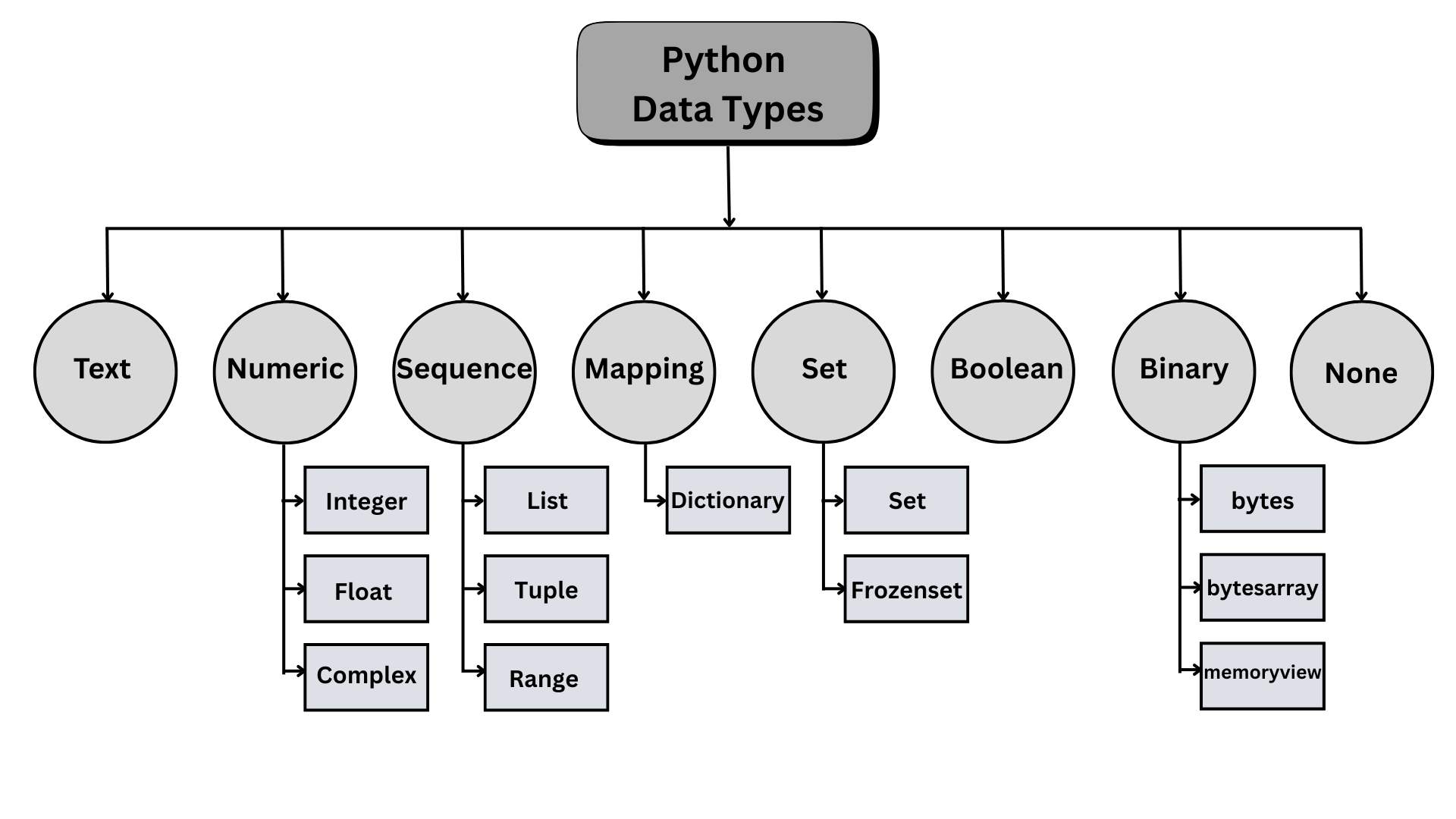
Fig. 2.2 Python Built-In Data Types#
These types can be grouped into simple/primitive data types and collections types; namely, among the often-used built-in types, some are for storing single values (Literals), while others are for storing multiple values.
Group |
No. |
Category |
Types |
Remarks |
|---|---|---|---|---|
Literals |
1 |
Numeric |
|
Represent numbers (whole numbers, decimals, complex numbers) |
2 |
String |
|
Represent text (immutable) |
|
3 |
Boolean |
|
Represent True/False |
|
4 |
Null |
|
Represent “nothing” |
|
Collections |
5 |
Sequence |
|
Ordered collections (list is mutable, tuple is immutable) |
6 |
Binary |
|
Store binary data |
|
7 |
Set |
|
Unordered unique values (set is mutable, frozenset is immutable) |
|
8 |
Mapping |
|
Key-value pairs for flexible data structure |
In the examples below, we look at some examples of data types.
2.1.4.1. Numbers#
Python has three numeric types:
integer = 42             # integer (natural number)
floating = 3.14          # floating-point number (real number)
complex_num = 3 + 4j     # complex number

print(f"Integer: {integer}")
print(f"Floating-point number: {floating}")
print(f"Complex number: {complex_num}")
Integer: 42
Floating-point number: 3.14
Complex number: (3+4j)
2.1.4.2. Strings (Text Data)#
Strings represent text (character sequences) and are created using quotes. Strings can be created using single or double quotes. You can also wrap a single quote in double quotes if you need to include a quote within the string.
name1 = "Alice"
name2 = 'Alice'
name3 = """Alice"""
print(name1, name2, name3)
Alice Alice Alice
Common string operations include:
Concatenation:
"Hello" + " " + "World"→"Hello World"Repetition:
"Ha" * 3→"HaHaHa". The multiplication (*) operator also works with strings; it makes multiple copies of a string and concatenates them.Length:
len("Python")→6. Python provides a useful function calledlenthat computes the length of a string. Notice thatlencounts the letters between the quotes, but not the quotes. In collection types,lencounts the number of elements in the collection.Indexing:
"Python"[0]→"P"Slicing:
"Python"[0:3]→"Pyt"
name = "Alice"
greeting = "Hello, " + name + "!"              ### 1. concatenation

print("1.", greeting)
print("2.", greeting * 3)                      ### 2. repetition
print(f"3. Length: {len(name)}")               ### 3. length + f-string
print(f"4. First letter: {name[0]}")           ### 4. indexing + f-string
print(f"5. First three letters: {name[0:3]}")  ### 5. slicing + f-string
1. Hello, Alice!
2. Hello, Alice!Hello, Alice!Hello, Alice!
3. Length: 5
4. First letter: A
5. First three letters: Ali
2.1.4.3. Boolean Values#
Booleans represent truth values and are used extensively in conditional comparisons and logical expressions, which involve comparison/relational operators and logical operators.
3 > 5 ### relational
False
2 > 1 and 3 > 2 ### logical
True
num1, num2, num3, num4 = 1, 2, 3, 4

if (num1 > num2):                  ### comparison operator ">"
    print("num1 is greater than num2.")
else:
    print("num1 is not greater than num2.")
num1 is not greater than num2.
num1 > num2 and num3 > num4 ### logical operator "and"
False
2.1.4.3.1. Truthy and Falsy#
In Python, every object has a truth value in Boolean contexts like if and while. “Truthy” values behave like True, while “falsy” values behave like False — empty containers and zero are falsy; most non-empty values are truthy.
Falsy:
False,None,0,0.0,'',[],{},set()Truthy: most other values (e.g.,
'0',[0]).Quick check:
bool(value); idiom:if not items:checks emptiness.
### truthy/falsy examples
print(bool(0))         # False
print(bool(''))        # False
print(bool('0'))       # True
print(bool([0]))       # True
False
False
True
True
### Exercise: Check Truthy and Falsy Values
# Use bool() to print the truth value of each value.
# Print exactly:
# Empty cart: False
# Cart with items: True
# Zero quantity: False
# Customer name: True
empty_cart = []
cart_items = ["notebook", "pen"]
quantity = 0
customer_name = "Ava"
### Your code starts here.


### Your code ends here.
Empty cart: False
Cart with items: True
Zero quantity: False
Customer name: True
2.1.4.4. Type conversion#
Type conversion is the general process of converting a value from one data type to another. There are two ways of type conversion to change type:
Type Casting: Explicit conversion performed by the programmer (e.g., using
int("42")).Type Coercion: Implicit conversion performed automatically by the programming language (e.g.,
3 + 4.5results in7.5, where the integer3is coerced to a float to match the other operand).
### casting vs. coercion

### type casting
num = 5
print("num's type:", type(num))
print("num's new type", str(num))  ### casting (explicit conversion) by programmer

### type coercion
x = 3               ### integer
y = 0.14            ### float
print(f"{x} + {y} is {x+y} and has the type: {type(x + y)}")
                    ### int + float = float done automatically by Python interpreter
                    ### coercion (implicit conversion)
num's type: <class 'int'>
num's new type 5
3 + 0.14 is 3.14 and has the type: <class 'float'>
Casting matters for keyboard input: input() always returns a string, so you need to convert the value before doing arithmetic with it.
age = input("Enter your age: ")
age = int(age)                        ### convert input string to integer
print(f"You will be {age + 1} years old next year.")
You will be 36 years old next year.
### Exercise: Convert Text Values
# Convert text values from a form into useful Python values.
# Also convert num_text into a float and add 1.0.
# Print the converted values and their types exactly as shown below.
# Quantity: 18 <class 'int'>
# Price: 4.5 <class 'float'>
# In stock: True <class 'bool'>
# Num: 101.1 <class 'float'>
quantity_text = "18"
price_text = "4.50"
in_stock_text = "yes"
num_text = "100.1"
### Your code starts here.


### Your code ends here.
Quantity: 18 <class 'int'>
Price: 4.5 <class 'float'>
In stock: True <class 'bool'>
Num: 101.1 <class 'float'>
2.1.4.5. Type Hinting#
Type hinting/annotation in Python allows you to specify the expected data types of variables, function parameters, and return values, making your code more readable and easier to debug. Introduced in Python 3.5, type hints are optional and do not affect program execution, but they help tools like linters and IDEs catch type-related errors early. For example, you can annotate a function as def add(a: int, b: int) -> int: to indicate that both parameters and the return value should be integers.
num: int = 10               ### type hinting for integer
name: str = "Alice"         ### type hinting for string
is_active: bool = True      ### type hinting for boolean
height: float = 5.9         ### type hinting for float
2.1.5. Operators#
In programming languages, operators are special symbols that perform computations or logical comparisons between values. They form the backbone of most expressions — whether you’re performing arithmetic, comparing data, assigning values, or testing relationships between objects. (For a detailed discussion of Expressions and Operators, see Python Reference/Expressions)
Category |
Operators |
Description |
Example |
|---|---|---|---|
Arithmetic |
|
Mathematical operations |
|
Comparison |
|
Compare values, return bool |
|
Logical |
|
Boolean logic |
|
Assignment |
|
Assign and update values |
|
Identity |
|
Test object identity |
|
Membership |
|
Test membership in sequence |
|
Bitwise |
|
Bit-level operations |
|
As an example for operators, we’ll cover some operators here.
2.1.5.1. Arithmetic Operators#
An arithmetic operator is a symbol that represents an arithmetic computation. For example:
The plus sign,
+, performs addition.The minus sign,
-, is the operator that performs subtraction.The asterisk,
*, performs multiplication.The forward slash,
/, performs division. Note that in modern Python (Python 3+), the division operator/always returns a floating-point number, even if the result is a whole number.The integer/floor division operator,
//, is called floor division because it always rounds down (toward the “floor”).The modulus operator
%returns the remainder after division.The operator
**performs exponentiation; that is, it raises a number to a power. In other languages, such as R, MATLAB, Julia, and Excel, the caret^is used for exponentiation.
a = 10 + 3
b = 10 - 3
c = 10 * 3
d = 10 / 3
e = 10 // 3
f = 10 % 3
g = 10 ** 3

print(a, b, c, d, e, f, g, sep="\n")
13
7
30
3.3333333333333335
3
1
1000
2.1.5.2. Integer division and modulus#
Recall that the integer division operator, //, divides two numbers and rounds down to an integer. For example, suppose the run time of a movie is 105 minutes. You might want to know how long that is in hours.
Conventional division returns a floating-point number:
minutes = 105
minutes / 60
1.75
But we don’t normally write hours with decimal points. Integer division returns the integer number of hours, rounding down:
minutes = 105
hours = minutes // 60
hours
1
To get the remainder, you could subtract off one hour in minutes:
remainder = minutes - hours * 60
remainder
45
Or you could use the modulus operator, %, which divides two numbers and returns the remainder.
remainder = minutes % 60
remainder
45
The modulus operator is more useful than it might seem.
For example, it can check whether one number is divisible by another – if x % y is zero, then x is divisible by y.
Also, it can extract the right-most digit or digits from a number.
For example, x % 10 yields the right-most digit of x (in base 10).
Similarly, x % 100 yields the last two digits.
x = 123
x % 10
3
x % 100
23
Finally, the modulus operator can do “clock arithmetic”. For example, if an event starts at 11 AM and lasts three hours, we can use the modulus operator to figure out what time it ends.
start = 11
duration = 3
end = (start + duration) % 12
end
2
The event would end at 2 PM.
2.1.5.3. Operator Precedence#
Operator precedence determines the order in which operations are evaluated in an expression. Operations with higher precedence are performed before those with lower precedence. When in doubt, use the parentheses () to ensure you have the preferred precedence.
Notice that exponentiation happens before addition because exponentiation is the 2nd highest precedence. This actually follows the order of operations you might have learned in a math class: exponentiation happens before multiplication and division, which happen before addition and subtraction.
In the following example, multiplication happens before addition, and exponentiation happens before multiplication.
num1 = 12 + 5 * 6
num2 = (12 + 5) * 6

x, y, z = 1, 2, 3

result = x + y * z ** 2
print(result)               ### output: 13
19
### Exercise: Pack Orders with Operators
# A warehouse packs items into boxes of 12.
# Use integer division and modulus to calculate full boxes and leftover items.
# Print exactly:
# Full boxes: 7
# Leftover items: 5
items = 89
box_size = 12
### Your code starts here.


### Your code ends here.
Full boxes: 7
Leftover items: 5
2.1.6. Python Keywords#
Reserved words, or keywords, are special words reserved by the programming language to be used to specify the structure of a program. Keywords of the language cannot be used as ordinary identifiers. For example, if you try to assign a string to a variable name class, since class is a keyword, you will receive a syntax error because the Python interpreter will detect that.
For example, this code is intentionally invalid because class is a Python keyword:
class = 'Self-Defense Against Fresh Fruit'
Python reports this as a syntax error before the program can run:
SyntaxError: invalid syntax
Here’s a complete list of 35 Python keywords as shown in the Python Language Reference:
False      await      else       import     pass
None       break      except     in         raise
True       class      finally    is         return
and        continue   for        lambda     try
as         def        from       nonlocal   while
assert     del        global     not        with
async      elif       if         or         yield
Keywords serve as the grammar glue for you to express structure and can be grouped as follows:
Structure |
Keywords |
|---|---|
1. Control flow |
|
2. Logic/conditions |
|
3. Definitions |
|
4. Exception handling |
|
5. Imports/modules |
|
6. Scope |
|
7. Async |
|
8. Context managers |
|
9. Constants/values |
|
You don’t have to memorize this list, but you can already see how these keywords play a critical role in formulating code. In most development environments, keywords are displayed in a different color; if you try to use one as a variable name, you’ll be alarmed not to.
### example of the "if" keyword in Python
num = 5
if num > 0:
    print("Positive number")
Positive number
### example of the "for" keyword in Python
for i in range(5):
    print(i)
0
1
2
3
4
2.1.6.1. Soft keywords#
Python’s soft keywords are special words that act as keywords only within specific contexts, but can be used as regular identifiers (like variable or function names) in other contexts. As of Python 3.12, there are 4 soft keywords: match, case, _, and type
# Import the keyword module to check whether
# note "match" and "type" are soft keywords.
import keyword
words = ["for", "customer_total", "match", "type"]
print(keyword.iskeyword(words[0]))
print(keyword.iskeyword(words[1]))
print(keyword.iskeyword(words[2]))
print(keyword.iskeyword(words[3]))
True
False
False
False
2.1.7. Data Structures#
Python’s data structure are the built‑in container types you use to store, organize, and operate on groups of items/values. The four main data structure types are: list, tuple, dictionary, and set.
The commonly used built-in/standard data structures can be grouped as:
Sequence Types
Set Types
Mapping Types
Collections (broad category)
├── Sequence Types (ordered, indexed)
│   ├── list
│   ├── tuple
│   ├── str (string)
│   ├── range
│   └── bytes/bytearray
│
├── Set Types (unordered, no duplicates)
│   ├── set
│   └── frozenset
│
└── Mapping Types (key-value pairs)
    └── dict
Among them, list, tuple, and range are sequence types. Also, strings are considered a sequence type (a kind of collection) because they behave like collections of characters, although conceptually, in many languages other than Python, strings are considered primitives, not collections.
range is debatable as a “collection”; it’s really a lazy sequence generator, not a traditional data structure. It does like a sequence, so Python treats it as one. Note that range stores a formula, not data; it computes values on demand. Therefore, range is a sequence protocol implementer, not a data container.
A set object is an “unordered collection of distinct hashable objects. Common uses include membership testing, removing duplicates from a sequence, and computing mathematical operations such as intersection, union, difference, and symmetric difference” [cite:pPython Standard Library_2026].
Mapping in Python refers to data types that store key-value pairs, where each key is associated with a corresponding value. The most common mapping type is the dictionary (dict).
Mutability and order are two important characteristics of Python data structures, summarized in the table below.
Type |
Literal |
|
Ordered |
Usage |
|---|---|---|---|---|
Sequence Types |
||||
list |
|
Yes |
Yes |
General purpose; dynamic arrays; index/slice access. |
tuple |
|
No |
Yes |
Fixed records; function returns; hashable if elements are.* |
range |
|
No |
Yes |
Memory-efficient integer sequences; iteration. |
str |
|
No |
Yes |
Text; immutable character sequences. |
Set Types |
||||
set |
|
Yes |
No |
Unique items; membership testing; set operations. |
frozenset |
|
No |
No |
Immutable set; dict keys; set elements. |
Mapping Types |
||||
dict |
|
Yes |
Yes** |
Key-value lookups; counting; grouping; configuration. |
Notes:
* Tuples are hashable only if all elements are hashable.
** Dict ordering guaranteed in Python 3.7+.
Python data collections let you:
model data naturally (ordered records, lookup tables, unique elements),
support iteration and common algorithms,
use methods for adding, removing, searching, and
transforming data.
2.1.7.1. Lists (Ordered Collections)#
Lists store multiple items in order and are mutable (can be changed):
numbers = [1, 2, 3, 4, 5]
fruits = ["Apple", "Banana", "Cherry"]
mixed = [1, "hello", 3.14, True]
empty_list = []

print(f"Numbers: {numbers}")
print(f"Fruits: {fruits}")
print(f"Mixed: {mixed}")
print(f"Empty list: {empty_list}")
Numbers: [1, 2, 3, 4, 5]
Fruits: ['Apple', 'Banana', 'Cherry']
Mixed: [1, 'hello', 3.14, True]
Empty list: []
Common list operations:
Append:
numbers.append(6)→[1, 2, 3, 4, 5, 6]Access/Indexing:
numbers[0]→1Slicing:
numbers[1:3]→[2, 3]Length:
len(numbers)→5
### run the previous code cell first to define the lists before running this cell
### append() method: add an element to the end of the list
print(numbers)          ### before append()
numbers.append(7)          ### append(); mutable: update/change the list
print(numbers)
[1, 2, 3, 4, 5]
[1, 2, 3, 4, 5, 7]
### indexing
numbers = [1, 2, 3, 4, 5]
print(numbers)
print(numbers[0])        ### indexing
print(numbers[2])        ### indexing
print(numbers[-1])       ### indexing (last element)
[1, 2, 3, 4, 5]
1
3
5
### slicing
print(numbers)
print(numbers[0:2])       ### slicing
print(numbers[0:])        ### slicing (all elements)
print(numbers[:-1])       ### slicing (all elements except the last one)
print(numbers[::2])      ### slicing (every second element)
print(numbers[0::2])      ### slicing (every second element)
[1, 2, 3, 4, 5]
[1, 2]
[1, 2, 3, 4, 5]
[1, 2, 3, 4]
[1, 3, 5]
[1, 3, 5]
### length
numbers = [1, 2, 3, 4, 5]
print(len(numbers))      ### length
5
fruits[2] = "cranberry"                     ### lists are mutable: modify an element
print(f"After modification: {fruits}")
After modification: ['Apple', 'Banana', 'cranberry']
2.1.7.2. Tuples (Immutable Sequences)#
Tuples are similar to lists, but they cannot be changed after creation (immutable). So, use tuples when you want to ensure data won’t change:
rgb_color = (255, 128, 0) single = (42,) # Note the comma for single-item tuple
fruits = tuple(fruits)
print(f"\nConverted to tuple: {fruits}")            ### ( )
print("first element in coordinate: ", fruits[0])   ### indexing
Converted to tuple: ('Apple', 'Banana', 'cranberry')
first element in coordinate:  Apple
Since tuples are immutable, the following operation would generate an error:
%%expect TypeError

fruits[2] = "cherry"  # This would cause an error because tuples are immutable!
TypeError: 'tuple' object does not support item assignment
2.1.7.3. Dictionaries (Key-Value Pairs)#
In Python, a mapping type is a collection that stores data as key–value pairs, where each key is unique and maps to a corresponding value. The most common mapping type is the dictionary (dict), which allows flexible data organization and fast lookup, insertion, and modification of values by key rather than numerical index. An example of a Python dictionary:
student = {
    "name": "Alice",
    "age": 20,
    "major": "IST"
}
student
{'name': 'Alice', 'age': 20, 'major': 'IST'}
Common dictionary operations:
Access:
student["name"]→"Alice"Add/Update:
student["gpa"] = 3.8Keys:
student.keys()→dict_keys(['name', 'age', 'major'])Values:
student.values()→dict_values(['Alice', 20, 'Computer Science'])
print(f"Student Name: {student['name']}")   ### 1. access value by key
student["major"] = "CS"                     ### 2. update: MUTABLE
student["GPA"] = 3.5                        ### 2. add new key-value pair: MUTABLE
print(f"student: {student}")

print(student.keys())                       ### 3. keys
print(student.values())                     ### 4. values
Student Name: Alice
student: {'name': 'Alice', 'age': 20, 'major': 'CS', 'GPA': 3.5}
dict_keys(['name', 'age', 'major', 'GPA'])
dict_values(['Alice', 20, 'CS', 3.5])
2.1.7.4. Objects, references, and mutability#
2.1.7.4.1. Type checking#
The built-in function type() returns the data type of the object; in this case, variables.
num1 = 10                   ### integer
num2 = 10.1                 ### floating-point number
greeting = "hello, world"   ### text/string
fruits = ['Apple', 'Banana', 'Cherry']      ### lists are enclosed with square brackets

print(type(num1))
print(type(num2))
print(type(greeting))
print(type(fruits))
<class 'int'>
<class 'float'>
<class 'str'>
<class 'list'>
2.1.7.4.2. Object ID#
In Python, every object has a unique identity, which can be obtained using the built-in id() function. An identity is a unique integer that remains constant for an object throughout its lifetime. This is useful for understanding how Python manages objects in memory and for distinguishing between objects that have the same value.
print(id(num1))
print(id(num2))
print(id(greeting))
print(id(fruits))
140414664357992
140413762299856
140413761282864
140413763360512
### Exercise: Choose Data Structures
# Create a list, tuple, and dictionary for a small sales record.
# Print exactly:
# Regions: ['North', 'South', 'West']
# Quarter: (2026, 'Q1')
# West sales: 4100

### Your code starts here.


### Your code ends here.
Regions: ['North', 'South', 'West']
Quarter: (2026, 'Q1')
West sales: 4100
2.1.8. Modules and Packages#
In Python, functions, classes, modules, packages, and libraries are essential tools for organizing and reusing code:
A function is a named block of code that performs a specific task and can be called whenever needed.
A class is a blueprint for creating objects that encapsulate data and behavior (methods/functions) together, supporting object-oriented programming.
Modules are files containing Python code—such as functions, classes, or variables—that can be imported into other programs.
Packages are collections of modules organized in directories, making it easier to structure larger projects.
Libraries are collections of related modules and packages that provide ready-to-use solutions for common programming tasks, such as data analysis, web development, or scientific computing.
Together, these components help make Python code more organized, efficient, and maintainable.
Note that a module is a single Python file (e.g., calc.py) and a Package: a directory/folder containing modules (optionally with __init__.py). So:
Module: a single Python file (e.g.,
mymodule.py).Package: a directory of modules (optionally with
__init__.py).
Import patterns (when to use):
import math→ usemath.sqrt(25); clear, namespaced imports.from math import sqrt→ usesqrt(25); convenient but use sparingly for readability.import math as m→ usem.pi; alias for brevity (common with large libs).
Installing external packages (Notebooks):
Use
%pip install package_nameto install into the active kernel; if imports fail, restart the kernel.For projects, prefer a virtual environment (e.g.,
python -m venv .venv) activated.
Style notes: Prefer absolute imports in top-level scripts; reserve relative imports for package internals. Follow PEP 8 import order: standard library → third-party → local.
Common data-science aliases (for later chapters): numpy as np, pandas as pd, matplotlib.pyplot as plt.
Python has about 300 built-in modules as part of the standard library that are shipped with Python. For those modules, you just import and use them (e.g., import math). There are different ways of importing:
Import Pattern |
Example Code |
Usage Example |
Description |
|---|---|---|---|
Standard import |
|
|
Clear, namespaced imports |
Selective import |
|
|
Convenient, but use sparingly for readability |
Import all (not recommended) |
|
|
Imports all names; can cause name conflicts and is discouraged |
Aliased import |
|
|
Alias for brevity (common with large libs) |
To use a variable/attribute in a module, you have to use the dot operator (.) between the name of the module and the name of the variable. For example, the Python math module provides a variable called pi that contains the value of the mathematical constant denoted \(\pi\). We can display its value like math.pi:
import math
math.sqrt(25)     ### dot operator
5.0
External Package Notes
Python external (third-party) modules created by the community. You must use pip to install them first (e.g., notebook, NumPy, pandas, …), then import them to use. Most software on the Python Package Index (PyPI; https://pypi.org, where pip accesses software packages) is referred to as “packages” in this context.
To install the packages in the CLI, you would go into your project directory, activate your virtual environment, and then use the pip installation syntax to install the package into your .venv folder (site-packages) for dependency integrity:
pip install [package_name]
If you are in Jupyter Notebook, use the Jupyter Notebook magic command %pip (instead of the older !pip) to achieve the same:
%pip install [package_name]
For example, NumPy (numeric Python) is a popular package for data science and we can install it from inside Jupyter Notebook:
# %pip install numpy
If you have installed the package already, you would want to comment it out:
%pip install numpy
### Exercise: Use a Standard Library Module
# Use the math module to calculate how many vans are needed.
# Each van can carry 15 boxes.
# Print exactly:
# Vans needed: 6
boxes = 82
van_capacity = 15
### Your code starts here.


### Your code ends here.
Vans needed: 6
2.1.2. Comments#
Comments are explanatory notes in your code that are ignored by the Python interpreter. Comments are used to:
Explain complex logic: Help others (and your future self) understand what the code does;
Document assumptions: Note why certain decisions were made;
Mark TODO items: Indicate areas that need improvement or completion; and
Disable code temporarily: Comment out code for testing without deleting it.
Single-line comments start with the hash symbol
#. Everything after#on that line is ignored by Python. For multi-line comments, we use multiple hashes.Ideally, good variable names can reduce the need for comments, but long names can make complex expressions hard to read, so there is a tradeoff. For example,
velocity_mph = 8might be clear without a comment, butv = 8 # velocity in miles per hourmight be more readable in a mathematical formula.Show code cell source
Hide code cell source