6.4.3. Homework#
Use this assignment to practice the chapter’s concepts and coding skills in runnable Python code.
Sign in from the account menu before you start working on the assignment.
Write and run your code directly in the coding cells.
Multiple submissions are allowed. The highest score is kept.
1. Figures and Axes
A marketing analyst builds a four-chart dashboard with fig, axes = plt.subplots(2, 2) and then calls axes[0, 0].set_title("Q3 Marketing Dashboard"). A colleague says this puts the title above the whole dashboard.
2. Object-Oriented Plotting
An analyst’s report script builds six charts in one figure, and each chart will be adjusted later. The team lead recommends plt.subplots() and calling methods on each Axes object instead of repeated plt.title() and plt.xlabel() calls, because it makes clear which chart each command changes.
3. Choosing a Plot Type
An operations manager wants to show how delivery times are spread out at three warehouses, including the median and any unusually slow deliveries. The analyst decides a line plot connecting each warehouse’s delivery times in order is the best choice.
4. Shared Axes
Store A sells about 50 units a month and Store B about 500. An analyst puts their monthly sales in side-by-side bar charts created with sharey=True. Store A’s bars will look much shorter than Store B’s, which accurately reflects the difference in sales.
5. Saving Figures
A consultant saves a chart for a printed board report with fig.savefig("sales.png"), and it looks blurry on paper. Saving it again with fig.savefig("sales.png", dpi=300) makes a sharper image without changing the data in the chart.
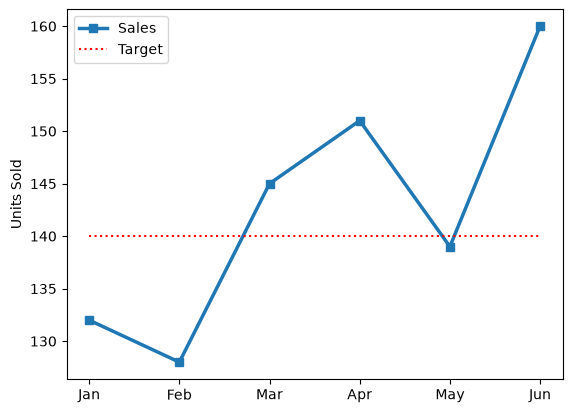
### 6. Sales vs Target
# The operations team wants monthly sales to stand out against the target.
#   1. Create a figure and axes with plt.subplots().
#   2. Plot sales with linewidth=2.5, square markers (marker='s'),
#      and the label "Sales".
#   3. Plot target as a red dotted line (color='red', ls=':')
#      with the label "Target".
#   4. Set the y-label "Units Sold" and show the legend.
import matplotlib.pyplot as plt

months = ["Jan", "Feb", "Mar", "Apr", "May", "Jun"]
sales = [132, 128, 145, 151, 139, 160]
target = [140, 140, 140, 140, 140, 140]

### Your code starts here.


### Your code ends here.
### 7. Two Stores, One Histogram
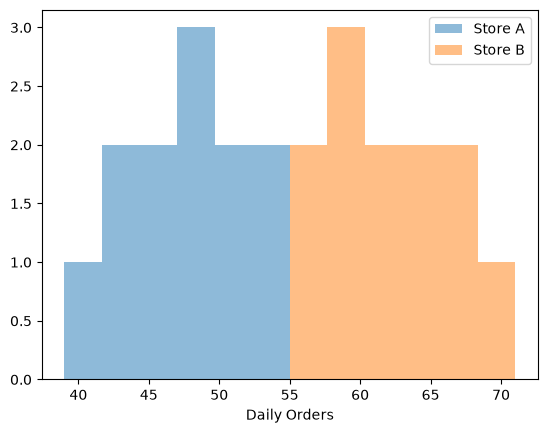
# A district manager wants to compare daily order counts at two stores.
#   1. Create a figure and axes with plt.subplots().
#   2. Draw a histogram of store_a with bins=6, alpha=0.5, and the label "Store A".
#   3. Draw a histogram of store_b on the same axes with bins=6, alpha=0.5,
#      and the label "Store B".
#   4. Set the x-label "Daily Orders" and show the legend.
import matplotlib.pyplot as plt

store_a = [42, 48, 51, 45, 39, 55, 47, 50, 44, 53, 46, 49]
store_b = [58, 62, 55, 66, 60, 71, 57, 64, 59, 68, 61, 63]

### Your code starts here.


### Your code ends here.
### 8. Year with a Q4 Inset
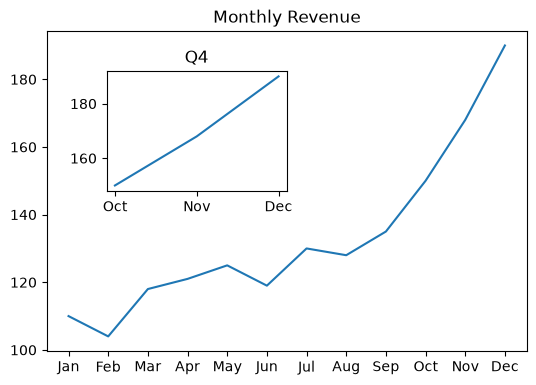
# The CFO wants the full year on one chart with a close-up of Q4.
#   1. Create a figure with fig = plt.figure(figsize=(6, 4)).
#   2. Add a main axes with fig.add_axes([0.1, 0.1, 0.8, 0.8]), plot months vs revenue,
#      and set the title "Monthly Revenue".
#   3. Add an inset axes with fig.add_axes([0.2, 0.5, 0.3, 0.3]) and plot only
#      the last three months (use slicing: months[-3:] and revenue[-3:]).
#   4. Set the inset title "Q4".
import matplotlib.pyplot as plt

months = ["Jan", "Feb", "Mar", "Apr", "May", "Jun",
          "Jul", "Aug", "Sep", "Oct", "Nov", "Dec"]
revenue = [110, 104, 118, 121, 125, 119, 130, 128, 135, 150, 168, 190]

### Your code starts here.


### Your code ends here.
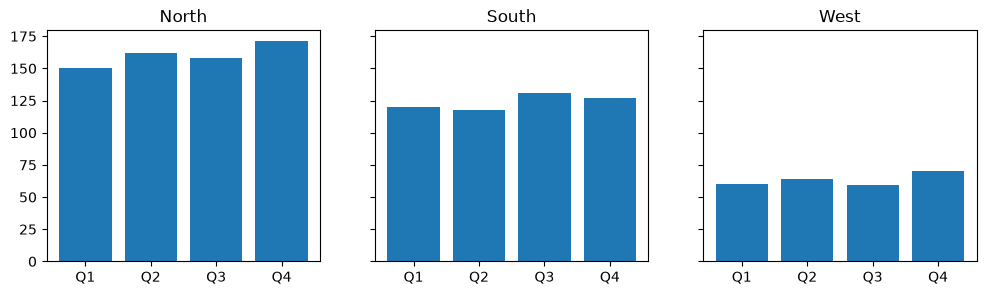
### 9. Fair Regional Comparison
# Three regional managers are comparing quarterly revenue. Separate y-axis
# scales would make small regions look as big as large ones.
#   1. Create one row of three axes that share the y-axis:
#      fig, axes = plt.subplots(1, 3, figsize=(12, 3), sharey=True).
#   2. Loop over the axes, region names, and revenue lists together with zip().
#      On each axes, draw a bar chart of quarters vs that region's revenue
#      and set the title to the region name.
import matplotlib.pyplot as plt

quarters = ["Q1", "Q2", "Q3", "Q4"]
names = ["North", "South", "West"]
revenue = [[150, 162, 158, 171], [120, 118, 131, 127], [60, 64, 59, 70]]

### Your code starts here.


### Your code ends here.
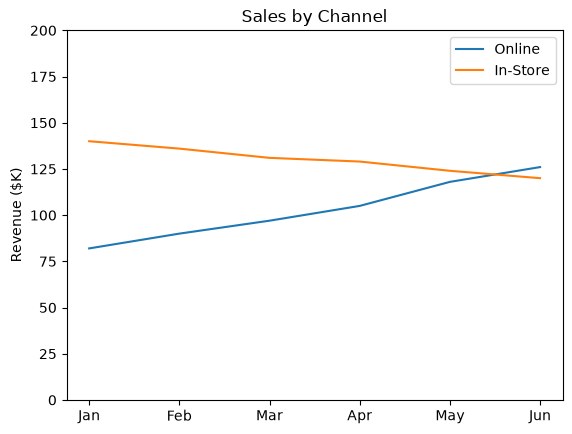
### 10. Pandas Plot, Matplotlib Polish
# pandas draws the chart quickly; Matplotlib finishes it for the report.
#   1. Create a figure and axes with plt.subplots().
#   2. Draw the DataFrame on that axes with df.plot(ax=ax).
#   3. Use the axes to set the title "Sales by Channel",
#      the y-label "Revenue ($K)", and the y-axis range 0 to 200.
import matplotlib.pyplot as plt
import pandas as pd

df = pd.DataFrame(
    {"Online": [82, 90, 97, 105, 118, 126], "In-Store": [140, 136, 131, 129, 124, 120]},
    index=["Jan", "Feb", "Mar", "Apr", "May", "Jun"],
)

### Your code starts here.


### Your code ends here.