
15.2. K-Means Workflow#
15.2.1. K-means in a nutshell#
K-means partitions the data into “k” groups by minimizing the within-cluster sum of squares. It alternates between two steps until convergence:
Assign each point to the nearest cluster center.
Update each center to be the mean of its assigned points.
This process is fast and simple, but it assumes clusters are roughly spherical and similar in size.
from sklearn.datasets import make_blobs
15.2.2. Create Some Data#
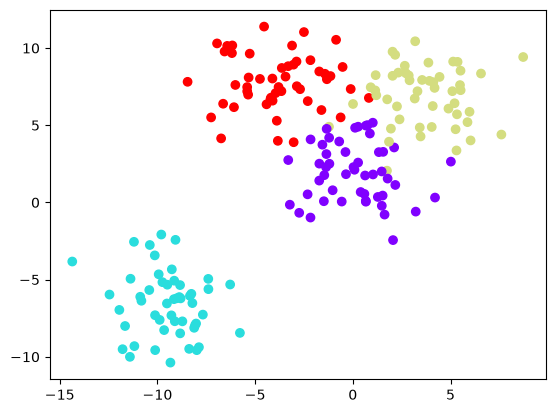
make_blobs generates synthetic Gaussian clusters for quick experiments. It returns the feature matrix and the cluster labels used to create the points. Because we generate the data ourselves, we know which group each point came from, so we can check whether k-means recovers those groups. Real data come without these labels; the next section clusters a customer data set.
# Create Data
data = make_blobs(n_samples=200, n_features=2,
                           centers=4, cluster_std=1.8,random_state=101)
15.2.3. Visualize Data#
plt.scatter(data[0][:,0],data[0][:,1],c=data[1],cmap='rainbow')
<matplotlib.collections.PathCollection at 0x7f6d7e3852b0>
15.2.4. Creating the Clusters#
from sklearn.cluster import KMeans
K-means starts from randomly placed centers, so different runs can end in different clusters. n_init=10 runs the algorithm 10 times from different starting centers and keeps the best result, and random_state fixes the random starts so that the result is the same every time the page is built.
kmeans = KMeans(n_clusters=4, n_init=10, random_state=101)
kmeans.fit(data[0])
KMeans(n_clusters=4, n_init=10, random_state=101)In a Jupyter environment, please rerun this cell to show the HTML representation or trust the notebook.
On GitHub, the HTML representation is unable to render, please try loading this page with nbviewer.org.
Parameters
Fitted attributes
| Name | Type | Value |
|---|---|---|
|
cluster_centers_
cluster_centers_: ndarray of shape (n_clusters, n_features) Coordinates of cluster centers. If the algorithm stops before fully converging (see ``tol`` and ``max_iter``), these will not be consistent with ``labels_``. |
ndarray[float64](4, 2) | [[-9.47,-6.56], [-0.01, 2.13], [ 3.72, 7.01], [-4.14, 7.95]] |
|
inertia_
inertia_: float Sum of squared distances of samples to their closest cluster center, weighted by the sample weights if provided. |
float | 1318 |
|
labels_
labels_: ndarray of shape (n_samples,) Labels of each point |
ndarray[int32](200,) | [3,2,1,...,2,0,1] |
|
n_features_in_
n_features_in_: int Number of features seen during :term:`fit`. .. versionadded:: 0.24 |
int | 2 |
|
n_iter_
n_iter_: int Number of iterations run. |
int | 5 |
4 features
| kmeans0 |
| kmeans1 |
| kmeans2 |
| kmeans3 |
kmeans.cluster_centers_
array([[-9.46941837, -6.56081545],
       [-0.0123077 ,  2.13407664],
       [ 3.71749226,  7.01388735],
       [-4.13591321,  7.95389851]])
kmeans.labels_
array([3, 2, 1, 2, 2, 0, 2, 1, 2, 1, 3, 1, 2, 2, 3, 1, 2, 1, 0, 3, 0, 1,
       1, 0, 3, 0, 0, 1, 2, 2, 3, 0, 2, 1, 1, 3, 0, 0, 0, 1, 0, 3, 3, 3,
       1, 2, 3, 1, 0, 1, 1, 3, 2, 1, 0, 3, 1, 1, 3, 2, 0, 2, 0, 3, 2, 1,
       0, 2, 2, 0, 2, 1, 0, 1, 0, 2, 2, 1, 3, 1, 1, 0, 2, 0, 1, 1, 1, 3,
       1, 0, 0, 0, 0, 1, 1, 0, 2, 3, 0, 2, 1, 0, 1, 1, 2, 1, 0, 2, 0, 0,
       2, 3, 3, 2, 0, 2, 3, 3, 2, 3, 1, 3, 1, 3, 1, 2, 3, 1, 0, 3, 3, 3,
       1, 0, 0, 3, 2, 3, 2, 1, 0, 2, 0, 3, 3, 2, 1, 0, 3, 3, 3, 3, 1, 2,
       1, 3, 2, 2, 2, 1, 2, 1, 1, 3, 0, 3, 1, 2, 3, 1, 2, 1, 3, 2, 1, 3,
       2, 2, 0, 2, 3, 0, 0, 3, 0, 0, 0, 0, 0, 1, 0, 2, 2, 3, 0, 1, 2, 2,
       0, 1], dtype=int32)
f, (ax1, ax2) = plt.subplots(1, 2, sharey=True,figsize=(10,6))
ax1.set_title('K Means')
ax1.scatter(data[0][:,0],data[0][:,1],c=kmeans.labels_,cmap='rainbow')
ax2.set_title("Original")
ax2.scatter(data[0][:,0],data[0][:,1],c=data[1],cmap='rainbow')
<matplotlib.collections.PathCollection at 0x7f6d7b55c2d0>
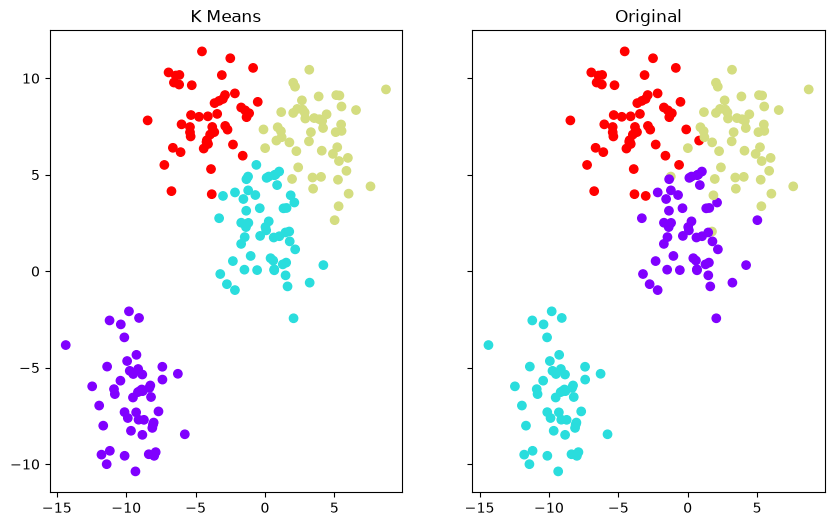
The two plots mostly agree, except where the original groups overlap. The colors need not match: k-means numbers its clusters in whatever order it finds them, so a group that is cluster 2 in the original labels may be cluster 0 in the k-means result. Cluster numbers are names, not rankings.
15.2.5. Section Practice#
Use this short exercise to check the main workflow from this section.
### Exercise: Practice K-Means Workflow
# Run one round of k-means by hand on six customers' monthly spend (one feature).
#   1. Assign each value to the nearer of the two centers (0 or 1).
#   2. Update each center to the mean of the values assigned to it.
# Print exactly:
# Assignments: [0, 0, 0, 1, 1, 1]
# New centers: [22.0, 71.0]
spend = [12, 20, 34, 58, 70, 85]
centers = [20, 60]
### Your code starts here


### Your code ends here
Assignments: [0, 0, 0, 1, 1, 1]
New centers: [22.0, 71.0]