
11.2. The Bootstrap#
A data scientist uses a random sample of data to estimate an unknown parameter. She uses the sample to calculate the value of a statistic that she will use as her estimate of the population value.
Once she has calculated the observed value of her statistic, she could simply present it as her estimate and proceed. But she’s a data scientist. She knows that her random sample is just one of numerous possible random samples, and thus her estimate is just one of numerous plausible estimates.
By how much could those estimates vary? To answer this, it appears that she needs to draw another sample from the population and compute a new estimate based on the new sample. However, she doesn’t have the resources to return to the population and draw another sample.
It appears that the data scientist is at an impasse.
Fortunately, a brilliant idea called the bootstrap can help her out. Since it is not feasible to generate new samples from the population, the bootstrap generates new random samples using a method called resampling: the new samples are drawn at random from the original sample.
In this section, we will see how and why the bootstrap works. In the rest of the chapter, we will use the bootstrap for inference.
A bootstrap estimate of sampling variability uses the original sample as a stand-in for an unknown population. It does not collect new independent observations. Keep these three distributions separate:
Distribution |
What varies? |
What it describes |
|---|---|---|
Individual observations |
The value for each employee. |
Variation in employee compensation. |
Sampling distribution |
A statistic from each new population sample. |
How an estimate varies across repeated samples. |
Bootstrap distribution |
A statistic from each resample of one fixed sample. |
An approximation to that sampling variability. |
The original sample size is n; the number of bootstrap resamples is B. Increasing n can improve precision. Increasing B stabilizes the numerical approximation and does not add population information. Run the demonstration cells in order; exercises include their own setup.
11.2.1. Employee Compensation in the City of San Francisco#
SF OpenData is a website where the City and County of San Francisco make some of their data publicly available. One of the data sets contains compensation data for employees of the City. These include medical professionals at City-run hospitals, police officers, fire fighters, transportation workers, elected officials, and all other employees of the City.
Compensation data for the calendar year 2019 are in the table sf2019.
sf2019_all = pd.read_csv(path_data + 'san_francisco_2019.csv')
sf2019 = sf2019_all.copy()
sf2019
| Organization Group | Department | Job Family | Job | Salary | Overtime | Benefits | Total Compensation | |
|---|---|---|---|---|---|---|---|---|
| 0 | Public Protection | Adult Probation | Information Systems | IS Trainer-Journey | 91332.0 | 0.0 | 40059.0 | 131391.0 |
| 1 | Public Protection | Adult Probation | Information Systems | IS Engineer-Assistant | 123241.0 | 0.0 | 49279.0 | 172520.0 |
| 2 | Public Protection | Adult Probation | Information Systems | IS Business Analyst-Senior | 115715.0 | 0.0 | 46752.0 | 162468.0 |
| 3 | Public Protection | Adult Probation | Information Systems | IS Business Analyst-Principal | 159394.0 | 0.0 | 57312.0 | 216706.0 |
| 4 | Public Protection | Adult Probation | Information Systems | IS Programmer Analyst | 70035.0 | 0.0 | 28671.0 | 98706.0 |
| ... | ... | ... | ... | ... | ... | ... | ... | ... |
| 44520 | General Administration & Finance | Treasurer/Tax Collector | Revenue | Investigator, Tax Collector | 44961.0 | 42.0 | 19546.0 | 64549.0 |
| 44521 | General Administration & Finance | Treasurer/Tax Collector | Revenue | Investigator, Tax Collector | 85706.0 | 107.0 | 38924.0 | 124737.0 |
| 44522 | General Administration & Finance | Treasurer/Tax Collector | Revenue | Investigator, Tax Collector | 101403.0 | 0.0 | 43185.0 | 144587.0 |
| 44523 | General Administration & Finance | Treasurer/Tax Collector | Revenue | Pr Investigator, Tax Collector | 113738.0 | 397.0 | 47104.0 | 161240.0 |
| 44524 | General Administration & Finance | Treasurer/Tax Collector | Revenue | Pr Investigator, Tax Collector | 113237.0 | 0.0 | 49749.0 | 162986.0 |
44525 rows × 8 columns
There is one row for each of over 44,500 employees. There are numerous columns containing information about City departmental affiliation and details of the different parts of the employee’s compensation package. Here is the row corresponding to London Breed, the Mayor of San Francisco in 2019.
sf2019[sf2019['Job'] == 'Mayor']
| Organization Group | Department | Job Family | Job | Salary | Overtime | Benefits | Total Compensation | |
|---|---|---|---|---|---|---|---|---|
| 43382 | General Administration & Finance | Mayor | Administrative & Mgmt (Unrep) | Mayor | 342974.0 | 0.0 | 98012.0 | 440987.0 |
We are going to study the final column, Total Compensation. That’s the employee’s salary plus the City’s contribution towards their retirement and benefit plans.
Financial packages in a calendar year can sometimes be hard to understand as they depend on the date of hire, whether the employee is changing jobs within the City, and so on. For example, the lowest values in the Total Compensation column look a little strange.
Note
sort_values() Key Parameters
sort_values() is a pandas DataFrame/Series method that sorts by one or more columns. sort_values() sorts a DataFrame by one or more columns. The by parameter specifies which column to sort on, and ascending=False reverses the order (largest first). Combined with .head(), it lets you quickly inspect the
extreme values in a dataset.
# Ascending (smallest first) — the default
df.sort_values(by='column')

# Descending (largest first)
df.sort_values(by='column', ascending=False)
Parameter |
Default |
Meaning |
|---|---|---|
|
required |
column name or list of columns |
|
|
|
|
|
modify df directly if |
|
|
put NaNs first or last |
sf2019.sort_values(by='Total Compensation').head()
| Organization Group | Department | Job Family | Job | Salary | Overtime | Benefits | Total Compensation | |
|---|---|---|---|---|---|---|---|---|
| 29935 | Community Health | Public Health | Housekeeping & Laundry | Porter | 0.0 | 0.0 | 0.0 | 0.0 |
| 38090 | Culture & Recreation | Recreation And Park Commission | Dietary & Food | Food Service Worker | 0.0 | 0.0 | 0.0 | 0.0 |
| 9660 | Public Works, Transportation & Commerce | Airport Commission | Housekeeping & Laundry | Custodian | 0.0 | 0.0 | 0.0 | 0.0 |
| 40786 | General Administration & Finance | Administrative Services | Journeyman Trade | Automotive Machinist | 0.0 | 0.0 | 0.0 | 0.0 |
| 10644 | Public Works, Transportation & Commerce | Building Inspection | Clerical, Secretarial & Steno | Principal Clerk | 0.0 | 0.0 | 0.0 | 0.0 |
To define a more comparable analysis population, keep records with annual salary over $15,000. Salary is a screening variable, not a direct measure of hours or full-year employment. This filter changes the population to which the estimate refers; it excludes some city employees.
sf2019 = sf2019[sf2019['Salary'] > 15000]
len(sf2019)
37103
11.2.2. Population and Parameter#
Our analysis population is the 37,103 records with salary over $15,000, not all 44,525 employee records in the file. The parameter is the median total compensation in that filtered group. The histogram below describes the individual compensation values in that group.
sf_bins = np.arange(0, 775000, 25000)
fig, ax = plt.subplots(figsize=(7, 4))
ax.hist(sf2019['Total Compensation'], bins=sf_bins, density=True, edgecolor='white')
ax.set_xlabel('Annual Total Compensation (Dollars)')
ax.set_ylabel('Probability Density')
ax.tick_params(axis='x', rotation=45)
ax.set_title('Filtered Population Compensation')
Text(0.5, 1.0, 'Filtered Population Compensation')
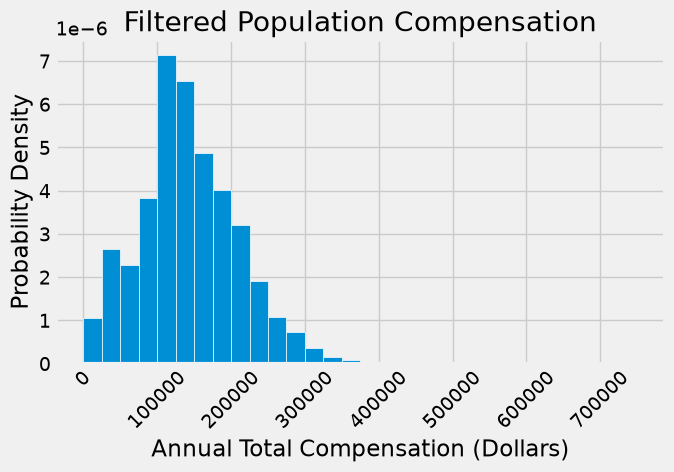
Most compensation values are below \(300,000, but some are higher. The largest is \)724,031, so the bins extend beyond $700,000 and include the full recorded range.
sf2019.sort_values(by='Total Compensation', ascending=False).head(3)
| Organization Group | Department | Job Family | Job | Salary | Overtime | Benefits | Total Compensation | |
|---|---|---|---|---|---|---|---|---|
| 43936 | General Administration & Finance | Retirement Services | Administrative & Mgmt (Unrep) | Chief Investment Officer | 577633.0 | 0.0 | 146398.0 | 724031.0 |
| 43937 | General Administration & Finance | Retirement Services | Unassigned | Managing Director | 483072.0 | 0.0 | 134879.0 | 617951.0 |
| 43938 | General Administration & Finance | Retirement Services | Unassigned | Managing Director | 482649.0 | 0.0 | 134905.0 | 617554.0 |
Suppose the parameter in which we are interested is the median of the total compensations.
Since we have the luxury of having all of the data from the population, we can simply calculate the parameter:
pop_median = np.median(sf2019['Total Compensation']).item()
pop_median
135747.0
The median total compensation in the filtered population is \(135,747. The median across all 44,525 records is \)121,630. These are different parameters because they describe different groups.
We know the filtered population here so we can evaluate the estimation procedure. For the exercise in inference, pretend we cannot inspect it after drawing the sample. Neither the population median nor the other population records enter the bootstrap calculation.
11.2.3. A Random Sample and an Estimate#
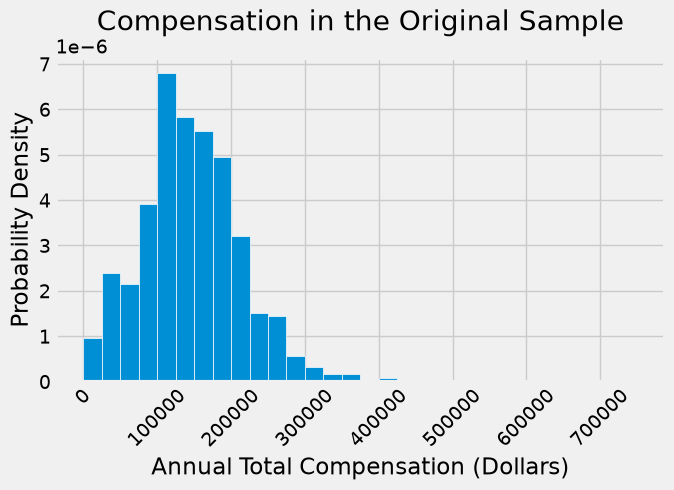
Let us draw a sample of 500 employees at random without replacement, and let the median total compensation of the sampled employees serve as our estimate of the parameter.
our_sample = sf2019.sample(500, replace=False, random_state=42)
sf_bins = np.arange(0, 775000, 25000)
fig, ax = plt.subplots(figsize=(7, 4))
ax.hist(our_sample['Total Compensation'], bins=sf_bins, density=True, edgecolor='white')
ax.set_xlabel('Annual Total Compensation (Dollars)')
ax.set_ylabel('Probability Density')
ax.tick_params(axis='x', rotation=45)
ax.set_title('Compensation in the Original Sample')
Text(0.5, 1.0, 'Compensation in the Original Sample')
est_median = np.median(our_sample['Total Compensation']).item()
est_median
139515.5
Because the sample was drawn randomly and consists of 500 observations, its distribution tends to resemble that of the population — a consequence of the law of large numbers. The sample median is therefore a reasonable estimate of the population median, though not identical to it.
So now we have one estimate of the parameter. But had the sample come out differently, the estimate would have had a different value. We would like to be able to quantify the amount by which the estimate could vary across samples. That measure of variability will help us measure how accurately we can estimate the parameter.
To see how different the estimate would be if the sample had come out differently, we could just draw another sample from the population. But that would be cheating. We are trying to mimic real life, in which we won’t have all the population data at hand.
Somehow, we have to get another random sample without sampling again from the population.
11.2.4. The Bootstrap: Resampling from the Sample#
What we do have is a large random sample from the population. As we know, a large random sample is likely to resemble the population from which it is drawn. This observation allows data scientists to lift themselves up by their own bootstraps: the sampling procedure can be replicated by sampling from the sample.
Here are the steps of the bootstrap method for generating another random sample that resembles the population:
Treat the original sample as if it were the population.
Draw from the sample, at random with replacement, the same number of times as the original sample size.
It is important to resample the same number of times as the original sample size. The reason is that the variability of an estimate depends on the size of the sample. Since our original sample consisted of 500 employees, our sample median was based on 500 values. To see how different the sample could have been, we have to compare it to the median of other samples of size 500.
If we drew 500 times at random without replacement from our sample of size 500, we would just get the same sample back. By drawing with replacement, we create the possibility for the new samples to be different from the original, because some employees might be drawn more than once and others not at all.
The same-size rule preserves the sample size associated with the statistic’s variability. The independent unit here is one employee record. Ordinary row resampling assumes approximately independent observations from the population of interest; repeated measurements or clustered observations may need a different resampling unit.
11.2.5. Why the Bootstrap Works#
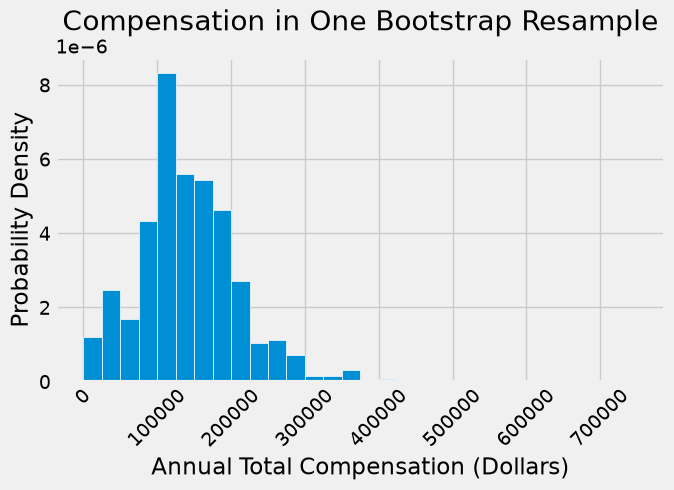
Why is this a good idea? By the law of averages, the distribution of the original sample is likely to resemble the population, and the distributions of all the “resamples” are likely to resemble the original sample. So the distributions of all the resamples are likely to resemble the population as well.
Resampling makes the empirical sample distribution play the role of the unknown population distribution. For statistics such as a median in a sufficiently large, representative sample, this can approximate repeated-sample variability. It is an approximation under conditions, not a guarantee for every statistic or sample.
The sample is about 1.35% of the filtered population, so the difference between the original without-replacement sampling and the ordinary with-replacement bootstrap is small here. If the sampling fraction were large, that distinction would need attention.
A bootstrap cannot repair nonresponse bias, restore excluded groups, or discover an unseen population maximum. More bootstrap repetitions do not fix those problems.
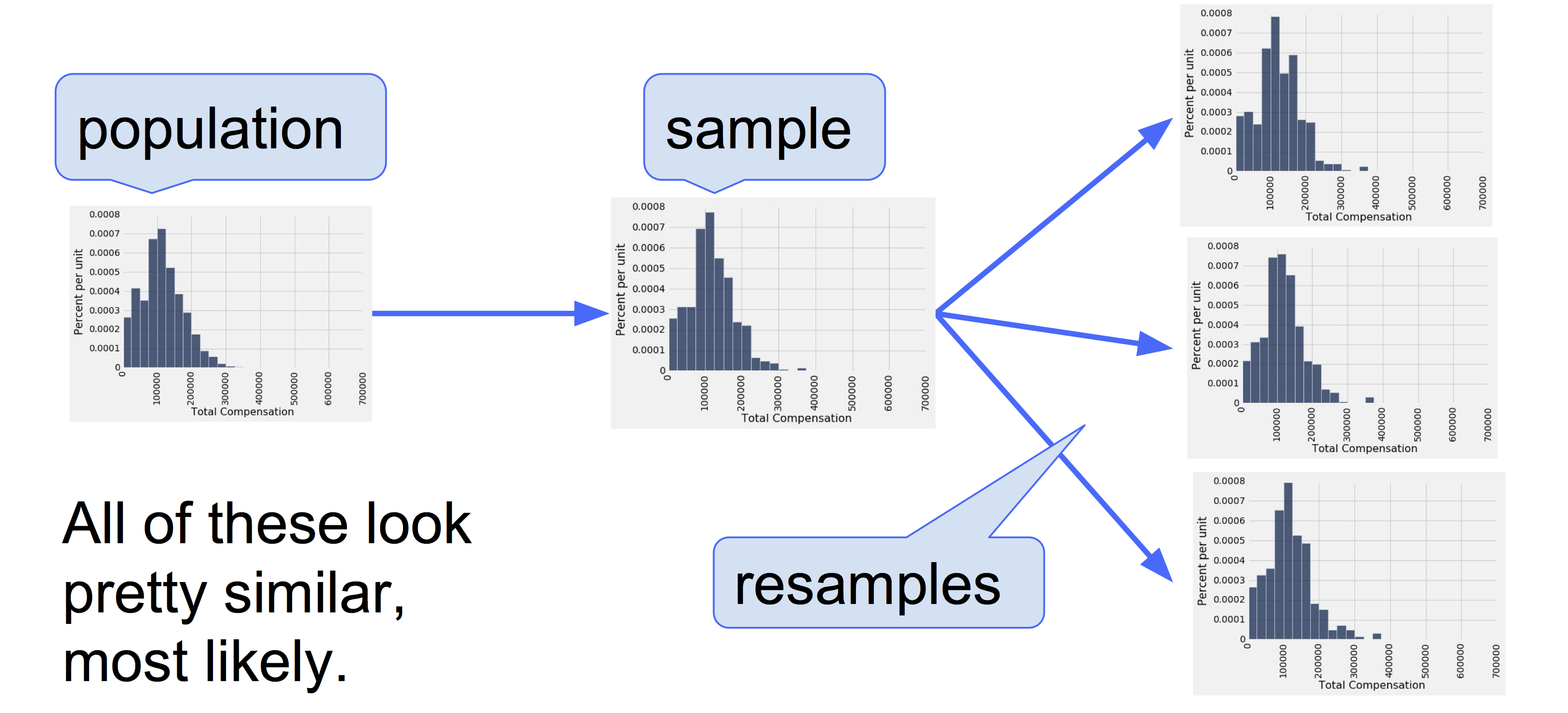
Fig. 11.1 Bootstrap#
11.2.6. A Resampled Median#
The pandas sample method draws one row without replacement by default, so for the bootstrap we set both arguments explicitly: sample(len(our_sample), replace=True) draws as many rows as the original sample, with replacement. Here is one new sample drawn from the original sample, and the corresponding sample median.
11.2.6.1. Resampling#
resample_1 = our_sample.sample(len(our_sample), replace=True, random_state=1)
resample_1
| Organization Group | Department | Job Family | Job | Salary | Overtime | Benefits | Total Compensation | |
|---|---|---|---|---|---|---|---|---|
| 12985 | Public Works, Transportation & Commerce | Municipal Transportation Agcy | Journeyman Trade | Transit Power Line Worker | 116545.0 | 64340.0 | 25075.0 | 205959.0 |
| 16538 | Public Works, Transportation & Commerce | Municipal Transportation Agcy | Street Transit | Transit Operator | 38795.0 | 13149.0 | 28440.0 | 80384.0 |
| 21664 | Public Works, Transportation & Commerce | Public Utilities Commission | Journeyman Trade | Sr Statnry Eng, Wtr Treat Plnt | 132790.0 | 30471.0 | 53760.0 | 217022.0 |
| 10542 | Public Works, Transportation & Commerce | Building Inspection | Professional Engineering | Assoc Engineer | 115963.0 | 0.0 | 47307.0 | 163271.0 |
| 26693 | Community Health | Public Health | Information Systems | IS Business Analyst-Senior | 127852.0 | 0.0 | 49398.0 | 177250.0 |
| ... | ... | ... | ... | ... | ... | ... | ... | ... |
| 23679 | Human Welfare & Neighborhood Development | Human Services | Public Service Aide | Public Svc Aide-Public Works | 15913.0 | 0.0 | 9701.0 | 25614.0 |
| 34182 | Community Health | Public Health | Nursing | Registered Nurse | 20730.0 | 1047.0 | 8599.0 | 30375.0 |
| 40968 | General Administration & Finance | Administrative Services | Management | Dep Dir III | 197386.0 | 0.0 | 68032.0 | 265418.0 |
| 25841 | Human Welfare & Neighborhood Development | Human Services | Clerical, Secretarial & Steno | Senior Clerk Typist | 70798.0 | 10.0 | 34862.0 | 105670.0 |
| 41838 | General Administration & Finance | Board Of Supervisors | Information Systems | IT Operations Support Admin IV | 121411.0 | 0.0 | 49022.0 | 170434.0 |
500 rows × 8 columns
sf_bins = np.arange(0, 775000, 25000)
fig, ax = plt.subplots(figsize=(7, 4))
ax.hist(resample_1['Total Compensation'], bins=sf_bins, density=True, edgecolor='white')
ax.set_xlabel('Annual Total Compensation (Dollars)')
ax.set_ylabel('Probability Density')
ax.tick_params(axis='x', rotation=45)
ax.set_title('Compensation in One Bootstrap Resample')
Text(0.5, 1.0, 'Compensation in One Bootstrap Resample')
### Exercise: Resample the Same Size
# Generate a bootstrap resample with replacement and the same size as salaries.
# Print the original and resample sizes, then the number of distinct resampled values.
import pandas as pd
salaries = pd.Series([58, 62, 64, 66, 70, 72, 75, 81, 88, 120])
### Your code starts here.

### Your code ends here.
Original size: 10
Resample size: 10
Distinct resampled values: 7
11.2.6.2. Get Median(s) from Percentile#
resampled_median_1 = np.median(resample_1['Total Compensation']).item()
resampled_median_1
132903.0
This value is an estimate of the population median.
By resampling again and again, we can get many such estimates, and hence an empirical distribution of the estimates.
resample_2 = our_sample.sample(len(our_sample), replace=True)
resampled_median_2 = np.median(resample_2['Total Compensation']).item()
resampled_median_2
138088.0
Let us collect this code and define a function one_bootstrap_median that returns one bootstrapped median of total compensation, based on bootstrapping the original random sample that we called our_sample.
def one_bootstrap_median():
    resampled_table = our_sample.sample(len(our_sample), replace=True)
    bootstrapped_median = np.median(resampled_table['Total Compensation']).item()
    return bootstrapped_median
Run the cell below a few times to see how the bootstrapped medians vary. Remember that each of them is an estimate of the population median.
one_bootstrap_median()
142622.0
### Exercise: Collect Bootstrap Statistics
# Use a single seeded generator to make 100 resamples and collect their medians.
# Print how many statistics were collected. Each resample must have size len(values).
import numpy as np
rng = np.random.default_rng(42)
values = np.array([58, 62, 64, 66, 70, 72, 75, 81, 88, 120])
### Your code starts here.

### Your code ends here.
Bootstrap statistics: 100
11.2.7. Bootstrap Empirical Distribution of the Sample Median#
We can now repeat the bootstrap process multiple times by running a for loop as usual. In each iteration, we will call the function one_bootstrap_median to generate one value of the bootstrapped median based on our original sample our_sample. Then we will append the bootstrapped median to the collection array bstrap_medians.
Since we are asking for 5000 repetitions, the code might take a while to run. It has a lot of resampling to do!
np.random.seed(42)
num_repetitions = 5000
bstrap_medians = np.array([])
for _ in range(num_repetitions):
    bstrap_medians = np.append(bstrap_medians, one_bootstrap_median())
Here is an empirical histogram of the 5000 bootstrapped medians. The green line is the population parameter: it is the median of the entire population, which is what we are trying to estimate. In this example we happen to know its value, but we did not use it in the bootstrap process.
resampled_medians = pd.DataFrame({'Bootstrap Sample Median': bstrap_medians})
fig, ax = plt.subplots(figsize=(7, 4))
ax.hist(bstrap_medians, bins=20, density=True, edgecolor='white')
ax.axvline(pop_median, color='green', label='Known filtered-population median')
ax.axvline(est_median, color='black', linestyle='--', label='Original sample median')
ax.set_xlabel('Bootstrap Median Total Compensation (Dollars)')
ax.set_ylabel('Probability Density')
ax.set_title('Statistics from Resampling One Fixed Sample')
ax.tick_params(axis='x', rotation=45)
ax.legend(fontsize=9)
<matplotlib.legend.Legend at 0x7f9926343a10>
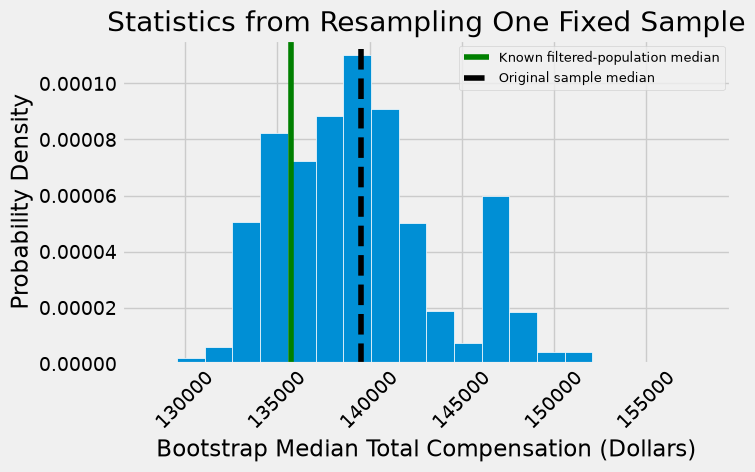
The population median is fixed at $135,747. The original sample median is one point estimate. The bootstrap medians vary because the resamples vary, and their distribution is conditional on this one original sample.
The point estimates do not have to equal the parameter. The interval procedure is designed to capture the parameter frequently across new original samples, not to guarantee a correct interval every time.
11.2.8. Do the Estimates Capture the Parameter?#
Does the middle 95% of the bootstrap medians contain the known population median? The endpoints below define that interval. We can check it here because the population is available.
left = np.percentile(bstrap_medians, 2.5, method='nearest').item()
left
132935.0
right = np.percentile(bstrap_medians, 97.5, method='nearest').item()
right
147936.0
Compare the fixed population median with the two endpoints printed above. The following plot displays whether this particular interval captures it. An interval’s nominal level does not guarantee its success for every sample.
resampled_medians = pd.DataFrame({'Bootstrap Sample Median': bstrap_medians})
fig, ax = plt.subplots(figsize=(7, 4))
ax.hist(bstrap_medians, bins=20, density=True, edgecolor='white')
ax.axvline(pop_median, color='green', label='Known filtered-population median')
ax.axvline(est_median, color='black', linestyle='--', label='Original sample median')
ax.axvspan(left, right, color='gold', alpha=0.3, label='95% percentile interval')
ax.set_xlabel('Bootstrap Median Total Compensation (Dollars)')
ax.set_ylabel('Probability Density')
ax.set_title('Statistics from Resampling One Fixed Sample')
ax.tick_params(axis='x', rotation=45)
ax.legend(fontsize=9)
<matplotlib.legend.Legend at 0x7f9923b7da90>
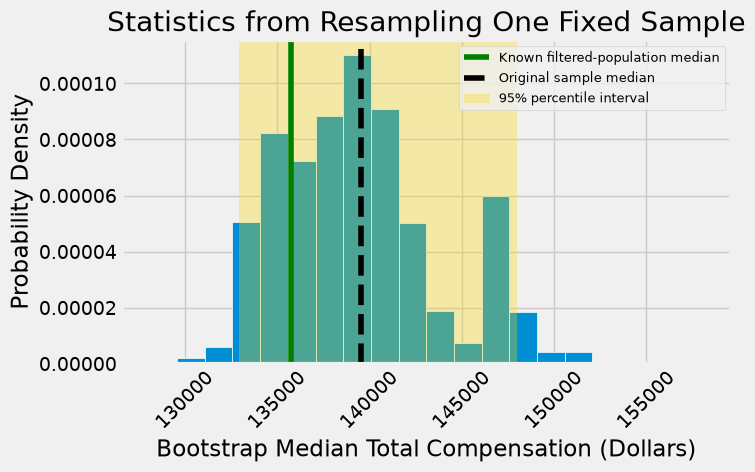
One interval cannot establish a long-run coverage rate. To examine coverage, repeat the whole experiment, drawing a new original sample from the known population each time, then bootstrapping that sample and constructing its interval.
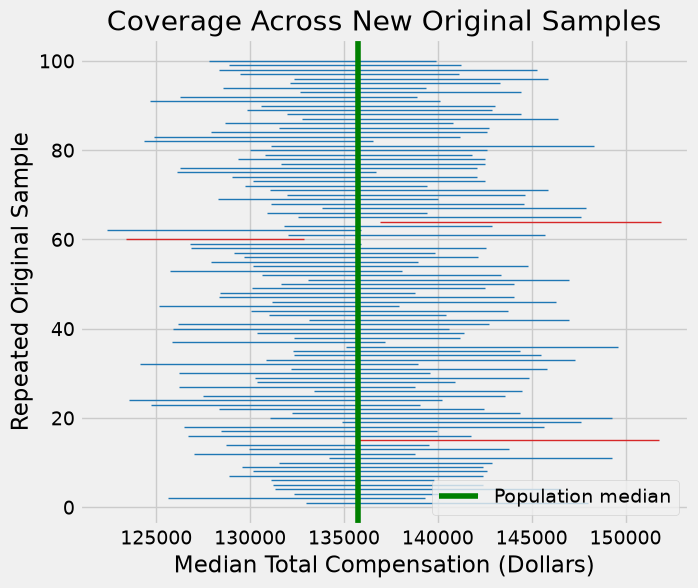
The demonstration below constructs 100 intervals. Each uses an original sample of 500 employees and 1,000 bootstrap resamples. These counts describe different operations: 100 new population samples, each with 1,000 resamples from its own fixed sample. Coverage should be near the nominal level when the method’s assumptions are adequate, but the observed count is random and the bootstrap is approximate.
The function bootstrap_median(original_sample, num_repetitions) returns one ordinary median per bootstrap resample. The array pattern np.random.choice(values, size=(B, n), replace=True) makes a table with B rows of n draws. Each row is one resample; np.median(..., axis=1) computes its median. This performs the same steps as a loop, using array operations to keep the coverage demonstration fast.
def bootstrap_median(original_sample, num_repetitions):
    values = original_sample['Total Compensation'].to_numpy()
    resamples = np.random.choice(values, size=(num_repetitions, len(values)), replace=True)
    return np.median(resamples, axis=1)
For each of 100 new samples, calculate a bootstrap interval and store its endpoints. The seed makes the demonstration reproducible. Increase the number of outer experiments to study coverage more precisely; increase the inner bootstrap count to stabilize each interval’s numerical endpoints.
np.random.seed(42)
coverage_repetitions = 100
bootstrap_repetitions = 1000
left_ends = []
right_ends = []
for _ in range(coverage_repetitions):
    original_sample = sf2019.sample(500, replace=False)
    medians = bootstrap_median(original_sample, bootstrap_repetitions)
    left, right = np.percentile(medians, [2.5, 97.5], method='nearest')
    left_ends.append(left)
    right_ends.append(right)
intervals = pd.DataFrame({'Left': left_ends, 'Right': right_ends})
For each of the 100 replications of the entire process, we get one interval of estimates of the median.
intervals
| Left | Right | |
|---|---|---|
| 0 | 132994.0 | 147981.0 |
| 1 | 125636.0 | 139337.0 |
| 2 | 132310.5 | 142158.5 |
| 3 | 131303.5 | 146577.0 |
| 4 | 131202.0 | 142432.0 |
| ... | ... | ... |
| 95 | 132362.5 | 145871.5 |
| 96 | 129444.0 | 141121.5 |
| 97 | 128336.5 | 145259.0 |
| 98 | 128859.0 | 141235.5 |
| 99 | 127795.0 | 139925.5 |
100 rows × 2 columns
The good intervals are those that contain the parameter we are trying to estimate. Typically the parameter is unknown, but in this section we happen to know what the parameter is.
pop_median
135747.0
An interval covers the parameter when Left <= parameter <= Right. Include equality at either endpoint, which matters for discrete data and rounded values.
covered = (intervals['Left'] <= pop_median) & (pop_median <= intervals['Right'])
print('Intervals containing the parameter:', int(covered.sum()), 'of', len(intervals))
print('Observed coverage:', round(covered.mean(), 3))
Intervals containing the parameter: 97 of 100
Observed coverage: 0.97
### Exercise: Include the Interval Endpoints
# Count the intervals that include parameter, including equality at either endpoint.
import numpy as np
parameter = 10
left = np.array([8, 10, 11])
right = np.array([10, 12, 14])
### Your code starts here.

### Your code ends here.
Intervals covering the parameter: 2
The printed fraction is the observed coverage in this finite demonstration. It need not be exactly 95%. The nominal 95% level is an intended property of the interval procedure under suitable conditions, not a promise about every set of 100 intervals.
In the next graph, each horizontal segment is one interval. Green is the fixed population median; blue intervals cover it and red intervals miss it. The vertical axis identifies the outer experiment, not an employee or a bootstrap resample.
fig, ax = plt.subplots(figsize=(7, 6))
for i in range(len(intervals)):
    ends = intervals.iloc[i]
    color = 'tab:blue' if covered.iloc[i] else 'tab:red'
    ax.plot([ends['Left'], ends['Right']], [i + 1, i + 1], color=color, linewidth=1)
ax.axvline(pop_median, color='green', label='Population median')
ax.set_xlabel('Median Total Compensation (Dollars)')
ax.set_ylabel('Repeated Original Sample')
ax.set_title('Coverage Across New Original Samples')
ax.legend()
<matplotlib.legend.Legend at 0x7f99207f91d0>
One bootstrap percentile interval follows this workflow: draw a representative original sample, resample it with replacement at the same size, calculate the same statistic for every resample, and take the chosen percentile endpoints of those statistics.
Confidence concerns what happens when the entire sampling-and-interval process is repeated. For a reliable approximate 95% method, about 95% of intervals cover the fixed parameter in the long run. After calculating one interval, we generally do not know whether it covers the parameter.
Changing the confidence level from 95% to 80% selects a central range that is no wider from the same bootstrap statistics. It reduces the intended long-run coverage. Increasing bootstrap repetitions alone does not produce narrower intervals or more independent data.
11.2.9. Section Practice#
Use this short exercise to check the main workflow from this section.
### Exercise: Practice The Bootstrap
# HR has a random sample of 10 salaries (in $1,000s).
#   1. Draw one bootstrap resample with sample.sample(len(sample), replace=True, random_state=1)
#      and compute its median.
#   2. Repeat with 1,000 resamples (random_state=i for i in range(1000)) and
#      collect the medians.
#   3. Print the sample median, the first resample's median, and the range
#      (min and max) of the 1,000 bootstrap medians.
import numpy as np
import pandas as pd

sample = pd.Series([58, 62, 64, 66, 70, 72, 75, 81, 88, 120])
### Your code starts here


### Your code ends here
Sample median: 71.0
First resample median: 73.5
Bootstrap medians range from 60.0 to 88.0