
8.2. Descriptive Distributions#
This section uses numeric summaries, visualizations, and common distribution families to describe observed data and simulated outcomes. We continue with the tips data from the previous section.
tips = sns.load_dataset('tips')
8.2.1. Descriptive Statistics#
df.describe() gives you the descriptive statistics of the dataset.
tips.describe()
| total_bill | tip | size | |
|---|---|---|---|
| count | 244.000000 | 244.000000 | 244.000000 |
| mean | 19.785943 | 2.998279 | 2.569672 |
| std | 8.902412 | 1.383638 | 0.951100 |
| min | 3.070000 | 1.000000 | 1.000000 |
| 25% | 13.347500 | 2.000000 | 2.000000 |
| 50% | 17.795000 | 2.900000 | 2.000000 |
| 75% | 24.127500 | 3.562500 | 3.000000 |
| max | 50.810000 | 10.000000 | 6.000000 |
Key summaries for a numeric variable:
Mean (average)
Median (middle value)
Standard deviation (typical distance from the mean)
IQR (middle 50% range)
Let’s compute them for total_bill.
8.2.2. Center: Mean vs Median#
col = tips['total_bill']

summary = pd.DataFrame({
    'mean': [col.mean()],
    'median': [col.median()],
    'std (SD)': [col.std()],
    'IQR': [col.quantile(0.75) - col.quantile(0.25)]
})
summary
| mean | median | std (SD) | IQR | |
|---|---|---|---|---|
| 0 | 19.785943 | 17.795 | 8.902412 | 10.78 |
The mean bill ($19.79) is about $2 higher than the median bill ($17.80). The median is the middle value, so it depends only on the order of the bills. The mean adds up every dollar, so a handful of large bills between $40 and $50 pull it upward. When the mean sits above the median like this, the distribution is skewed to the right: most values are bunched at the low end and a long tail stretches toward large values. You can see that tail in the histogram in Visualizing One Variable below. pandas measures the skew directly with .skew(); a positive value means a right tail.
col.skew()
np.float64(1.1332130376158205)
For skewed data, the median usually describes a “typical” value better than the mean. In this book’s exercises we use a simple rule of thumb: if the mean is more than 20% above the median, treat the data as right-skewed and report the median as the typical value. This is a convenient cutoff for practice, not a formal statistical test. For the tips data the mean is about 11% above the median, so the skew is moderate and the mean and median tell a similar story.
8.2.3. Spread: SD, Percentiles, IQR#
Center tells you where a typical value is; spread tells you how far values typically fall from it.
8.2.3.1. Standard Deviation and Variance#
The standard deviation (SD) measures the typical distance of the values from the mean. The variance is the SD squared. Variance is in squared units (here, dollars squared), which are hard to interpret, so we usually report the SD.
print('Variance:', round(col.var(), 2))
print('SD (pandas .std):', round(col.std(), 2))
print('SD (np.std):', round(np.std(col), 2))
Variance: 79.25
SD (pandas .std): 8.9
SD (np.std): 8.88
pandas .std() divides by \(n-1\) (the sample SD, ddof=1), while np.std() divides by \(n\) (the population SD, ddof=0) by default. With 244 bills the two barely differ ($8.90 vs $8.88), but with a small dataset the gap is noticeable, so use the function an exercise asks for.
8.2.3.2. Percentiles and the IQR#
The \(p\)-th percentile is the value below which \(p\%\) of the observations fall. The median is the 50th percentile. The 25th and 75th percentiles are the first and third quartiles (Q1 and Q3), and the interquartile range (IQR = Q3 − Q1) is the width of the middle 50% of the data.
q25, q50, q75, q90 = np.percentile(col, [25, 50, 75, 90])
print('25th percentile (Q1):', q25)
print('50th percentile (median):', q50)
print('75th percentile (Q3):', q75)
print('90th percentile:', q90)
print('IQR:', round(q75 - q25, 2))
25th percentile (Q1): 13.3475
50th percentile (median): 17.795
75th percentile (Q3): 24.127499999999998
90th percentile: 32.23500000000001
IQR: 10.78
Half of the bills fall between about $13.35 and $24.13, an IQR of $10.78. The 90th percentile is $32.24: 90% of bills are at or below that amount. Like the median, percentiles and the IQR depend only on the order of the values, so a few extreme bills do not move them much. That makes them a good choice for skewed data, while the SD is sensitive to extreme values just like the mean.
8.2.3.3. Outliers: The 1.5 × IQR Rule#
A common way to flag outliers is to call any value more than 1.5 IQRs above Q3 (or below Q1) unusual:
iqr = q75 - q25
upper_fence = q75 + 1.5 * iqr
lower_fence = q25 - 1.5 * iqr
print('Upper fence:', round(upper_fence, 2))
print('Lower fence:', round(lower_fence, 2))
print('Bills above the upper fence:', (col > upper_fence).sum())
Upper fence: 40.3
Lower fence: -2.82
Bills above the upper fence: 9
Nine bills are above $40.30, and none are below the lower fence. A boxplot uses exactly this rule: those nine bills are the individual points drawn above the top whisker in the boxplot below.
8.2.4. Visualizing One Variable#
We’ll use:
Histogram (counts or density)
Boxplot (median, quartiles, outliers)
KDE / density curve (smoothed shape)
Interpretation checklist: center / spread / shape / outliers.
sns.set_theme()

fig, axes = plt.subplots(1, 2, figsize=(10,4))

sns.histplot(tips, x='total_bill', kde=True, ax=axes[0])
axes[0].set_title('Histogram + KDE')

sns.boxplot(y=tips['total_bill'], ax=axes[1])
axes[1].set_title('Boxplot')

plt.tight_layout()
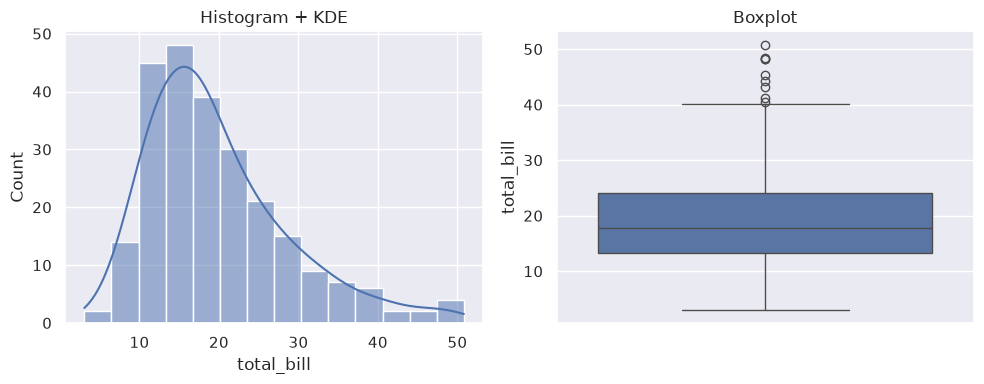
The histogram shows the shape: a peak between about $10 and $20 and a long tail to the right. The boxplot shows the same thing in summary form. The median line sits closer to the bottom of the box, the upper whisker is longer than the lower one, and the outliers are all on the high side. Together with the numbers above, this covers center (median about $18), spread (IQR about $11), and shape (right-skewed, with a few large bills).
8.2.5. Distributions#
8.2.5.1. Normal Distribution#
A normal distribution—also called a Gaussian distribution—is a symmetrical, bell-shaped probability distribution centered on the mean, where most data points cluster around that mean with frequencies tapering off equally toward both extremes.
Key Properties:
Defined by its mean (μ) and standard deviation (σ).
The
mean,median, andmodeare equal and located at the center.Symmetrical: the left and right sides are mirror images.
68% of data falls within 1 standard deviation, 95% within 2, and 99.7% within 3 standard deviations from the mean (“Empirical Rule”).
Frequently models real-world phenomena due to the Central Limit Theorem.
Example Applications:
Heights of People: Human heights in a given population typically follow a normal distribution—most people are near the average height, with fewer extremely short or tall.
IQ Scores: Measured intelligence is designed to follow a normal curve, with an average of 100 and most people close to the average.
Measurement Errors: Repeated measurements of something (e.g., lengths, weights) often cluster around the true value, following a normal distribution.
Test Scores: Large-scale standardized test results (e.g., SAT, GRE) often approximate a normal distribution after some normalization.
Example |
Mean (μ) |
Standard Deviation (σ) |
What is Measured |
|---|---|---|---|
Adult heights |
170 cm |
10 cm |
Human height distribution |
IQ scores |
100 |
15 |
Intelligence |
SAT scores |
1050 |
200 |
Standardized tests |
Let us use the random module in NumPy to explore.
np.random.seed(42)
x = np.random.normal(size=(2, 3))
print(type(x))
print(x)
<class 'numpy.ndarray'>
[[ 0.49671415 -0.1382643   0.64768854]
 [ 1.52302986 -0.23415337 -0.23413696]]
Now let’s add mean and standard deviation (because this is a normal distribution). Here we are controlling the center and the spread of the distribution. Here in the normal function, the parameters loc= means the mean and scale= means the standard deviation, or SD.
### generate a random normal distribution of size 2X3 with mean at 1 and SD of 2

np.random.seed(42)
x = np.random.normal(loc=1, scale=2, size=(2, 3))
print(x)
[[1.99342831 0.7234714  2.29537708]
 [4.04605971 0.53169325 0.53172609]]
8.2.5.2. Checking the 68–95–99.7 Rule#
The empirical rule is easy to check by simulation. Below we draw 1,000 values from a normal distribution with mean 50 and SD 5, and count how many fall within 1, 2, and 3 SDs of the mean (45–55, 40–60, and 35–65).
np.random.seed(42)
values = np.random.normal(loc=50, scale=5, size=1000)

for k in [1, 2, 3]:
    within = ((values > 50 - k * 5) & (values < 50 + k * 5)).mean()
    print(f'Within {k} SD: {within:.1%}')
Within 1 SD: 69.8%
Within 2 SD: 95.9%
Within 3 SD: 99.7%
The simulated shares (69.8%, 95.9%, and 99.7%) are close to the 68%, 95%, and 99.7% the rule predicts. Simulation lets you check a rule instead of memorizing it. We use the 95% figure again in Section 8.3 for the margin of error.
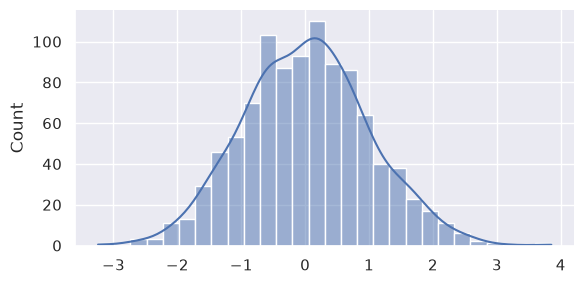
Time for some visualization. Here we plot 1,000 draws from a standard normal distribution (mean 0, SD 1). displot() is a figure-level function, so we control the figure size with height and aspect (the width-to-height ratio).
np.random.seed(42)
sns.displot(np.random.normal(size=1000), height=3, aspect=2, kde=True)
<seaborn.axisgrid.FacetGrid at 0x7f761d571550>
8.2.5.3. Binomial Distribution#
A binomial distribution is a discrete probability distribution that models the number of successes in a fixed number of independent trials, where each trial has only two outcomes: “success” or “failure.” Every trial must have the same probability of success. This distribution is fundamental for analyzing repeated yes/no-type experiments (Bernoulli trials) and appears frequently in statistics and data science.
Key Features:
There are
nfixed trials.Each trial is independent.
There are only two possible outcomes per trial (success or failure).
The chance of success
pis constant for each trial.
For example, flipping a fair coin 10 times and counting the number of heads. Here, each flip is independent, and the probability of heads (success) is 0.5. The distribution of the number of heads follows a binomial distribution with n=10, p=0.5.
np.random.seed(42)
arr = np.random.choice([0, 1], size=10)
print(arr)
# count number of 1s in the array
print(np.sum(arr))
[0 1 0 0 0 1 0 0 0 1]
3
### create an empty array to store the number of 1s in each iteration
np.random.seed(42)
arr = np.array([])
for i in range(100):
    arr = np.append(arr, np.sum(np.random.choice([0, 1], size=10)))
print(arr)

### histogram of the number of 1s in each iteration
fig, ax = plt.subplots(1,2,figsize=(8, 3))
ax[0].hist(arr, alpha=0.6, color='g', bins=np.arange(-0.5, 11.5, 1), density=True)
sns.histplot(arr, bins=np.arange(0.5, 11.5, 1), ax=ax[1])

ax[0].set_title('Matplotlib')
ax[1].set_title('Seaborn')
[3. 4. 9. 4. 7. 4. 4. 7. 5. 9. 8. 6. 6. 1. 5. 3. 5. 4. 3. 3. 5. 2. 5. 9.
 3. 4. 4. 7. 5. 5. 6. 4. 7. 5. 4. 5. 4. 7. 4. 6. 8. 5. 6. 6. 5. 6. 5. 5.
 5. 4. 4. 7. 6. 4. 5. 7. 5. 6. 6. 6. 6. 5. 5. 5. 5. 4. 4. 8. 5. 7. 7. 7.
 3. 4. 4. 6. 5. 4. 5. 3. 5. 3. 6. 3. 4. 2. 6. 5. 5. 4. 5. 7. 2. 5. 4. 4.
 3. 7. 9. 7.]
Text(0.5, 1.0, 'Seaborn')
Note
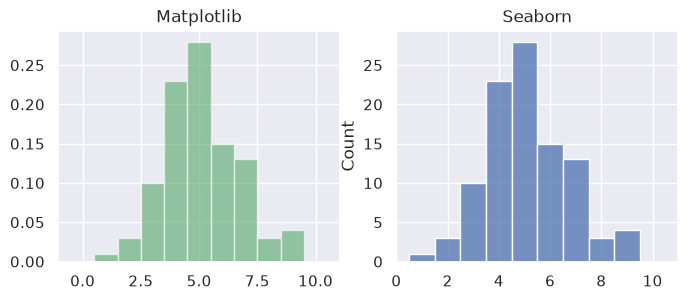
To center each bin on a whole number (0.5→1.5 for 1, 1.5→2.5 for 2, etc.) to make both plots look consistent, use this general formula:
bins=np.arange(0.5, max(arr) + 1.5, 1)
### test out 1 scalar
np.random.seed(42)
np.random.binomial(n=100, p=0.5, size=1)
array([49])
8.2.5.3.1. Central Limit Theorem#
A binomial count is a sum of \(n\) independent 0/1 trials. The Central Limit Theorem (CLT) says that sums and averages of many independent values tend toward a normal distribution as the number of values grows, even when each single value is far from normal. So as the number of trials \(n\) gets larger, the binomial distribution should look more and more like a normal curve.
Below, the chance of success is \(p = 0.2\), so with only a few trials the counts pile up near 0 and the distribution is skewed to the right. We draw 5,000 binomial counts for \(n = 5\), \(30\), and \(300\) trials, and overlay a normal curve with the same mean (\(np\)) and standard deviation (\(\sqrt{np(1-p)}\)).
np.random.seed(42)
p = 0.2
ns = [5, 30, 300]

fig, ax = plt.subplots(1, 3, figsize=(12, 3))
for i, n in enumerate(ns):
    counts = np.random.binomial(n=n, p=p, size=5000)      ### 5,000 binomial counts with n trials each
    sns.histplot(counts, discrete=True, stat='density', color='green', ax=ax[i])

    mu, sd = n * p, np.sqrt(n * p * (1 - p))               ### matching normal curve
    x = np.linspace(counts.min() - 1, counts.max() + 1, 300)
    ax[i].plot(x, np.exp(-(x - mu)**2 / (2 * sd**2)) / (sd * np.sqrt(2 * np.pi)), color='red')
    ax[i].set_title(f'n = {n} trials')
plt.tight_layout()
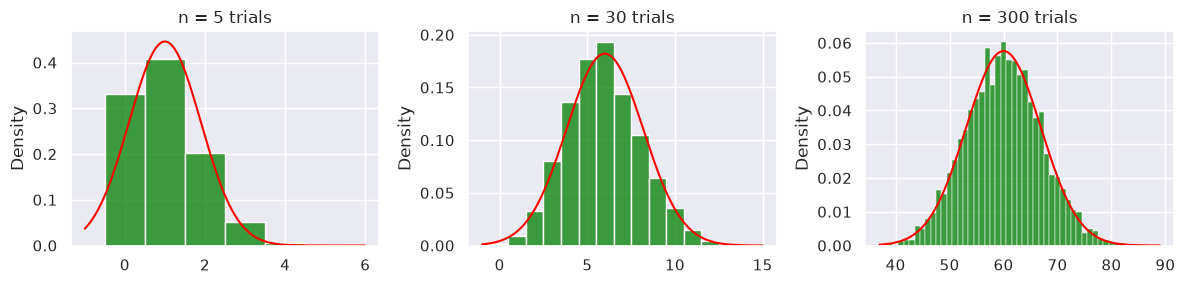
With \(n = 5\) the counts are clearly skewed and the normal curve fits poorly. By \(n = 30\) the shape is close to a bell, and with \(n = 300\) the histogram follows the normal curve almost exactly. Notice that the number of draws (5,000) is the same in every panel. What changes the shape is \(n\), the number of trials added up in each count. Section 8.3 shows the same effect for sample means.
Visually comparing normal distribution and binomial distribution.
### normal distribution vs binomial
### binomial approximates normal distribution when n is big (np >=5)
### binomial "spikes" because it's integers

np.random.seed(42)
norm = np.random.normal(loc=50, scale=5, size=1000)     ### mean=50, SD=5 to match binomial
bino = np.random.binomial(n=100, p=0.5, size=1000)      ### n= number of trials (100), p= probability of success,
                                                        ### size= number of samples (1000)

fig, ax = plt.subplots(1, 2, figsize=(8, 3))
sns.histplot(norm, label='normal', color='red', ax=ax[0], kde=True)
sns.histplot(bino, label="binomial", color='green', ax=ax[1], kde=True)
fig.legend()
fig.tight_layout()
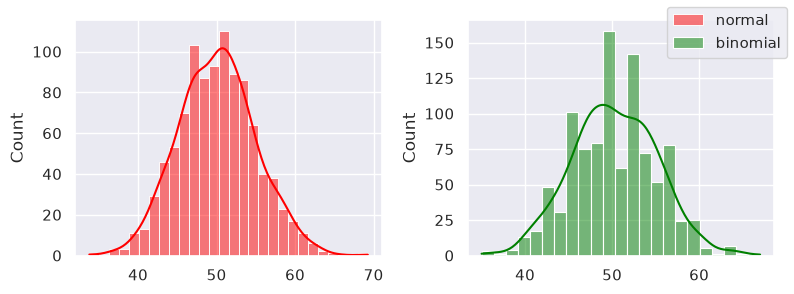
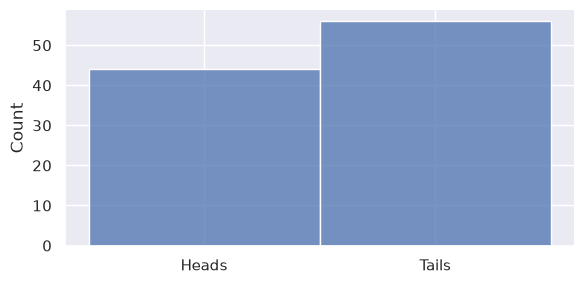
Coin flipping! These are the numbers generated and plotted in the green chart on the right. The choice function has the size= parameter, which is how many times you draw/pick from the coin array.
# Define the coin sides
coin = ['Heads', 'Tails']

# Simulate 100 coin flips
np.random.seed(42)
flips = np.random.choice(coin, size=100)

# Count the number of heads
num_heads = np.count_nonzero(flips == 'Heads')

print("Number of Heads:", num_heads)

sns.displot(flips, height=3, aspect=2, bins=10, kde=False)
Number of Heads: 44
<seaborn.axisgrid.FacetGrid at 0x7f7615e7a710>
8.2.5.4. Uniform Distribution#
A uniform distribution is a probability distribution where every outcome within a certain range is equally likely to occur. This means there is no bias—each result has the same probability as any other within the specified set.
Examples:
Rolling a fair six-sided die. Each face (1 through 6) has a 1/6 chance of appearing, so the probability of rolling any particular number is equal.
Flipping a fair coin. Heads and tails each have a 50% chance.
The np.random.uniform() method draws samples from a uniform distribution. Samples are uniformly distributed over the half-open interval [low, high) (includes low, but excludes high). In other words, any value within the given interval is equally likely to be drawn by uniform.
The syntax:
np.random.uniform(low=0.0, high=1.0, size=None)
np.random.seed(42)

unif1 = np.random.uniform()                               ### return 1 number [0, 1)
unif2 = np.random.uniform(low=1, high=5, size=3)          ### return size=3 numbers [1, 5)
unif3 = np.random.uniform(low=5, high=10, size=(3, 3))    ### return a 3x3 2D array
unif4 = np.round(np.random.uniform(low=5, high=10, size=(3, 3)), 2)     ### rounded

unif5 = np.random.randint(low=5, high=10, size=(3, 3))    ### int

for unif in [ unif1, unif2, unif3, unif4, unif5 ]:
    print(unif, '\n')
0.3745401188473625

[4.80285723 3.92797577 3.39463394]

[[5.7800932  5.7799726  5.29041806]
 [9.33088073 8.00557506 8.54036289]
 [5.10292247 9.84954926 9.1622132 ]]

[[6.06 5.91 5.92]
 [6.52 7.62 7.16]
 [6.46 8.06 5.7 ]]

[[8 8 7]
 [8 8 5]
 [7 9 7]]
8.2.5.4.1. Example: Rolling a Die#
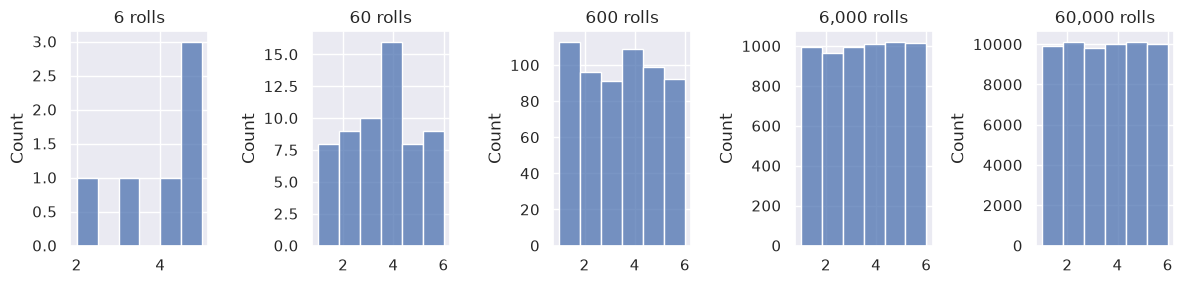
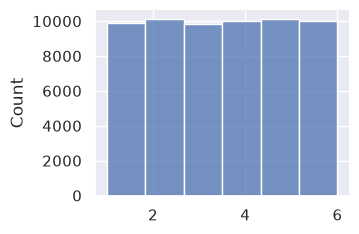
Here we roll a fair six-sided die 6, 60, 600, 6,000, and 60,000 times. With only a few rolls, some faces come up more often than others by chance. As the number of rolls grows, all six faces appear about equally often, which is what a uniform distribution predicts.
### roll a die more and more times
np.random.seed(42)
fig, axes = plt.subplots(1, 5, figsize=(12, 3))

for i, n_rolls in enumerate([ 6, 60, 600, 6000, 60000 ]):
    rolls = np.random.randint(1, 7, size=n_rolls)     ### integers 1 to 6
    sns.histplot(rolls, ax=axes[i], bins=6)
    axes[i].set_title(f'{n_rolls:,} rolls')

plt.tight_layout()
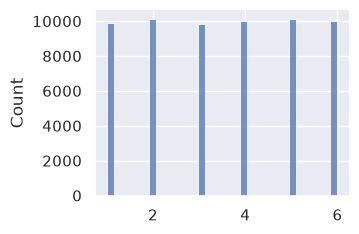
Note that binning can affect the plotting greatly.
### displot with height and aspect

sns.displot(rolls, height=2.5, aspect=3/2)
sns.displot(rolls, height=2.5, aspect=3/2, bins=6)
<seaborn.axisgrid.FacetGrid at 0x7f7615b84910>
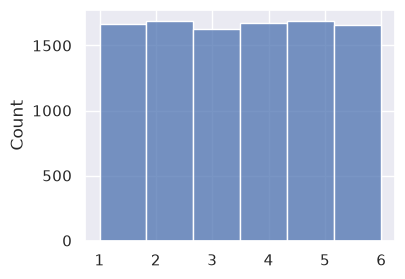
Now roll the die 10,000 times. With six equally likely faces, we expect each face to come up about 10,000 / 6 ≈ 1,667 times.
### roll a die 10,000 times
np.random.seed(42)
rolls2 = np.random.randint(1, 7, size=10000)

plt.figure(figsize=(4, 3))
sns.histplot(rolls2, bins=6)

print('Number of rolls:', len(rolls2))
print('Expected rolls per face:', round(len(rolls2) / 6, 1))
Number of rolls: 10000
Expected rolls per face: 1666.7
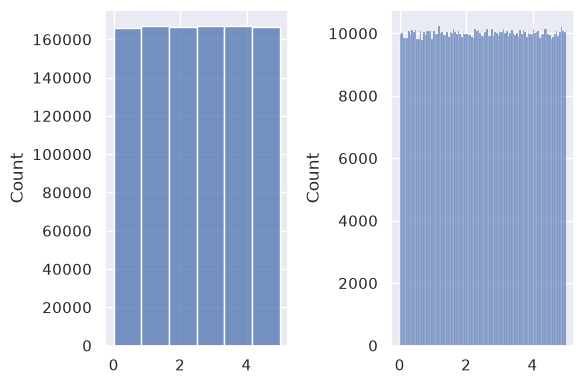
Continuous uniform draws with np.random.uniform() behave the same way. With 1,000,000 draws between 0 and 5, the histogram looks flat with either 6 bins or 100 bins.
np.random.seed(42)
unif = np.random.uniform(0, 5, size=1000000)

fig, ax = plt.subplots(1, 2, figsize=(6, 4))

sns.histplot(data=unif, bins=6, ax=ax[0])
sns.histplot(data=unif, bins=100, ax=ax[1])

plt.tight_layout()
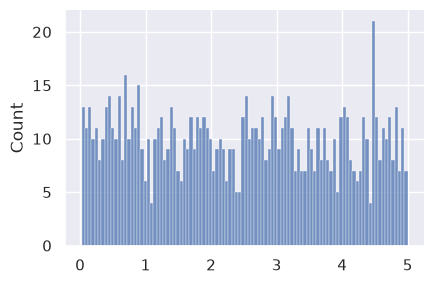
But, when we have smaller n and larger bins, we see spikes:
np.random.seed(42)
unif = np.random.uniform(0, 5, size=1000)    ### low, high exclusive
sns.displot(data=unif, kind='hist', height=3, aspect=3/2, bins=100)
# sns.displot(unif, kind='kde')
# plt.show()
<seaborn.axisgrid.FacetGrid at 0x7f760eb5d1d0>
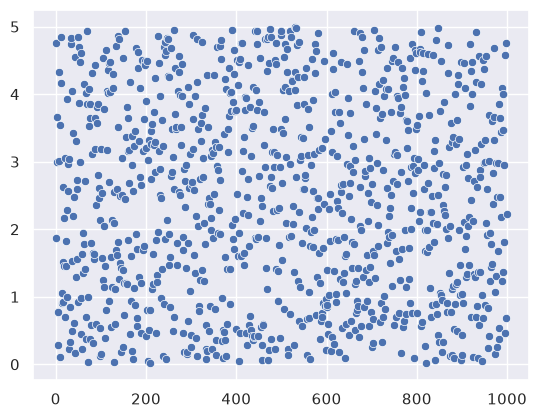
Using scatter plot to visualize.
np.random.seed(42)
unif = np.random.uniform(0, 5, size=1000)

sns.scatterplot(data=unif)
<Axes: >
np.random.seed(42)
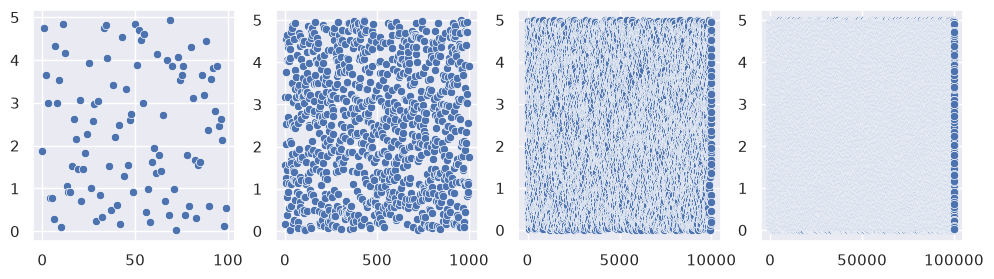
fig, axes = plt.subplots(1, 4, figsize=(12, 3))     ### one figure with four axes

unif1 = np.random.uniform(0, 5, size=100)
unif2 = np.random.uniform(0, 5, size=1000)
unif3 = np.random.uniform(0, 5, size=10000)
# unif4 = np.random.uniform(0, 5, size=10000000)  ### too big, will crash the kernel
unif4 = np.random.uniform(0, 5, size=100000)

sns.scatterplot(unif1, ax=axes[0])
sns.scatterplot(unif2, ax=axes[1])
sns.scatterplot(unif3, ax=axes[2])
sns.scatterplot(unif4, ax=axes[3])
<Axes: >
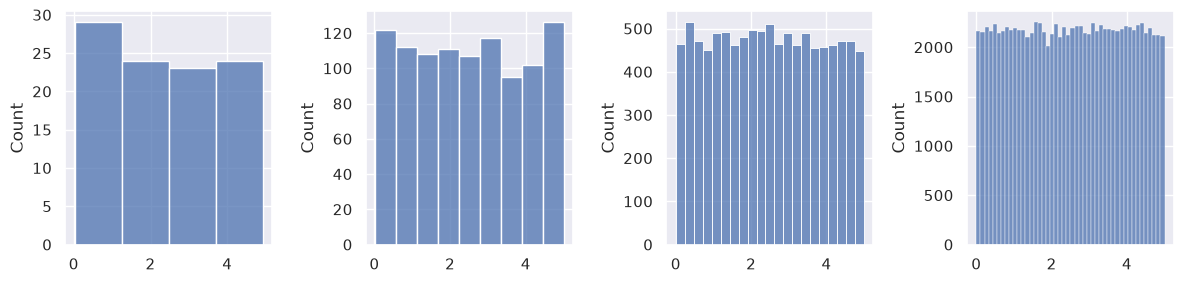
Next, histograms of the same four uniform samples. Instead of choosing the number of bins by hand, we use the Freedman–Diaconis rule, which sets the bin width from the data:
Data with a wider spread (larger IQR) get wider bins, and larger samples get narrower bins. So as \(n\) grows, the histogram gets more bins and shows more detail, while small samples get fewer bins and do not break into random spikes.
fig, axes = plt.subplots(1, 4, figsize=(12, 3))     ### one figure with four axes

datasets = [ unif1, unif2, unif3, unif4 ]
for i, data in enumerate(datasets):

    q25, q75 = np.percentile(data, [25, 75])            ### IQR: interquartile range, the difference between the 75th and 25th percentiles
    bin_width = 2 * (q75 - q25) * len(data) ** (-1/3)   ###  Freedman-Diaconis rule for bin width
    bins = int((data.max() - data.min()) / bin_width)   ### bins

    sns.histplot(data=data, ax=axes[i], bins=bins)      ### plot

plt.tight_layout()
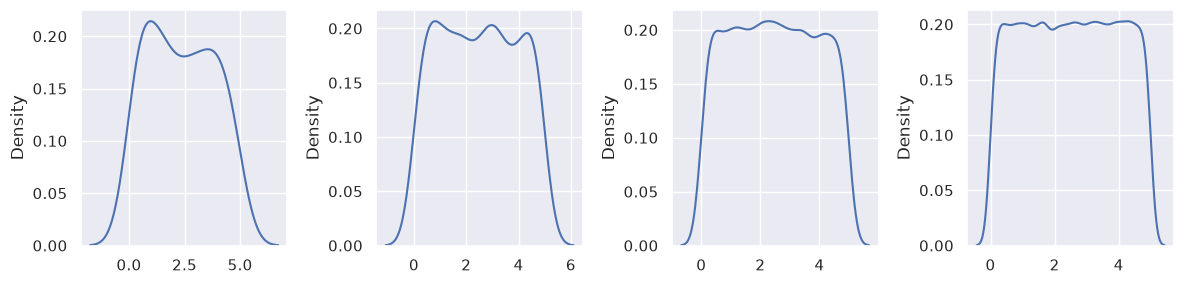
Visualizing using KDE.
fig, axes = plt.subplots(1, 4, figsize=(12, 3))     ### one figure with four axes

for i, data in enumerate(datasets):
    sns.kdeplot(data=data, ax=axes[i])

plt.tight_layout()
8.2.6. The Law of Large Numbers#
The law of large number says that the more samples you take, the closer your sample mean gets to the true population mean.
We’ll simulate coin flips to show:
Randomness
Law of large numbers (the running average stabilizes)
Each flip is 0 (tails) or 1 (heads).
rng = np.random.default_rng(42)
# rng = np.random.default_rng()

type(rng.integers(0, 2, 10))
rng = np.random.default_rng(42)
flips = rng.integers(0, 2, 200)
flips
array([0, 1, 1, 0, 0, 1, 0, 1, 0, 0, 1, 1, 1, 1, 1, 1, 1, 0, 1, 0, 1, 0,
       0, 1, 1, 1, 0, 1, 1, 0, 0, 0, 0, 1, 1, 0, 1, 1, 0, 1, 0, 1, 1, 0,
       0, 1, 0, 1, 1, 1, 1, 0, 0, 0, 0, 0, 1, 0, 1, 1, 1, 1, 0, 1, 0, 0,
       1, 0, 0, 0, 1, 0, 0, 0, 1, 0, 0, 0, 1, 1, 1, 0, 0, 1, 1, 1, 0, 0,
       1, 1, 0, 1, 1, 0, 1, 0, 0, 1, 1, 0, 1, 0, 1, 0, 1, 1, 1, 1, 0, 1,
       0, 1, 1, 0, 1, 1, 0, 0, 0, 0, 0, 1, 1, 0, 1, 1, 0, 1, 1, 1, 1, 1,
       0, 1, 1, 0, 1, 0, 0, 0, 1, 0, 0, 0, 1, 1, 0, 0, 1, 0, 1, 0, 1, 0,
       0, 1, 0, 1, 1, 1, 1, 1, 0, 0, 0, 1, 0, 0, 0, 0, 0, 0, 1, 1, 1, 0,
       1, 0, 1, 1, 1, 0, 0, 1, 0, 0, 0, 0, 0, 0, 1, 1, 1, 0, 1, 0, 0, 0,
       0, 1])
np.arange(len(flips)) + 1 ### fixed and grow linearly
array([  1,   2,   3,   4,   5,   6,   7,   8,   9,  10,  11,  12,  13,
        14,  15,  16,  17,  18,  19,  20,  21,  22,  23,  24,  25,  26,
        27,  28,  29,  30,  31,  32,  33,  34,  35,  36,  37,  38,  39,
        40,  41,  42,  43,  44,  45,  46,  47,  48,  49,  50,  51,  52,
        53,  54,  55,  56,  57,  58,  59,  60,  61,  62,  63,  64,  65,
        66,  67,  68,  69,  70,  71,  72,  73,  74,  75,  76,  77,  78,
        79,  80,  81,  82,  83,  84,  85,  86,  87,  88,  89,  90,  91,
        92,  93,  94,  95,  96,  97,  98,  99, 100, 101, 102, 103, 104,
       105, 106, 107, 108, 109, 110, 111, 112, 113, 114, 115, 116, 117,
       118, 119, 120, 121, 122, 123, 124, 125, 126, 127, 128, 129, 130,
       131, 132, 133, 134, 135, 136, 137, 138, 139, 140, 141, 142, 143,
       144, 145, 146, 147, 148, 149, 150, 151, 152, 153, 154, 155, 156,
       157, 158, 159, 160, 161, 162, 163, 164, 165, 166, 167, 168, 169,
       170, 171, 172, 173, 174, 175, 176, 177, 178, 179, 180, 181, 182,
       183, 184, 185, 186, 187, 188, 189, 190, 191, 192, 193, 194, 195,
       196, 197, 198, 199, 200])
flips.cumsum() ### grow slower because of 0, 1
array([  0,   1,   2,   2,   2,   3,   3,   4,   4,   4,   5,   6,   7,
         8,   9,  10,  11,  11,  12,  12,  13,  13,  13,  14,  15,  16,
        16,  17,  18,  18,  18,  18,  18,  19,  20,  20,  21,  22,  22,
        23,  23,  24,  25,  25,  25,  26,  26,  27,  28,  29,  30,  30,
        30,  30,  30,  30,  31,  31,  32,  33,  34,  35,  35,  36,  36,
        36,  37,  37,  37,  37,  38,  38,  38,  38,  39,  39,  39,  39,
        40,  41,  42,  42,  42,  43,  44,  45,  45,  45,  46,  47,  47,
        48,  49,  49,  50,  50,  50,  51,  52,  52,  53,  53,  54,  54,
        55,  56,  57,  58,  58,  59,  59,  60,  61,  61,  62,  63,  63,
        63,  63,  63,  63,  64,  65,  65,  66,  67,  67,  68,  69,  70,
        71,  72,  72,  73,  74,  74,  75,  75,  75,  75,  76,  76,  76,
        76,  77,  78,  78,  78,  79,  79,  80,  80,  81,  81,  81,  82,
        82,  83,  84,  85,  86,  87,  87,  87,  87,  88,  88,  88,  88,
        88,  88,  88,  89,  90,  91,  91,  92,  92,  93,  94,  95,  95,
        95,  96,  96,  96,  96,  96,  96,  96,  97,  98,  99,  99, 100,
       100, 100, 100, 100, 101])
flips.cumsum() / (np.arange(len(flips)) + 1) ### will get as big as about half of len()
array([0.        , 0.5       , 0.66666667, 0.5       , 0.4       ,
       0.5       , 0.42857143, 0.5       , 0.44444444, 0.4       ,
       0.45454545, 0.5       , 0.53846154, 0.57142857, 0.6       ,
       0.625     , 0.64705882, 0.61111111, 0.63157895, 0.6       ,
       0.61904762, 0.59090909, 0.56521739, 0.58333333, 0.6       ,
       0.61538462, 0.59259259, 0.60714286, 0.62068966, 0.6       ,
       0.58064516, 0.5625    , 0.54545455, 0.55882353, 0.57142857,
       0.55555556, 0.56756757, 0.57894737, 0.56410256, 0.575     ,
       0.56097561, 0.57142857, 0.58139535, 0.56818182, 0.55555556,
       0.56521739, 0.55319149, 0.5625    , 0.57142857, 0.58      ,
       0.58823529, 0.57692308, 0.56603774, 0.55555556, 0.54545455,
       0.53571429, 0.54385965, 0.53448276, 0.54237288, 0.55      ,
       0.55737705, 0.56451613, 0.55555556, 0.5625    , 0.55384615,
       0.54545455, 0.55223881, 0.54411765, 0.53623188, 0.52857143,
       0.53521127, 0.52777778, 0.52054795, 0.51351351, 0.52      ,
       0.51315789, 0.50649351, 0.5       , 0.50632911, 0.5125    ,
       0.51851852, 0.51219512, 0.5060241 , 0.51190476, 0.51764706,
       0.52325581, 0.51724138, 0.51136364, 0.51685393, 0.52222222,
       0.51648352, 0.52173913, 0.52688172, 0.5212766 , 0.52631579,
       0.52083333, 0.51546392, 0.52040816, 0.52525253, 0.52      ,
       0.52475248, 0.51960784, 0.52427184, 0.51923077, 0.52380952,
       0.52830189, 0.53271028, 0.53703704, 0.53211009, 0.53636364,
       0.53153153, 0.53571429, 0.53982301, 0.53508772, 0.53913043,
       0.54310345, 0.53846154, 0.53389831, 0.52941176, 0.525     ,
       0.52066116, 0.52459016, 0.52845528, 0.52419355, 0.528     ,
       0.53174603, 0.52755906, 0.53125   , 0.53488372, 0.53846154,
       0.54198473, 0.54545455, 0.54135338, 0.54477612, 0.54814815,
       0.54411765, 0.54744526, 0.54347826, 0.53956835, 0.53571429,
       0.53900709, 0.53521127, 0.53146853, 0.52777778, 0.53103448,
       0.53424658, 0.53061224, 0.52702703, 0.53020134, 0.52666667,
       0.52980132, 0.52631579, 0.52941176, 0.52597403, 0.52258065,
       0.52564103, 0.52229299, 0.52531646, 0.52830189, 0.53125   ,
       0.53416149, 0.53703704, 0.53374233, 0.5304878 , 0.52727273,
       0.53012048, 0.52694611, 0.52380952, 0.52071006, 0.51764706,
       0.51461988, 0.51162791, 0.51445087, 0.51724138, 0.52      ,
       0.51704545, 0.51977401, 0.51685393, 0.51955307, 0.52222222,
       0.52486188, 0.52197802, 0.51912568, 0.52173913, 0.51891892,
       0.51612903, 0.51336898, 0.5106383 , 0.50793651, 0.50526316,
       0.5078534 , 0.51041667, 0.51295337, 0.51030928, 0.51282051,
       0.51020408, 0.50761421, 0.50505051, 0.50251256, 0.505     ])
rng = np.random.default_rng(42)        ### random generator; seed: 42

flips = rng.integers(0, 2, size=200)   ### 200 0 or 1
running_prop = flips.cumsum() / (np.arange(len(flips)) + 1)     ### cumsum(): cumulative sum
                                                                ### output: an array
plt.figure(figsize=(12,4))
plt.plot(running_prop, marker='o', markersize=2, linewidth=1)   ### matplotlib.pyplot the array
plt.axhline(0.5, color='red', linestyle='--')
plt.xlabel('Number of flips')
plt.ylabel('Proportion heads so far')
plt.title('Law of Large Numbers intuition')
plt.ylim(0,1)
plt.show()
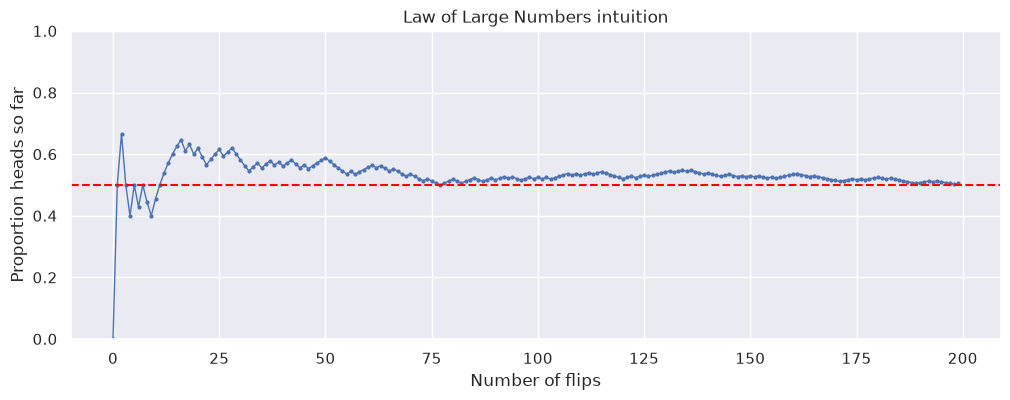
Dividing gives us the proportion of heads up to that point.
As you see, early on it bounces around wildly, but as n grows it converges toward 0.5 (the red dashed line), which is the Law of Large Numbers in action.
8.2.7. Section Practice#
Use this short exercise to check the main workflow from this section.
### Exercise: Practice Descriptive Distributions
# An online store recorded daily website visits for two weeks.
#   1. Compute the mean, median, and standard deviation (np.std) of visits.
#   2. Is the distribution skewed? Compare the mean with the median.
#   3. Print the three statistics rounded to 1 decimal, and which one you would
#      report as a "typical" day.
#   4. Use np.percentile() to find Q1 and Q3, then the IQR and the upper fence
#      (Q3 + 1.5 * IQR). How many days are outliers above the fence?
# Print exactly:
# Mean: 527.5
# Median: 417.5
# SD: 281.3
# Typical day: median
# Q1: 406.25
# Q3: 428.75
# IQR: 22.5
# Upper fence: 462.5
# Outlier days: 2
import numpy as np

visits = np.array([410, 395, 430, 420, 405, 1250, 415, 400, 425, 390, 435, 410, 1180, 420])
### Your code starts here


### Your code ends here
Mean: 527.5
Median: 417.5
SD: 281.3
Typical day: median
Q1: 406.25
Q3: 428.75
IQR: 22.5
Upper fence: 462.5
Outlier days: 2