
8.1. Probability Models#
This section introduces probability language and the table structure used to describe data. We start with a probability model for a business process: the possible outcomes, their chances, and what we can compute from them. Then we turn to observed data and separate the population or process we care about from the sample we observe, and identify variables, observations, and distributions.
8.1.1. Probability Models#
A probability model (or chance model) describes a random process by listing every possible outcome and the probability of each. The list of all possible outcomes is the sample space.
Consider an online store that ships orders. When a shipment goes out, the store does not know whether it will arrive on time. From past experience, the operations team uses this model for one shipment:
shipping = pd.DataFrame({
    'outcome': ['on time', '1 day late', '3+ days late'],
    'probability': [0.80, 0.15, 0.05],
})
shipping
| outcome | probability | |
|---|---|---|
| 0 | on time | 0.80 |
| 1 | 1 day late | 0.15 |
| 2 | 3+ days late | 0.05 |
Every probability model follows two rules:
Each probability is between 0 (impossible) and 1 (certain).
The probabilities of all the outcomes in the sample space add up to 1, because exactly one of them must happen.
shipping['probability'].sum()
np.float64(1.0)
8.1.1.1. Events and Complements#
An event is a set of outcomes we care about. The event “the shipment is late” contains two outcomes, 1 day late and 3+ days late, so its probability is the sum of their probabilities.
late = shipping['outcome'] != 'on time'
p_late = shipping.loc[late, 'probability'].sum()
p_late
np.float64(0.2)
The complement of an event is “the event does not happen.” Because the probabilities add up to 1, the probability of the complement is 1 minus the probability of the event:
The complement is often the easier way to compute a probability: “at least one day late” is everything except “on time.”
p_not_late = 1 - p_late
p_not_late
np.float64(0.8)
8.1.1.2. Expected Value#
Managers usually care about a number attached to each outcome, such as a cost. Suppose the store gives a $5 credit when a shipment is 1 day late and a $20 credit when it is 3 or more days late. The credit is a random variable: a numeric quantity whose value depends on chance.
The expected value of a random variable is the sum of each value times its probability:
shipping['credit'] = [0, 5, 20]
expected_credit = (shipping['credit'] * shipping['probability']).sum()
expected_credit
np.float64(1.75)
The expected credit is $1.75 per shipment. No single shipment costs $1.75: each costs $0, $5, or $20. The expected value is the long-run average over many shipments. If the store ships 10,000 orders a month, it should budget about $17,500 a month for late-delivery credits.
Delivery credits like this are real. Fig. 8.1 shows Temu’s delivery guarantee: a $5.00 credit for a delay, a refund if tracking does not update for 15 days, and a refund if the package does not arrive within 20 days. Each promise attaches a dollar amount to an outcome, so the retailer can budget for the whole guarantee with the same expected-value calculation.
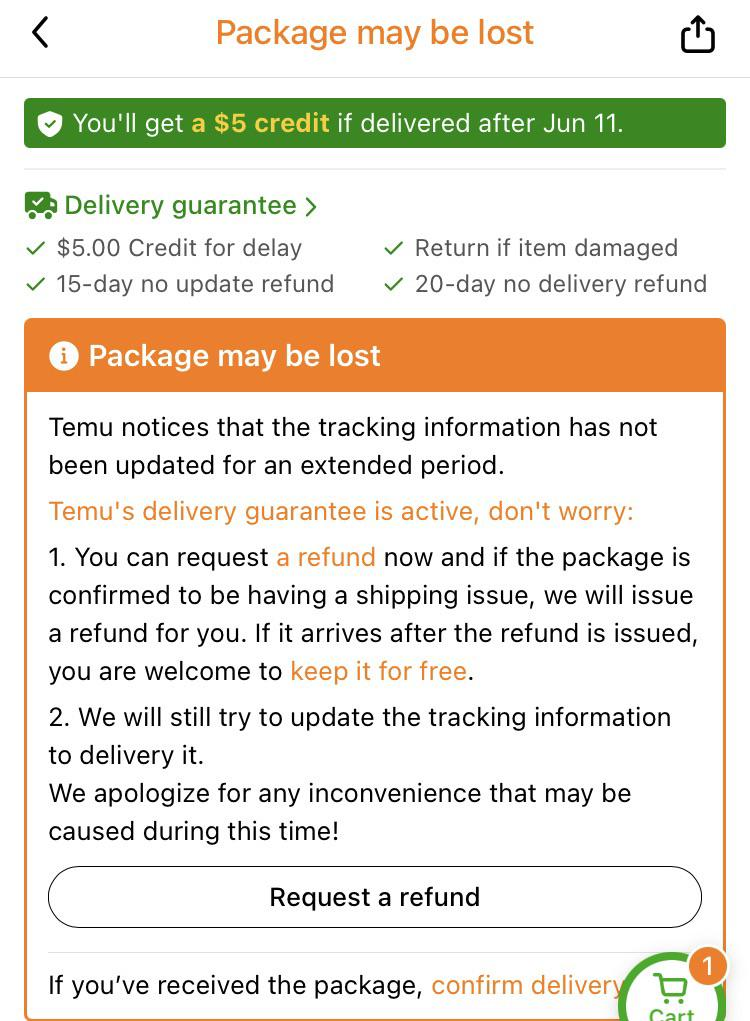
Fig. 8.1 Temu’s delivery guarantee for a package that may be lost#
Customers have to think about the outcomes too. In this Reddit thread, a shopper asks whether they still get the $5 delay credit if they request a refund. That question is about which outcomes the credit is attached to, which is exactly what a probability model has to spell out.
8.1.1.3. From Model to Data#
A probability model describes the process; data are what we actually observe. We can connect the two with a simulation: use the model to generate many shipments and look at what happens. rng.choice draws outcomes at random with the model’s probabilities.
You met choice() in Chapter 3. Here we use the modern form, which takes three parts:
rng = np.random.default_rng(8)creates a random number generator. The seed8makes the results the same every time the cell runs.rng.choice(values, size=10000)draws 10,000 values fromvalues.p=shipping['probability']gives each value its chance of being drawn. Withoutp, every outcome would be equally likely. With it, the draws follow the model.
To compare the simulation with the model, we count the outcomes. value_counts() counts how many times each value appears, and normalize=True divides each count by the total, so the result is a proportion instead of a count.
rng = np.random.default_rng(8)
simulated = pd.Series(rng.choice(shipping['outcome'], size=10000, p=shipping['probability']))

simulated.value_counts(normalize=True)
on time         0.8016
1 day late      0.1525
3+ days late    0.0459
Name: proportion, dtype: float64
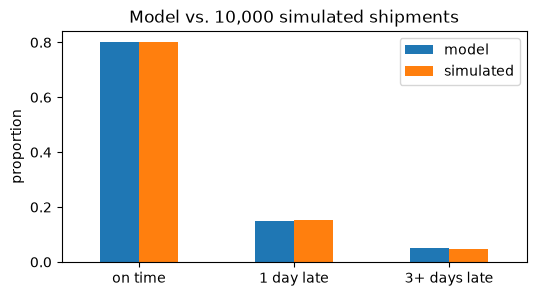
Putting the model and the simulation side by side makes the comparison easy to see. pandas lines up the two columns by index label, not by position. value_counts() labels its rows by outcome, so we use set_index('outcome') to label the model’s probabilities by outcome too (see Chapter 4). Without it, the rows would not line up, and the table would be filled with NaN.
comparison = pd.DataFrame({
    'model': shipping.set_index('outcome')['probability'],
    'simulated': simulated.value_counts(normalize=True),
})
comparison.plot.bar(rot=0, figsize=(6, 3), ylabel='proportion', title='Model vs. 10,000 simulated shipments')
plt.show()
comparison
| model | simulated | |
|---|---|---|
| on time | 0.80 | 0.8016 |
| 1 day late | 0.15 | 0.1525 |
| 3+ days late | 0.05 | 0.0459 |
The proportions in the simulated data, the empirical distribution, are close to the model’s probabilities, but not exactly equal: each simulation gives slightly different results. The same is true of the average credit:
credit_by_outcome = shipping.set_index('outcome')['credit']
simulated.map(credit_by_outcome).mean()
np.float64(1.6805)
The simulated average credit is close to the expected value of $1.75. With more shipments, it tends to get closer. The next section returns to this idea as the law of large numbers.
In practice, we usually work the other way around: we observe data and use them to learn about the process that produced them. The rest of this section introduces the language for describing observed data.
8.1.2. Probability, Data, and Variables#
A probability model starts from known chances and tells us what data to expect. Statistics usually runs the other way: we start with data and try to learn about the process that produced it. Before we can describe data, we need a few terms: where the data came from (population vs sample), how the table is organized (observations vs variables), and how the values are spread out (distribution).
We will use the tips dataset from seaborn, which records 244 restaurant bills. Each row is one party’s bill, with the total, the tip, and details about the party and the meal. The size column is the number of people in the party.
tips = sns.load_dataset('tips')
tips                      ### size means number of ppl in the party
| total_bill | tip | sex | smoker | day | time | size | |
|---|---|---|---|---|---|---|---|
| 0 | 16.99 | 1.01 | Female | No | Sun | Dinner | 2 |
| 1 | 10.34 | 1.66 | Male | No | Sun | Dinner | 3 |
| 2 | 21.01 | 3.50 | Male | No | Sun | Dinner | 3 |
| 3 | 23.68 | 3.31 | Male | No | Sun | Dinner | 2 |
| 4 | 24.59 | 3.61 | Female | No | Sun | Dinner | 4 |
| ... | ... | ... | ... | ... | ... | ... | ... |
| 239 | 29.03 | 5.92 | Male | No | Sat | Dinner | 3 |
| 240 | 27.18 | 2.00 | Female | Yes | Sat | Dinner | 2 |
| 241 | 22.67 | 2.00 | Male | Yes | Sat | Dinner | 2 |
| 242 | 17.82 | 1.75 | Male | No | Sat | Dinner | 2 |
| 243 | 18.78 | 3.00 | Female | No | Thur | Dinner | 2 |
244 rows × 7 columns
tips.shape ### a dataframe has shape, which is a tuple
(244, 7)
tips.shape returns (244, 7): 244 rows and 7 columns.
8.1.2.1. Population vs Sample#
The population is the full group we care about (e.g., “all bills at the restaurant this year”), whereas the sample is the subset we actually measured (e.g., the 244 rows in the tips dataset). We only ever see the sample, but the questions we ask are usually about the population. Using a sample to draw conclusions about a population is called statistical inference, and it is the main goal of the rest of this chapter.
8.1.2.2. Variable vs Observation#
Each row in the dataframe is an observation (e.g., one restaurant bill), whereas each column is a variable (e.g., total_bill, tip, smoker, time).
Quantitative variable: numeric values that are measured or counted, such as
total_bill,tip, andsize.Categorical variable: values that place an observation in a group, such as
time(Lunch/Dinner) andsmoker(Yes/No).
The data types give a quick first check:
tips.dtypes
total_bill     float64
tip            float64
sex           category
smoker        category
day           category
time          category
size             int64
dtype: object
The float64 and int64 columns are quantitative, and the category columns are categorical. Data types are only a starting point, though: a column of ZIP codes or product IDs is stored as numbers but is categorical, because averaging ZIP codes means nothing.
8.1.2.3. Distribution#
A distribution shows which values a variable takes and how often each one occurs. For a categorical variable, the distribution is the proportion of observations in each category:
tips['time'].value_counts(normalize=True)
time
Dinner    0.721311
Lunch     0.278689
Name: proportion, dtype: float64
About 72% of the bills are from dinner and 28% from lunch. These proportions are an empirical distribution, just like the simulated shipments earlier. If the sample represents the restaurant’s bills well, 0.72 is our estimate of the probability that a randomly chosen bill is a dinner bill.
For a quantitative variable, we group the values into ranges and count how many fall in each range. Are most bills around $10? $20? $50?
pd.cut(tips['total_bill'], bins=[0, 10, 20, 30, 40, 60]).value_counts(sort=False)
total_bill
(0, 10]      17
(10, 20]    130
(20, 30]     65
(30, 40]     22
(40, 60]     10
Name: count, dtype: int64
Most bills (130 of 244) are between $10 and $20, and the counts drop off as the bills get larger. Only 10 bills are above $40, with the largest just over $50. The values trail off to the right rather than evenly on both sides.
These observations already touch the three features to cover whenever you describe a quantitative distribution:
Center: where a typical value is (most bills are in the teens).
Spread: how much the values vary (from under $10 to about $50).
Shape: whether the values are symmetric or skewed, and whether there are outliers (a long tail of large bills).
The next section, Descriptive Distributions, gives you the numeric summaries and plots to measure each of these precisely.
8.1.3. Section Practice#
Use this short exercise to check the main workflow from this section.
### Exercise: Practice Probability Models
# A bakery models how many custom cakes are ordered in a day.
#   1. Check that the probabilities add up to 1.
#   2. Compute the probability of at least one order, using the complement of 0 orders.
#   3. Compute the expected number of orders per day.
#   4. The bakery also recorded orders for 20 actual days (observed). These days are a
#      sample from the process the model describes. Compute the observed proportion of
#      days with at least one order and the observed average orders per day.
# Print exactly:
# Total probability: 1.0
# P(at least one order): 0.9
# Expected orders: 1.7
# Observed P(at least one order): 0.85
# Observed average orders: 1.6
demand = [0, 1, 2, 3]                       # cakes ordered in a day
probabilities = [0.10, 0.30, 0.40, 0.20]
observed = [2, 1, 0, 3, 2, 2, 1, 0, 2, 3, 1, 2, 2, 1, 3, 2, 0, 2, 1, 2]
### Your code starts here


### Your code ends here
Total probability: 1.0
P(at least one order): 0.9
Expected orders: 1.7
Observed P(at least one order): 0.85
Observed average orders: 1.6