
11.3. Confidence Intervals#
A manager needs both an estimate and a way to describe its uncertainty. A confidence interval estimates a population parameter using two endpoints. The confidence level describes the intended long-run coverage of the procedure: with fresh random samples and suitable assumptions, an approximate 95% procedure should capture the fixed population parameter about 95% of the time.
The bootstrap percentile method uses percentiles of resampled statistics as endpoints. For a central 95% interval, leave 2.5% in each tail and use the 2.5th and 97.5th percentiles. In general, a central C% interval leaves (100 − C)/2 percent in each tail. We use method='nearest' for endpoints throughout this chapter, and np.median for ordinary sample medians.
The salary example let us check coverage because we knew its population median. Usually the parameter is unknown. Once an interval is calculated, it either contains that fixed parameter or it does not; the confidence level describes the sampling procedure, rather than a probability assigned to the parameter after seeing the data. Bootstrap coverage is approximate and depends on the original sample and statistic.
11.3.1. Estimating a Population Median#
We will now use the bootstrap method to estimate an unknown population median. You have encountered the dataset before. It comes from a sample of newborns in a large hospital system. We will treat it as if it were a simple random sample though the sampling was done in multiple stages. Stat Labs by Deborah Nolan and Terry Speed has details about a larger dataset from which this set is drawn.
The table births contains the following variables for mother-baby pairs: the baby’s birth weight in ounces, the number of gestational days (the number of days the mother was pregnant), the mother’s age in completed years, the mother’s height in inches, pregnancy weight in pounds, and whether or not the mother smoked during pregnancy.
For this teaching example, the target is the population represented by these records. The original multistage sampling design limits a simple row bootstrap; the interval should not be generalized to all births today. We use the familiar data to practice estimation, not to make clinical recommendations.
births = pd.read_csv(path_data + 'baby.csv')
births
| Birth Weight | Gestational Days | Maternal Age | Maternal Height | Maternal Pregnancy Weight | Maternal Smoker | |
|---|---|---|---|---|---|---|
| 0 | 120 | 284 | 27 | 62 | 100 | False |
| 1 | 113 | 282 | 33 | 64 | 135 | False |
| 2 | 128 | 279 | 28 | 64 | 115 | True |
| 3 | 108 | 282 | 23 | 67 | 125 | True |
| 4 | 136 | 286 | 25 | 62 | 93 | False |
| ... | ... | ... | ... | ... | ... | ... |
| 1169 | 113 | 275 | 27 | 60 | 100 | False |
| 1170 | 128 | 265 | 24 | 67 | 120 | False |
| 1171 | 130 | 291 | 30 | 65 | 150 | True |
| 1172 | 125 | 281 | 21 | 65 | 110 | False |
| 1173 | 117 | 297 | 38 | 65 | 129 | False |
1174 rows × 6 columns
Birth weight and gestational days describe different aspects of the same birth. Their ratio gives a descriptive summary in ounces per gestational day. It does not measure an individual baby’s daily growth or predict its birth weight.
The table ratios contains birth weight, gestational days, and their ratio. The first entry is calculated as:
ratios = births[['Birth Weight', 'Gestational Days']].copy()

ratios['Ratio BW:GD'] = births['Birth Weight']/births['Gestational Days']
ratios
| Birth Weight | Gestational Days | Ratio BW:GD | |
|---|---|---|---|
| 0 | 120 | 284 | 0.422535 |
| 1 | 113 | 282 | 0.400709 |
| 2 | 128 | 279 | 0.458781 |
| 3 | 108 | 282 | 0.382979 |
| 4 | 136 | 286 | 0.475524 |
| ... | ... | ... | ... |
| 1169 | 113 | 275 | 0.410909 |
| 1170 | 128 | 265 | 0.483019 |
| 1171 | 130 | 291 | 0.446735 |
| 1172 | 125 | 281 | 0.444840 |
| 1173 | 117 | 297 | 0.393939 |
1174 rows × 3 columns
print(ratios["Ratio BW:GD"].min())
print(ratios["Ratio BW:GD"].max())
0.23673469387755103
0.7837837837837838
Here is a histogram of the ratios.
fig, ax = plt.subplots(1, 2, figsize = (12, 4))

ax[0].hist(ratios['Ratio BW:GD'], ec='white', density=True)

# xbins = np.arange(0.2, 0.81, 0.1)              ### this is to show bins config
# xbins = np.arange(0.2, 0.81, 0.05)           ### note the width of the bin
xbins = np.arange(0.2, 0.81, 0.01)           ### note the width of the bin
ax[1].hist(ratios['Ratio BW:GD'], ec='white', bins=xbins, density=True)  ### also note ethe subtle difference between ax[0] and ax[1]

ax[0].tick_params(axis='both', labelsize=10)
ax[1].tick_params(axis='both', labelsize=10)
formatter = plt.FuncFormatter(lambda x, _: '{:g}'.format(x * 100))
ax[0].yaxis.set_major_formatter(formatter)
ax[1].yaxis.set_major_formatter(formatter)
ax[0].set_xlabel('Ratio BW:GD', fontsize=12)
ax[0].set_ylabel('Percent per unit', fontsize=12)
Text(0, 0.5, 'Percent per unit')
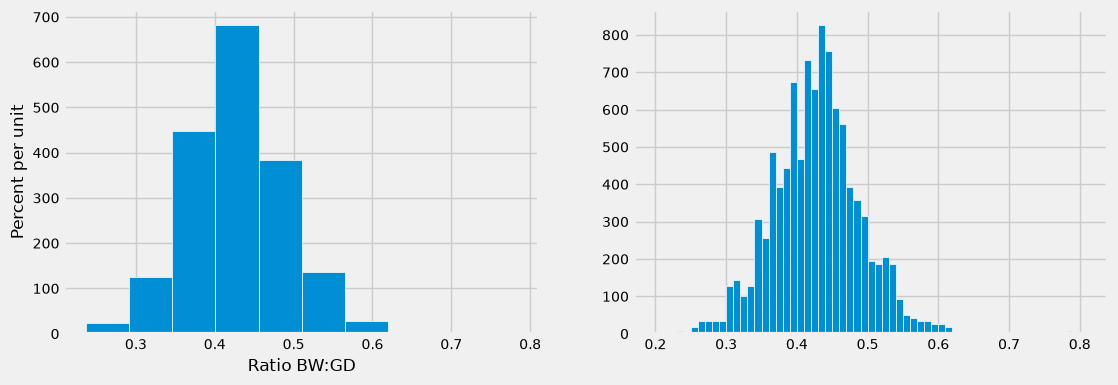
At first glance the histogram looks quite symmetric, with the density at its maximum over the interval 0.4 ounces per day to 0.45 ounces per day. But a closer look reveals that some of the ratios were quite large by comparison. The maximum value of the ratios was just over 0.78 ounces per day, almost double the typical value.
ratios_1 = ratios.sort_values(by=['Ratio BW:GD'], ascending=False)

ratios_1.iloc[[0]]
| Birth Weight | Gestational Days | Ratio BW:GD | |
|---|---|---|---|
| 238 | 116 | 148 | 0.783784 |
The median gives a sense of the typical ratio because it is unaffected by the very large or very small ratios. The median ratio in the sample is about 0.429 ounces per day.
np.median(ratios['Ratio BW:GD']).item()
0.42907801418439717
But what was the median in the population? We don’t know, so we will estimate it.
Our method will be exactly the same as in the previous section. We will bootstrap the sample 5,000 times resulting in 5,000 estimates of the median. Our 95% confidence interval will be the “middle 95%” of all of our estimates.
11.3.1.1. Constructing a Bootstrap Confidence Interval#
Define one_bootstrap_median to draw as many rows as the original sample, with replacement, and return one ordinary median. Resampling paired rows preserves the relationship between each birth’s weight and gestational days.
def one_bootstrap_median():
    resample = ratios.sample(len(ratios), replace=True)
    return np.median(resample['Ratio BW:GD']).item()
Run the cell below to get one resampled median. Each repetition gives a statistic, not a new observation from the population.
one_bootstrap_median()
0.4338054000218624
Now we can use a for loop to generate 5000 bootstrapped medians.
# Seed once so the example is reproducible; do not reset inside the loop.
np.random.seed(42)
### generate medians from 5000 bootstrap samples

num_repetitions = 5000
bstrap_medians = np.array([])
for i in np.arange(num_repetitions):
    bstrap_medians = np.append(bstrap_medians, one_bootstrap_median())
### get the endpoints of the 95% confidence interval

left = np.percentile(bstrap_medians, 2.5, method='nearest')
right = np.percentile(bstrap_medians, 97.5, method='nearest')

np.array([left, right])
array([0.42569024, 0.43267569])
The endpoints are about 0.425 and 0.433 ounces per day. This interval estimates the population median ratio, not the range containing 95% of individual births. Keep full precision for calculations; round only the displayed interpretation.
The ordinary sample median is about 0.429. A percentile interval need not be symmetric around that estimate, so do not assume a single plus-or-minus margin of error describes both sides.
The histogram below shows 5,000 bootstrap medians. The yellow segment marks the central 95% interval.
resampled_medians = pd.DataFrame({
    'Bootstrap Sample Median': bstrap_medians
})

### use pandas df.hist will give you the same thing, less the details ###
# resampled_medians['Bootstrap Sample Median'].hist(bins=15, ec='white', figsize=(5, 4), density=True)
# plt.plot([left, right], [0,0], color='yellow', lw=8)

fig, ax = plt.subplots(figsize = (5, 4))
ax.hist(resampled_medians, bins=15, density=True, ec='white')
plt.plot([left, right], [0,0], color='yellow', lw=8)

plt.xticks(rotation=90, fontsize=10)
plt.yticks(fontsize=10)
ax.yaxis.set_major_formatter(plt.FuncFormatter(lambda x, _: '{:g}'.format(x * 100)))
plt.xlabel('Bootstrap median ratio (ounces/day)', fontsize=12)
plt.ylabel('Percent per unit', fontsize=12)
Text(0, 0.5, 'Percent per unit')
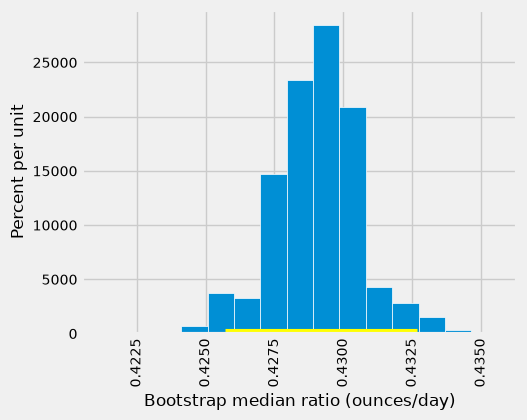
Unlike the salary demonstration, this plot has no line marking the population parameter: we do not know it. We cannot check whether this particular interval contains it. The confidence level refers to the intended coverage of the method across fresh original samples.
This is an approximate interval. More bootstrap repetitions reduce simulation noise in its endpoints; they cannot repair an unrepresentative original sample or an inappropriate sampling model.
### Exercise: Choose the tails
# A central 90% interval leaves what percentage in each tail?
# Compute its lower and upper percentile levels and print them.
### Your code starts here.

### Your code ends here.
5.0 95.0
11.3.2. Estimating a Population Mean#
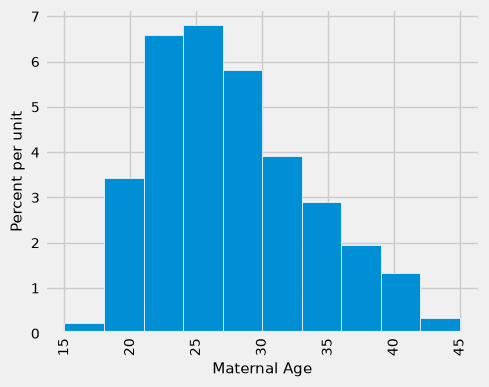
What we have done for medians can also be applied to averages. Suppose we want to estimate the average age of the mothers in the population. A natural estimate is the average age of the mothers in the sample. Here is the distribution of their ages, along with their average age, which was approximately 27.2 years.
fig, ax = plt.subplots(figsize = (5, 4))

ax.hist(births['Maternal Age'], density=True, ec='white')

plt.xticks(rotation=90, fontsize=10)
plt.yticks(fontsize=10)
ax.yaxis.set_major_formatter(plt.FuncFormatter(lambda x, _: '{:g}'.format(x * 100)))
ax.set_ylabel('Percent per unit', fontsize=11)
ax.set_xlabel('Maternal Age', fontsize=11)
Text(0.5, 0, 'Maternal Age')
np.average(births['Maternal Age']).item()
27.228279386712096
What was the average age of the mothers in the population? We don’t know the value of this parameter.
Let’s estimate the unknown parameter by the bootstrap method. To do this, we will adapt the code for one_bootstrap_median to instead define the function one_bootstrap_mean. The code is the same except that the statistics are means (that is, averages) instead of medians, and are collected in an array called bstrap_means instead of bstrap_medians.
def one_bootstrap_mean():
    resample = births.sample(len(births), replace=True)
    return np.average(resample['Maternal Age'])
# Seed once so the example is reproducible; do not reset inside the loop.
np.random.seed(42)
### generate means from 5000 bootstrap samples

num_repetitions = 5000
bstrap_means = np.array([])
for i in np.arange(num_repetitions):
    bstrap_means = np.append(bstrap_means, one_bootstrap_mean())
### get the endpoints of the 95% confidence interval

left = np.percentile(bstrap_means, 2.5, method='nearest')
right = np.percentile(bstrap_means, 97.5, method='nearest')

np.array([left, right])
array([26.90204429, 27.56218058])
The 95% confidence interval spans approximately 26.9 to 27.6 years. That is, we estimate that the average age of mothers in the population is somewhere in the interval of 26.9 to 27.6 years.
Notice how close the two ends are to the average of about 27.2 years in the original sample. The sample size is very large – 1,174 mothers – and so the sample averages don’t vary much. In general, the larger the sample, the less its average varies from one sample to the next.
The empirical histogram of the 5,000 bootstrapped mean ages is shown below, along with the 95% confidence interval for the population mean age.
resampled_means = pd.DataFrame({
    'Bootstrap Sample Mean': bstrap_means
})

fig, ax = plt.subplots(figsize = (5, 3))
ax.hist(resampled_means['Bootstrap Sample Mean'], bins=15, density=True, ec='white')
ax.plot(np.array([left, right]), np.array([0,0]), color='yellow', lw=8, zorder=10)

plt.xticks(rotation=45, fontsize=10)
plt.yticks(fontsize=10)
ax.yaxis.set_major_formatter(plt.FuncFormatter(lambda x, _: '{:g}'.format(x * 100)))
ax.set_ylabel('Percent per unit', fontsize=12)
ax.set_xlabel('Bootstrap mean age (years)', fontsize=12)
Text(0.5, 0, 'Bootstrap mean age (years)')
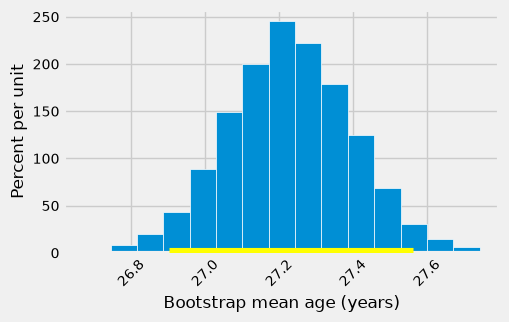
Once again, the average of the original sample (27.23 years) is close to the center of the interval. That’s not very surprising, because each bootstrapped sample is drawn from that same original sample. The averages of the bootstrapped samples are about symmetrically distributed on either side of the average of the sample from which they were drawn.
Notice also that the empirical histogram of the resampled means has roughly a symmetric bell shape, even though the histogram of the sampled ages was not symmetric at all as seen below:
fig, ax = plt.subplots(figsize = (5, 4))

ax.hist(births['Maternal Age'], bins=15, density=True, ec='white')

plt.xticks(rotation=45, fontsize=10)
plt.yticks(fontsize=10)
ax.yaxis.set_major_formatter(plt.FuncFormatter(lambda x, _: '{:g}'.format(x * 100)))
ax.set_ylabel('Percent per unit', fontsize=12)
ax.set_xlabel('Maternal Age', fontsize=12)
Text(0.5, 0, 'Maternal Age')
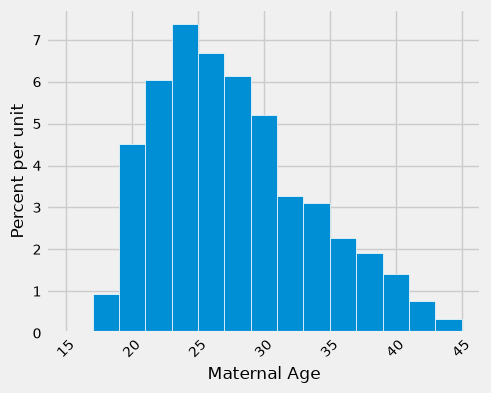
The Central Limit Theorem (CLT) helps explain this pattern: for independent observations from a population with finite variance, the sampling distribution of the mean becomes approximately normal as sample size n grows. Strong skew or unusual values can require a much larger sample; n = 30 is not a universal guarantee. The bootstrap histogram here approximates variation in the sample mean, while the age histogram describes variation among individuals.
11.3.3. An 80% Confidence Interval#
You can use the bootstrapped sample means to construct an interval of any level of confidence. For example, to construct an 80% confidence interval for the mean age in the population, you would take the “middle 80%” of the resampled means. So you would want 10% of the distribution in each of the two tails, and hence the endpoints would be the 10th and 90th percentiles of the resampled means.
left_80 = np.percentile(bstrap_means, 10, method='nearest')
right_80 = np.percentile(bstrap_means, 90, method='nearest')
np.array([left_80, right_80])
array([27.01277683, 27.44207836])
# resampled_means.hist(bins=15)
# plt.plot([left_80, right_80], [0, 0], color='yellow', lw=8);

fig, ax = plt.subplots(figsize = (5, 3))
ax.hist(resampled_means, bins=15, density=True, ec='white')
ax.plot(np.array([left_80, right_80]), np.array([0,0]), color='yellow', lw=8, zorder=10)

plt.xticks(rotation=45, fontsize=10)
plt.yticks(fontsize=10)
ax.yaxis.set_major_formatter(plt.FuncFormatter(lambda x, _: '{:g}'.format(x * 100)))
ax.set_ylabel('Percent per unit', fontsize=12)
ax.set_xlabel('Bootstrap mean age (years)', fontsize=12)
Text(0.5, 0, 'Bootstrap mean age (years)')
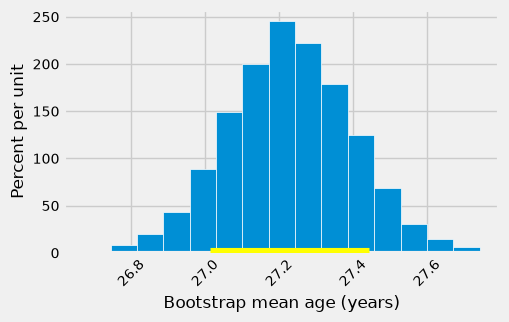
The 80% interval is shorter here, about 27.0 to 27.4 years. It trades coverage for precision: the procedure aims to capture the parameter about 80% of the time under suitable conditions. From the same bootstrap distribution, an 80% central interval cannot be wider than its 95% central interval; ties can make their widths equal.
To seek a narrower interval at the same confidence level, collect a larger representative original sample. Increasing n adds information. Increasing the number of bootstrap repetitions B stabilizes the simulation but does not add people to the original sample.
### Exercise: More data or more resamples?
# An analyst has 100 customer responses and 2,000 bootstrap statistics.
# Compare the n and B for collecting 300 more responses versus generating
# 3,000 more bootstrap statistics. Which action adds population information?
### Your code starts here.

### Your code ends here.
Collect responses: n = 400 B = 2000
More resamples: n = 100 B = 5000
11.3.4. Estimating a Population Proportion#
In the sample, 39% of the mothers smoked during pregnancy.
len(births[births['Maternal Smoker'] == True]) / len(births)
0.3909710391822828
Remember that a proportion is an average of zeros and ones. So the proportion of mothers who smoked could also be calculated using array operations as follows.
smoking = births['Maternal Smoker']
np.count_nonzero(smoking) / len(smoking)
np.float64(0.3909710391822828)
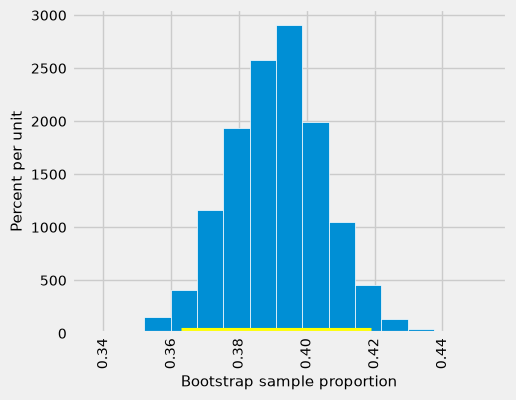
What percent of mothers in the population smoked during pregnancy? This is an unknown parameter which we can estimate by a bootstrap confidence interval. The steps are analogous to those we took to estimate the population median and mean.
We will start by defining a function one_bootstrap_proportion that bootstraps the sample and returns the proportion of smokers in the bootstrapped sample. Then we will call the function multiple times using a for loop, and get the 2.5th percentile and 97.5th percentiles of the bootstrapped proportions.
def one_bootstrap_proportion():
    resample = births.sample(len(births), replace=True)
    smoking = resample['Maternal Smoker']
    return np.count_nonzero(smoking) / len(smoking)
# Seed once so the example is reproducible; do not reset inside the loop.
np.random.seed(42)
### generate proportions from 5000 bootstrap samples

bstrap_proportions = np.array([])
num_repetitions = 5000
for i in np.arange(num_repetitions):
    bstrap_proportions = np.append(bstrap_proportions, one_bootstrap_proportion())
### get the endpoints of the 95% confidence interval

left = np.percentile(bstrap_proportions, 2.5, method='nearest')
right = np.percentile(bstrap_proportions, 97.5, method='nearest')

np.array([left, right])
array([0.36286201, 0.41908007])
The interval is about 0.36 to 0.42, or 36% to 42%, for the population proportion in the population represented by the sample. This is an interval for a proportion, not a prediction of an individual mother’s smoking status. The interval width is about 0.06, or 6 percentage points.
resampled_proportions = pd.DataFrame({
    'Bootstrap Sample Proportion': bstrap_proportions
})

# resampled_proportions.hist(bins=15)

fig, ax = plt.subplots(figsize = (5, 4))
ax.hist(resampled_proportions, bins=15, density=True, ec='white')
ax.plot([left, right], [0, 0], color='yellow', lw=8)

plt.xticks(rotation=90, fontsize=10)
plt.yticks(fontsize=10)
ax.yaxis.set_major_formatter(plt.FuncFormatter(lambda x, _: '{:g}'.format(x * 100)))
ax.set_ylabel('Percent per unit', fontsize=11)
ax.set_xlabel('Bootstrap sample proportion', fontsize=11)
Text(0.5, 0, 'Bootstrap sample proportion')
11.3.5. Care in Using the Bootstrap Percentile Method#
Before using an interval to support a management decision, check the data and the process that generated it.
Define the population and statistic. A median, a mean, and a proportion answer different questions. Explain the units and time period of the target population.
Check the original sample. A large convenience sample can still be biased. Resampling cannot recover customers, employees, or transactions systematically missing from the data.
Respect dependence. This chapter resamples independent rows. Repeated purchases by one customer, branches sampled in clusters, and time-series records may need a different resampling design.
Separate n from B. A few thousand resamples often give useful teaching approximations. Check endpoint stability with more repetitions for a consequential analysis. Repeating the bootstrap does not increase the original sample size or guarantee the stated coverage.
Watch difficult statistics. A resample cannot exceed the observed maximum or fall below the observed minimum, so this simple method is unreliable for population extremes. Very small samples, strong bias, highly discrete statistics, or skewed sampling distributions can also give poor percentile coverage. A bell-shaped histogram alone does not prove validity.
Interpret a threshold cautiously. If a proposed value lies inside an interval, the data do not rule it out by this procedure; that does not prove the value or show a supplier meets a business requirement. Report the interval alongside the requirement and the consequences of a wrong decision.
11.3.6. Section Practice#
Use this short exercise to check the main workflow from this section.
### Exercise: Practice Confidence Intervals
# A store's random sample of 20 order values (in dollars) is below. A manager claims
# the average order value of all orders is $60.
#   1. Build 2,000 bootstrap means (resample with replacement, random_state=i).
#   2. Compute the 95% confidence interval with np.percentile(..., method='nearest').
#   3. Is $60 inside the interval? Print the interval and the answer.
import numpy as np
import pandas as pd

orders = pd.Series([42, 55, 48, 61, 39, 52, 47, 58, 44, 50, 63, 41, 49, 56, 45, 53, 46, 51, 59, 43])
### Your code starts here


### Your code ends here
Sample mean: 50.1
95% CI: 47.15 to 52.95
$60 inside the interval: False