7.4.3. Homework#
Use this assignment to practice the chapter’s concepts and coding skills in runnable Python code.
Sign in from the account menu before you start working on the assignment.
Write and run your code directly in the coding cells.
Multiple submissions are allowed. The highest score is kept.
Write the interpretation responses below as Python comments in the same answer cells. They are for reflection and class discussion; the automatic score checks the existing coding tasks, not the written explanations. Keep the specified printed output and plots unchanged.
1. From Wide to Long
A sales table has the columns quarter, North, and South, with one revenue column per region. To color bars by region with hue='region', the analyst first needs to reshape the table into long format, for example with melt().
2. Hue Mapping
In sns.scatterplot(data=campaigns, x='ad_spend', y='revenue', hue='region'), the analyst must choose a color for each region before Seaborn can draw the plot.
3. Figure-Level Functions
A manager wants a Seaborn scatter plot in the right panel of fig, axes = plt.subplots(1, 2). Calling sns.relplot(data=df, x='discount', y='units', ax=axes[1]) puts the plot in that panel.
4. Reading a Box Plot
A box plot of delivery days by shipping method shows each method’s median and spread, so it can reveal that one method is faster on a typical order but less consistent than another.
5. Themes
Running sns.set_theme(style='darkgrid') before drawing a box plot changes the delivery-day values that the box plot summarizes.
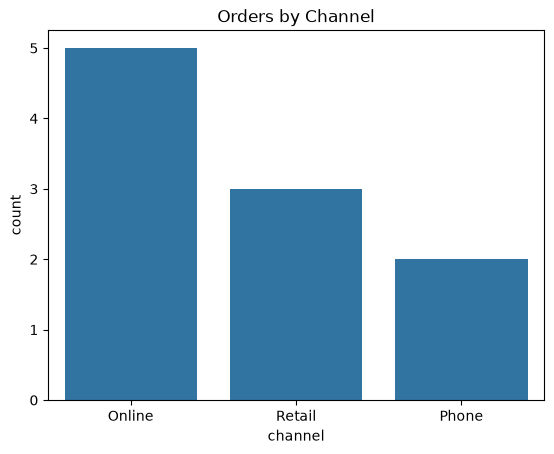
### 6. Orders by Channel
# The sales team wants to see which channel brings in the most orders.
#   1. Create a figure and axes with plt.subplots().
#   2. Use sns.countplot() to count orders by channel (x='channel').
#   3. Set the title "Orders by Channel".
# Reflection (answer in comments): Which channel has the most recorded orders? Does the chart identify the channel with the most revenue?
import matplotlib.pyplot as plt
import pandas as pd
import seaborn as sns

orders = pd.DataFrame({
    "channel": ["Online", "Retail", "Online", "Phone", "Online",
                "Retail", "Online", "Phone", "Retail", "Online"],
})

### Your code starts here.


### Your code ends here.
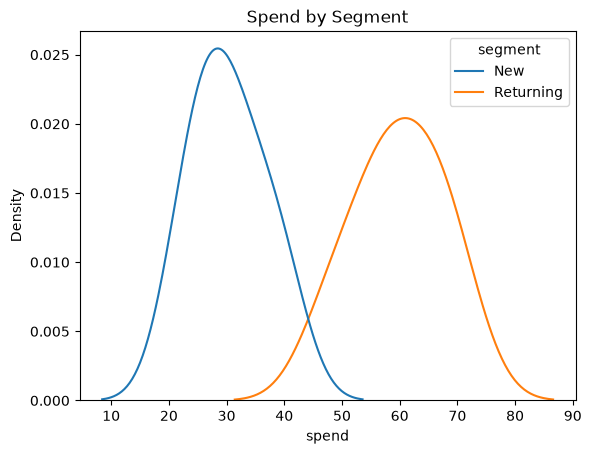
### 7. Spending by Customer Segment
# Marketing wants to compare how much new and returning customers spend.
#   1. Create a figure and axes with plt.subplots().
#   2. Use sns.kdeplot() to draw the distribution of spend from customers,
#      with one curve per segment (hue='segment').
#   3. Set the title "Spend by Segment".
# Reflection (answer in comments): Which segment tends to spend more in this sample? Why should you be cautious about the smooth curves?
import matplotlib.pyplot as plt
import pandas as pd
import seaborn as sns

customers = pd.DataFrame({
    "spend": [22, 35, 28, 40, 31, 26, 55, 62, 48, 70, 58, 66],
    "segment": ["New"] * 6 + ["Returning"] * 6,
})

### Your code starts here.


### Your code ends here.
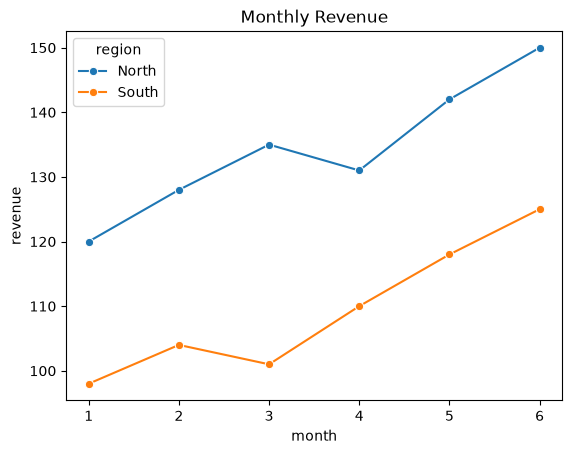
### 8. Monthly Revenue Trend
# The regional managers want to compare revenue trends over six months.
#   1. Create a figure and axes with plt.subplots().
#   2. Use sns.lineplot() to draw revenue (y) by month (x) from monthly,
#      with one line per region (hue='region') and circle markers (marker='o').
#   3. Set the title "Monthly Revenue".
# Reflection (answer in comments): Describe the two revenue trends. Can six months of observations guarantee the next month's revenue?
import matplotlib.pyplot as plt
import pandas as pd
import seaborn as sns

monthly = pd.DataFrame({
    "month": [1, 2, 3, 4, 5, 6] * 2,
    "revenue": [120, 128, 135, 131, 142, 150, 98, 104, 101, 110, 118, 125],
    "region": ["North"] * 6 + ["South"] * 6,
})

### Your code starts here.


### Your code ends here.
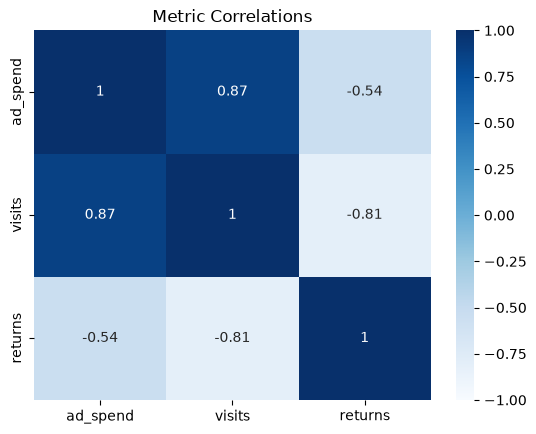
### 9. Correlation Heatmap
# An analyst wants to see which store metrics move together.
#   1. Compute the correlation matrix with metrics.corr() and store it in corr.
#   2. Create a figure and axes with plt.subplots().
#   3. Use sns.heatmap() to draw corr with the values shown in each cell
#      (annot=True), cmap='Blues', vmin=-1, and vmax=1.
#   4. Set the title "Metric Correlations".
# Reflection (answer in comments): Describe one relationship shown by the heatmap. Does it establish what would happen if ad spend were increased?
import matplotlib.pyplot as plt
import pandas as pd
import seaborn as sns

metrics = pd.DataFrame({
    "ad_spend": [5, 10, 15, 20, 25, 30],
    "visits": [210, 300, 250, 380, 330, 450],
    "returns": [12, 9, 11, 8, 10, 9],
})

### Your code starts here.


### Your code ends here.
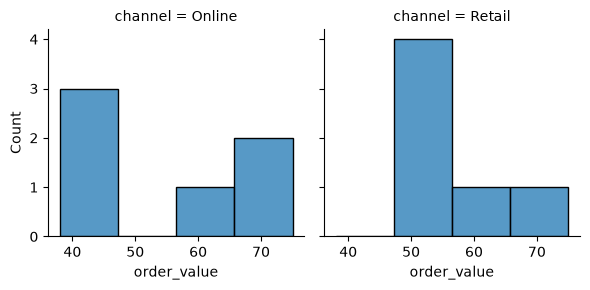
### 10. Order Values by Channel
# The store manager wants separate order-value histograms for each channel.
#   1. Use the figure-level function sns.displot() to draw histograms of
#      order_value from orders with bins=4.
#   2. Put each channel in its own column (col='channel') and use height=3.
# Reflection (answer in comments): Compare the channel distributions and explain one limitation of the sample. Then choose an alternative chart for a manager who wants to compare typical order value and variability by channel; justify your choice in comments without drawing another plot.
import matplotlib.pyplot as plt
import pandas as pd
import seaborn as sns

orders = pd.DataFrame({
    "order_value": [45, 52, 38, 61, 75, 49, 58, 66, 40, 55, 70, 48],
    "channel": ["Online", "Retail"] * 6,
})

### Your code starts here.


### Your code ends here.