
15.3. Interpreting Clusters#
This section shows how to interpret a k-means result after the model has been fit. The technical output is only the starting point. The analyst still has to choose a reasonable number of clusters, describe each cluster, and decide whether the grouping supports the business question.
We work with an online store’s customers. For each of 240 customers, the data record the amount spent in the last year (annual_spend, in dollars) and the number of orders placed (orders_per_year). Marketing wants to know whether customers fall into groups that call for different treatment.
Note
customer_segments.csv is a synthetic data set generated for this book with four built-in customer types, so we can see whether k-means finds them. Real customer data are messier, and the groups are rarely this clean.
customers = pd.read_csv(path_data + 'customer_segments.csv')
customers.head()
| customer_id | annual_spend | orders_per_year | |
|---|---|---|---|
| 0 | C001 | 1133 | 25 |
| 1 | C002 | 443 | 2 |
| 2 | C003 | 1327 | 18 |
| 3 | C004 | 731 | 28 |
| 4 | C005 | 898 | 26 |
Scale the features first. The two features are on very different scales: spend runs from about $60 to $3,400, while orders run from 1 to 35. K-means groups points by distance, so without scaling, a $100 difference in spend counts as much as a difference of 100 orders, and the clusters form almost entirely by spend. Here is k-means with 4 clusters on the raw features and on the features in standard units, both plotted in the original units:
features = ['annual_spend', 'orders_per_year']
X = customers[features]
X_scaled = (X - X.mean()) / X.std(ddof=0)      # standard units

raw_labels = KMeans(n_clusters=4, n_init=10, random_state=101).fit_predict(X)
scaled_labels = KMeans(n_clusters=4, n_init=10, random_state=101).fit_predict(X_scaled)

fig, axes = plt.subplots(1, 2, figsize=(10, 4), sharey=True)
sns.scatterplot(data=customers, x='annual_spend', y='orders_per_year', hue=raw_labels, palette='tab10', ax=axes[0])
axes[0].set_title('Raw features')
sns.scatterplot(data=customers, x='annual_spend', y='orders_per_year', hue=scaled_labels, palette='tab10', ax=axes[1])
axes[1].set_title('Standard units')
plt.show()
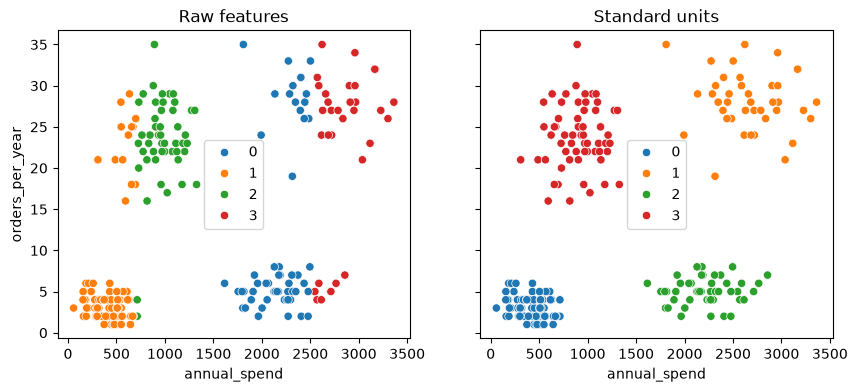
On the raw features (left), the clusters are bands of spend: customers who spend about the same land in the same cluster whether they order 3 times a year or 30. In standard units (right), both features count, and the clusters follow the customer types you can see in the plot. From here on, we cluster the scaled features.
15.3.1. Choosing k#
K-means needs the number of clusters up front. Two common heuristics are the elbow method and the silhouette score. These tools help compare choices, but they do not remove judgment. A technically neat value of k still needs a practical interpretation.
15.3.2. Elbow Check#
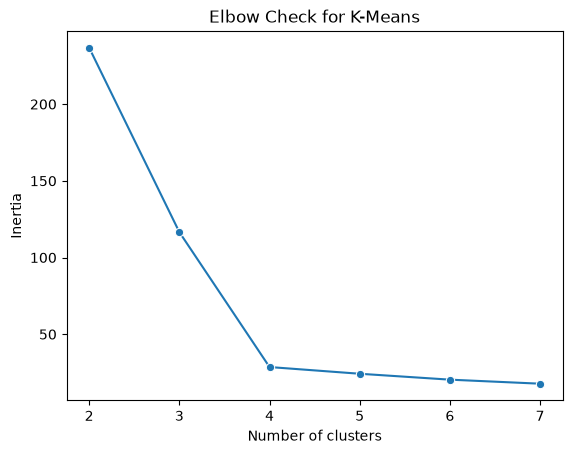
The elbow method fits k-means for several values of k and records the model’s inertia, which is the within-cluster sum of squares. Lower inertia is better, but it always improves as k increases. The useful question is where the improvement starts to flatten.
inertias = []
k_values = range(2, 8)

for k in k_values:
    model = KMeans(n_clusters=k, n_init=10, random_state=101)
    model.fit(X_scaled)
    inertias.append(model.inertia_)

elbow_df = pd.DataFrame({"k": list(k_values), "inertia": inertias})
elbow_df
| k | inertia | |
|---|---|---|
| 0 | 2 | 236.793172 |
| 1 | 3 | 116.569217 |
| 2 | 4 | 28.609085 |
| 3 | 5 | 24.227739 |
| 4 | 6 | 20.382649 |
| 5 | 7 | 17.746656 |
sns.lineplot(data=elbow_df, x="k", y="inertia", marker="o")
plt.title("Elbow Check for K-Means")
plt.xlabel("Number of clusters")
plt.ylabel("Inertia")
Text(0, 0.5, 'Inertia')
15.3.3. Silhouette Check#
The silhouette score compares how close each point is to its own cluster relative to nearby clusters. Values closer to 1 suggest tighter, better-separated clusters. Values near 0 suggest overlap, and negative values suggest points may be assigned to the wrong cluster.
silhouette_scores = []

for k in k_values:
    model = KMeans(n_clusters=k, n_init=10, random_state=101)
    labels = model.fit_predict(X_scaled)
    silhouette_scores.append(silhouette_score(X_scaled, labels))

silhouette_df = pd.DataFrame({"k": list(k_values), "silhouette": silhouette_scores})
silhouette_df
| k | silhouette | |
|---|---|---|
| 0 | 2 | 0.516182 |
| 1 | 3 | 0.644066 |
| 2 | 4 | 0.771513 |
| 3 | 5 | 0.675900 |
| 4 | 6 | 0.629143 |
| 5 | 7 | 0.548643 |
sns.lineplot(data=silhouette_df, x="k", y="silhouette", marker="o")
plt.title("Silhouette Check for K-Means")
plt.xlabel("Number of clusters")
plt.ylabel("Silhouette score")
Text(0, 0.5, 'Silhouette score')
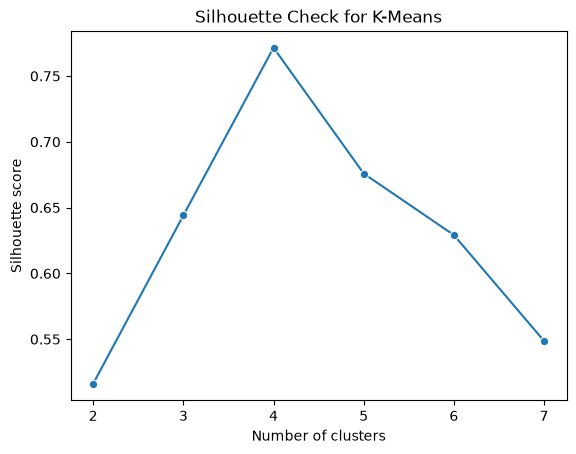
Both checks point to k = 4. Inertia drops steeply up to 4 clusters and then barely improves, and the silhouette score is highest at 4 (about 0.77). In real data, the two checks often disagree or show no clear winner, and the business question has to break the tie.
15.3.4. Describing Clusters#
After choosing k, summarize each cluster in the units that matter for the decision. We fit the model on the scaled features, but we describe the clusters in the original units, dollars and orders, because those are what a manager can act on. In a customer example, that might mean average order value, purchase frequency, tenure, and churn rate. In an operations example, it might mean processing time, defect rate, and order size.
final_model = KMeans(n_clusters=4, n_init=10, random_state=101)
customers['cluster'] = final_model.fit_predict(X_scaled)

profile = customers.groupby('cluster')[features].mean().round(0)
profile['customers'] = customers['cluster'].value_counts().sort_index()
profile
| annual_spend | orders_per_year | customers | |
|---|---|---|---|
| cluster | |||
| 0 | 410.0 | 3.0 | 90 |
| 1 | 2669.0 | 28.0 | 40 |
| 2 | 2221.0 | 5.0 | 50 |
| 3 | 902.0 | 24.0 | 60 |
15.3.5. Practical Interpretation#
Cluster labels are useful only when they support an interpretable decision. The final step is to describe the groups in business language and decide whether the segments suggest different actions.
The colors in a cluster plot are arbitrary. Cluster 0 in one model is not guaranteed to match cluster 0 in another model, even when the same data are used.
sns.scatterplot(data=customers, x='annual_spend', y='orders_per_year', hue='cluster', palette='tab10')
plt.title('Customer Segments')
plt.show()
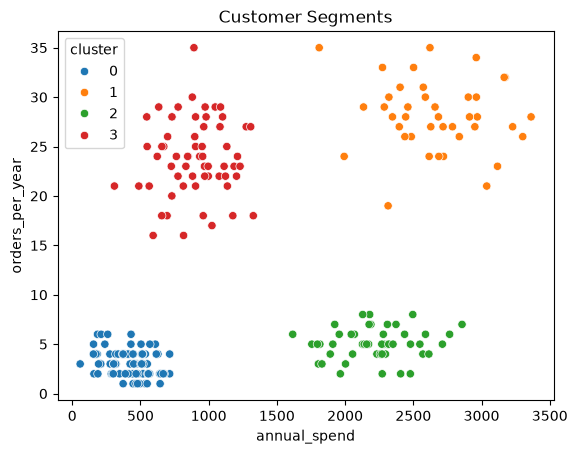
Reading the profile table, we can name each cluster and propose an action for it:
Cluster |
Profile |
Customers |
Possible action |
|---|---|---|---|
0 |
Occasional buyers: about $410 a year over 3 orders |
90 |
Low-cost reactivation emails; test a discount on a second purchase |
1 |
Loyal high-value: about $2,670 a year over 28 orders |
40 |
Retention first: loyalty perks and early access; watch for any drop in orders |
2 |
Big-ticket buyers: about $2,220 a year over 5 orders |
50 |
Follow each large purchase with accessories, service plans, and replacement reminders |
3 |
Frequent small baskets: about $900 a year over 24 orders |
60 |
Raise the basket size with bundles and a free-shipping threshold |
These actions are hypotheses, not results. Before rolling one out, test it, for example with an A/B test that compares customers who get the offer with similar customers who don’t (Chapter 10). Also check that the segments are stable: if a new month of data or a different random start reshuffles the customers, the segments are not a solid basis for a decision.
15.3.6. Practical Tips#
Scale features before clustering when units differ.
Run multiple initializations with
n_initto avoid poor local minima.Use
random_statefor reproducible examples.Treat cluster labels as arbitrary identifiers, not ranked categories.
Validate clusters with domain knowledge before using them for decisions.
15.3.7. Section Practice#
Use this short exercise to check the main workflow from this section.
### Exercise: Practice Interpreting Clusters
# K-means has assigned eight customers to clusters. Describe the clusters in business terms.
#   1. Use groupby to compute the mean annual_spend and orders_per_year of each cluster.
#   2. Find the cluster with the highest mean spend and count its customers.
# Print exactly:
# Highest-spend cluster: 2
# Mean spend: 2550.0
# Mean orders: 27.0
# Customers: 2
import pandas as pd

segments = pd.DataFrame({
    'annual_spend': [420, 380, 950, 880, 2600, 2500, 400, 910],
    'orders_per_year': [3, 2, 25, 22, 28, 26, 4, 24],
    'cluster': [0, 0, 1, 1, 2, 2, 0, 1],
})
### Your code starts here


### Your code ends here
Highest-spend cluster: 2
Mean spend: 2550.0
Mean orders: 27.0
Customers: 2