
10.1. A/B Testing#
An A/B test randomly assigns units, such as customers, to two conditions and compares an outcome. A manager might compare checkout versions using purchase rates. Comparing existing groups uses similar calculations, but the study design determines whether the result supports a causal claim.
For example, suppose 40 of 500 visitors assigned to version A purchase, compared with 50 of 500 assigned to B. The conversion rates are 8% and 10%. The observed difference, B minus A, is two percentage points. A permutation test asks whether a difference this large would be unusual under a stated model of no version effect.
Stage |
What you do |
What stays fixed |
|---|---|---|
Observe |
Compute B minus A using the real labels. |
The recorded visitors and purchases. |
Simulate |
Rearrange labels and recompute the difference. |
Outcomes and the number of labels in each group. |
Compare |
Count simulated differences at least as large as observed. |
The alternative and cutoff selected before testing. |
Interpret |
Connect the evidence to design and business consequences. |
The limits of what was measured. |
The detailed example below compares babies of mothers who smoked with babies of mothers who did not. This is an observational comparison, not a randomized A/B experiment: smoking status was not assigned. The permutation method assesses association under an exchangeable-label null model; it does not make smoking a randomized treatment.
The newborn data come from a large hospital system. For this illustration, treat the observations as a simple random sample, although the original sampling involved multiple stages. Stat Labs by Deborah Nolan and Terry Speed describes the larger source dataset.
Run the demonstration cells in order, including the setup. Each Interactive Exercise includes its own setup and can run independently.
10.1.1. Random Sampling Prelude#
We have seen several examples of assessing whether a single sample looks like random draws from a specified chance model.
Did the Alameda County jury panels look like a random sample from the population of eligible jurors?
Did the pea plants that Mendel grew have colors that were consistent with the chances he specified in his model?
In all of these cases there was just one random sample, and we were trying to decide how it had been generated. But often, data scientists have to compare two random samples with each other. For example, they might have to compare the outcomes of patients who have been assigned at random to a treatment group and a control group. Or they might have randomized internet users to receive two different versions of a website, after which they would want to compare the actions of the two random groups.
In this chapter, we develop a way of using Python to compare two random samples and answer questions about the similarities and differences between them. You will see that the methods we develop have diverse applications. Our examples are from medicine and public health as well as football!
First of all, let us review the random sampling techniques we have covered so far.
Random sampling determines who enters a sample and supports generalization when the sample represents the target population. Random assignment determines which condition a participant receives and supports causal comparison in a well-run experiment. A label shuffle creates neither new participants nor a new real-world experiment; it simulates a null model using the observations already collected.
path_data = '../../data/'

import numpy as np
import pandas as pd

import matplotlib.pyplot as plt
plt.style.use('fivethirtyeight')
10.1.1.1. Random Sampling in Python#
This section summarizes the methods for sampling at random using Python:
DataFrame.sample()(pandas)np.random.choice()(NumPy)sample_proportions()(a helper function defined below)
10.1.1.1.1. Sampling a DataFrame#
If you are sampling from a population of individuals whose data are represented in the rows of a dataframe, then you can use the Pandas method sample to randomly select rows of the table. That is, you can use sample to select a random sample of individuals.
By default, DataFrame.sample() draws uniformly at random without replacement. So, for a natural model for chance experiments, such as rolling a die, we need to set replace=True.
faces = np.arange(1, 7)
die = pd.DataFrame({
    'Face': faces})
die
| Face | |
|---|---|
| 0 | 1 |
| 1 | 2 |
| 2 | 3 |
| 3 | 4 |
| 4 | 5 |
| 5 | 6 |
Run the cell below to simulate 7 rolls of a die.
die.sample(7, replace=True) ### default replace=False
| Face | |
|---|---|
| 3 | 4 |
| 4 | 5 |
| 2 | 3 |
| 1 | 2 |
| 2 | 3 |
| 5 | 6 |
| 5 | 6 |
Sometimes it is more natural to sample individuals at random without replacement. This is called a simple random sample. The argument replace=False allows you to do this.
actors = pd.read_csv(path_data + 'actors.csv')

print(len(actors))
actors

### showing all 50 rows because it's less than 60
50
| Actor | Total Gross | Number of Movies | Average per Movie | #1 Movie | Gross | |
|---|---|---|---|---|---|---|
| 0 | Harrison Ford | 4871.7 | 41 | 118.8 | Star Wars: The Force Awakens | 936.7 |
| 1 | Samuel L. Jackson | 4772.8 | 69 | 69.2 | The Avengers | 623.4 |
| 2 | Morgan Freeman | 4468.3 | 61 | 73.3 | The Dark Knight | 534.9 |
| 3 | Tom Hanks | 4340.8 | 44 | 98.7 | Toy Story 3 | 415.0 |
| 4 | Robert Downey, Jr. | 3947.3 | 53 | 74.5 | The Avengers | 623.4 |
| 5 | Eddie Murphy | 3810.4 | 38 | 100.3 | Shrek 2 | 441.2 |
| 6 | Tom Cruise | 3587.2 | 36 | 99.6 | War of the Worlds | 234.3 |
| 7 | Johnny Depp | 3368.6 | 45 | 74.9 | Dead Man's Chest | 423.3 |
| 8 | Michael Caine | 3351.5 | 58 | 57.8 | The Dark Knight | 534.9 |
| 9 | Scarlett Johansson | 3341.2 | 37 | 90.3 | The Avengers | 623.4 |
| 10 | Gary Oldman | 3294.0 | 38 | 86.7 | The Dark Knight | 534.9 |
| 11 | Robin Williams | 3279.3 | 49 | 66.9 | Night at the Museum | 250.9 |
| 12 | Bruce Willis | 3189.4 | 60 | 53.2 | Sixth Sense | 293.5 |
| 13 | Stellan Skarsgard | 3175.0 | 43 | 73.8 | The Avengers | 623.4 |
| 14 | Anthony Daniels | 3162.9 | 7 | 451.8 | Star Wars: The Force Awakens | 936.7 |
| 15 | Ian McKellen | 3150.4 | 31 | 101.6 | Return of the King | 377.8 |
| 16 | Will Smith | 3149.1 | 24 | 131.2 | Independence Day | 306.2 |
| 17 | Stanley Tucci | 3123.9 | 50 | 62.5 | Catching Fire | 424.7 |
| 18 | Matt Damon | 3107.3 | 39 | 79.7 | The Martian | 228.4 |
| 19 | Robert DeNiro | 3081.3 | 79 | 39.0 | Meet the Fockers | 279.3 |
| 20 | Cameron Diaz | 3031.7 | 34 | 89.2 | Shrek 2 | 441.2 |
| 21 | Liam Neeson | 2942.7 | 63 | 46.7 | The Phantom Menace | 474.5 |
| 22 | Andy Serkis | 2890.6 | 23 | 125.7 | Star Wars: The Force Awakens | 936.7 |
| 23 | Don Cheadle | 2885.4 | 34 | 84.9 | Avengers: Age of Ultron | 459.0 |
| 24 | Ben Stiller | 2827.0 | 37 | 76.4 | Meet the Fockers | 279.3 |
| 25 | Helena Bonham Carter | 2822.0 | 36 | 78.4 | Harry Potter / Deathly Hallows (P2) | 381.0 |
| 26 | Orlando Bloom | 2815.8 | 17 | 165.6 | Dead Man's Chest | 423.3 |
| 27 | Woody Harrelson | 2815.8 | 50 | 56.3 | Catching Fire | 424.7 |
| 28 | Cate Blanchett | 2802.6 | 39 | 71.9 | Return of the King | 377.8 |
| 29 | Julia Roberts | 2735.3 | 42 | 65.1 | Ocean's Eleven | 183.4 |
| 30 | Elizabeth Banks | 2726.3 | 35 | 77.9 | Catching Fire | 424.7 |
| 31 | Ralph Fiennes | 2715.3 | 36 | 75.4 | Harry Potter / Deathly Hallows (P2) | 381.0 |
| 32 | Emma Watson | 2681.9 | 17 | 157.8 | Harry Potter / Deathly Hallows (P2) | 381.0 |
| 33 | Tommy Lee Jones | 2681.3 | 46 | 58.3 | Men in Black | 250.7 |
| 34 | Brad Pitt | 2680.9 | 40 | 67.0 | World War Z | 202.4 |
| 35 | Adam Sandler | 2661.0 | 32 | 83.2 | Hotel Transylvania 2 | 169.7 |
| 36 | Daniel Radcliffe | 2634.4 | 17 | 155.0 | Harry Potter / Deathly Hallows (P2) | 381.0 |
| 37 | Jonah Hill | 2605.1 | 29 | 89.8 | The LEGO Movie | 257.8 |
| 38 | Owen Wilson | 2602.3 | 39 | 66.7 | Night at the Museum | 250.9 |
| 39 | Idris Elba | 2580.6 | 26 | 99.3 | Avengers: Age of Ultron | 459.0 |
| 40 | Bradley Cooper | 2557.7 | 25 | 102.3 | American Sniper | 350.1 |
| 41 | Mark Wahlberg | 2549.8 | 36 | 70.8 | Transformers 4 | 245.4 |
| 42 | Jim Carrey | 2545.2 | 27 | 94.3 | The Grinch | 260.0 |
| 43 | Dustin Hoffman | 2522.1 | 43 | 58.7 | Meet the Fockers | 279.3 |
| 44 | Leonardo DiCaprio | 2518.3 | 25 | 100.7 | Titanic | 658.7 |
| 45 | Jeremy Renner | 2500.3 | 21 | 119.1 | The Avengers | 623.4 |
| 46 | Philip Seymour Hoffman | 2463.7 | 40 | 61.6 | Catching Fire | 424.7 |
| 47 | Sandra Bullock | 2462.6 | 35 | 70.4 | Minions | 336.0 |
| 48 | Chris Evans | 2457.8 | 23 | 106.9 | The Avengers | 623.4 |
| 49 | Anne Hathaway | 2416.5 | 25 | 96.7 | The Dark Knight Rises | 448.1 |
### simple random sample of 5 rows

actors.sample(5, replace=False)
| Actor | Total Gross | Number of Movies | Average per Movie | #1 Movie | Gross | |
|---|---|---|---|---|---|---|
| 37 | Jonah Hill | 2605.1 | 29 | 89.8 | The LEGO Movie | 257.8 |
| 41 | Mark Wahlberg | 2549.8 | 36 | 70.8 | Transformers 4 | 245.4 |
| 10 | Gary Oldman | 3294.0 | 38 | 86.7 | The Dark Knight | 534.9 |
| 46 | Philip Seymour Hoffman | 2463.7 | 40 | 61.6 | Catching Fire | 424.7 |
| 3 | Tom Hanks | 4340.8 | 44 | 98.7 | Toy Story 3 | 415.0 |
Since sample gives you the entire sample in the order in which the rows were selected, you can use Pandas methods on the sampled table to answer many questions about the sample. For example, you can find the number of times the die showed six spots, or the average number of movies in which the sampled actors appeared, or whether one specified actor appeared in the sample. You might need multiple lines of code to get some of this information.
10.1.1.1.2. Sampling an Array#
If you are sampling from a population of individuals whose data are represented as an array, you can use the NumPy function np.random.choice to randomly select elements of the array.
By default, np.random.choice samples at random with replacement.
### the faces of a die, as an array

faces
array([1, 2, 3, 4, 5, 6])
### 7 rolls of the die

np.random.choice(faces, 7)
array([5, 3, 5, 5, 1, 5, 4])
The argument replace=False allows you to get a simple random sample, that is, a sample drawn at random without replacement.
### array of actor names

actor_names = actors['Actor']
# Simple random sample of 5 actor names
np.random.choice(actor_names, 5, replace=False)
array(['Owen Wilson', 'Robert Downey, Jr.', 'Helena Bonham Carter',
       'Matt Damon', 'Jonah Hill'], dtype=object)
Just as sample did, so also np.random.choice gives you the entire sequence of sampled elements. You can use array operations to answer many questions about the sample. For example, you can find which actor was the second one to be drawn, or the number of faces of the die that appeared more than once. Some answers might need multiple lines of code.
10.1.1.1.3. Sampling a Categorical Distribution#
Sometimes we are interested in a categorical attribute of our sampled individuals. For example, we might be looking at whether a coin lands Heads or Tails; or we might be interested in the political parties of randomly selected voters.
In such cases, we frequently need the proportions of sampled voters in the different categories. If we have the entire sample, we can calculate these proportions. The function sample_proportions does that work for us. It is tailored for sampling at random with replacement from a categorical distribution and returns the proportions of sampled elements in each category.
The sample_proportions function takes two arguments:
the sample size
the distribution of the categories in the population, as a list or array of proportions that add up to 1
It returns an array containing the distribution of the categories in a random sample of the given size taken from the population. That’s an array consisting of the sample proportions in all the different categories, in the same order in which they appeared in the population distribution.
For example, suppose each plant of a species is red-flowering with a chance of 25%, pink-flowering with a chance 50%, and white-flowering with a chance 25%, regardless of the flower colors of all other plants. You can use sample_proportions to see the proportions of the different colors among 300 plants of the species.
np.random.seed(42)
def sample_proportions(sample_size, probabilities):
    """Return the proportion of random draws for each outcome in a distribution.
    This function is similar to np.random.multinomial, but returns proportions
    instead of counts.
    Args:
        ``sample_size``: The size of the sample to draw from the distribution.
        ``probabilities``: An array of probabilities that forms a distribution.
    Returns:
        An array with the same length as ``probability`` that sums to 1.
    """
    return np.random.multinomial(sample_size, probabilities) / sample_size
### Species distribution of flower colors:
### Proportions are in the order Red, Pink, White

species_proportions = [0.25, 0.5, .25]

sample_size = 300

# Distribution of sample
sample_distribution = sample_proportions(sample_size, species_proportions)
sample_distribution
array([0.24, 0.5 , 0.26])
As you expect, the proportions in the sample sum to 1.
sum(sample_distribution)
np.float64(1.0)
The categories in species_proportions are in the order Red, Pink, White. That order is preserved by sample_proportions. If you just want the proportion of pink-flowering plants in the sample, you can use item:
The exercises use rng = np.random.default_rng(seed) to create a reproducible random-number generator. The pattern rng.choice(values, size=n, replace=False) selects n different entries. In contrast, rng.permutation(values) returns every entry in a shuffled order. A fixed seed lets you reproduce the same sequence of draws; it is not part of the statistical model.
### Sample proportion of pink-flowering plants

sample_distribution.item(1)
0.5
### Exercise: Distinguish Two Random Processes
# A company selects 20 customers from its list, then assigns them to A or B.
# Use rng.choice to select 20 different customer IDs, then rng.permutation
# to shuffle ten A labels and ten B labels. Print the two group sizes.
# Explain in a comment which step selects people and which allocates conditions.
import numpy as np
rng = np.random.default_rng(5)
customer_ids = np.arange(100)
labels = np.array(['A'] * 10 + ['B'] * 10)
### Your code starts here.

### Your code ends here.
Group A: 10
Group B: 10
You can use sample_proportions and array operations to answer questions based only on the proportions of sampled individuals in the different categories. You will not be able to answer questions that require more detailed information about the sample, such as which of the sampled plants had each of the different colors.
10.1.2. Smokers and Nonsmokers#
The table births contains the following variables for 1,174 mother-baby pairs: the baby’s birth weight in ounces, the number of gestational days, the mother’s age in completed years, the mother’s height in inches, pregnancy weight in pounds, and whether or not the mother smoked during pregnancy.
births = pd.read_csv(path_data + 'baby.csv')
births
| Birth Weight | Gestational Days | Maternal Age | Maternal Height | Maternal Pregnancy Weight | Maternal Smoker | |
|---|---|---|---|---|---|---|
| 0 | 120 | 284 | 27 | 62 | 100 | False |
| 1 | 113 | 282 | 33 | 64 | 135 | False |
| 2 | 128 | 279 | 28 | 64 | 115 | True |
| 3 | 108 | 282 | 23 | 67 | 125 | True |
| 4 | 136 | 286 | 25 | 62 | 93 | False |
| ... | ... | ... | ... | ... | ... | ... |
| 1169 | 113 | 275 | 27 | 60 | 100 | False |
| 1170 | 128 | 265 | 24 | 67 | 120 | False |
| 1171 | 130 | 291 | 30 | 65 | 150 | True |
| 1172 | 125 | 281 | 21 | 65 | 110 | False |
| 1173 | 117 | 297 | 38 | 65 | 129 | False |
1174 rows × 6 columns
One of the aims of the study was to see whether maternal smoking was associated with birth weight. Let’s see what we can say about the two variables.
We’ll start by selecting just Birth Weight and Maternal Smoker. There are 715 non-smokers among the women in the sample, and 459 smokers.
# smoking_and_birthweight = births[['Maternal Smoker', 'Birth Weight']]          ### double brackets
smoking_and_birthweight = births.loc[ : , ['Maternal Smoker', 'Birth Weight']]   ### .loc by label
smoking_and_birthweight
| Maternal Smoker | Birth Weight | |
|---|---|---|
| 0 | False | 120 |
| 1 | False | 113 |
| 2 | True | 128 |
| 3 | True | 108 |
| 4 | False | 136 |
| ... | ... | ... |
| 1169 | False | 113 |
| 1170 | False | 128 |
| 1171 | True | 130 |
| 1172 | False | 125 |
| 1173 | False | 117 |
1174 rows × 2 columns
smoking_and_birthweight.dtypes
Maternal Smoker     bool
Birth Weight       int64
dtype: object
smoking_and_birthweight.info()
<class 'pandas.DataFrame'>
RangeIndex: 1174 entries, 0 to 1173
Data columns (total 2 columns):
 #   Column           Non-Null Count  Dtype
---  ------           --------------  -----
 0   Maternal Smoker  1174 non-null   bool
 1   Birth Weight     1174 non-null   int64
dtypes: bool(1), int64(1)
memory usage: 10.4 KB
# pd.DataFrame({ 'count': smoking_and_birthweight.groupby('Maternal Smoker')['Birth Weight'].count()}).reset_index()

### reset_index() is used to reset the index of the DataFrame to the default
# integer index because groupby() sets the grouping key as the index of the result.
# smoking_and_birthweight.groupby('Maternal Smoker')['Birth Weight'].count()
# pd.DataFrame({ 'count': smoking_and_birthweight.groupby('Maternal Smoker')['Birth Weight'].count()})
#
smoking_and_birthweight.groupby('Maternal Smoker').size()
# pd.DataFrame({'count': smoking_and_birthweight.groupby('Maternal Smoker').size()})
# smoking_and_birthweight.groupby('Maternal Smoker').size().to_frame('count')
Maternal Smoker
False    715
True     459
dtype: int64
Let’s look at the distribution of the birth weights of the babies of the non-smoking mothers compared to those of the smoking mothers. To generate two overlaid histograms, we split the rows into smokers and non-smokers and call ax.hist() once for each group on the same axes.
smoker = births[births['Maternal Smoker'] == True]
non_smoker = births[births['Maternal Smoker'] == False]
smoker
| Birth Weight | Gestational Days | Maternal Age | Maternal Height | Maternal Pregnancy Weight | Maternal Smoker | |
|---|---|---|---|---|---|---|
| 2 | 128 | 279 | 28 | 64 | 115 | True |
| 3 | 108 | 282 | 23 | 67 | 125 | True |
| 8 | 143 | 299 | 30 | 66 | 136 | True |
| 10 | 144 | 282 | 32 | 64 | 124 | True |
| 11 | 141 | 279 | 23 | 63 | 128 | True |
| ... | ... | ... | ... | ... | ... | ... |
| 1162 | 143 | 281 | 28 | 65 | 135 | True |
| 1163 | 113 | 287 | 29 | 70 | 145 | True |
| 1164 | 109 | 244 | 21 | 63 | 102 | True |
| 1165 | 103 | 278 | 30 | 60 | 87 | True |
| 1171 | 130 | 291 | 30 | 65 | 150 | True |
459 rows × 6 columns
fig, ax = plt.subplots(figsize=(7, 4))
bins = np.histogram_bin_edges(births['Birth Weight'], bins=12)
ax.hist(smoker['Birth Weight'], bins=bins, density=True, alpha=0.6,
        edgecolor='white', label='Smoking mothers')
ax.hist(non_smoker['Birth Weight'], bins=bins, density=True, alpha=0.6,
        edgecolor='white', label='Nonsmoking mothers')
ax.set_xlabel('Birth Weight (Ounces)')
ax.set_ylabel('Probability Density')
ax.legend()
<matplotlib.legend.Legend at 0x7f5feb721010>
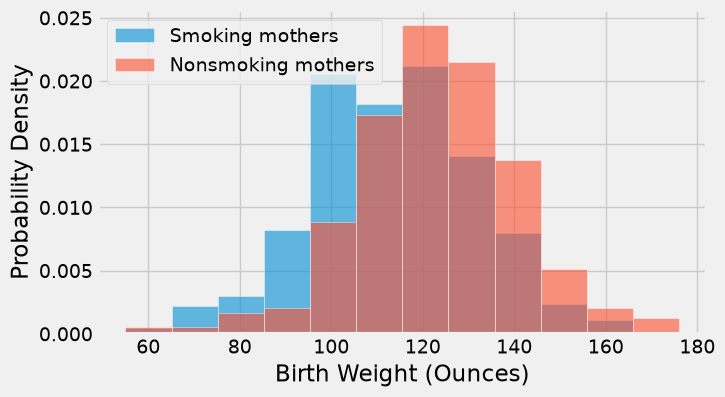
The distribution of the weights of the babies born to mothers who smoked appears to be based slightly to the left of the distribution corresponding to non-smoking mothers. The weights of the babies of the mothers who smoked seem lower on average than the weights of the babies of the non-smokers.
This raises the question of whether the difference reflects just chance variation or a difference in the distributions in the larger population. Could it be that there is no difference between the two distributions in the population, but we are seeing a difference in the samples just because of the mothers who happened to be selected?
10.1.3. The Hypotheses#
We can try to answer this question by a test of hypotheses. The chance model that we will test says that there is no underlying difference in the populations; the distributions in the samples are different just due to chance.
Formally, this is the null hypothesis. We are going to have to figure out how to simulate a useful statistic under this hypothesis. But as a start, let’s just state the two natural hypotheses.
Null hypothesis: In the population, the distribution of birth weights of babies is the same for mothers who don’t smoke as for mothers who do. The difference in the sample is due to chance.
Alternative hypothesis: In the population, the babies of the mothers who smoke have a lower birth weight, on average, than the babies of the non-smokers.
10.1.4. Test Statistic#
The alternative hypothesis compares the average birth weights of the two groups and says that the average for the mothers who smoke is smaller. Therefore it is reasonable for us to use the difference between the two group means as our statistic.
We will do the subtraction in the order “average weight of the smoking group \(-\) average weight of the non-smoking group”. Small values (that is, large negative values) of this statistic will favor the alternative hypothesis.
The observed value of the test statistic is about \(-9.27\) ounces.
means_table = smoking_and_birthweight.groupby('Maternal Smoker').mean()
means_table
| Birth Weight | |
|---|---|
| Maternal Smoker | |
| False | 123.085315 |
| True | 113.819172 |
means = means_table.iloc[:,0]
# means
observed_difference = means.iloc[1] - means.iloc[0]
observed_difference
np.float64(-9.266142572024918)
We are going compute such differences repeatedly in our simulations below, so we will define a function to do the job. The function takes three arguments:
the name of the table of data
the label of the column that contains the numerical variable whose average is of interest
the label of the column that contains the Boolean variable for grouping
It returns the difference between the means of the True group and the False group.
def difference_of_means(table, label, group_label):
    """Return the True-group mean minus the False-group mean."""
    means = table.groupby(group_label)[label].mean()
    return means.loc[True] - means.loc[False]
To check that the function is working, let’s use it to calculate the observed difference between the mean birth weights of the two groups in the sample.
difference_of_means(births, 'Birth Weight', 'Maternal Smoker')
np.float64(-9.266142572024918)
That’s the same as the value of observed_difference calculated earlier.
10.1.5. Predicting the Statistic Under the Null Hypothesis#
To see how the statistic should vary under the null hypothesis, we have to figure out how to simulate the statistic under that hypothesis. A clever method based on random permutations does just that.
If there were no difference between the two distributions in the underlying population, then whether a birth weight has the label True or False with respect to maternal smoking should make no difference to the average. The idea, then, is to shuffle all the labels randomly among the mothers. This is called random permutation.
Shuffling ensures that the count of True labels does not change, and nor does the count of False labels. This is important for the comparability of the simulated differences of means and the original difference of means. We will see later in the course that the sample size affects the variability of a sample mean.
Take the difference of the two new group means: the mean weight of the babies whose mothers have been randomly labeled smokers and the mean weight of the babies of the remaining mothers who have all been randomly labeled non-smokers. This is a simulated value of the test statistic under the null hypothesis.
Let’s see how to do this. It’s always a good idea to start with the data. We have reduced the table to have just the columns that we need.
This shuffle requires exchangeability under the null: under that model, labels can be rearranged without changing the joint distribution of the outcomes. For the observational smoking comparison, this is a modeling assumption, not a consequence of random assignment. Equal means alone do not guarantee exchangeable labels if other distributional features differ.
The pattern table[group_label].sample(frac=1, replace=False).to_numpy() rearranges every label exactly once. Converting to an array matters: assigning a shuffled pandas Series directly can align it back to the original row indices and undo the shuffle. Keep the outcome column fixed and attach the reordered labels by position.
smoking_and_birthweight
| Maternal Smoker | Birth Weight | |
|---|---|---|
| 0 | False | 120 |
| 1 | False | 113 |
| 2 | True | 128 |
| 3 | True | 108 |
| 4 | False | 136 |
| ... | ... | ... |
| 1169 | False | 113 |
| 1170 | False | 128 |
| 1171 | True | 130 |
| 1172 | False | 125 |
| 1173 | False | 117 |
1174 rows × 2 columns
There are 1,174 rows in the table. To shuffle all the labels, we will draw a random sample of 1,174 rows without replacement. Then the sample will include all the rows of the table, in random order.
We can use the pandas method sample with replace=False. We pass the len() of the DataFrame as the sample size so that sample draws all rows in the table.
smoking_and_birthweight2 = smoking_and_birthweight.copy()       ### to avoid modifying the original table
shuffled_labels = smoking_and_birthweight2.sample(len(smoking_and_birthweight2), replace = False)   # shuffle the rows of the table, which also shuffles the labels
shuffled_labels = np.array(shuffled_labels['Maternal Smoker'])  ### extract the shuffled labels as a numpy array
smoking_and_birthweight2['Shuffled Label'] = shuffled_labels    ### add the shuffled labels as a new column to the table
original_and_shuffled = smoking_and_birthweight2                ### the table with both original and shuffled labels
### Exercise: Preserve the Outcomes
# Shuffle the labels without changing the revenue values. Add the shuffled
# labels as a new column, then print the group sizes under the new labels.
import numpy as np
import pandas as pd
rng = np.random.default_rng(3)
sales = pd.DataFrame({'group': ['A', 'A', 'B', 'B'], 'revenue': [8, 12, 10, 14]})
### Your code starts here.

### Your code ends here.
shuffled
A    2
B    2
dtype: int64
original_and_shuffled
| Maternal Smoker | Birth Weight | Shuffled Label | |
|---|---|---|---|
| 0 | False | 120 | True |
| 1 | False | 113 | True |
| 2 | True | 128 | False |
| 3 | True | 108 | False |
| 4 | False | 136 | True |
| ... | ... | ... | ... |
| 1169 | False | 113 | True |
| 1170 | False | 128 | True |
| 1171 | True | 130 | True |
| 1172 | False | 125 | False |
| 1173 | False | 117 | False |
1174 rows × 3 columns
Each baby’s mother now has a random smoker/non-smoker label in the column Shuffled Label, while her original label is in Maternal Smoker. If the null hypothesis is true, all the random re-arrangements of the labels should be equally likely.
Let’s see how different the average weights are in the two randomly labeled groups.
shuffled_only = original_and_shuffled[['Birth Weight', 'Shuffled Label']]
shuffled_group_means = shuffled_only.groupby('Shuffled Label').mean()
shuffled_group_means.reset_index()
| Shuffled Label | Birth Weight | |
|---|---|---|
| 0 | False | 119.725874 |
| 1 | True | 119.052288 |
The averages of the two randomly selected groups are quite a bit closer than the averages of the two original groups. We can use our function difference_of_means to find the two differences.
difference_of_means(original_and_shuffled, 'Birth Weight', 'Shuffled Label')
np.float64(-0.6735865441747819)
difference_of_means(original_and_shuffled, 'Birth Weight', 'Maternal Smoker')
np.float64(-9.266142572024918)
But could a different shuffle have resulted in a larger difference between the group averages? To get a sense of the variability, we must simulate the difference many times.
As always, we will start by defining a function that simulates one value of the test statistic under the null hypothesis. This is just a matter of collecting the code that we wrote above. But because we will later want to use the same process for comparing means of other variables, we will define a function that takes three arguments:
the name of the table of data
the label of the column that contains the numerical variable
the label of the column that contains the Boolean variable for grouping
It returns the difference between the means of two groups formed by randomly shuffling all the labels.
def one_simulated_difference(table, label, group_label):
    table_shuffled = table.copy()
    shuffled_labels = table[group_label].sample(frac=1, replace=False).to_numpy()
    table_shuffled['Shuffled Label'] = shuffled_labels
    return difference_of_means(table_shuffled, label, 'Shuffled Label')
Run the cell below a few times to see how the output changes.
one_simulated_difference(births, 'Birth Weight', 'Maternal Smoker')
np.float64(1.100729771318015)
10.1.6. Permutation Test#
Tests based on random permutations of the data are called permutation tests. We are performing one in this example. In the cell below, we will simulate our test statistic – the difference between the average birth weight of the two randomly formed groups – many times and collect the differences in an array.
np.random.seed(42)
differences = np.array([])

repetitions = 5000
for i in np.arange(repetitions):
    new_difference = one_simulated_difference(births, 'Birth Weight', 'Maternal Smoker')
    differences = np.append(differences, new_difference)

differences
array([-0.92399409, -1.34610966,  1.2724378 , ...,  0.1348721 ,
        0.10625409,  1.16512028], shape=(5000,))
The array differences contains 5,000 simulated values of our test statistic: the difference between the mean weight in the smoking group and the mean weight in the non-smoking group, when the labels have been assigned at random.
10.1.7. Conclusion of the Test#
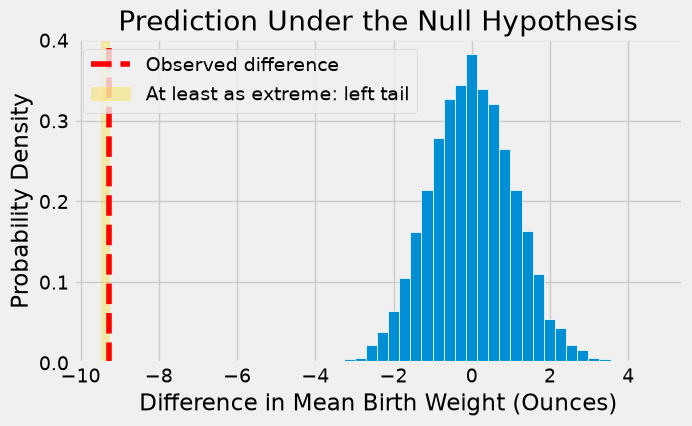
The histogram below shows the distribution of these 5,000 values. It is the empirical distribution of the test statistic simulated under the null hypothesis. This is a prediction about the test statistic, based on the null hypothesis.
fig, ax = plt.subplots(figsize=(7, 4))
ax.hist(differences, bins=30, density=True, edgecolor='white')
ax.axvline(observed_difference, color='red', linestyle='--', label='Observed difference')
ax.axvspan(min(observed_difference, differences.min()) - 0.2, observed_difference,
           color='gold', alpha=0.3, label='At least as extreme: left tail')
ax.set_title('Prediction Under the Null Hypothesis')
ax.set_xlabel('Difference in Mean Birth Weight (Ounces)')
ax.set_ylabel('Probability Density')
ax.legend()
<matplotlib.legend.Legend at 0x7f5fe935c2d0>
10.1.7.1. The p-Value#
Notice how the distribution is centered roughly around 0. This makes sense, because under the null hypothesis the two groups should have roughly the same average. Therefore the difference between the group averages should be around 0.
The observed difference in the original sample is about \(-9.27\) ounces, marked by the red dashed line in the shaded left-tail region. The observed value of the statistic and the predicted behavior of the statistic under the null hypothesis are inconsistent.
The conclusion of the test is that the data favor the alternative over the null. It supports the hypothesis that the average birth weight of babies born to mothers who smoke is less than the average birth weight of babies born to non-smokers.
If you want to compute an empirical p-value, remember that low values of the statistic favor the alternative hypothesis.
empirical_p = np.count_nonzero(differences <= observed_difference) / repetitions
empirical_p
np.float64(0.0)
### Exercise: Choose the Tail
# The statistic is mean B minus mean A. The alternative says B is lower.
# Compute the simulated tail fraction, including results equal to observed.
import numpy as np
observed = -2.0
simulated = np.array([-3.0, -2.0, -1.0, 0.0, 2.0, 3.0])
### Your code starts here.

### Your code ends here.
Left-tail fraction: 0.3333333333333333
None of these 5,000 permutations reached the observed difference or a lower value, so the simulated tail fraction is zero. A finite simulation can miss rare outcomes; it does not establish a zero probability or an exact upper bound of 1/5,000. Report the number of extreme results and repetitions, and use more repetitions or exact methods when finer precision is needed.
These data provide strong evidence against the stated equal-distribution model. They support an association between smoking status and birth weight in the population represented by the sample. The test alone cannot identify the causal effect of smoking.
10.1.8. Another Permutation Test#
We can use the same method to compare other attributes of the smokers and the non-smokers, such as their ages. Histograms of the ages of the two groups show that in the sample, the mothers who smoked tended to be younger.
fig, ax = plt.subplots(figsize=(7, 4))
bins = np.histogram_bin_edges(births['Maternal Age'], bins=12)
ax.hist(smoker['Maternal Age'], bins=bins, density=True, alpha=0.6,
        edgecolor='white', label='Smoking mothers')
ax.hist(non_smoker['Maternal Age'], bins=bins, density=True, alpha=0.6,
        edgecolor='white', label='Nonsmoking mothers')
ax.set_xlabel('Maternal Age (Years)')
ax.set_ylabel('Probability Density')
ax.legend()
<matplotlib.legend.Legend at 0x7f5fe93e9d10>
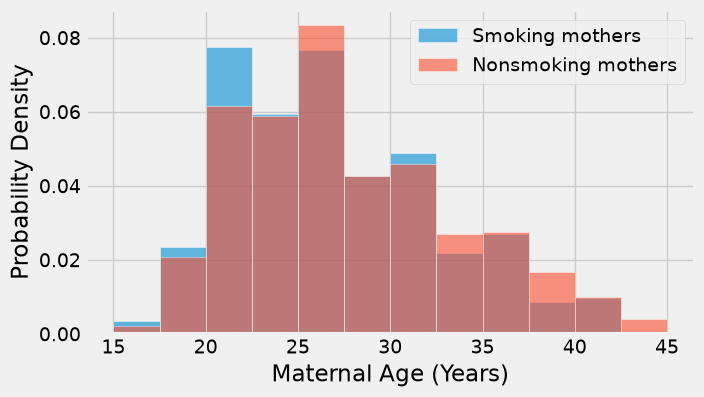
The observed difference between the average ages is about \(-0.8\) years.
observed_age_difference = difference_of_means(births, 'Maternal Age', 'Maternal Smoker')
observed_age_difference
np.float64(-0.8076725017901509)
Remember that the difference is calculated as the mean age of the smokers minus the mean age of the non-smokers. The negative sign shows that the smokers are younger on average.
Is this difference due to chance, or does it reflect an underlying difference in the population?
As before, we can use a permutation test to answer this question. If the underlying distributions of ages in the two groups are the same, then the empirical distribution of the difference based on permuted samples will predict how the statistic should vary due to chance.
np.random.seed(43)
age_differences = np.array([])

repetitions = 5000
for i in np.arange(repetitions):
    new_difference = one_simulated_difference(births, 'Maternal Age', 'Maternal Smoker')
    age_differences = np.append(age_differences, new_difference)
The observed difference is in the tail of the empirical distribution of the differences simulated under the null hypothesis.
fig, ax = plt.subplots(figsize=(7, 4))
ax.hist(age_differences, bins=30, density=True, edgecolor='white')
ax.axvline(observed_age_difference, color='red', linestyle='--', label='Observed difference')
ax.axvspan(min(observed_age_difference, age_differences.min()) - 0.2, observed_age_difference,
           color='gold', alpha=0.3, label='At least as extreme: left tail')
ax.set_title('Prediction Under the Null Hypothesis')
ax.set_xlabel('Difference in Mean Age (Years)')
ax.set_ylabel('Probability Density')
ax.legend()
<matplotlib.legend.Legend at 0x7f5fe928f250>
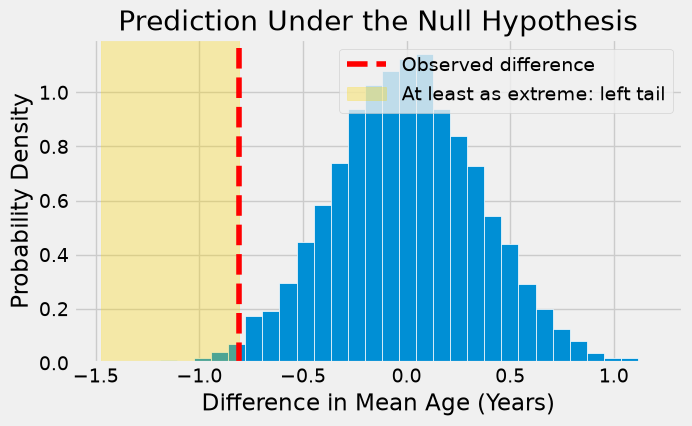
Once again, the empirical distribution of the simulated differences is centered roughly around 0, because the simulation is under the null hypothesis that there is no difference between the distributions of the two groups.
The empirical p-value of the test is the proportion of simulated differences that were equal to or less than the observed difference. This is because low values of the difference favor the alternative hypothesis that the smokers were younger on average.
Choose the direction before examining the test result. For the statistic “smokers minus nonsmokers,” a younger-smokers alternative uses the left tail. For an alternative allowing either age direction, compare absolute differences instead. Do not choose whichever tail makes the observed result appear most significant.
empirical_P = np.count_nonzero(age_differences <= observed_age_difference) / len(age_differences)
empirical_P
np.float64(0.0096)
The empirical p-value is around 1% and therefore the result is statistically significant. The test supports the hypothesis that the smokers were younger on average.
Relative and absolute effects: In the checkout example, 10% minus 8% is an increase of two percentage points. The relative lift is (0.10 - 0.08) / 0.08 * 100 = 25%. These describe the same estimated change on different scales. Relative lift requires a nonzero baseline.
For 10,000 monthly visits, that estimated change corresponds to 200 extra purchases. At \(5 contribution per purchase, the estimated gain is \)1,000 before implementation and operating costs. A p-value does not measure this gain or its uncertainty. Report the estimated effect, an interval when available, and relevant costs alongside the evidence.
10.1.9. Section Practice#
Use this short exercise to check the main workflow from this section.
### Exercise: Practice A/B Testing
# An online store showed two checkout pages, A and B, at random.
#   1. Compute the observed difference in mean order value: B minus A.
#   2. Shuffle the version labels 5,000 times (rng.permutation) and compute the
#      difference each time.
#   3. Compute the p-value: the proportion of shuffled differences at least as large
#      as the observed difference. Print the observed difference and the p-value.
import numpy as np
import pandas as pd

rng = np.random.default_rng(1)
orders = pd.DataFrame({
    'version': ['A', 'B'] * 8,
    'value': [42, 47, 38, 52, 45, 49, 40, 46, 44, 53, 41, 48, 39, 50, 43, 51],
})
### Your code starts here


### Your code ends here
Observed difference: 8.0
P-value: 0.0002