7.1. Seaborn Foundations#
Recommended classroom practice
Use the exercises below as the core practice path for this section. Additional practice reinforces the same skills; optional extensions explore more advanced tools. These labels guide your study and classroom work. Follow your instructor’s directions and the separate Lab and Homework instructions for assigned work.
Histogram of Tips.
Map Day to Color.
Reshape Regional Sales.
7.1.1. Overview#
Seaborn is a high-level visualization library built on top of Matplotlib. It gives you cleaner defaults and concise plotting functions for statistical graphics, while still letting you use Matplotlib for fine-grained control.
In this notebook, we will use the following learning path:
A first look at Seaborn plots
Compare Seaborn with pandas and Matplotlib
The Seaborn data model: semantic mappings (
hue,style,size) and tidy, wide, and nested dataFigure-level vs. axes-level functions
The plot families (distribution, relational, categorical) come in the next section, followed by faceting, multivariate views, and styling.
By convention, Seaborn is imported as sns:
7.1.1.1. A First Look#
Begin with one question and one chart, then add a grouping variable. Once those steps are familiar, use the four-panel comparison below as a reference for how different plotting functions work together.
The syntax for using Seaborn is:
sns.PLOT-TYPE(data=df, x='col_a', y='col_b', hue='col_c')
      ↑           ↑         ↑          ↑          ↑
   plot type   DataFrame  x-axis     y-axis     color by
Read the dataset before choosing the chart
In tips, one row records a restaurant bill and its tip, not one customer. A bill can cover several people, so a count of rows is a count of bills rather than a count of diners.
Column |
Meaning |
Kind of variable |
|---|---|---|
|
Bill amount in dollars |
Numerical amount |
|
Tip amount in dollars |
Numerical amount |
|
Number of people in the party |
Numerical count |
|
Recorded day of the week |
Categorical group |
|
Lunch or Dinner |
Categorical group |
|
Recorded sex category |
Categorical group |
|
Recorded smoking-status category |
Categorical group |
The name size refers to party size in the data. Passing size='size' to a scatter plot maps that count to marker size; s=80 instead sets the same marker size for every point.
Inspect a few rows below. Before interpreting any plot, identify what its axes measure and what each point, bar, or group represents.
# df.loc[row_label, column_label]

tips.loc[:, ['total_bill', 'tip', 'size', 'day', 'time', 'sex']].head()
| total_bill | tip | size | day | time | sex | |
|---|---|---|---|---|---|---|
| 0 | 16.99 | 1.01 | 2 | Sun | Dinner | Female |
| 1 | 10.34 | 1.66 | 3 | Sun | Dinner | Male |
| 2 | 21.01 | 3.50 | 3 | Sun | Dinner | Male |
| 3 | 23.68 | 3.31 | 2 | Sun | Dinner | Male |
| 4 | 24.59 | 3.61 | 4 | Sun | Dinner | Female |
Tip dollars and tip percentage answer different questions
A manager asking “Which customers tip more?” needs to specify the measure. Tip dollars describe the amount left for service; tip percentage describes the tip as a share of the bill. Calculate the percentage as 100 * tip / total_bill. For example, a \(6 tip is larger than a \)4 tip, but it can represent a smaller share of a larger bill.
# Two hypothetical bills illustrate the difference between dollars and percentages.
import pandas as pd
bill_examples = pd.DataFrame({
    'total_bill': [20, 40],
    'tip': [4, 6]
})
bill_examples['tip_pct'] = 100 * bill_examples['tip'] / bill_examples['total_bill']
print(bill_examples.to_string(index=False))
 total_bill  tip  tip_pct
         20    4     20.0
         40    6     15.0
The \(20 bill has a \)4 tip (20%); the $40 bill has a $6 tip (15%). The second bill has the larger dollar tip but the smaller percentage. Neither measure is universally better: choose the one that answers the question, label its units, and explain the comparison.
These are hypothetical bills used to illustrate the calculation. The later faceting and heatmap exercises apply tip percentages to the actual tips data.
First, draw one relationship
A restaurant manager asks: “Do larger bills tend to come with larger dollar tips?” Both variables are numerical, so start with a scatter plot. Before running the code, predict whether the points will tend to rise, fall, or show no clear direction. Each point represents one recorded bill and its tip.
fig, ax = plt.subplots(figsize=(5, 3))
sns.scatterplot(data=tips, x='total_bill', y='tip', ax=ax)
ax.set_xlabel('Total bill ($)')
ax.set_ylabel('Tip ($)')
ax.set_title('Bill Amount and Tip Amount')
plt.tight_layout()
plt.show()
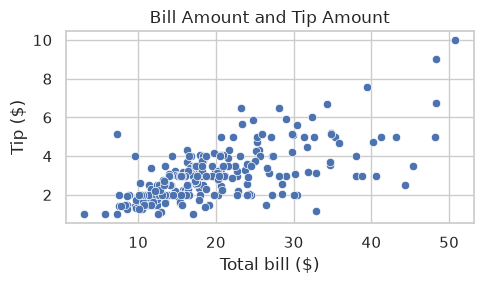
The points show a broadly positive association: larger bills tend to accompany larger tips, with substantial variation. This chart does not identify meal groups or establish that a larger bill causes a particular tip.
Then, add meal-time colors
The manager now asks: “Does that direction look similar at lunch and dinner?” Keep the same variables on the axes and add hue='time'. Seaborn uses the meal-time column to assign colors and create a legend. Predict what extra information the colors will reveal without changing the underlying observations.
fig, ax = plt.subplots(figsize=(5, 3))
sns.scatterplot(data=tips, x='total_bill', y='tip', hue='time', ax=ax)
ax.set_xlabel('Total bill ($)')
ax.set_ylabel('Tip ($)')
ax.set_title('Bill Amount and Tip by Meal Time')
plt.tight_layout()
plt.show()
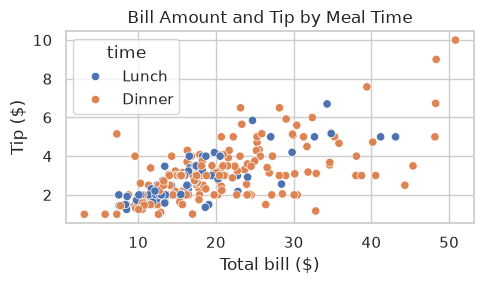
Both meal groups show a broadly positive association, and their points overlap. The colors identify which observations belong to each meal; they do not change the bill or tip values. More points of one color mean more recorded bills in that group, not necessarily larger tips per bill.
Read the axis labels and legend before stating a finding. If the overlap makes the comparison difficult, separate panels can help; the faceting section develops that approach.
Reference comparison: several plotting functions
The next example combines four panels. Use it to consolidate the single-plot syntax after the steps above; you do not need to reproduce the whole layout on a first reading.
Using the Matplotlib subplots() function, you can place the plots side-by-side. The ax= parameter tells each plotting function which subplot panel to draw on; without it, axes-level calls can reuse the current axes, so several plots may land on the same panel. pandas df.plot() accepts the same ax= argument, which is how the comparisons below put a pandas plot and a Seaborn plot side by side. You can see that the Seaborn syntax for calling the plotting functions is familiar but the method names are different. Here we have one plot created by Matplotlib and three by Seaborn.
Style note: these plots use the global theme set earlier with sns.set_theme(style='whitegrid', context='notebook').
fig, ax = plt.subplots(1, 4, figsize=(16, 3))

### Matplotlib
ax[0].hist(tips['total_bill'], bins=25, alpha=0.7)
ax[0].set_title('Matplotlib hist()')

### Seaborn
sns.histplot(data=tips, x='total_bill', bins=25, ax=ax[1])
ax[1].set_title('Histogram')

### Seaborn with hue
sns.scatterplot(data=tips, x='total_bill', y='tip', hue='time', ax=ax[2])
ax[2].set_title('Scatter + hue')

### Seaborn categorical plot
sns.boxplot(data=tips, x='day', y='total_bill', ax=ax[3])
ax[3].set_title('Categorical boxplot')

plt.tight_layout()

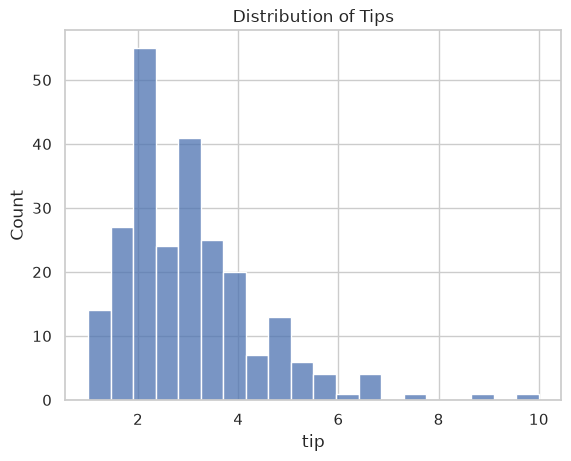
### Exercise: Histogram of Tips
# Practice path: Core classroom practice.
# A restaurant manager wants to see how large tips usually are.
# Use sns.histplot() to draw a histogram of the tip column of tips with 20 bins.
# Add the title 'Distribution of Tips'.
# Then, in a comment, answer: about how much is a typical tip, and are large tips common?
# Also explain one limitation: Can this chart tell you whether lunch and dinner customers tip differently?
### Your code starts here


### Your code ends here
7.1.2. Comparing Libraries#
Pandas plotting is excellent for fast, direct plotting from a DataFrame. Seaborn becomes stronger when you need semantic mappings (color/style/size by variables), cleaner statistical defaults, and grouped comparisons.
Practical rules:
Start with Pandas for quick checks.
Use Seaborn for statistical/grouped visuals.
Drop to Matplotlib when you need exact low-level control.
As a comparison between the three visualization libraries:
Library |
Strength |
Typical call |
|---|---|---|
pandas |
Fastest plot straight from a |
|
Matplotlib |
Full control over every element |
|
Seaborn |
Statistical defaults and grouping by variables |
|
7.1.2.1. Scatter Plots: pandas vs. Seaborn#
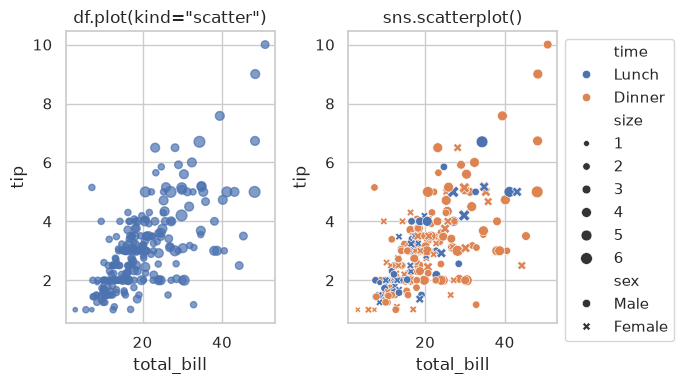
Compare the two plots in the next cell. The Seaborn version shows more information about the data:
df.plot(kind='scatter'): fast DataFrame-first plotting.sns.scatterplot(): semantic mappings (hue,style,size) with cleaner statistical defaults.
fig, ax = plt.subplots(1, 2, figsize=(7, 4))

# Pandas: fast DataFrame-first plotting
tips.plot(
    kind='scatter',
    x='total_bill', y='tip',
    s=tips['size']*10,          ### s, not size, for scatter plot marker size
    alpha=0.7,                  ### add some transparency for better visibility
    ax=ax[0],
    title='df.plot(kind="scatter")',
)
# Seaborn: maps more variables (color, marker, size) with about the same amount of code
sns.scatterplot(
    data=tips,
    x='total_bill', y='tip',
    hue='time',
    style='sex',
    size='size',
    ax=ax[1]
)
ax[1].set_title('sns.scatterplot()')
ax[1].legend(bbox_to_anchor=(1, 1))  ### move legend outside the plot
plt.tight_layout()
### Exercise: Map Day to Color
# Practice path: Core classroom practice.
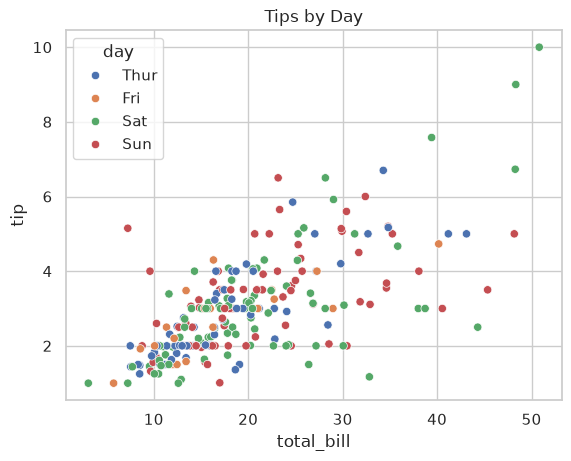
# A restaurant manager wants to see whether tipping patterns differ by day of the week.
# Using the tips DataFrame, draw a scatter plot of total_bill (x) vs. tip (y)
# with the points colored by day. Add the title 'Tips by Day'.
# In a comment, describe the overall relationship between bill amount and tip.
# Also explain one limitation: Does this chart establish that the day itself causes differences in tips?
### Your code starts here


### Your code ends here
7.1.2.2. Histograms: pandas, Matplotlib, and Seaborn#
Compare histogram APIs across pandas, Matplotlib, and Seaborn:
pandas: DataFrame-oriented convenience
Matplotlib: lower-level direct control
Seaborn: statistical defaults and cleaner styling
fig, ax = plt.subplots(1, 3, figsize=(10, 3))

data = tips[['total_bill', 'tip']]
print(data.head())

### Pandas histogram
data.plot(kind='hist', title='Pandas plot(kind="hist")', ax=ax[0])

### Matplotlib histogram
ax[1].hist(data, label=['total_bill', 'tip'])
ax[1].set_title('Matplotlib ax.hist()')
ax[1].legend()

### Seaborn histogram
sns.histplot(data=data, ax=ax[2])
ax[2].set_title('Seaborn histplot()')

plt.tight_layout()
   total_bill   tip
0       16.99  1.01
1       10.34  1.66
2       21.01  3.50
3       23.68  3.31
4       24.59  3.61
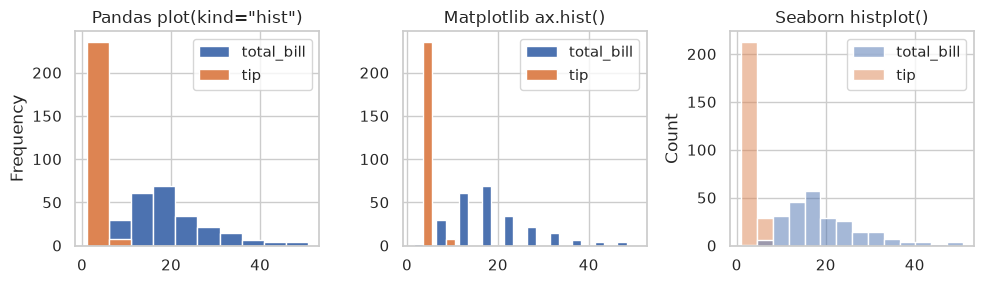
The histograms are different because:
pandas and Matplotlib use 10 bins by default, whereas Seaborn chooses the number of bins from the data (NumPy’s
'auto'rule, the larger of the Sturges and Freedman-Diaconis estimates), which may produce more or fewer bins.Matplotlib bars are narrow because we pass a 2-column DataFrame directly to
ax.hist(). Matplotlib draws the two columns as side-by-side bars within each bin, so each bar takes half of the bin width.Seaborn draws both columns on the same bins, one on top of the other, and makes the bars partly transparent. Where a
tipbar and atotal_billbar fall in the same bin, the colors mix (the small gray-purple bar near $7). Because tips and bills are on very different scales, almost all tips land in the first two bins, so in practice you would plot variables with different scales separately.
### Exercise: Compare Tip Distributions
# Practice path: Additional practice.
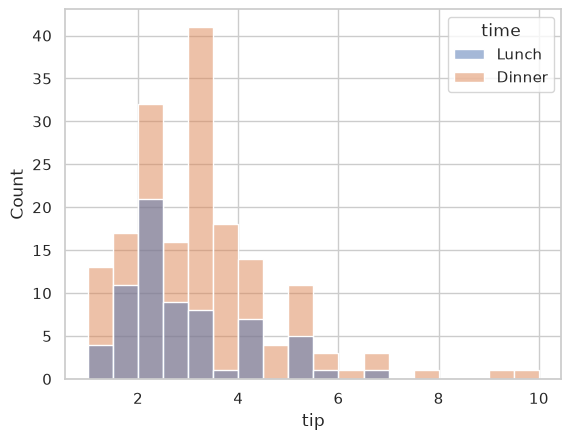
# The manager now wants to compare tips at lunch and at dinner on one chart.
# Use sns.histplot() to draw a histogram of tip with the bars colored by time.
# In a comment, explain how you would compare typical tips without confusing counts with tip amounts.
# Also explain one limitation: Do taller bars necessarily mean that customers leave larger tips?
### Your code starts here


### Your code ends here
7.1.3. Seaborn Data Model and Semantic Mappings#
Seaborn works best with tidy data, which the Seaborn documentation calls long-form data:
each column is a variable
each row is one observation
Common semantic mappings (you already saw all three in the pandas vs. Seaborn scatter plot: hue='time', style='sex', size='size'):
hue: map category/value to colorstyle: map category to marker or line stylesize: map numeric values to marker size
Important distinction:
Use
size=...to map from dataUse
s=...for a constant marker size
7.1.3.1. Data Formats#
Data can be structured in different ways. Understanding these formats is essential because most Python visualization and analysis libraries, including Seaborn and pandas, expect data in a specific format. The common data formats are tidy, wide, and nested.
Format |
Best For |
|---|---|
Tidy |
Seaborn, statsmodels, most analysis |
Wide |
Excel, quick inspection, some ML models |
Nested |
Raw API/JSON data before processing |
Seaborn supports both long-form and wide-form data. Long-form data makes explicit mappings such as x='subject', y='score', and hue='gender' easier because each variable has a named column. Wide-form plots can also work, as in the histogram comparison above.
If the variable you want to map exists only in column headings, reshape it into a column with melt() before using that explicit mapping. If a plot fails, check column names, data types, and the requested mapping before deciding that the table needs reshaping. See Seaborn’s data-structure guide.
7.1.3.2. Tidy (Long-Form) Format#
In tidy data,
each row is one observation,
each column is one variable, and
each cell holds one value.
This is the preferred format for analysis and visualization.
import pandas as pd

tidy = pd.DataFrame({
    'student': ['Alice', 'Alice', 'Bob', 'Bob'],
    'subject': ['math', 'english', 'math', 'english'],
    'score':   [90, 85, 78, 88]
})
tidy
| student | subject | score | |
|---|---|---|---|
| 0 | Alice | math | 90 |
| 1 | Alice | english | 85 |
| 2 | Bob | math | 78 |
| 3 | Bob | english | 88 |
The observation unit and meaning of each column matter more than whether a table looks long. Keep measurements with different meanings and units, such as score and attendance, separate when summarizing them. Melting them into one value column does not make a combined mean meaningful; retain the measurement label and analyze each measurement separately.
7.1.3.3. Wide Format#
In wide data,
each row represents one student, and
each subject has its own column.
This format is easier for humans to read at a glance.
wide = pd.DataFrame({
    'student': ['Alice', 'Bob'],
    'math':    [90, 78],
    'english': [85, 88]
})
wide
| student | math | english | |
|---|---|---|---|
| 0 | Alice | 90 | 85 |
| 1 | Bob | 78 | 88 |
7.1.3.4. Nested Format#
Nested data stores values inside dictionaries or lists, common when loading from JSON or APIs. It must be flattened before use.
nested = {
    'Alice': {'math': 90, 'english': 85},
    'Bob':   {'math': 78, 'english': 88}
}
nested
{'Alice': {'math': 90, 'english': 85}, 'Bob': {'math': 78, 'english': 88}}
7.1.3.5. Converting Formats#
Wide vs. tidy data errors:
If the column you want to pass as x= or hue= does not exist because its categories are spread across several columns, the data is in wide format. Use pd.melt() to convert it to tidy format first.
Start with a wide table of student scores:
students = pd.DataFrame({
    'student': ['Alice', 'Bob', 'Carol', 'David', 'Eve'],
    'gender':  ['F', 'M', 'F', 'M', 'F'],
    'grade':   [10, 10, 11, 11, 12],
    'math':    [90, 78, 85, 72, 95],
    'english': [85, 88, 80, 76, 92],
    'science': [92, 80, 88, 70, 96]
})
students
| student | gender | grade | math | english | science | |
|---|---|---|---|---|---|---|
| 0 | Alice | F | 10 | 90 | 85 | 92 |
| 1 | Bob | M | 10 | 78 | 88 | 80 |
| 2 | Carol | F | 11 | 85 | 80 | 88 |
| 3 | David | M | 11 | 72 | 76 | 70 |
| 4 | Eve | F | 12 | 95 | 92 | 96 |
Wide to tidy: pd.melt() keeps the id_vars columns and stacks the subject columns into two new columns, subject and score.
students_tidy = pd.melt(students,
                        id_vars=['student', 'gender', 'grade'],
                        var_name='subject',
                        value_name='score')
students_tidy
| student | gender | grade | subject | score | |
|---|---|---|---|---|---|
| 0 | Alice | F | 10 | math | 90 |
| 1 | Bob | M | 10 | math | 78 |
| 2 | Carol | F | 11 | math | 85 |
| 3 | David | M | 11 | math | 72 |
| 4 | Eve | F | 12 | math | 95 |
| 5 | Alice | F | 10 | english | 85 |
| 6 | Bob | M | 10 | english | 88 |
| 7 | Carol | F | 11 | english | 80 |
| 8 | David | M | 11 | english | 76 |
| 9 | Eve | F | 12 | english | 92 |
| 10 | Alice | F | 10 | science | 92 |
| 11 | Bob | M | 10 | science | 80 |
| 12 | Carol | F | 11 | science | 88 |
| 13 | David | M | 11 | science | 70 |
| 14 | Eve | F | 12 | science | 96 |
Tidy to wide: pivot() reverses the process, with one row per student and one column per subject.
students_wide = students_tidy.pivot(index='student',
                                    columns='subject', values='score')
students_wide
| subject | english | math | science |
|---|---|---|---|
| student | |||
| Alice | 85 | 90 | 92 |
| Bob | 88 | 78 | 80 |
| Carol | 80 | 85 | 88 |
| David | 76 | 72 | 70 |
| Eve | 92 | 95 | 96 |
Nested to tidy: build a DataFrame from the dictionary, turn the student names into a column, then melt.
nested_tidy = (
    pd.DataFrame(nested).T
    .rename_axis('student')
    .reset_index()
    .melt(id_vars='student', var_name='subject', value_name='score')
)
nested_tidy
| student | subject | score | |
|---|---|---|---|
| 0 | Alice | math | 90 |
| 1 | Bob | math | 78 |
| 2 | Alice | english | 85 |
| 3 | Bob | english | 88 |
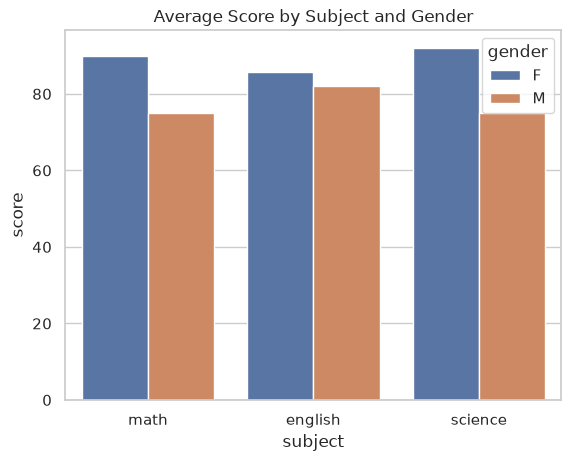
Once the data is tidy, every column can be passed straight to Seaborn. Here subject goes on the x-axis and gender is mapped to color:
sns.barplot(data=students_tidy, x='subject', y='score', hue='gender',
            errorbar=None)   ### hide error bars; we only have a few students
plt.title('Average Score by Subject and Gender')
plt.show()
### Exercise: Reshape Regional Sales
# Practice path: Core classroom practice.
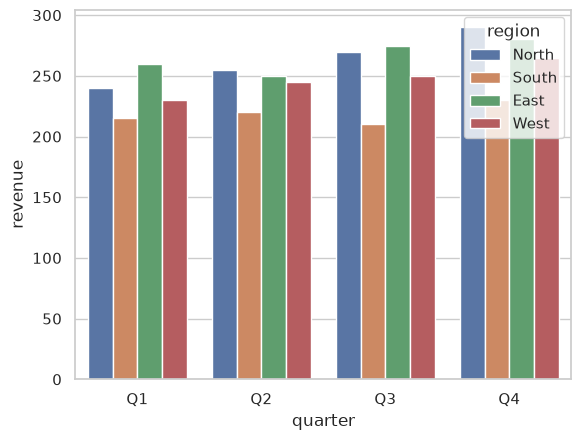
# The sales team keeps quarterly revenue (in $1,000s) in the wide table below.
# 1. Use pd.melt() to make a tidy DataFrame named sales_tidy
#    with the columns region, quarter, and revenue.
# 2. Draw a bar plot with quarter on the x-axis, revenue on the y-axis,
#    and the bars colored by region.
# In a comment, identify the region with the highest Q4 revenue.
# Also explain one limitation: Can one revenue value per region and quarter show variation among individual orders?
sales = pd.DataFrame({
    'region': ['North', 'South', 'East', 'West'],
    'Q1': [240, 215, 260, 230],
    'Q2': [255, 220, 250, 245],
    'Q3': [270, 210, 275, 250],
    'Q4': [290, 230, 280, 265]
})
### Your code starts here


### Your code ends here
  region quarter  revenue
0  North      Q1      240
1  South      Q1      215
2   East      Q1      260
3   West      Q1      230
4  North      Q2      255
7.1.4. Figure vs. Axes-Level APIs#
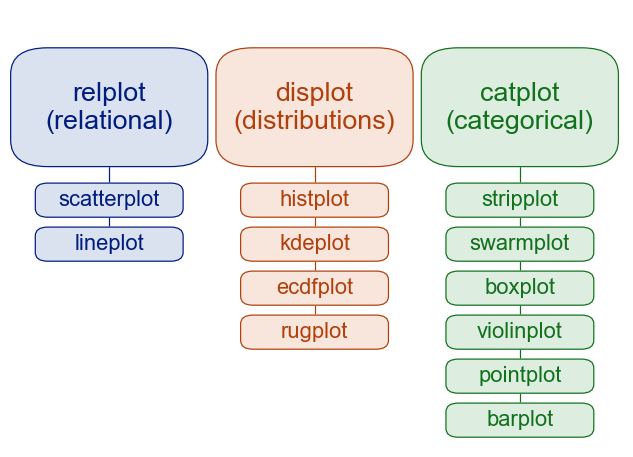
Seaborn has two common usage patterns:
Figure-level functions (e.g.,
displot,relplot,catplot) manage an entire figure/grid and return grid objects (FacetGrid,JointGrid,PairGrid).Axes-level functions (e.g.,
histplot,scatterplot,lineplot,boxplot) draw on a specific Matplotlibaxand return anAxes. Because they draw onto one MatplotlibAxes, you can combine them with other plots in the same figure.
Rule of thumb:
Use figure-level when faceting is the main goal.
Use axes-level for custom subplot composition.
7.1.4.1. API Differences#
Aspect |
Figure-level |
Axes-level |
|---|---|---|
Returns |
|
|
Faceting |
Built-in via |
Not available — use |
Sizing |
|
|
Multiple panels |
Automatic grid from data |
|
Layering plots |
Hard |
Easy: multiple functions on the same |
When to use |
Grouped/faceted views, small multiples |
Custom layouts, overlaying, single-axes control |
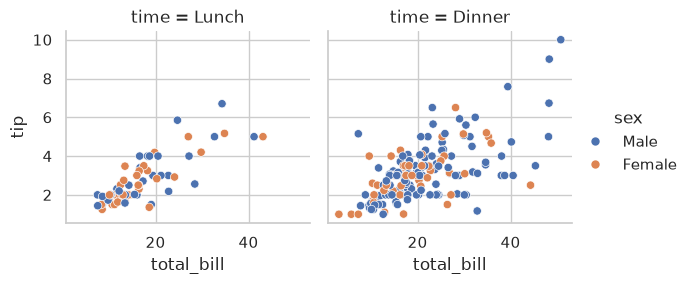
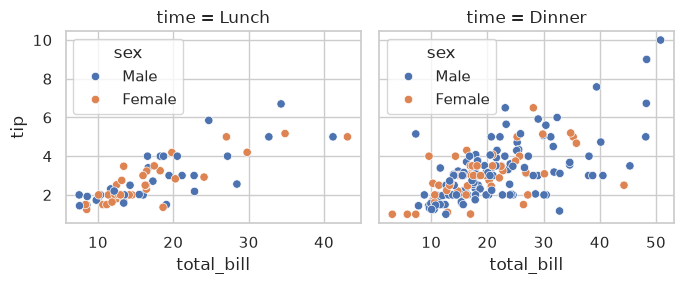
Here is the same scatter plot, split by meal time, drawn both ways. The figure-level relplot() builds the panels from the col= variable; the axes-level version needs plt.subplots(), a loop, and ax=.
### Figure-level: one call, panels built from the data
sns.relplot(data=tips, x='total_bill', y='tip', hue='sex',
            col='time', height=3)
plt.show()

### Axes-level: you create the panels and fill each one
fig, axes = plt.subplots(1, 2, figsize=(7, 3), sharey=True)
for ax, meal in zip(axes, ['Lunch', 'Dinner']):
    sns.scatterplot(data=tips[tips['time'] == meal],
                    x='total_bill', y='tip', hue='sex', ax=ax)
    ax.set_title(f'time = {meal}')
plt.tight_layout()
plt.show()
7.1.4.2. Function Reference#
The table below summarizes common figure-level functions and their typical axes-level backends.
Figure-level |
Axes-level Functions |
Typical use |
|---|---|---|
|
|
Distributions, histograms, KDE, ECDF |
|
|
Relationships and trends |
|
|
Categorical comparisons |
|
|
Bivariate plots with marginals and/or regression |
|
|
Pairwise relationships across variables |
Box plots read the same way as in Pandas Chart Types: the median line, the box for the middle 50% of values, whiskers for the usual range, and dots for possible outliers. Section 7.2 returns to them.
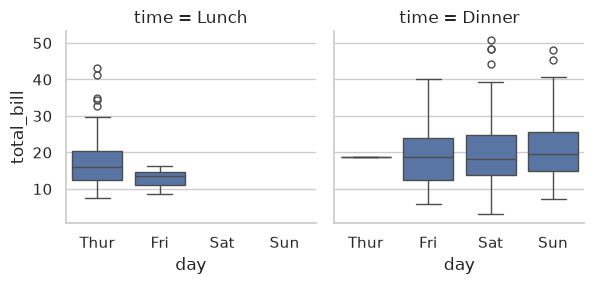
### Exercise: Facet a Box Plot
# Practice path: Additional practice.
# A manager wants to compare bill sizes across days, separately for lunch and dinner.
# Use the figure-level function sns.catplot() to draw box plots of total_bill by day,
# with one panel per meal time. Keep each panel small (about 3 inches tall).
# Then, in a comment, answer: at dinner, which day has the highest median bill?
# Are lunch bills or dinner bills more spread out?
# Also explain one limitation: Can a box plot tell you how many bills each group contains?
### Your code starts here


### Your code ends here