
13.1. Linear Regression#
Your neighbor is a real estate agent and wants some help predicting housing prices for regions in the USA. It would be great if you could somehow create a model for her that allows her to put in a few features of a house and returns back an estimate of what the house would sell for.
She has asked you if you could help her out with your new data science skills. You say yes, and decide that Linear Regression might be a good path to solve this problem!
Your neighbor then gives you some information about a bunch of houses in regions of the United States,it is all in the data set: USA_Housing.csv.
The data contains the following columns:
‘Avg. Area Income’: Avg. Income of residents of the city house is located in.
‘Avg. Area House Age’: Avg Age of Houses in same city
‘Avg. Area Number of Rooms’: Avg Number of Rooms for Houses in same city
‘Avg. Area Number of Bedrooms’: Avg Number of Bedrooms for Houses in same city
‘Area Population’: Population of city house is located in
‘Price’: Price that the house sold at
‘Address’: Address for the house
Note
USA_Housing.csv is a synthetic data set: the values were generated for practice, not collected from real home sales. We use it to learn how to fit and read a regression model. The coefficients describe this made-up data, not real housing markets.
13.1.1. Machine-Learning Framing#
Machine learning is a broad family of methods for using data to make predictions, detect patterns, or support decisions. In this part of the book, the goal is not to cover every algorithm family. The goal is to connect familiar statistical ideas to practical predictive workflows: define a target, choose useful features, train a model, test it on held-out data, and interpret the result in context.
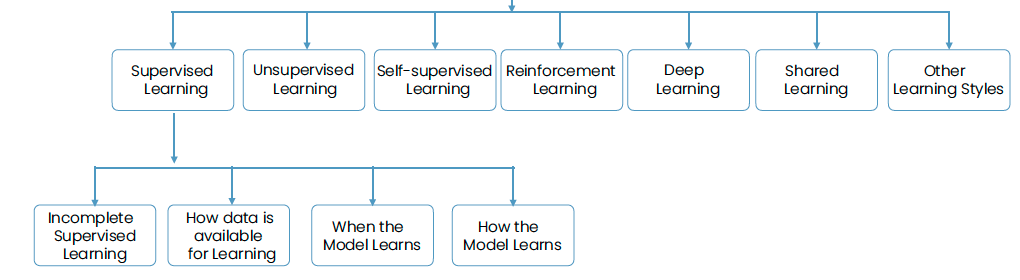
Fig. 13.1 Types of machine learning tasks.#
The main algorithm families differ by the kind of question they answer:
Regression predicts a numeric target such as price, demand, or revenue.
Classification predicts a category such as churn/no churn, fraud/not fraud, or approved/denied.
Clustering finds groups when labels are not provided.
Ranking, pattern detection, time series, anomaly detection, survival analysis, and causal analysis support other common business questions.
Chapter 13 focuses on regression because it is the cleanest bridge from correlation and simple regression into predictive modeling. Chapters 14 and 15 then move to classification and clustering.
13.1.2. Validation and Evaluation#
A predictive model should be judged on data it did not use for training. A common workflow uses:
A training set to fit the model.
An optional validation set to compare choices such as features or tuning parameters.
A test set to estimate performance on new cases.
Evaluation depends on the task. Regression models usually focus on prediction error and residual patterns. Classification models focus on how well the model separates classes. Clustering models focus on compact, separated, and interpretable groups.
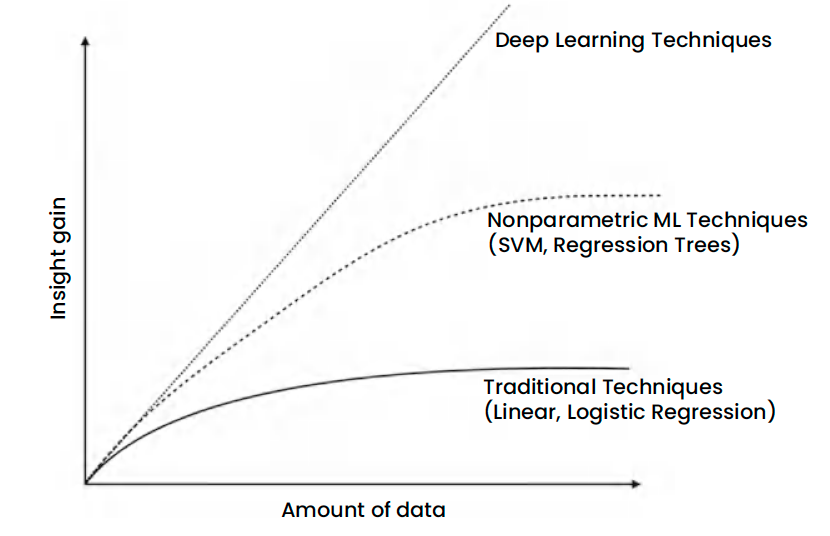
Fig. 13.2 Machine-learning models need enough relevant examples to estimate patterns reliably.#
13.1.3. Data Types in Predictive Work#
Machine-learning projects combine numeric, categorical, text, time, image, and other data types. Regression models in this chapter use numeric predictors, but the same planning question carries across methods: what information is available before the decision, and how should it be represented as model features?
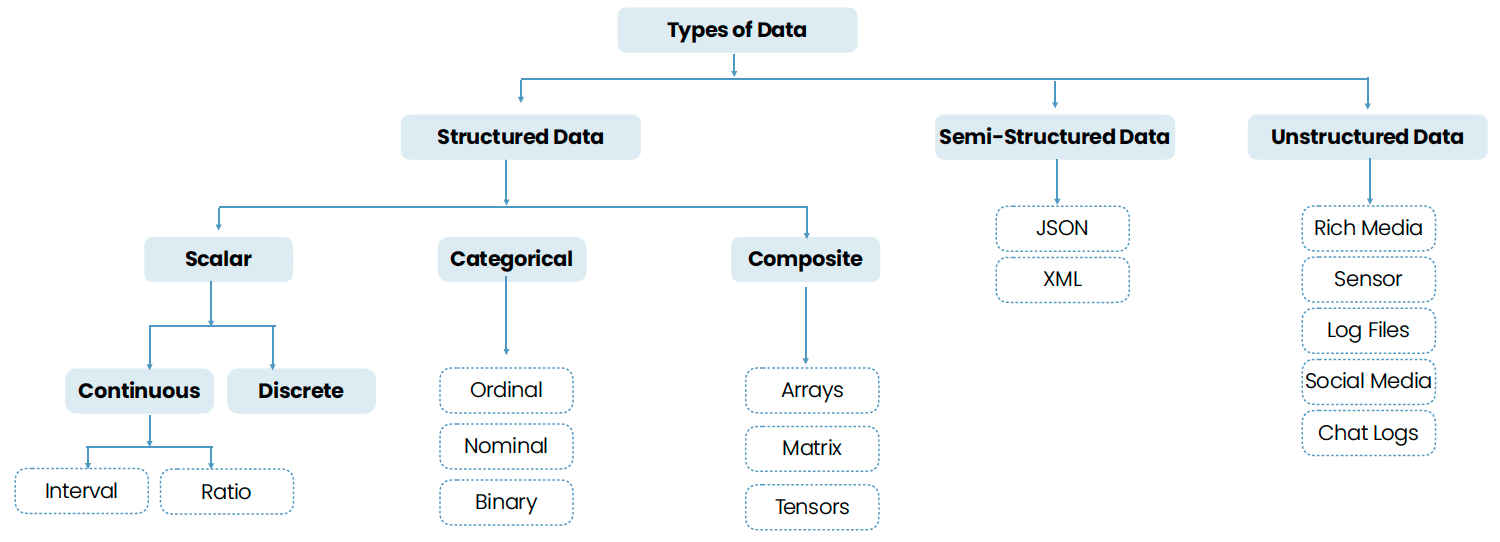
Fig. 13.3 Common data types used in data science and machine-learning projects.#
13.1.4. Multiple Regression Orientation#
In simple linear regression we related one feature to a target. Real data sets rarely have a single useful feature, so we turn to multiple regression, which fits a linear model using several predictors at once. This lets us capture richer structure (e.g., size and neighborhood and age for a house) and measure the unique contribution of each feature while holding the others fixed.
13.1.5. The model#
A multiple regression with predictors \(x_1, x_2, \dots, x_p\) and target \(y\) is written as:
\(\beta_0\) is the intercept (predicted \(y\) when all predictors are 0).
Each \(\beta_j\) captures the change in \(\hat{y}\) for a one-unit increase in \(x_j\), holding other predictors constant.
13.1.6. Typical workflow#
Inspect and clean the data; handle missing values and outliers.
Explore relationships with a pair plot and a correlation heatmap. Strongly correlated predictors (multicollinearity) make individual coefficients harder to interpret.
Split into training and testing sets.
Fit the regression model on training data and examine the intercept and coefficients.
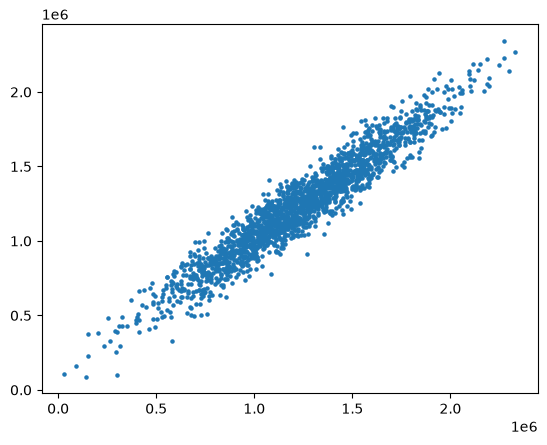
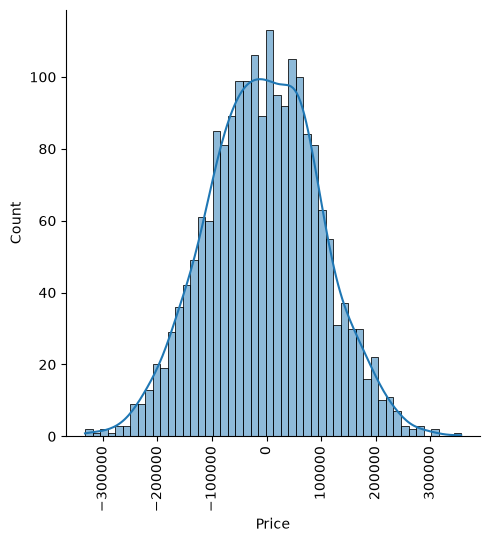
Check the residuals (actual minus predicted) for patterns, for example with a plot of predicted against actual values and a histogram of the residuals.
Evaluate on held-out test data using metrics like MAE, RMSE, and \(R^2\).
13.1.7. In this chapter#
We’ll start with a housing-price example: fit a multiple regression with scikit-learn and evaluate it on test data.
We’ll interpret coefficients carefully (e.g., “holding area constant, an extra bedroom adds…”), and connect them to domain knowledge.
We’ll check the model with residual plots and error metrics, and see how correlated predictors complicate the reading of coefficients.
In the next section, we’ll build a multiple regression from scratch and compare it with a nearest-neighbor approach.
Use the next notebooks to dive into code examples, model fitting, and evaluation.
We’ve been able to get some data from your neighbor for housing prices as a csv set, let’s get our environment ready with the libraries we’ll need and then import the data.
USAhousing = pd.read_csv(path_data + 'USA_Housing.csv')
USAhousing.head()
| Avg. Area Income | Avg. Area House Age | Avg. Area Number of Rooms | Avg. Area Number of Bedrooms | Area Population | Price | Address | |
|---|---|---|---|---|---|---|---|
| 0 | 79545.458574 | 5.682861 | 7.009188 | 4.09 | 23086.800503 | 1.059034e+06 | 208 Michael Ferry Apt. 674\nLaurabury, NE 3701... |
| 1 | 79248.642455 | 6.002900 | 6.730821 | 3.09 | 40173.072174 | 1.505891e+06 | 188 Johnson Views Suite 079\nLake Kathleen, CA... |
| 2 | 61287.067179 | 5.865890 | 8.512727 | 5.13 | 36882.159400 | 1.058988e+06 | 9127 Elizabeth Stravenue\nDanieltown, WI 06482... |
| 3 | 63345.240046 | 7.188236 | 5.586729 | 3.26 | 34310.242831 | 1.260617e+06 | USS Barnett\nFPO AP 44820 |
| 4 | 59982.197226 | 5.040555 | 7.839388 | 4.23 | 26354.109472 | 6.309435e+05 | USNS Raymond\nFPO AE 09386 |
USAhousing.info()
<class 'pandas.DataFrame'>
RangeIndex: 5000 entries, 0 to 4999
Data columns (total 7 columns):
 #   Column                        Non-Null Count  Dtype
---  ------                        --------------  -----
 0   Avg. Area Income              5000 non-null   float64
 1   Avg. Area House Age           5000 non-null   float64
 2   Avg. Area Number of Rooms     5000 non-null   float64
 3   Avg. Area Number of Bedrooms  5000 non-null   float64
 4   Area Population               5000 non-null   float64
 5   Price                         5000 non-null   float64
 6   Address                       5000 non-null   str
dtypes: float64(6), str(1)
memory usage: 273.6 KB
USAhousing.describe()
| Avg. Area Income | Avg. Area House Age | Avg. Area Number of Rooms | Avg. Area Number of Bedrooms | Area Population | Price | |
|---|---|---|---|---|---|---|
| count | 5000.000000 | 5000.000000 | 5000.000000 | 5000.000000 | 5000.000000 | 5.000000e+03 |
| mean | 68583.108984 | 5.977222 | 6.987792 | 3.981330 | 36163.516039 | 1.232073e+06 |
| std | 10657.991214 | 0.991456 | 1.005833 | 1.234137 | 9925.650114 | 3.531176e+05 |
| min | 17796.631190 | 2.644304 | 3.236194 | 2.000000 | 172.610686 | 1.593866e+04 |
| 25% | 61480.562388 | 5.322283 | 6.299250 | 3.140000 | 29403.928702 | 9.975771e+05 |
| 50% | 68804.286404 | 5.970429 | 7.002902 | 4.050000 | 36199.406689 | 1.232669e+06 |
| 75% | 75783.338666 | 6.650808 | 7.665871 | 4.490000 | 42861.290769 | 1.471210e+06 |
| max | 107701.748378 | 9.519088 | 10.759588 | 6.500000 | 69621.713378 | 2.469066e+06 |
USAhousing.columns
Index(['Avg. Area Income', 'Avg. Area House Age', 'Avg. Area Number of Rooms',
       'Avg. Area Number of Bedrooms', 'Area Population', 'Price', 'Address'],
      dtype='str')
13.1.8. Exploratory Data Analysis#
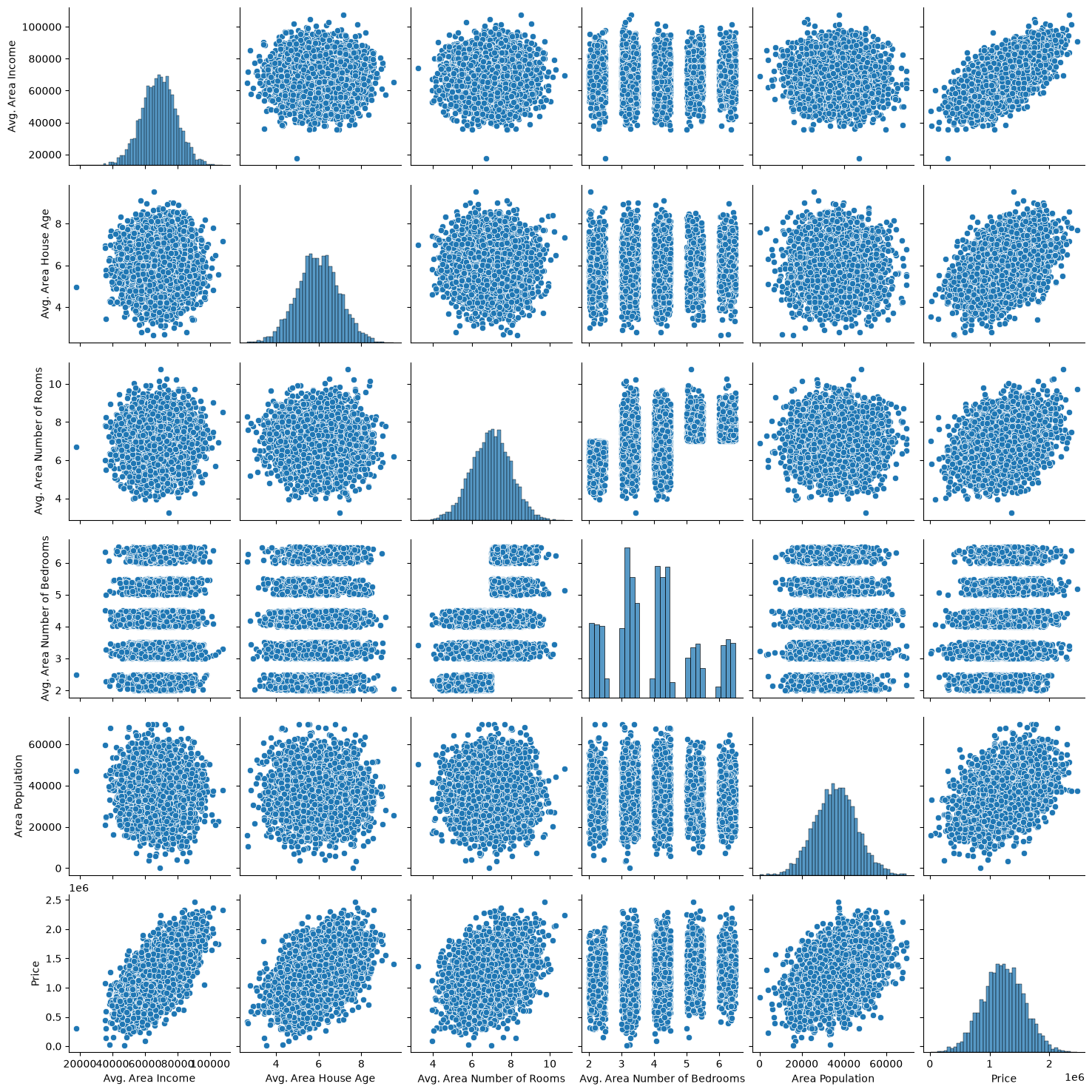
Let’s create some simple plots to check out the data!
sns.pairplot(USAhousing)
<seaborn.axisgrid.PairGrid at 0x7f2319812120>
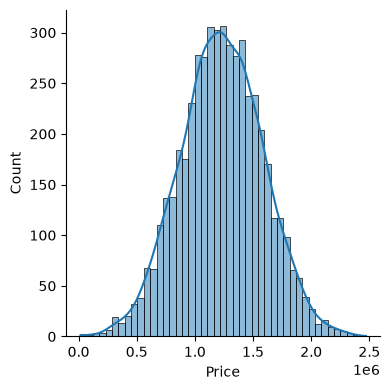
sns.displot(USAhousing['Price'], kde=True, height=4)
<seaborn.axisgrid.FacetGrid at 0x7f23198da660>
# sns.heatmap(USAhousing.drop('Address', axis=1).corr(), annot=True, cmap='viridis', fmt=".2f", linewidths=.5)
sns.heatmap(USAhousing.drop('Address', axis=1).corr(), annot=True, cmap='coolwarm', fmt=".2f", linewidths=.5)
<Axes: >
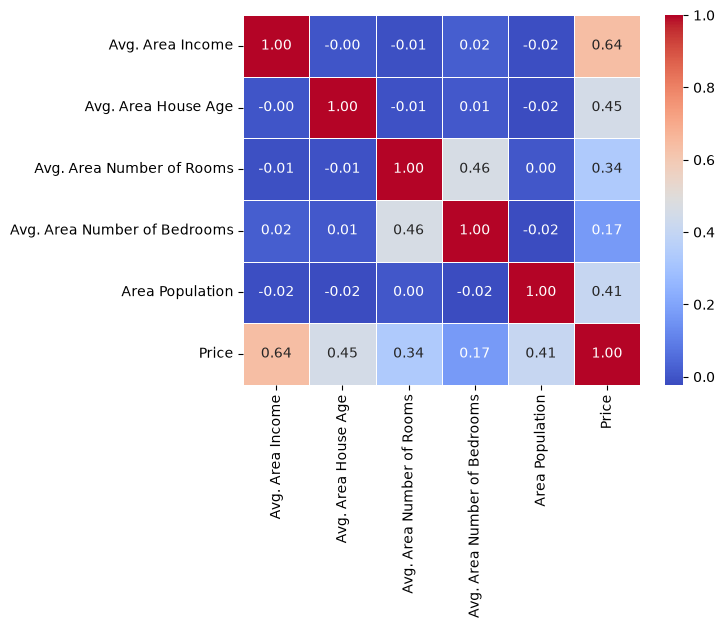
Most predictors are almost uncorrelated with each other, but Avg. Area Number of Rooms and Avg. Area Number of Bedrooms have a correlation of about 0.46: areas with more rooms tend to have more bedrooms. When predictors are correlated like this (multicollinearity), the model has a harder time separating their effects. Keep this pair in mind when we read the coefficients below.
13.1.9. Training a Linear Regression Model#
Let’s now begin to train out regression model! We will need to first split up our data into an X array that contains the features to train on, and a y array with the target variable, in this case the Price column. We will toss out the Address column because it only has text info that the linear regression model can’t use.
13.1.9.1. X and y arrays#
X = USAhousing[['Avg. Area Income', 'Avg. Area House Age', 'Avg. Area Number of Rooms',
               'Avg. Area Number of Bedrooms', 'Area Population']]
y = USAhousing['Price']
13.1.10. Train Test Split#
Now let’s split the data into a training set and a testing set. We will train out model on the training set and then use the test set to evaluate the model.
from sklearn.model_selection import train_test_split
X_train, X_test, y_train, y_test = train_test_split(X, y, test_size=0.4, random_state=101)
13.1.11. Creating and Training the Model#
from sklearn.linear_model import LinearRegression
lm = LinearRegression()
lm.fit(X_train,y_train)
LinearRegression()In a Jupyter environment, please rerun this cell to show the HTML representation or trust the notebook.
On GitHub, the HTML representation is unable to render, please try loading this page with nbviewer.org.
Parameters
Fitted attributes
13.1.12. Model Evaluation#
Let’s evaluate the model by checking out it’s coefficients and how we can interpret them.
### print the intercept

print(lm.intercept_)
-2640159.7968526953
coeff_df = pd.DataFrame(lm.coef_,X.columns,columns=['Coefficient'])
coeff_df
| Coefficient | |
|---|---|
| Avg. Area Income | 21.528276 |
| Avg. Area House Age | 164883.282027 |
| Avg. Area Number of Rooms | 122368.678027 |
| Avg. Area Number of Bedrooms | 2233.801864 |
| Area Population | 15.150420 |
Interpreting the coefficients:
Holding all other features fixed, a 1 unit increase in Avg. Area Income is associated with an **increase of $21.52 **.
Holding all other features fixed, a 1 unit increase in Avg. Area House Age is associated with an **increase of $164883.28 **.
Holding all other features fixed, a 1 unit increase in Avg. Area Number of Rooms is associated with an **increase of $122368.67 **.
Holding all other features fixed, a 1 unit increase in Avg. Area Number of Bedrooms is associated with an **increase of $2233.80 **.
Holding all other features fixed, a 1 unit increase in Area Population is associated with an **increase of $15.15 **.
Notice that the Avg. Area Number of Bedrooms coefficient is small compared with Avg. Area Number of Rooms. Because the two are correlated, once the number of rooms is held fixed, the number of bedrooms adds little information of its own. That is multicollinearity at work: the coefficient on one of two related predictors can look unimportant even when the predictor is related to price.
Do these numbers make sense? Some look odd. For example, a one-year increase in the average house age adds about $165,000. Remember that this data set is synthetic, so the coefficients show how to read a regression model, not facts about real housing prices. To repeat this analysis on real data, try scikit-learn’s California housing data set, which comes from the 1990 U.S. Census. (Older tutorials use a Boston housing data set. scikit-learn removed it in version 1.2 because one of its variables was built on a racially biased assumption, so avoid it.)
from sklearn.datasets import fetch_california_housing
california = fetch_california_housing(as_frame=True)   # downloads the data the first time
print(california.DESCR)
california_df = california.frame                         # features plus the target, MedHouseVal
13.1.13. Predictions from our Model#
Let’s grab predictions off our test set and see how well it did!
predictions = lm.predict(X_test)
plt.scatter(y_test,predictions, s=5)
<matplotlib.collections.PathCollection at 0x7f230b942490>
Residual Histogram
sns.displot((y_test-predictions), bins=50, kde=True)
plt.xticks(rotation=90)
plt.show()
13.1.14. Regression Evaluation Metrics#
Here are three common evaluation metrics for regression problems:
Mean Absolute Error (MAE) is the mean of the absolute value of the errors:
Mean Squared Error (MSE) is the mean of the squared errors:
Root Mean Squared Error (RMSE) is the square root of the mean of the squared errors:
Comparing these metrics:
MAE is the easiest to understand, because it’s the average error.
MSE is more popular than MAE, because MSE “punishes” larger errors, which tends to be useful in the real world.
RMSE is even more popular than MSE, because RMSE is interpretable in the “y” units.
All of these are loss functions, because we want to minimize them.
\(R^2\) (R-squared) is different: it is the proportion of the variation in the target that the model explains. It is at most 1, and higher is better. An \(R^2\) of 0.9 means the model’s predictions account for 90% of the variation in prices in the test set.
from sklearn import metrics
print('MAE:', metrics.mean_absolute_error(y_test, predictions))
print('MSE:', metrics.mean_squared_error(y_test, predictions))
print('RMSE:', np.sqrt(metrics.mean_squared_error(y_test, predictions)))
print('R^2:', metrics.r2_score(y_test, predictions))
MAE: 82288.22251914942
MSE: 10460958907.208977
RMSE: 102278.82922290897
R^2: 0.9176824009649241
This was your first real Machine Learning experience! Congrats on helping your neighbor out! We’ll let this end here for now, but go ahead and try the California housing data set mentioned earlier to repeat this analysis on real data!
13.1.15. Section Practice#
Use this short exercise to check the main workflow from this section.
### Exercise: Practice Linear Regression
# A model produced the predictions and actual values below.
# Calculate each error as actual minus predicted. Then print the mean absolute error.
predicted = [98, 105, 110, 120]
actual = [100, 102, 114, 119]
### Your code starts here


### Your code ends here
[2, -3, 4, -1]
2.5