7.4.2. Lab#
Use this assignment to practice the chapter’s concepts and coding skills in runnable Python code.
Sign in from the account menu before you start working on the assignment.
Write and run your code directly in the coding cells.
Multiple submissions are allowed. The highest score is kept.
Write the interpretation responses below as Python comments in the same answer cells. They are for reflection and class discussion; the automatic score checks the existing coding tasks, not the written explanations. Keep the specified printed output and plots unchanged.
You are preparing a short retail operations review. The questions use separate small datasets from sales, marketing, finance, operations, and regional management. For each chart, connect the observed pattern to the department’s question and explain what the data cannot establish.
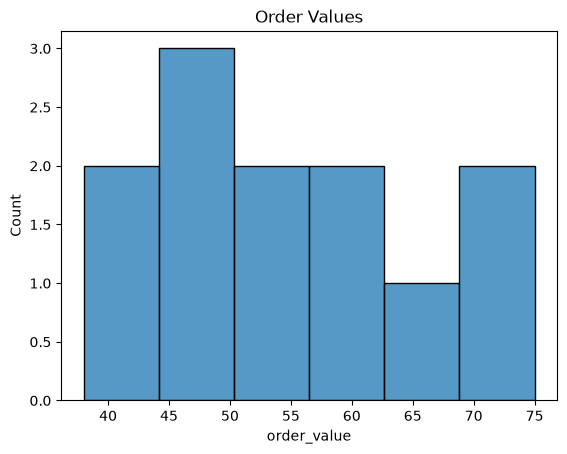
### Question 1: Order Value Distribution
# The online store manager wants to see how order values are spread out.
#   1. Create a figure and axes with plt.subplots().
#   2. Use sns.histplot() to draw a histogram of the order_value column
#      of orders with bins=6 on that axes (ax=ax).
#   3. Set the title "Order Values".
# Reflection (answer in comments): Describe where order values are concentrated. Can this chart compare sales channels?
import matplotlib.pyplot as plt
import pandas as pd
import seaborn as sns

orders = pd.DataFrame({
    "order_value": [45, 52, 38, 61, 75, 49, 58, 66, 40, 55, 70, 48],
})
### Your code starts here.


### Your code ends here.
### Question 2: Ad Spend and Revenue by Region
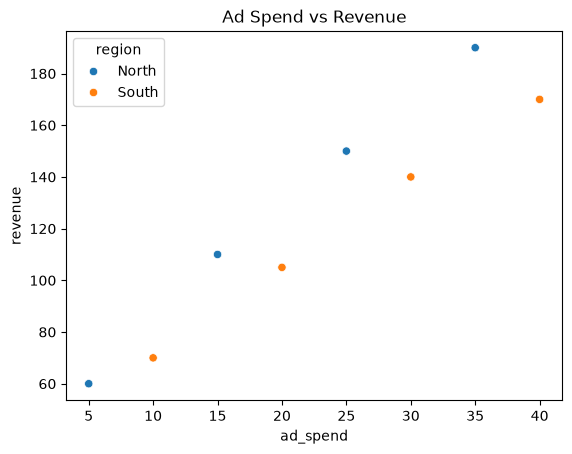
# Marketing wants to know whether ad spend pays off the same way in both regions.
#   1. Create a figure and axes with plt.subplots().
#   2. Use sns.scatterplot() to plot ad_spend (x) vs revenue (y) from campaigns,
#      with the points colored by region (hue='region').
#   3. Set the title "Ad Spend vs Revenue".
# Reflection (answer in comments): Describe the relationship between ad spend and revenue. Does the chart show that spending caused the revenue?
import matplotlib.pyplot as plt
import pandas as pd
import seaborn as sns

campaigns = pd.DataFrame({
    "ad_spend": [5, 10, 15, 20, 25, 30, 35, 40],
    "revenue": [60, 70, 110, 105, 150, 140, 190, 170],
    "region": ["North", "South", "North", "South", "North", "South", "North", "South"],
})
### Your code starts here.


### Your code ends here.
### Question 3: From Wide to Tidy
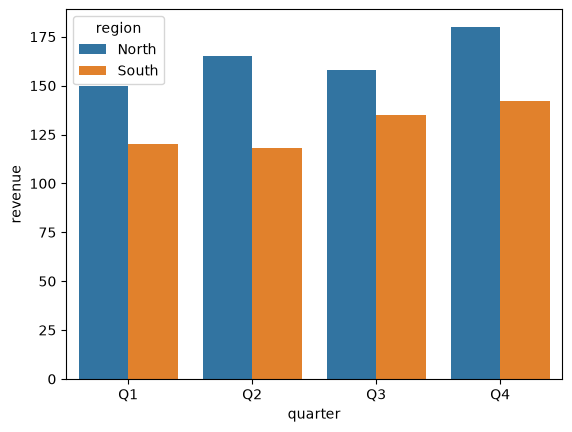
# Finance keeps quarterly revenue in wide format: one column per region.
# Seaborn needs tidy (long) data to color bars by region.
#   1. Reshape sales with sales.melt(id_vars='quarter', var_name='region',
#      value_name='revenue') and store the result in tidy.
#   2. Print the number of rows in tidy. Print exactly:
#      Tidy rows: 8
#   3. Create a figure and axes, then use sns.barplot() to draw revenue (y)
#      by quarter (x) with the bars colored by region (hue='region').
# Reflection (answer in comments): Which region has higher revenue in Q4? Do these quarterly totals show variation among individual orders?
import matplotlib.pyplot as plt
import pandas as pd
import seaborn as sns

sales = pd.DataFrame({
    "quarter": ["Q1", "Q2", "Q3", "Q4"],
    "North": [150, 165, 158, 180],
    "South": [120, 118, 135, 142],
})
### Your code starts here.


### Your code ends here.
Tidy rows: 8
### Question 4: Delivery Days by Shipping Method
# Operations wants to compare how long each shipping method takes.
#   1. Create a figure and axes with plt.subplots().
#   2. Use sns.boxplot() to draw days (y) by method (x) from deliveries.
#   3. Set the title "Delivery Days by Method".
#   4. Find the method with the lowest median delivery days using
#      groupby() and median(), then print it. Print exactly:
#      Fastest median: Overnight
# Reflection (answer in comments): Does the method with the fastest median also have the smallest IQR? Explain using the boxes, and state one limitation.
import matplotlib.pyplot as plt
import pandas as pd
import seaborn as sns

deliveries = pd.DataFrame({
    "method": ["Standard"] * 5 + ["Express"] * 5 + ["Overnight"] * 5,
    "days": [5, 6, 5, 7, 6, 2, 4, 3, 5, 2, 1, 1, 2, 1, 1],
})
### Your code starts here.


### Your code ends here.
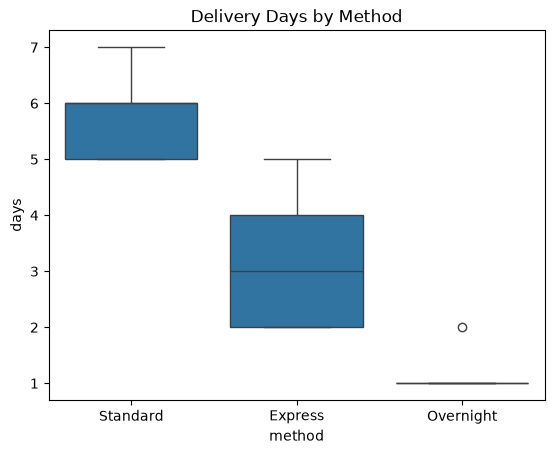
Fastest median: Overnight
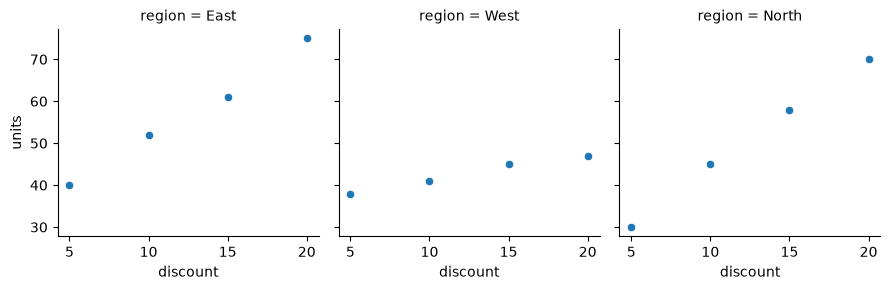
### Question 5: Discount Response by Region
# A regional director wants one panel per region showing how discount
# relates to units sold.
#   1. Use the figure-level function sns.relplot() to draw a scatter plot
#      of discount (x) vs units (y) from promo.
#   2. Put each region in its own column (col='region') and use height=3.
# Reflection (answer in comments): Which region shows the smallest change in units as discount increases? Does this comparison justify a discount policy by itself?
import matplotlib.pyplot as plt
import pandas as pd
import seaborn as sns

promo = pd.DataFrame({
    "discount": [5, 10, 15, 20] * 3,
    "units": [40, 52, 61, 75, 38, 41, 45, 47, 30, 45, 58, 70],
    "region": ["East"] * 4 + ["West"] * 4 + ["North"] * 4,
})
### Your code starts here.


### Your code ends here.