7.2. Seaborn Plot Families#
Recommended classroom practice
Use the exercises below as the core practice path for this section. Additional practice reinforces the same skills; optional extensions explore more advanced tools. These labels guide your study and classroom work. Follow your instructor’s directions and the separate Lab and Homework instructions for assigned work.
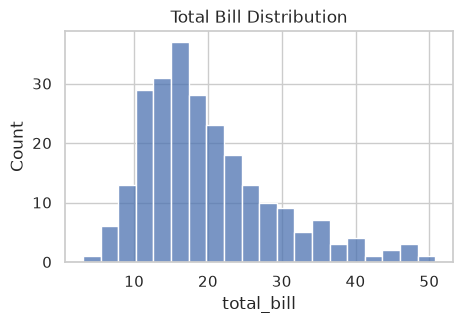
Histogram for Total Bill.
Scatter with Semantic Mapping.
Typical Speed and Consistency.
Equal Means, Different Reliability.
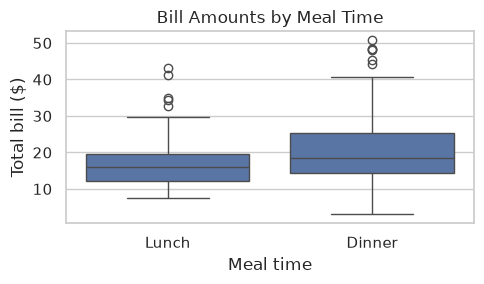
Choose a Chart for the Manager.
The two delivery exercises answer different questions: one compares median and IQR; the other shows why equal means can hide different reliability. Finish with the chart-choice exercise to apply those distinctions independently.
Choose a chart from the question
Before writing a plotting call, identify what one row represents, whether each variable is numerical or categorical, and what you want to compare. A numerical variable measures an amount; a categorical variable identifies a group. Choose the chart before choosing its colors or other style settings.
Business question |
Data needed |
Starting chart |
Seaborn function |
|---|---|---|---|
How are individual order values distributed? |
One numerical variable |
Histogram |
|
How many orders came through each channel? |
One categorical variable, with one row per order |
Count plot |
|
How do typical delivery times and variability differ by method? |
A numerical variable and a categorical group |
Box plot |
|
How do advertising spend and revenue relate? |
Two numerical variables |
Scatter plot |
|
How does monthly revenue change over time? |
Ordered time and a numerical value |
Line plot |
|
How do mean order values compare across channels? |
A numerical variable and a categorical group |
Mean bar plot |
|
Counts, summaries, and distributions answer different questions. A count plot counts rows; a mean bar plot summarizes a numerical column within each group; a box plot shows the median and spread. If a row contains a monthly total rather than one order, counting rows counts months, not orders. For example, to compare typical delivery time and consistency, start with a box plot rather than a bar plot of means.
Use hue to distinguish groups in one panel. When overlapping groups become hard to read, use facets to put the same chart in separate panels. Use lines when the horizontal axis has a meaningful order, such as consecutive months; unrelated categories do not form a time trend.
7.2.1. Distribution Plots#
7.2.1.1. Histogram#
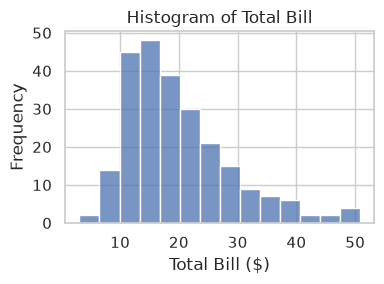
A histogram groups values into bins and shows frequency in each bin. histplot() is an axes-level function that returns an Axes object for further customization.
ax = sns.histplot(data=tips, x='total_bill')    ### sns.PLOT-TYPE(data=df, x='col_a', y='col_b', hue='col_c')
ax.set_title('Histogram of Total Bill')
ax.set_xlabel('Total Bill ($)')
ax.set_ylabel('Frequency')
ax.figure.set_size_inches(4, 3)
plt.tight_layout()
To control figure size, create an axes with Matplotlib and pass
ax=.Changing
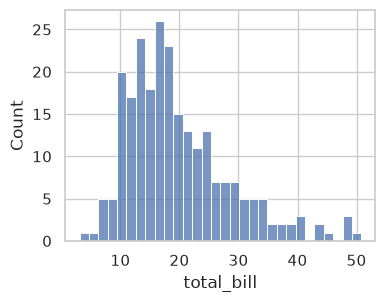
bins=changes how values are grouped. More bins can expose detail, but can also make random variation look like a pattern. Compare several choices without changing the underlying observations.
fig, ax = plt.subplots(figsize=(4, 3))
sns.histplot(data=tips, x='total_bill', bins=30, ax=ax)
<Axes: xlabel='total_bill', ylabel='Count'>
### Exercise: Histogram for Total Bill
# Practice path: Core classroom practice.
# The manager wants to see how large bills usually are.
#   1. Create a figure and axes about 5 inches wide and 3 inches tall.
#   2. Use sns.histplot() to draw a histogram of total_bill on those axes, with 20 bins.
#   3. Set the title to 'Total Bill Distribution'.
# In a comment, describe the distribution: where are bills concentrated, and which way does the tail extend?
# Also explain one limitation: Can this combined histogram tell you which day has the largest typical bill?
### Your code starts here.


### Your code ends here.
Text(0.5, 1.0, 'Total Bill Distribution')
7.2.1.1.1. Bins, Alpha, and KDE#
Three common controls:
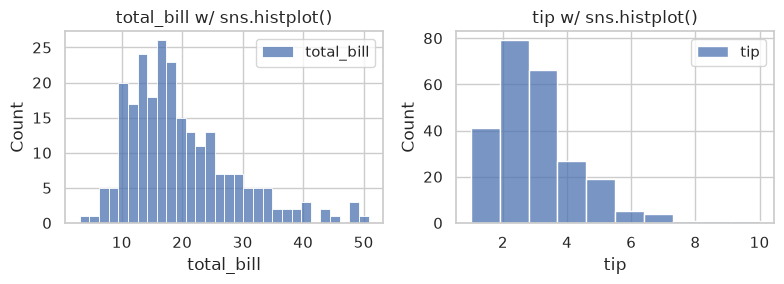
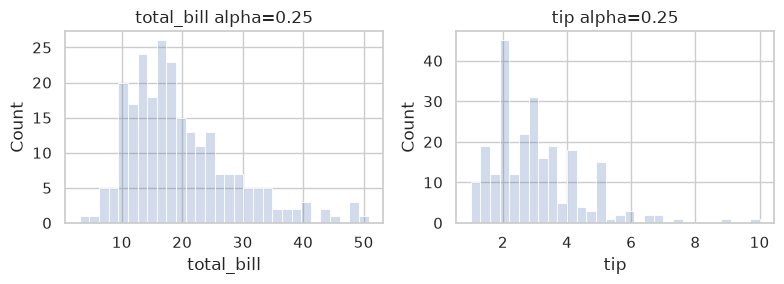
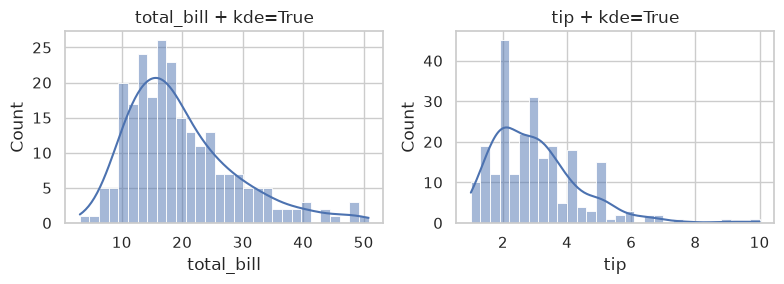
bins: granularity of histogram barsalpha: transparencykde=True: overlay smooth density estimate
fig, axes = plt.subplots(1, 2, figsize=(8, 3))
bins = [30, 10]
for i, col in enumerate(data.columns):
    sns.histplot(data[col], bins=bins[i], label=col, ax=axes[i])
    axes[i].set_title(f'{col} w/ sns.histplot()')
    axes[i].legend()
plt.tight_layout()
fig, axes = plt.subplots(1, 2, figsize=(8, 3))
for i, col in enumerate(data.columns[:2]):
    sns.histplot(data[col], alpha=0.25, bins=30, ax=axes[i])
    axes[i].set_title(f'{col} alpha=0.25')
plt.tight_layout()
To overlay KDE, set keyword argument kde=True when plotting.
fig, axes = plt.subplots(1, 2, figsize=(8, 3))
for i, col in enumerate(data.columns):
    ### add kde=True for kernel density estimate overlay
    sns.histplot(data[col], alpha=0.5, bins=30, kde=True, ax=axes[i])
    axes[i].set_title(f'{col} + kde=True')
plt.tight_layout()
### Exercise: Compare Histogram Settings
# Practice path: Additional practice.
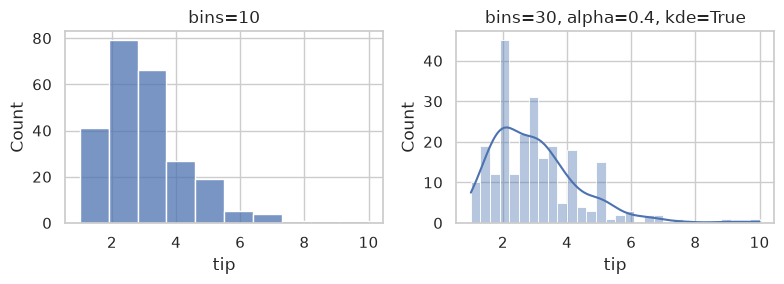
# The manager wants to know whether a histogram's shape depends on how it is drawn.
#   1. Create two side-by-side axes, about 8 inches wide and 3 inches tall in total.
#   2. On the left axes, use sns.histplot() to draw tip with 10 bins. Title it 'bins=10'.
#   3. On the right axes, draw tip with 30 bins, see-through bars (alpha 0.4),
#      and a smooth density curve. Title it 'bins=30, alpha=0.4, kde=True'.
#   4. Keep the two panels from overlapping.
#   5. In a comment, answer: what does the 30-bin version show that the 10-bin version hides?
# Also explain one limitation: Did the extra peaks appear because the underlying tip values changed?
### Your code starts here.


### Your code ends here.
7.2.1.2. KDE / Density#
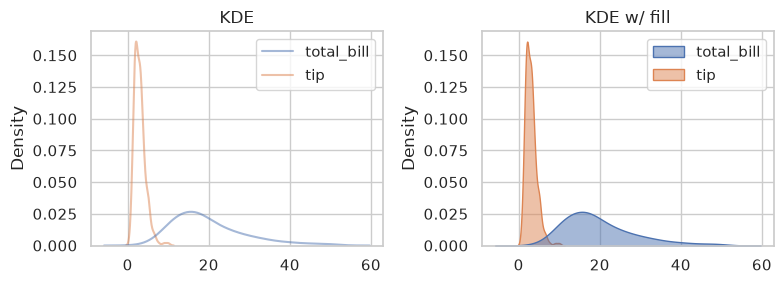
KDE is a smooth estimate of a distribution. It is often useful alongside histograms.
Read a density curve
Read the horizontal axis as the measured amount. The vertical axis is density, not a count of customers and not the probability of one exact value. The area under a single normalized density curve is one; the area over an interval represents an estimated share of observations. When groups share normalization, their total areas may differ, so do not infer group size or typical spending from peak height alone.
A KDE is estimated from the observations using smoothing. More smoothing can merge peaks; less smoothing can make small irregularities look like separate peaks. Compare the curve with the actual observations or a histogram, especially for small samples. A smooth curve is not evidence that you have a large or representative sample.
Smoothing can also extend a curve beyond meaningful boundaries, such as negative bill amounts. Such an extension does not mean the sample contains negative bills. For discrete counts such as party size, a count plot or histogram often communicates the observations more directly.
fig, axes = plt.subplots(1, 2, figsize=(8, 3))

sns.kdeplot(data=data, alpha=0.5, ax=axes[0])   ### seaborn ignores non-numeric columns, so no need to specify x or y
axes[0].set_title('KDE')

sns.kdeplot(data=data, alpha=0.5, ax=axes[1], fill=True)    ### add fill=True for filled KDE
axes[1].set_title('KDE w/ fill')

plt.tight_layout()
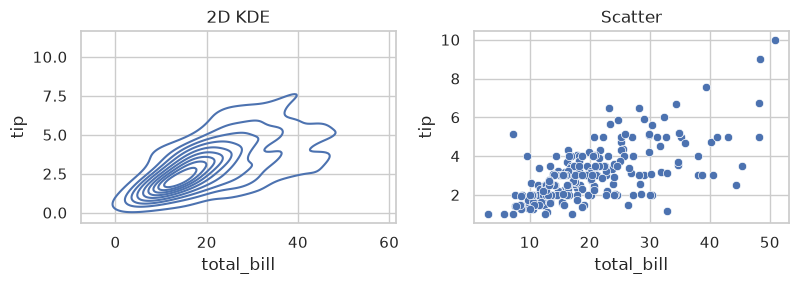
A two-dimensional KDE estimates where pairs of values are concentrated. The horizontal and vertical axes still represent bill amount and tip amount; the contours show estimated joint density. Dense regions summarize clusters of observations, but a contour is not an individual bill and is not a fitted regression line. Compare it with the scatter plot to see the underlying points.
fig, axes = plt.subplots(1, 2, figsize=(8, 3))

sns.kdeplot(data=data, x='total_bill', y='tip', ax=axes[0])  ### specify x and y for 2D KDE
axes[0].set_title('2D KDE')

sns.scatterplot(data=data, x='total_bill', y='tip', ax=axes[1])
axes[1].set_title('Scatter')

plt.tight_layout()
Here we use density plot as an example of how Pandas visualization differs, syntactically, from Matplotlib and Seaborn:
Library |
Function |
Notes |
|---|---|---|
Seaborn |
|
most common, easy to use |
Pandas |
|
convenient for quick plots |
Matplotlib + SciPy |
|
manual control over details |
### Exercise: KDE for Two Variables
# Practice path: Additional practice.
# The manager wants to compare the shape of bills and tips side by side.
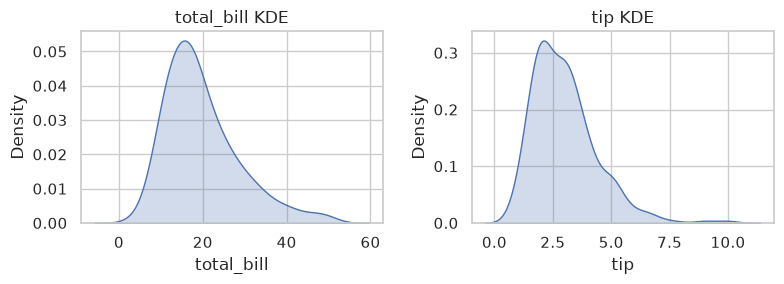
#   1. Create two side-by-side axes, about 8 inches wide and 3 inches tall in total.
#   2. Use sns.kdeplot() to draw a shaded density curve of total_bill on the left
#      and of tip on the right.
#   3. Title them 'total_bill KDE' and 'tip KDE', and keep the panels from overlapping.
#   4. In a comment, answer: where does each curve peak, and are the two shapes alike?
# Also explain one limitation: Is a density curve an exact record of how many bills or tips equal each amount?
### Your code starts here.


### Your code ends here.
7.2.2. Relational Plots#
Relational plots show how variables move together (patterns, trends, clusters).
7.2.2.1. Scatter Plot#
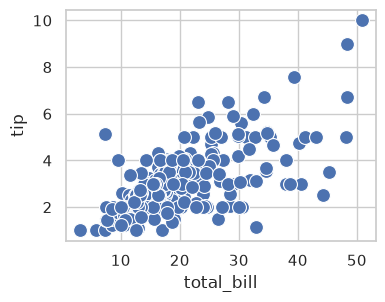
A scatter plot shows paired numerical values: each point’s horizontal position is its x value, and its vertical position is its y value. Here, one point is one restaurant bill, with bill amount on x and dollar tip on y. A manager can use it to ask whether larger bills tend to accompany larger tips and how much tips differ among bills of similar size.
Start by reading the overall direction and the spread of points, then look for unusual observations. An upward pattern indicates a positive association, not proof that one variable causes the other. The examples below keep the same observations and add one display choice at a time.
One relationship, one marker size. The first call uses s=100 to give every point the same marker size. Without a grouping mapping, all points represent the same plotted series; legend=True does not introduce group information by itself.
sns.scatterplot(x='total_bill', y='tip', data=tips, s=100, legend=True)
<Axes: xlabel='total_bill', ylabel='tip'>
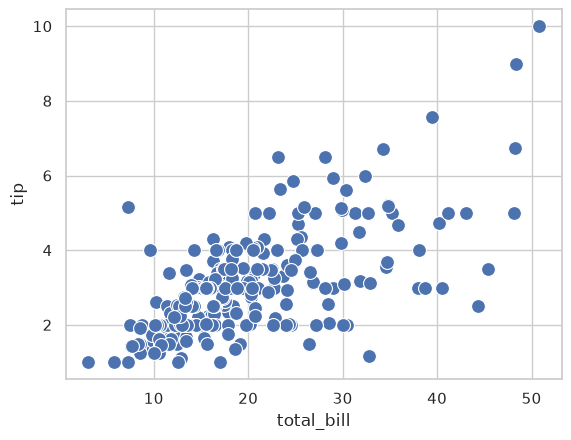
Control the panel size. plt.subplots(figsize=(4, 3)) creates a figure four inches wide and three inches tall, along with an axes named ax. Passing ax=ax tells Seaborn to draw in that panel. This changes the space available for the chart, not the bill or tip values.
The points show a broadly positive bill-tip association with substantial variation. Compare points at similar horizontal positions: similar bills can have different tips. Closely overlapping points may be hard to distinguish; transparency or separate group panels can help when that matters to the question.
fig, ax = plt.subplots(figsize=(4, 3))
sns.scatterplot(x='total_bill', y='tip', data=tips, s=100, legend=True, ax=ax)
<Axes: xlabel='total_bill', ylabel='tip'>
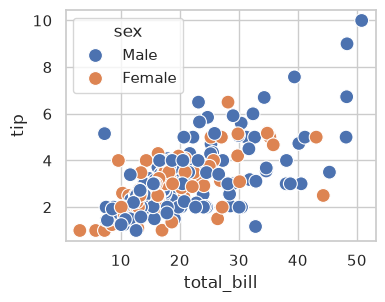
Use color to identify groups. Adding hue='sex' colors the points using the recorded sex categories and adds a legend. You can now inspect whether the groups occupy similar regions of the chart while retaining the same bill and tip axes.
Read both the legend and the locations of points. A color appearing more often can reflect more recorded bills in that group; it does not mean larger tips. Differences between these observational groups also do not isolate the effect of group membership.
fig, ax = plt.subplots(figsize=(4, 3))
sns.scatterplot(x='total_bill', y='tip', data=tips, s=100, legend=True, ax=ax, hue='sex')
<Axes: xlabel='total_bill', ylabel='tip'>
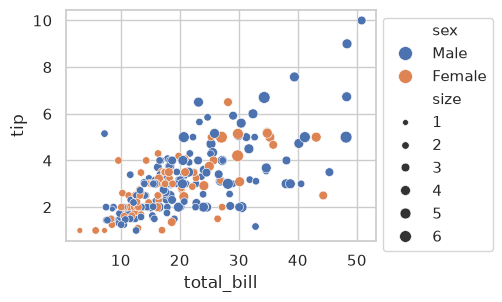
Map party size to marker size. Adding size='size' makes larger markers represent larger parties. The data column size counts people; marker size is its visual encoding. Use the size legend to interpret markers rather than assuming a particular marker represents a specific number of people.
The chart now combines bill amount, tip amount, recorded sex group, and party size. Larger party markers often occur at higher bill amounts, but several mappings can make the chart harder to read. Keep only mappings needed for the manager’s question. The exercise below uses meal time instead of sex as the color grouping.
bbox_to_anchor=(1, 1) places the legend at an anchor on the right edge near the top of the axes, helping it avoid covering observations. Its final placement also depends on the legend’s alignment; leave enough figure space so the legend remains visible. (bbox means bounding box.)
fig, ax = plt.subplots(figsize=(4, 3))
sns.scatterplot(x='total_bill', y='tip', data=tips, s=100, legend=True, ax=ax, hue='sex', size='size')
ax.legend(bbox_to_anchor=(1, 1))  ### move legend outside the plot
<matplotlib.legend.Legend at 0x7fceb8abccd0>
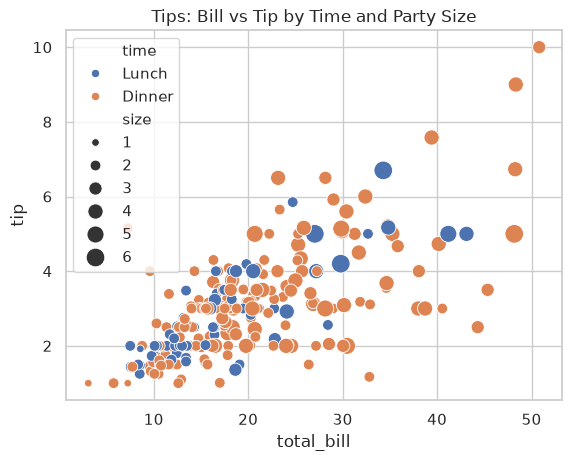
### Exercise: Scatter with Semantic Mapping
# Practice path: Core classroom practice.
# The manager wants one chart showing bill vs. tip, the meal, and the party size.
#   1. Use sns.scatterplot() to plot total_bill (x) against tip (y).
#   2. Color the points by meal time, and draw larger parties as larger points
#      (point sizes from 30 to 180).
#   3. Set the title to 'Tips: Bill vs Tip by Time and Party Size'.
#   4. In a comment, answer: where on the chart do the largest parties appear?
# Also explain one limitation: Does the association establish that adding a person causes a larger tip?
### Your code starts here.


### Your code ends here.
Text(0.5, 1.0, 'Tips: Bill vs Tip by Time and Party Size')
7.2.2.2. Line Plot#
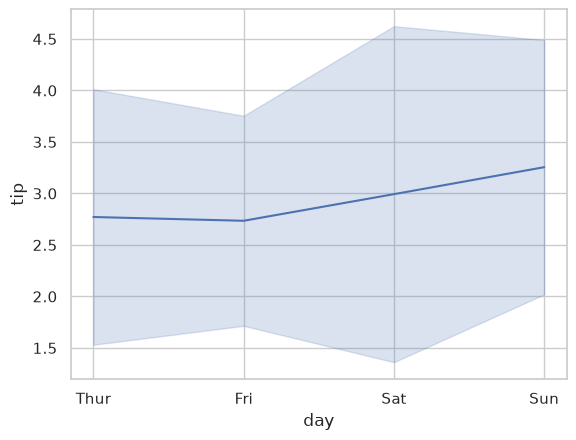
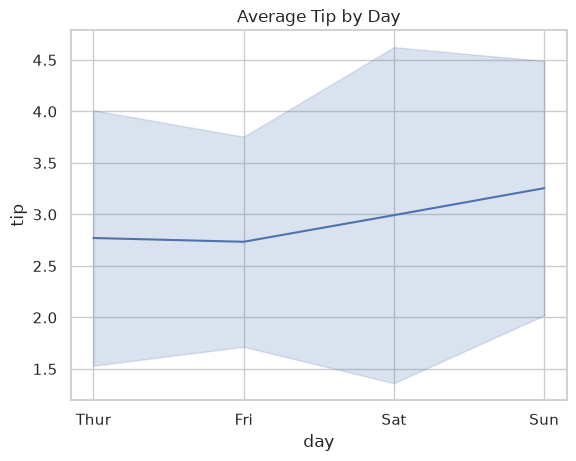
lineplot is commonly used for trends across an ordered x-axis. When an x value repeats, seaborn plots the mean and draws a shaded band around it. Here errorbar='sd' makes the band one standard deviation above and below the mean: how spread out the tips are on each day.
Seaborn’s default band is a 95% confidence interval, which describes how precisely the sample estimates the mean rather than how spread out the values are. Chapter 11 explains confidence intervals.
The weekday example below summarizes separate bills by day; it is not a chronological record of sales over successive dates. Connecting weekday means does not show how a particular customer’s tip changes over time. For a business time trend, use ordered dates or months, as in the homework revenue example; a categorical bar or point plot is another way to compare weekday means.
sns.lineplot(x='day', y='tip', data=tips, estimator='mean', errorbar='sd')
<Axes: xlabel='day', ylabel='tip'>
### Exercise: Average Tip by Day
# Practice path: Additional practice.
# The manager wants to compare the average tip on each day and how much tips vary.
#   1. Use sns.lineplot() to draw tip by day from tips, showing the mean tip for each day.
#   2. Show the spread of tips as a band one standard deviation above and below the mean.
#   3. Set the title to 'Average Tip by Day'.
#   4. In a comment, answer: which day has the highest average tip,
#      and on which day are tips most spread out?
# Also explain one limitation: Does the standard-deviation band contain every individual tip?
### Your code starts here.


### Your code ends here.
Text(0.5, 1.0, 'Average Tip by Day')
7.2.3. Categorical Plots#
Categorical plots summarize or compare values across groups.
sns.catplot() is a figure-level wrapper for categorical plots (kind='box', 'violin', 'bar', 'count', etc.).
Use it when you want consistent faceting/layout behavior across categorical plot types.
7.2.3.1. Box Plot#
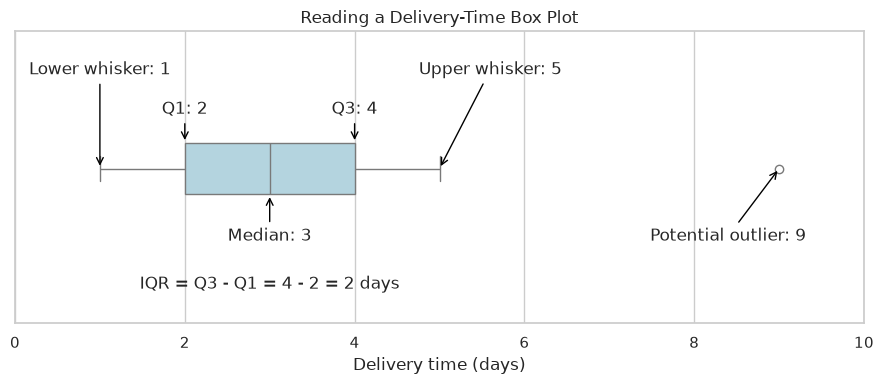
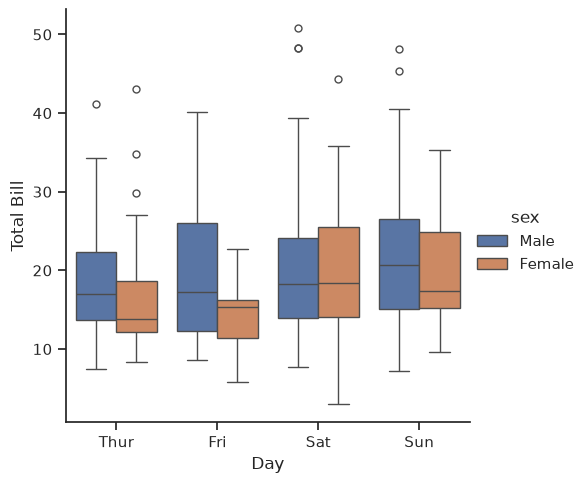
A box plot summarizes a distribution: the line inside the box is the median, the box spans the middle 50% of values (25th to 75th percentile), the whiskers extend to observed values within the outlier thresholds, and points beyond the whiskers are possible outliers. For a labeled example, see the BoxPlots section of Pandas Chart Types.
When you compare boxes, compare the typical value (the median line) and the spread (the height of the box) separately. One day can have a higher median bill and also more variable bills.
Note
The with sns.axes_style(...) block is a context manager that temporarily applies a style only to the plots created inside it. Once the block ends, Seaborn reverts to the previous theme — nothing is permanently changed.
Read the parts of a box plot
In the labeled delivery-time example below, the first quartile (Q1) is the 25th percentile, and the third quartile (Q3) is the 75th percentile. The box extends from Q1 to Q3, and the line inside it is the median (50th percentile). The interquartile range (IQR) is Q3 minus Q1, the width of the middle half of the data.
With the default rule, the whiskers reach the smallest and largest observed values within Q1 minus 1.5 times the IQR and Q3 plus 1.5 times the IQR. These thresholds need not be observed values; the whiskers end at actual observations within them. Points outside are flagged as potential outliers. They can represent valid unusual deliveries, so investigate them before removing anything.
This chart is horizontal: further right means more days, and a wider box means more variability in the middle half of the deliveries. For a vertical box plot, read higher values and taller boxes instead. Whiskers need not show the full data range, and the median is not necessarily the mean.
delivery_times = pd.DataFrame({'days': [1, 2, 2, 3, 3, 4, 4, 5, 9]})
fig, ax = plt.subplots(figsize=(9, 4))
sns.boxplot(data=delivery_times, x='days', whis=1.5, width=0.3,
            color='lightblue', ax=ax)
# Annotate known positions for this small teaching dataset.
labels = [
    ('Lower whisker: 1', (1, 0), (1, -0.55)),
    ('Q1: 2', (2, -0.15), (2, -0.32)),
    ('Median: 3', (3, 0.15), (3, 0.42)),
    ('Q3: 4', (4, -0.15), (4, -0.32)),
    ('Upper whisker: 5', (5, 0), (5.6, -0.55)),
    ('Potential outlier: 9', (9, 0), (8.4, 0.42))
]
for label, point, position in labels:
    ax.annotate(label, xy=point, xytext=position, ha='center',
                arrowprops={'arrowstyle': '->', 'color': 'black'})
ax.text(3, 0.7, 'IQR = Q3 - Q1 = 4 - 2 = 2 days', ha='center')
ax.set_ylim(0.9, -0.8)
ax.set_xlim(0, 10)
ax.set_xlabel('Delivery time (days)')
ax.set_yticks([])
ax.set_title('Reading a Delivery-Time Box Plot')
plt.tight_layout()
plt.show()
### Exercise: Typical Speed and Consistency
# Practice path: Core classroom practice.
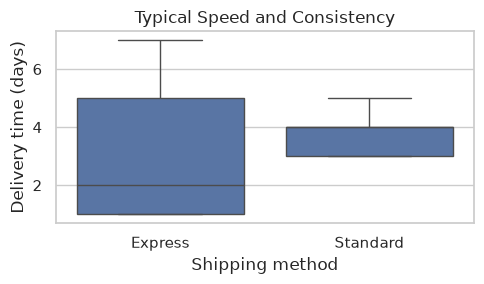
# A manager compares two shipping methods in this small sample.
shipping = pd.DataFrame({
    'method': ['Express'] * 9 + ['Standard'] * 9,
    'days': [1, 1, 1, 2, 2, 3, 5, 6, 7,
             3, 3, 3, 4, 4, 4, 4, 5, 5]
})
# 1. Draw a box plot comparing delivery days by method.
# 2. Compute each method's median and IQR, and print both values.
# 3. In comments, identify the faster typical method and the more consistent
#    method using the spread of the middle 50% of deliveries.
# 4. Explain why those answers can differ and why the chart does not show sample size.
### Your code starts here.


### Your code ends here.
          median_days  iqr_days
method
Express           2.0       4.0
Standard          4.0       1.0
with sns.axes_style(style='ticks'):
    # g = sns.catplot(data=tips, x='day', y='total_bill', kind='box')
    g = sns.catplot(data=tips, x='day', y='total_bill', hue='sex', kind='box')
    g.set_axis_labels('Day', 'Total Bill')
### Exercise: Box Plot by Day and Sex
# Practice path: Additional practice.
# The manager wants to know whether men and women spend differently on each day.
#   1. Use sns.catplot() to draw box plots of total_bill by day from tips,
#      with a separate box for each sex on every day.
#   2. Set the axis labels to 'Day' and 'Total Bill'.
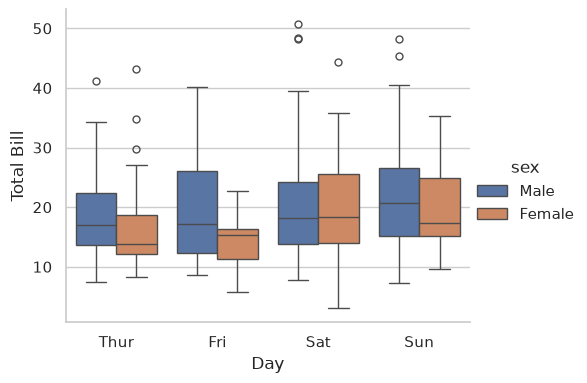
#   3. In a comment, answer: on which day are men's and women's bills most alike?
# Also explain one limitation: Do similar medians mean that the two groups have identical bill distributions?
### Your code starts here.


### Your code ends here.
<seaborn.axisgrid.FacetGrid at 0x7fceb8611bd0>
7.2.3.2. Bar Plot#
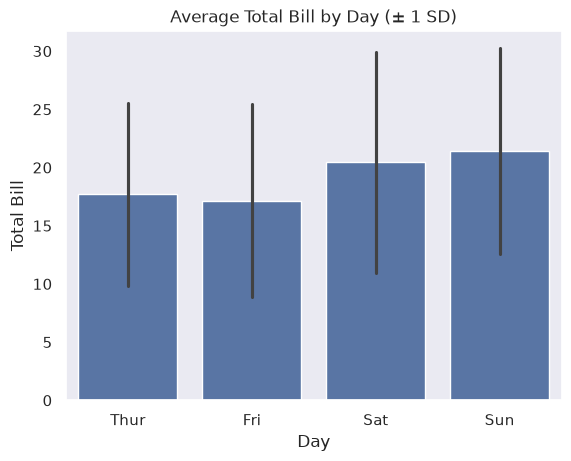
barplot shows an estimator (mean by default) with an error bar. With errorbar='sd', the line on each bar spans one standard deviation below and above the mean.
Also, here we explore different plotting techniques:
Saving axes: Instead of using
subplots(), we save the plot, which is an axes, and then control the styling directly.The
withstatement: Thewithstatement (the “context manager” that handles resources) temporarily applies a style only for the plots created inside its block. Once the block ends, Seaborn returns to the previous style — nothing is permanently changed.
What a mean chart hides
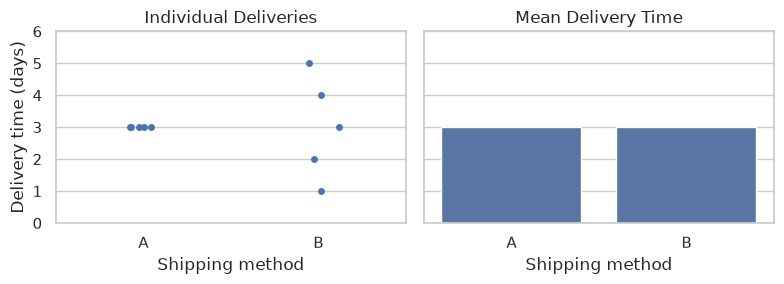
Two shipping methods can have the same average delivery time but different levels of consistency. In the small dataset below, one row is one delivery, and both methods average three days. Method A always takes three days; Method B ranges from one to five days.
The left panel shows every delivery. The sideways offsets keep overlapping points visible; they do not represent another variable. The right panel shows only the group means. Equal bars hide the variation within each method and how many deliveries were recorded.
The bars use errorbar=None to isolate the mean. Adding errorbar='sd' would summarize variability with one standard deviation above and below the mean, but would still hide individual observations. A confidence interval answers a different question: how uncertain is the estimated population mean? It is not a range containing all deliveries. Chapter 11 develops confidence intervals.
deliveries_demo = pd.DataFrame({
    'method': ['A'] * 5 + ['B'] * 5,
    'days': [3, 3, 3, 3, 3, 1, 2, 3, 4, 5]
})
fig, axes = plt.subplots(1, 2, figsize=(8, 3), sharey=True)
sns.stripplot(data=deliveries_demo, x='method', y='days',
              jitter=0.12, ax=axes[0])
axes[0].set_title('Individual Deliveries')
sns.barplot(data=deliveries_demo, x='method', y='days',
            errorbar=None, ax=axes[1])
axes[1].set_title('Mean Delivery Time')
for ax in axes:
    ax.set_xlabel('Shipping method')
    ax.set_ylabel('Delivery time (days)')
    ax.set_ylim(0, 6)
plt.tight_layout()
plt.show()
### Exercise: Equal Means, Different Reliability
# Practice path: Core classroom practice.
# A manager is choosing a method for deliveries promised within four days.
# Use deliveries_demo from the example above.
# 1. Count the deliveries taking more than four days for each method.
# 2. Print the counts so you can compare the methods.
# 3. In comments, explain which method met the promise more consistently in this sample.
# 4. Explain why the mean bars alone cannot answer the manager's question,
#    and why this small sample cannot guarantee future delivery performance.
### Your code starts here.


### Your code ends here.
method
A    0
B    1
Name: late, dtype: int64
with sns.axes_style(style='dark'):
    g = sns.barplot(data=tips, x='day', y='total_bill', errorbar='sd')
    g.set_xlabel('Day')
    g.set_ylabel('Total Bill')
    g.set_title('Average Total Bill by Day (± 1 SD)')
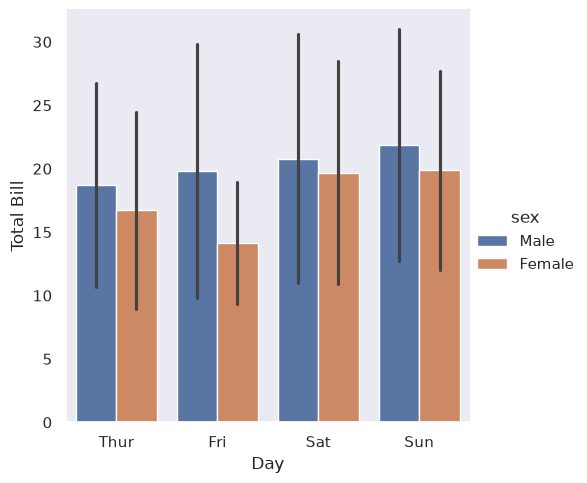
Set hue and see the magic seaborn does.
with sns.axes_style(style='dark'):
    g = sns.catplot(data=tips, x='day', y='total_bill', hue='sex', kind='bar', errorbar='sd')
    g.set_axis_labels('Day', 'Total Bill')
### Exercise: Mean Total Bill by Day
# Practice path: Additional practice.
# The manager wants to compare the average bill on each day.
#   1. Use sns.catplot() to draw a bar chart of the mean total_bill for each day,
#      with error bars showing one standard deviation.
#   2. Set the axis labels to 'Day' and 'Total Bill'.
#   3. In a comment, answer: which days have the highest average bills, and is
#      every bill on those days higher than on other days?
#   4. Use the original bill values to check the claim about every bill.
#      Show a counterexample if the claim is false.
# Also explain one limitation: Can the mean bars alone tell you the median or identify individual unusually large bills?
### Your code starts here.


### Your code ends here.
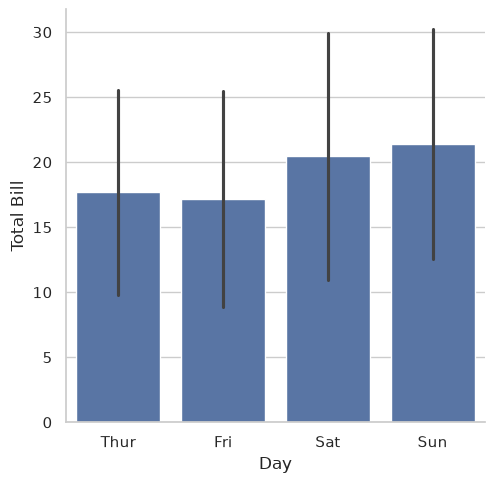
Largest Thursday/Friday bill: $43.11
Smallest Saturday/Sunday bill: $3.07
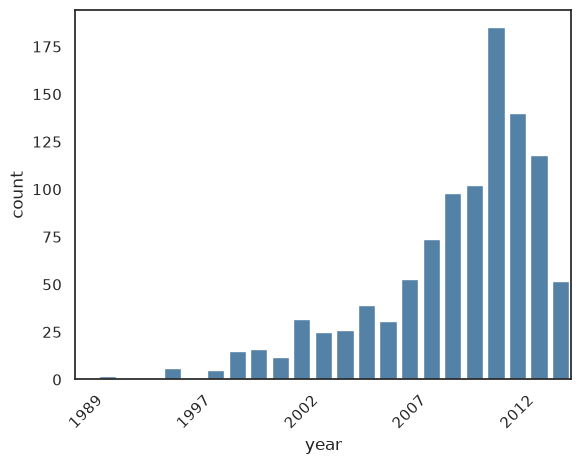
7.2.3.3. Count Plot (kind='count')#
Count plots show category frequencies. This is different from histograms, which bin continuous numeric values.
print(planets.head())

with sns.axes_style('white'):
    g = sns.countplot(
        data=planets,
        x='year',
        color='steelblue'
        )
    ticks = g.get_xticks()
    labels = [t.get_text() for t in g.get_xticklabels()]   # get labels before changing ticks

    g.set_xticks(ticks[::5])                    # set every 5th tick position
    g.set_xticklabels(labels[::5], rotation=45) # set every 5th label

### with figure level catplot:
# with sns.axes_style('white'):       ### with for temporary style
#     g = sns.catplot(
#         data=planets,
#         x='year',
#         aspect=2,           ### aspect ratio (width/height);
#         kind='count',
#         color='steelblue',
#         height=3
#     )
            method  number  orbital_period   mass  distance  year
0  Radial Velocity       1         269.300   7.10     77.40  2006
1  Radial Velocity       1         874.774   2.21     56.95  2008
2  Radial Velocity       1         763.000   2.60     19.84  2011
3  Radial Velocity       1         326.030  19.40    110.62  2007
4  Radial Velocity       1         516.220  10.50    119.47  2009
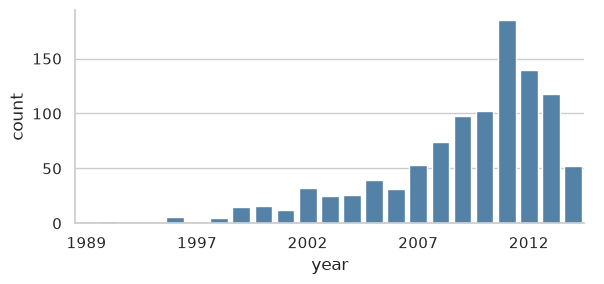
### Exercise: Count Planets Discoveries by Year
# Practice path: Additional practice.
# A science magazine wants a chart showing how planet discoveries took off over time.
#   1. Use the figure-level sns.catplot() (not countplot as above) to count
#      discoveries per year in planets. Make the chart 3 inches tall and twice as
#      wide as it is tall, with every bar 'steelblue'.
#   2. Label only every 5th year on the x-axis so the labels stay readable.
#   3. In a comment, answer: when did discoveries take off?
# Also explain one limitation: Can discovery counts tell you how many planets actually existed in each year?
### Your code starts here.


### Your code ends here.
<seaborn.axisgrid.FacetGrid at 0x7fceb8346fd0>
### Exercise: Choose a Chart for the Manager
# Practice path: Core classroom practice.
# In comments, choose a chart for each question and explain your choice.
# 1. How many restaurant bills were recorded at lunch and at dinner?
# 2. How does bill amount relate to tip amount?
# 3. How do typical bill amounts and their variability differ between lunch and dinner?
# For Question 3, draw the chart you chose using tips and label the axes clearly.
# Then describe one finding and one limitation. No plotting function is prescribed.
### Your code starts here.


### Your code ends here.