
5.4. Time Series Plots#
Many business questions are about time. Are sales growing? Which months are busy? Did a region slow down this summer? To answer them, we need a time series: a sequence of values recorded at regular points in time, such as daily revenue or monthly orders.
In this section we use retail_daily_sales.csv, simulated daily sales for a retail chain over two years (2024 and 2025). Each row is one date, one region (North, South, East, West), and one product category (Electronics, Home, Apparel), with the units sold, the revenue, and the advertising spend. We will learn how pandas handles dates, how to change the time unit, how to smooth a noisy line, and how to compare several series.
5.4.1. Dates in Pandas#
A CSV file stores dates as plain text, such as "2024-01-01". To pandas, that text is just a string, so it cannot tell that January comes before February or that a date is a Saturday. First, let’s read the file without any date handling and check the type of the date column.
raw = pd.read_csv(path_data + 'retail_daily_sales.csv')
print(raw.shape)
print(raw.dtypes)
raw.head()
(8772, 6)
date            str
region          str
category        str
units         int64
revenue     float64
ad_spend    float64
dtype: object
| date | region | category | units | revenue | ad_spend | |
|---|---|---|---|---|---|---|
| 0 | 2024-01-01 | North | Electronics | 5 | 589.66 | 99.41 |
| 1 | 2024-01-01 | North | Home | 14 | 617.12 | 99.41 |
| 2 | 2024-01-01 | North | Apparel | 26 | 792.02 | 99.41 |
| 3 | 2024-01-01 | South | Electronics | 15 | 1842.10 | 112.08 |
| 4 | 2024-01-01 | South | Home | 13 | 599.25 | 112.08 |
The date column has the type str (text). The function pd.to_datetime() converts text to real dates, with the type datetime64:
raw['date'] = pd.to_datetime(raw['date'])
raw['date'].dtype
dtype('<M8[us]')
A shorter way is to convert while reading the file. The parse_dates= argument of read_csv() takes a list of the columns that hold dates:
sales = pd.read_csv(path_data + 'retail_daily_sales.csv', parse_dates=['date'])
sales.dtypes
date        datetime64[us]
region                 str
category               str
units                int64
revenue            float64
ad_spend           float64
dtype: object
Once a column holds dates, the .dt accessor gives us parts of each date. .dt.month returns the month number (1 to 12), .dt.year returns the year, and .dt.day_name() returns the weekday name. These parts are useful for grouping, for example comparing weekends with weekdays.
sales['month'] = sales['date'].dt.month
sales['weekday'] = sales['date'].dt.day_name()
sales[['date', 'month', 'weekday', 'revenue']].head()
| date | month | weekday | revenue | |
|---|---|---|---|---|
| 0 | 2024-01-01 | 1 | Monday | 589.66 |
| 1 | 2024-01-01 | 1 | Monday | 617.12 |
| 2 | 2024-01-01 | 1 | Monday | 792.02 |
| 3 | 2024-01-01 | 1 | Monday | 1842.10 |
| 4 | 2024-01-01 | 1 | Monday | 599.25 |
The data has 12 rows per day (4 regions times 3 categories). To see the whole chain, we add up the revenue for each date with groupby(). The result is a Series whose index is the dates. An index made of dates is called a datetime index (DatetimeIndex), and it is what the time series tools in this section work on.
daily = sales.groupby('date')['revenue'].sum()
print(len(daily))
print(type(daily.index))
daily.head()
731
<class 'pandas.DatetimeIndex'>
date
2024-01-01    9469.96
2024-01-02    7342.17
2024-01-03    9392.98
2024-01-04    8595.49
2024-01-05    8573.13
Name: revenue, dtype: float64
If a table already has one row per date, df.set_index('date') turns the date column into a datetime index in one step.
When a Series has a datetime index, .plot() puts the dates on the x-axis automatically:
daily.plot(
    figsize=(8, 3),
    title="Daily Revenue Swings Too Much to Read",
    xlabel="Date",
    ylabel="Revenue ($)",
    lw=0.8,
);
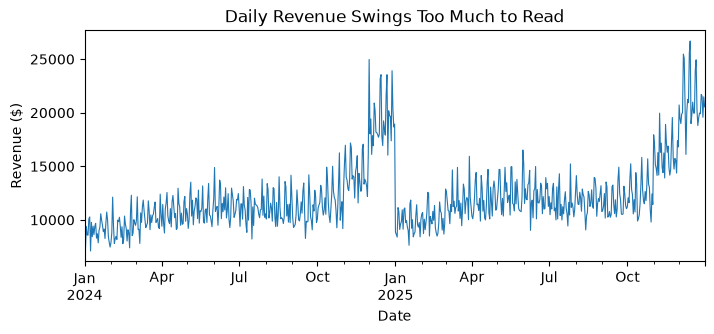
The 731 daily totals show a spike every December, but the day-to-day swings hide everything else: we cannot tell from this chart whether sales grew from 2024 to 2025.
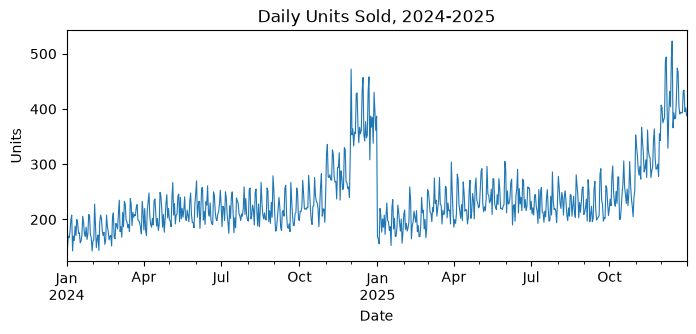
### Exercise: Plot Daily Units Sold
#   1. Read retail_daily_sales.csv with parse_dates=['date'] and name it sales.
#   2. Add a column 'year' using .dt.year.
#   3. Make a Series daily_units: total units for each date (groupby the date, sum units).
#   4. Plot daily_units as a line with figsize=(8, 3), a title,
#      xlabel="Date", and ylabel="Units".
### Your code starts here.


### Your code ends here.
5.4.2. Resampling#
Resampling changes the time unit of a time series, for example from days to weeks or months. With a datetime index, .resample() groups the rows into time bins, and an aggregation such as .sum() or .mean() combines each bin into one value. It works like groupby(), with time periods as the groups.
The text inside resample() is a frequency alias that names the time unit:
Alias |
Time unit |
Each bin is labeled by |
|---|---|---|
|
day |
the day |
|
week |
the Sunday that ends the week |
|
month |
the last day of the month |
|
quarter |
the last day of the quarter |
|
year |
the last day of the year |
Pandas 3 uses "ME" (month end), "QE", and "YE". Older tutorials show "M", "Q", and "Y"; in pandas 3, "M" raises an error, so use "ME".
weekly = daily.resample("W").sum()
print(len(weekly))
weekly.tail(3)
105
date
2025-12-21    148674.45
2025-12-28    141734.88
2026-01-04     61609.53
Freq: W-SUN, Name: revenue, dtype: float64
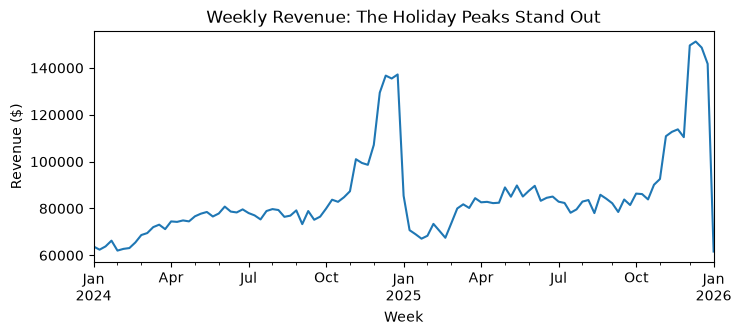
The 731 days become 105 weeks. The last bin, labeled 2026-01-04, holds only three days (December 29 to 31), so its total (61,610) is low because the week is cut short, not because sales fell. Watch for partial bins at the start and end of a series.
monthly = daily.resample("ME").sum()
print(len(monthly))
monthly.tail(3).round(0)
24
date
2025-10-31    381682.0
2025-11-30    482796.0
2025-12-31    652892.0
Freq: ME, Name: revenue, dtype: float64
weekly.plot(
    figsize=(8, 3),
    title="Weekly Revenue: The Holiday Peaks Stand Out",
    xlabel="Week",
    ylabel="Revenue ($)",
);
monthly.plot(
    figsize=(8, 3),
    marker="o",
    title="Monthly Revenue Rises Each Year and Peaks in December",
    xlabel="Month",
    ylabel="Revenue ($)",
);
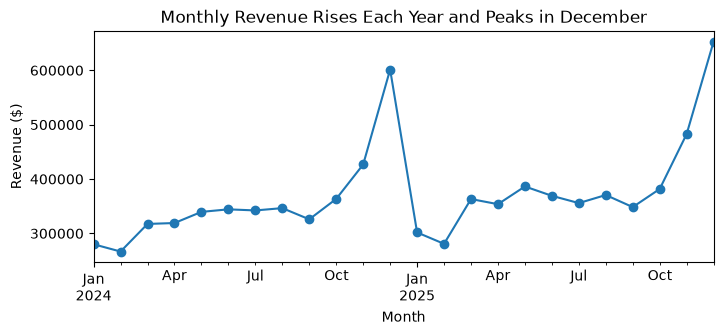
The monthly chart shows what the daily chart hid: revenue climbs through each year, December is the peak month (601,437 in December 2024 and 652,892 in December 2025), and 2025 runs higher than 2024.
Choose the time unit that fits the question:
Staffing a store next week: daily or weekly, because the manager needs to see individual busy days.
Monthly budget review: monthly, which removes day-to-day noise.
Annual report: yearly totals.
For the annual report, one number per year is enough:
daily.resample("YE").sum().round(0)
date
2024-12-31    4273190.0
2025-12-31    4647043.0
Freq: YE-DEC, Name: revenue, dtype: float64
Revenue grew from 4,273,190 in 2024 to 4,647,043 in 2025, about 8.7%. A yearly total answers “did we grow?” but hides when in the year the growth happened.
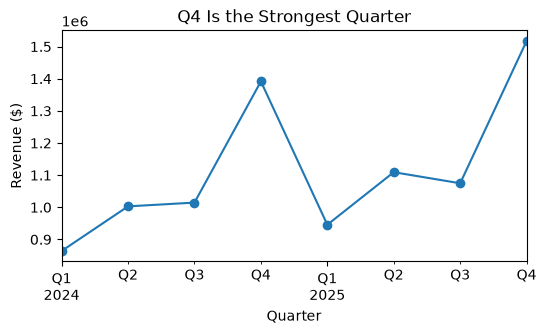
### Exercise: Quarterly Revenue
#   1. Resample the Series daily to quarters with "QE" and sum. Name it quarterly.
#   2. Print quarterly.
#   3. Plot quarterly as a line with marker="o", figsize=(6, 3), a title,
#      xlabel="Quarter", and ylabel="Revenue ($)".
#   4. Which quarter had the highest revenue?
### Your code starts here.


### Your code ends here.
date
2024-03-31     864035.0
2024-06-30    1002901.0
2024-09-30    1014599.0
2024-12-31    1391655.0
2025-03-31     945742.0
2025-06-30    1109203.0
2025-09-30    1074727.0
2025-12-31    1517370.0
Freq: QE-DEC, Name: revenue, dtype: float64
Highest quarter: 2025-12-31
5.4.3. Moving Averages#
Resampling gives fewer points. A moving average keeps every day but replaces each value with the average of the last several days, called the rolling window. In pandas, .rolling(7).mean() averages each day with the 6 days before it. The first 6 values are NaN because there are not yet 7 days to average.
daily.rolling(7).mean().head(8).round(0)
date
2024-01-01       NaN
2024-01-02       NaN
2024-01-03       NaN
2024-01-04       NaN
2024-01-05       NaN
2024-01-06       NaN
2024-01-07    9108.0
2024-01-08    8769.0
Name: revenue, dtype: float64
To see the smoothing, we draw the daily values faintly and the 7-day and 30-day averages on top. The ax= argument puts later lines on the same chart as the first one.
ax = daily.plot(figsize=(8, 3.5), alpha=0.3, lw=0.8, label="Daily", legend=True)
daily.rolling(7).mean().plot(ax=ax, label="7-day average", legend=True)
daily.rolling(30).mean().plot(
    ax=ax,
    label="30-day average",
    lw=2,
    title="Moving Averages Reveal the Upward Trend",
    xlabel="Date",
    ylabel="Revenue ($)",
    legend=True,
);
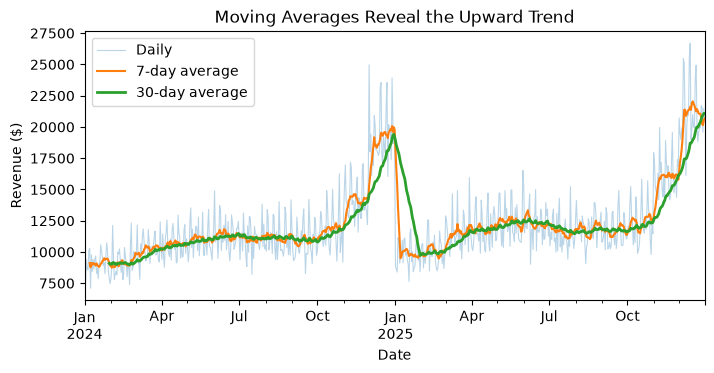
The 30-day average makes the steady rise and the holiday peaks easy to read, which is what a manager reviewing the year needs. The longer the window, the smoother the line, and the later it reacts to a change.
Smoothing can also hide information. Let’s zoom in on January and February 2024. Slicing a datetime index with .loc["2024-01":"2024-02"] selects January and February.
jan_feb = daily.loc["2024-01":"2024-02"]
ax = jan_feb.plot(figsize=(8, 3), marker=".", label="Daily", legend=True)
jan_feb.rolling(7).mean().plot(
    ax=ax,
    label="7-day average",
    title="Daily Revenue Jumps on Weekends",
    xlabel="Date",
    ylabel="Revenue ($)",
    legend=True,
);
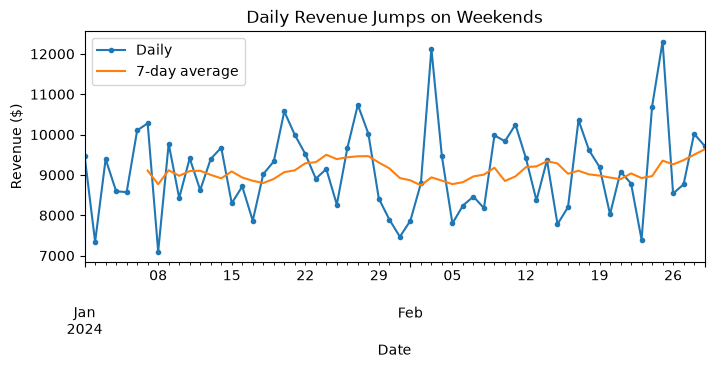
The daily line jumps on most weekends, while the 7-day average is nearly flat. Every 7-day window contains exactly one Saturday and one Sunday, so the weekend effect averages away. A bar chart of average revenue by weekday shows the pattern the moving average hid:
order = ["Monday", "Tuesday", "Wednesday", "Thursday", "Friday", "Saturday", "Sunday"]
by_weekday = daily.groupby(daily.index.day_name()).mean().reindex(order)
print(by_weekday.round(0))

by_weekday.plot.bar(
    figsize=(6, 3),
    title="Weekends Bring In About 20% More Revenue",
    xlabel="",
    ylabel="Average daily revenue ($)",
    rot=0,
    fontsize=8,
);
date
Monday       11661.0
Tuesday      11601.0
Wednesday    11397.0
Thursday     11423.0
Friday       11502.0
Saturday     13978.0
Sunday       13876.0
Name: revenue, dtype: float64
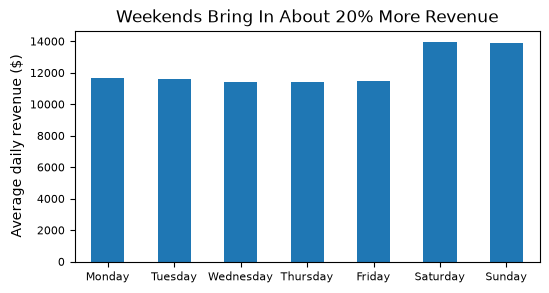
Saturday (13,978) and Sunday (13,876) average about 20% more than weekdays (11,397 to 11,661). A store manager scheduling staff needs this pattern, so a 7-day average is the wrong chart for that question even though it is the right chart for the trend.
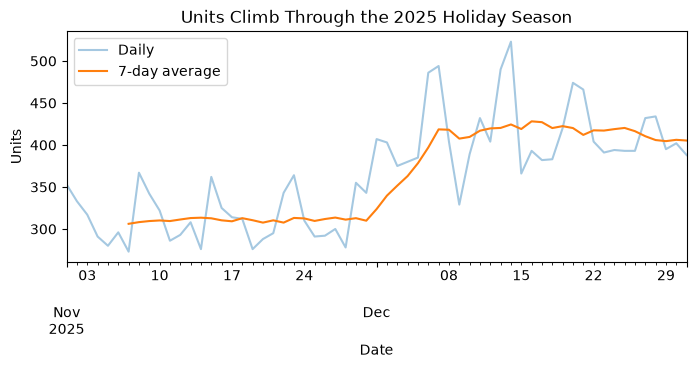
### Exercise: Smooth Daily Units in the Holiday Season
#   1. Make daily_units: total units for each date from sales (groupby date, sum units).
#   2. Select the dates from "2025-11" to "2025-12" with .loc. Name it holiday.
#   3. Plot holiday faintly (alpha=0.4) with figsize=(8, 3), and keep the Axes as ax.
#   4. Add the 7-day moving average of holiday on the same ax.
#   5. Add a title, xlabel="Date", ylabel="Units", and a legend.
### Your code starts here.


### Your code ends here.
5.4.4. Trend and Seasonality#
Two patterns appear in most business time series:
A trend is the long-run direction of the series: up, down, or flat. Our retail chain grows from year to year.
Seasonality is a pattern that repeats on a fixed calendar cycle, such as every year or every week. Retail has a holiday season every November and December, and a weekend bump every week.
What is left after trend and seasonality is noise: random ups and downs with no pattern.
A good way to see a yearly season is to put the months on the x-axis and draw one line per year. Lines that have the same shape show seasonality; a gap between the lines shows the trend. First we add year and month columns to the monthly totals, then pivot() to make rows = month and columns = year.
m = monthly.to_frame()
m['year'] = m.index.year
m['month'] = m.index.month
by_year = m.pivot(index='month', columns='year', values='revenue')
by_year.round(0)
| year | 2024 | 2025 |
|---|---|---|
| month | ||
| 1 | 280007.0 | 301762.0 |
| 2 | 266616.0 | 280792.0 |
| 3 | 317412.0 | 363188.0 |
| 4 | 319060.0 | 353735.0 |
| 5 | 339589.0 | 386324.0 |
| 6 | 344253.0 | 369145.0 |
| 7 | 342224.0 | 355736.0 |
| 8 | 346490.0 | 370608.0 |
| 9 | 325886.0 | 348383.0 |
| 10 | 363467.0 | 381682.0 |
| 11 | 426751.0 | 482796.0 |
| 12 | 601437.0 | 652892.0 |
by_year.plot(
    figsize=(7, 3.5),
    marker="o",
    title="December Peaks Both Years, and 2025 Runs Above 2024",
    xlabel="Month",
    ylabel="Revenue ($)",
    xticks=range(1, 13),
);
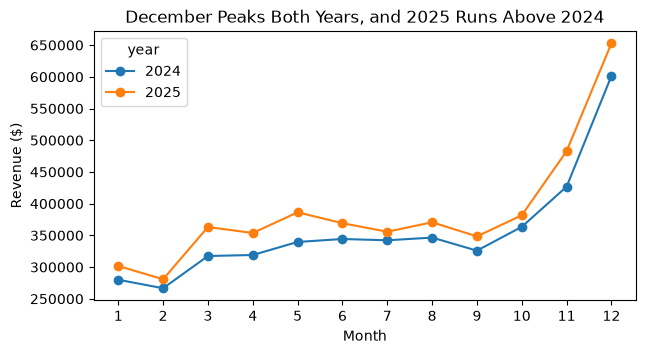
The two lines have the same shape: low in January and February, rising through the year, and a jump in November before the December peak. That repeated shape is the seasonality. The 2025 line sits above the 2024 line in all 12 months, and that gap is the trend. A buyer planning holiday inventory can read both from one chart: expect the December peak again, and expect it to be higher.
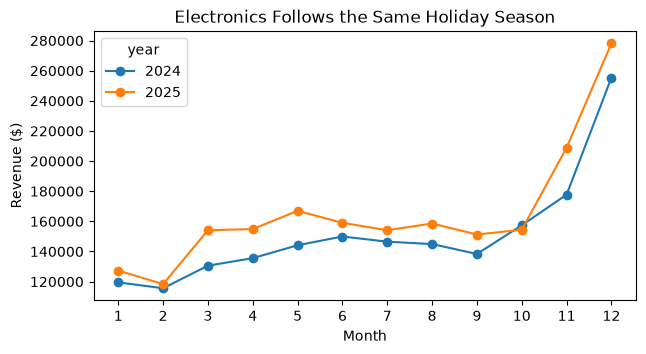
### Exercise: Seasonality for Electronics
#   1. Keep only the Electronics rows of sales. Name it elec.
#   2. Total the revenue for each date, then resample to months with "ME" and sum.
#      Name the Series elec_monthly.
#   3. Turn elec_monthly into a DataFrame with to_frame(), and add 'year' and 'month'
#      columns from its index.
#   4. Pivot with index='month', columns='year', values='revenue'.
#   5. Plot one line per year with marker="o", a title, xlabel="Month",
#      ylabel="Revenue ($)", and xticks=range(1, 13).
### Your code starts here.


### Your code ends here.
5.4.5. Comparing Series#
Managers often compare several series: regions, stores, or products. First we build monthly revenue for each region. We group by date and region, unstack() the regions into columns, and resample to months.
region_monthly = (
    sales.groupby(['date', 'region'])['revenue'].sum()
    .unstack()
    .resample("ME").sum()
)
region_monthly.head(3).round(0)
| region | East | North | South | West |
|---|---|---|---|---|
| date | ||||
| 2024-01-31 | 59957.0 | 65118.0 | 80058.0 | 74874.0 |
| 2024-02-29 | 59929.0 | 64984.0 | 71758.0 | 69946.0 |
| 2024-03-31 | 67617.0 | 74902.0 | 94840.0 | 80053.0 |
A DataFrame with several columns draws one line per column on a single chart:
region_monthly.plot(
    figsize=(8, 3.5),
    title="Monthly Revenue by Region",
    xlabel="Month",
    ylabel="Revenue ($)",
);
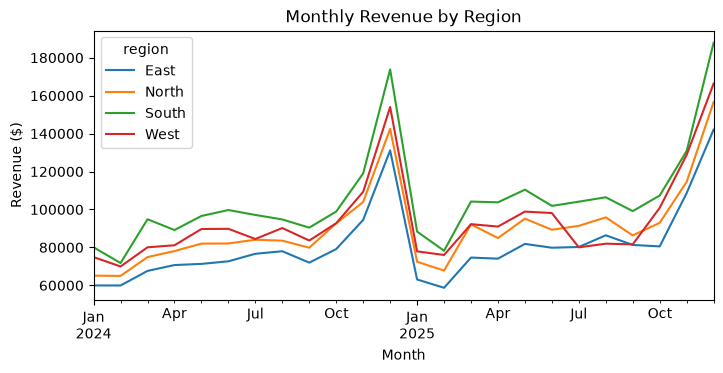
One chart is good for comparing levels: South is the largest region every month, and East is usually the smallest. But four lines with the same holiday shape lie on top of each other, and a change in one region is easy to miss.
Small multiples are a set of small charts, one per series, drawn with the same axes so they can be compared side by side. In pandas, subplots=True draws each column in its own panel with its own legend, layout=(2, 2) arranges the panels in a grid, and sharey=True gives every panel the same y-axis scale.
region_monthly.plot(
    subplots=True,
    layout=(2, 2),
    sharey=True,
    figsize=(8, 5),
    title="West Is the Only Region That Fell in Summer 2025",
    xlabel="Month",
    ylabel="Revenue ($)",
    fontsize=8,
);
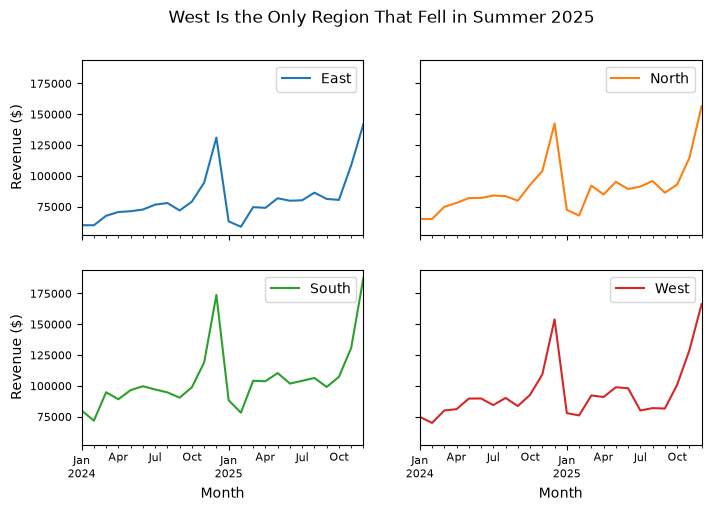
Each panel shows one region’s own shape. In the West panel, July to September 2025 sit below the same months of 2024, while the other three regions are higher in 2025. Without sharey=True, each panel would get its own scale and East (the smallest region) would look as large as South, so keep the shared scale when the panels are meant to be compared.
A quarterly table confirms what the chart suggests:
region_q = region_monthly.resample("QE").sum()
q3_change = (region_q.loc["2025-09-30"] / region_q.loc["2024-09-30"] - 1) * 100
q3_change.round(1)
region
East      9.4
North    10.5
South     9.7
West     -5.7
dtype: float64
Q3 revenue grew 9.4% to 10.5% in East, North, and South, but fell 5.7% in the West. That is a question for the West regional manager.
When to use each:
Chart |
Use it when |
Example question |
|---|---|---|
One chart, several lines |
You compare levels or rank the series, and there are only a few lines |
Which region sells the most? |
Small multiples ( |
You look at each series’ own pattern, or there are many series |
Did any region break from its usual pattern? |
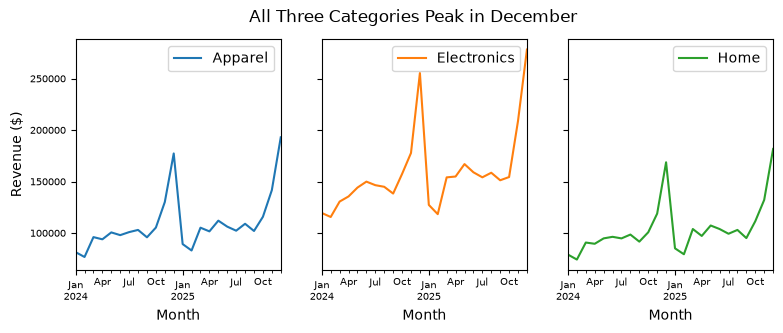
### Exercise: Small Multiples by Category
#   1. Build category_monthly: group sales by ['date', 'category'], sum revenue,
#      unstack(), then resample("ME").sum().
#   2. Plot it with subplots=True, layout=(1, 3), sharey=True, figsize=(9, 3),
#      a title, xlabel="Month", and ylabel="Revenue ($)".
#   3. Which category has the most revenue? Do all three share the December peak?
### Your code starts here.


### Your code ends here.
category
Electronics    3801829.0
Apparel        2620524.0
Home           2497879.0
dtype: float64
5.4.6. Extension: Year-over-Year Change#
This part is optional. Because of seasonality, comparing December with November says little: December is always higher. A fairer comparison is year-over-year change: each month against the same month one year earlier. On monthly data, pct_change(12) compares each value with the value 12 rows earlier. The first 12 months have no earlier year, so they are NaN and we drop them.
yoy = (monthly.pct_change(12) * 100).dropna()
yoy.index = yoy.index.strftime("%b")      ### label bars by month name: Jan, Feb, ...
print(yoy.round(1))

yoy.plot.bar(
    figsize=(7, 3),
    title="Every Month of 2025 Beat the Same Month of 2024",
    xlabel="",
    ylabel="Change vs. last year (%)",
    rot=0,
    fontsize=8,
);
date
Jan     7.8
Feb     5.3
Mar    14.4
Apr    10.9
May    13.8
Jun     7.2
Jul     3.9
Aug     7.0
Sep     6.9
Oct     5.0
Nov    13.1
Dec     8.6
Name: revenue, dtype: float64
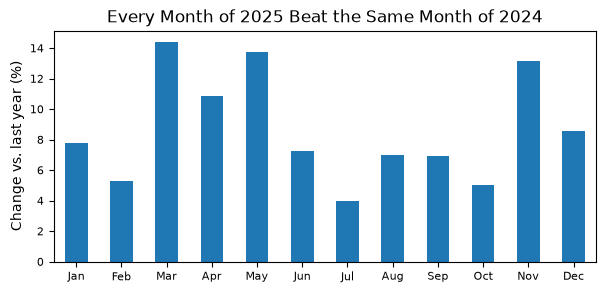
All 12 months grew, from 3.9% in July to 14.4% in March. pct_change(12) assumes the data has exactly one row per month with no gaps, which resample("ME") guarantees.
5.4.7. Summary#
A time series is a sequence of values at regular points in time. Convert date text with
pd.to_datetime()orparse_dates=, and use.dt.month,.dt.year, and.dt.day_name()to get parts of each date.A datetime index puts dates on the x-axis of
.plot()and enables the tools below.Resampling (
.resample("W"),.resample("ME"),.resample("QE")) changes the time unit. Pick the unit that fits the question, and watch for partial bins at the ends. Pandas 3 uses"ME", not"M".A moving average (
.rolling(7).mean()) smooths noise but can hide real patterns, such as the weekend bump.A trend is the long-run direction; seasonality is a pattern that repeats on a calendar cycle. A year-by-month pivot with one line per year shows both.
To compare series, use one chart to compare levels and small multiples (
subplots=True, sharey=True) to see each series’ own pattern.