
14.4. Nearest Neighbors with scikit-learn#
In the previous sections we built a \(k\)-nearest neighbor classifier by hand: compute distances, sort, take the \(k\) closest rows, and hold a majority vote. That code shows exactly what the method does, but it is slow and easy to get wrong. In practice, analysts use a library. In Chapter 13 you used scikit-learn’s LinearRegression and KNeighborsRegressor; scikit-learn’s KNeighborsClassifier does the same work for classification, with the same fit and predict steps.
This section follows one business case through the whole workflow. A subscription company (phone and internet service) wants to know which customers are likely to cancel next quarter, so that its retention team can call them with an offer before they leave. Customers who cancel are said to churn. The steps are the ones you already know from the hand-built classifier:
Choose the features and the target.
Split the data into a training set and a test set.
Put the features on a common scale, using the training set only.
Fit the classifier, predict, and measure accuracy on the test set.
Choose \(k\) by comparing accuracy on data the classifier has not seen.
14.4.1. The Customer Churn Data#
The file customer_churn.csv holds 1,000 customers of the company. Each row is one customer at the end of a quarter, with three numeric attributes and a label:
tenure_months: how many months the customer has been with the company,monthly_charges: the customer’s monthly bill in dollars,support_calls: the number of calls the customer made to customer support last quarter,churn: 1 if the customer cancelled during the next quarter, 0 if the customer stayed.
The data are synthetic (generated for this book with a fixed random seed) but follow patterns that churn studies commonly report: newer customers, customers with high bills, and customers who keep calling support are more likely to leave.
churn = pd.read_csv(path_data + 'customer_churn.csv')
churn.head()
| customer_id | tenure_months | monthly_charges | support_calls | churn | |
|---|---|---|---|---|---|
| 0 | C0001 | 11 | 62.23 | 1 | 1 |
| 1 | C0002 | 60 | 76.71 | 1 | 0 |
| 2 | C0003 | 48 | 58.86 | 2 | 1 |
| 3 | C0004 | 26 | 87.30 | 5 | 1 |
| 4 | C0005 | 7 | 84.22 | 2 | 1 |
How common is churn? The value_counts method with normalize=True gives the proportion of customers in each class.
churn['churn'].value_counts(normalize=True)
churn
0    0.714
1    0.286
Name: proportion, dtype: float64
About 29% of the customers churned and 71% stayed. The classes are imbalanced: one class is much more common than the other. Keep that 71% in mind. A “classifier” that predicts “stays” for every customer, without looking at any data, is already right about 71% of the time, so a real classifier has to beat that.
Comparing the average attributes of the two groups shows why the features should help.
churn.groupby('churn')[['tenure_months', 'monthly_charges', 'support_calls']].mean()
| tenure_months | monthly_charges | support_calls | |
|---|---|---|---|
| churn | |||
| 0 | 41.957983 | 65.942269 | 1.198880 |
| 1 | 22.412587 | 76.277203 | 2.255245 |
Customers who churned had been with the company for about 22 months on average, compared with about 42 months for those who stayed. They also paid about $10 more per month and made about twice as many support calls.
### Exercise: Churn Rate by Support Calls
#   1. Split the churn table into customers with 3 or more support calls and
#      customers with fewer than 3.
#   2. Compute the churn rate (the mean of the churn column) for each group,
#      rounded to 3 decimals.
# Print exactly:
# Churn rate, 3+ calls: 0.566
# Churn rate, under 3 calls: 0.218
churn = pd.read_csv(path_data + 'customer_churn.csv')
### Your code starts here.


### Your code ends here.
Churn rate, 3+ calls: 0.566
Churn rate, under 3 calls: 0.218
14.4.2. Features, Target, and a Train-Test Split#
As in Chapter 13, scikit-learn expects the inputs in two pieces:
X, a table of features (one column per attribute the classifier may use), andy, the target: the column of labels we want to predict.
The customer ID is only a name, not information about the customer, so it is not a feature.
features = ['tenure_months', 'monthly_charges', 'support_calls']

X = churn[features]
y = churn['churn']

X.shape, y.shape
((1000, 3), (1000,))
Next we hold out a test set. Section 1403 did this by shuffling the rows and cutting the table in two; train_test_split does both steps at once. We keep 30% of the customers for testing and fix random_state so the split is the same every time the page runs.
The argument stratify=y asks for a stratified split: the training and test sets keep the same share of churners as the full data. With imbalanced classes this matters, because an unlucky random split could leave the test set with too few churners to judge the classifier.
X_train, X_test, y_train, y_test = train_test_split(
    X, y, test_size=0.3, random_state=14, stratify=y)

print(len(X_train), 'training customers and', len(X_test), 'test customers')
print('Churn rate in training set:', round(y_train.mean(), 3))
print('Churn rate in test set:', round(y_test.mean(), 3))
700 training customers and 300 test customers
Churn rate in training set: 0.286
Churn rate in test set: 0.287
Both sets have a churn rate of about 0.29, the same as the full data. From here on, the test set stays locked away until we are ready to report how well the final classifier works.
### Exercise: A Different Split
#   1. Split X and y again, this time keeping 20% for testing.
#      Use random_state=1 and stratify=y.
#   2. Print the number of training and test customers and the churn rate of the
#      test set, rounded to 3 decimals.
# Print exactly:
# Training: 800
# Test: 200
# Test churn rate: 0.285
### Your code starts here.


### Your code ends here.
Training: 800
Test: 200
Test churn rate: 0.285
14.4.3. Scaling Features with StandardScaler#
Distance adds up the squared differences in every feature. Our features have very different scales: tenure runs from 1 to 72 months, monthly charges from $20 to $120, and support calls only from 0 to 6. Without scaling, a difference of $10 on the bill counts a hundred times as much as a difference of one support call, even though support calls are the strongest sign of churn.
In Sections 1402 and 1403 we converted each feature to standard units by subtracting its mean and dividing by its SD. scikit-learn’s StandardScaler does the same thing. It works in two steps:
fitlearns the mean and SD of each feature. We fit on the training set only, for the reason given in Section 1403: the test customers stand in for future customers, so they must not influence how the classifier is built.transformapplies those training means and SDs to any table: the training set, the test set, or a brand-new customer.
scaler = StandardScaler()
scaler.fit(X_train)

pd.DataFrame({'mean': scaler.mean_, 'SD': scaler.scale_}, index=features)
| mean | SD | |
|---|---|---|
| tenure_months | 36.765714 | 20.900772 |
| monthly_charges | 68.196971 | 19.111750 |
| support_calls | 1.464286 | 1.237571 |
X_train_scaled = scaler.transform(X_train)
X_test_scaled = scaler.transform(X_test)

X_train_scaled[:5].round(2)
array([[ 0.25, -1.28, -1.18],
       [-1.28,  1.09,  0.43],
       [-0.95, -1.92, -1.18],
       [ 1.54, -0.3 ,  0.43],
       [ 0.2 , -0.26, -0.38]])
The result is a NumPy array in standard units. Each column of the scaled training set now has mean 0 and SD 1. The scaled test set has means and SDs close to, but not exactly, 0 and 1, because it was scaled with the training statistics, which is what we want.
print('Training means:', X_train_scaled.mean(axis=0).round(2))
print('Training SDs:  ', X_train_scaled.std(axis=0).round(2))
print('Test means:    ', X_test_scaled.mean(axis=0).round(2))
print('Test SDs:      ', X_test_scaled.std(axis=0).round(2))
Training means: [-0. -0.  0.]
Training SDs:   [1. 1. 1.]
Test means:     [-0.06  0.12  0.1 ]
Test SDs:       [1.01 1.01 0.99]
A new customer is scaled the same way. Here is a customer who joined 6 months ago, pays $95 a month, and called support 4 times last quarter.
new_customer = pd.DataFrame({'tenure_months': [6],
                             'monthly_charges': [95.0],
                             'support_calls': [4]})

scaler.transform(new_customer).round(2)
array([[-1.47, 1.4 , 2.05]])
In standard units, this customer’s tenure is about 1.5 SDs below average, and both the bill and the number of support calls are well above average.
### Exercise: Scale a New Customer
#   1. Put a customer with tenure_months 48, monthly_charges 55.0, and
#      support_calls 0 in a one-row DataFrame with the columns in features.
#   2. Use the scaler fitted above (do not refit it) to convert the customer to
#      standard units, and print the result rounded to 2 decimals.
# Print exactly:
# [[ 0.54 -0.69 -1.18]]
### Your code starts here.


### Your code ends here.
[[ 0.54 -0.69 -1.18]]
14.4.4. Fitting and Predicting with KNeighborsClassifier#
KNeighborsClassifier is scikit-learn’s \(k\)-nearest neighbor classifier. The argument n_neighbors is \(k\). Fitting a nearest neighbor classifier does very little work: fit simply stores the training rows and their labels. The real work happens in predict, which, for each new row, finds the \(k\) nearest training rows and takes a majority vote, exactly like our classify function.
knn = KNeighborsClassifier(n_neighbors=5)
knn.fit(X_train_scaled, y_train)
KNeighborsClassifier()In a Jupyter environment, please rerun this cell to show the HTML representation or trust the notebook.
On GitHub, the HTML representation is unable to render, please try loading this page with nbviewer.org.
Parameters
Fitted attributes
To classify the new customer from the previous subsection, scale the customer with the same scaler and call predict.
new_scaled = scaler.transform(new_customer)
knn.predict(new_scaled)
array([1])
The prediction is 1: this customer is likely to churn. The kneighbors method shows the evidence behind the vote, the distances to the 5 nearest training customers and their positions in the training set. Looking up those customers confirms that it is the same distance-and-vote procedure we wrote by hand.
distances, positions = knn.kneighbors(new_scaled)

neighbors = X_train.iloc[positions[0]].copy()
neighbors['churn'] = y_train.iloc[positions[0]].values
neighbors['distance'] = distances[0].round(3)
neighbors
| tenure_months | monthly_charges | support_calls | churn | distance | |
|---|---|---|---|---|---|
| 535 | 18 | 88.13 | 4 | 1 | 0.677 |
| 386 | 22 | 95.25 | 4 | 1 | 0.766 |
| 774 | 3 | 101.50 | 3 | 1 | 0.888 |
| 83 | 14 | 79.35 | 4 | 1 | 0.904 |
| 181 | 2 | 102.25 | 3 | 1 | 0.913 |
Now classify every test customer at once and compare the predictions with the actual labels. Accuracy is the proportion of matches; accuracy_score computes it, and so does the classifier’s own score method.
y_pred = knn.predict(X_test_scaled)

print('First ten predictions:', y_pred[:10])
print('First ten actual:     ', y_test.values[:10])
print('Test accuracy:', round(accuracy_score(y_test, y_pred), 3))
First ten predictions: [0 0 0 0 1 1 1 0 1 0]
First ten actual:      [0 1 0 0 1 0 1 1 1 0]
Test accuracy: 0.83
The 5-nearest neighbor classifier is right for 83% of the test customers, well above the 71% of the always-“stays” rule.
How much did scaling help? Fit the same classifier on the raw features and compare.
knn_raw = KNeighborsClassifier(n_neighbors=5)
knn_raw.fit(X_train, y_train)

print('Test accuracy without scaling:', round(knn_raw.score(X_test, y_test), 3))
print('Test accuracy with scaling:   ', round(knn.score(X_test_scaled, y_test), 3))
Test accuracy without scaling: 0.787
Test accuracy with scaling:    0.83
Without scaling, accuracy drops to about 79%: the classifier mostly ignores support calls, the most useful feature, because its scale is so small. Scaling is part of the nearest neighbor method, not an optional extra.
### Exercise: Try k = 7
#   1. Fit a KNeighborsClassifier with n_neighbors=7 on X_train_scaled and y_train.
#   2. Predict the test set (X_test_scaled) and print the test accuracy rounded to 3 decimals.
#   3. Predict new_customer (use new_scaled) and print the predicted label.
# Print exactly:
# Test accuracy: 0.847
# New customer prediction: 1
### Your code starts here.


### Your code ends here.
Test accuracy: 0.847
New customer prediction: 1
14.4.5. Pipelines and Choosing k#
Keeping track of a separate scaler and classifier is easy to get wrong, for example by forgetting to scale a new customer. A pipeline joins the steps into one object. When you call fit on the pipeline, it fits the scaler on the training data, transforms them, and fits the classifier; when you call predict, it transforms the new rows with the training statistics and then predicts. Scaling with training statistics only is built in.
model = make_pipeline(StandardScaler(), KNeighborsClassifier(n_neighbors=5))
model.fit(X_train, y_train)

print('Test accuracy:', round(model.score(X_test, y_test), 3))
print('New customer prediction:', model.predict(new_customer)[0])
Test accuracy: 0.83
New customer prediction: 1
The pipeline gives the same accuracy and prediction as the two separate steps, and it takes the raw features directly.
Choosing \(k\). The number of neighbors is a choice we make, not something fit learns from the data; such choices are called hyperparameters. A natural idea is to try several values of \(k\) and keep the one with the best test accuracy. But then the test set has been used to build the classifier, and its accuracy is no longer an honest estimate for new customers, the same problem as testing on the training set, only milder.
The standard fix is a validation set: split the training set once more, use one part to fit and the other part to compare values of \(k\), and save the test set for a single final check.
X_fit, X_val, y_fit, y_val = train_test_split(
    X_train, y_train, test_size=0.25, random_state=14, stratify=y_train)

print(len(X_fit), 'customers for fitting and', len(X_val), 'for validation')
525 customers for fitting and 175 for validation
k_values = np.arange(1, 32, 2)     # odd values of k avoid ties in a two-class vote
val_accuracy = []

for k in k_values:
    candidate = make_pipeline(StandardScaler(), KNeighborsClassifier(n_neighbors=k))
    candidate.fit(X_fit, y_fit)
    val_accuracy.append(candidate.score(X_val, y_val))

k_results = pd.DataFrame({'k': k_values, 'validation accuracy': np.round(val_accuracy, 3)})
k_results
| k | validation accuracy | |
|---|---|---|
| 0 | 1 | 0.720 |
| 1 | 3 | 0.794 |
| 2 | 5 | 0.817 |
| 3 | 7 | 0.834 |
| 4 | 9 | 0.823 |
| 5 | 11 | 0.840 |
| 6 | 13 | 0.823 |
| 7 | 15 | 0.823 |
| 8 | 17 | 0.823 |
| 9 | 19 | 0.817 |
| 10 | 21 | 0.817 |
| 11 | 23 | 0.823 |
| 12 | 25 | 0.834 |
| 13 | 27 | 0.829 |
| 14 | 29 | 0.834 |
| 15 | 31 | 0.829 |
fig, ax = plt.subplots(figsize=(6, 3.5))
ax.plot(k_results['k'], k_results['validation accuracy'], marker='o', lw=2)
ax.set_xlabel('k (number of neighbors)')
ax.set_ylabel('Validation accuracy')
plt.show()
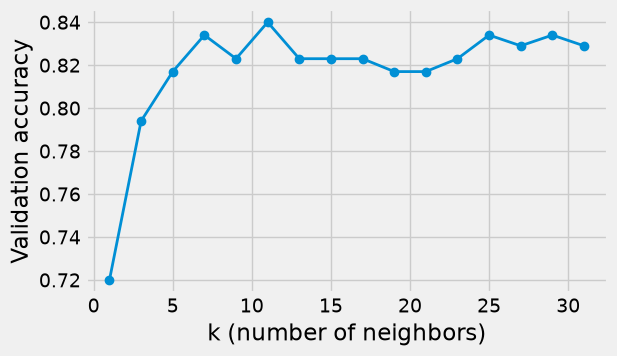
With \(k = 1\) the classifier follows individual training customers too closely (it overfits), and validation accuracy is lowest. Accuracy rises as \(k\) grows and then levels off; very large \(k\) would eventually blur the pattern, because distant customers get a vote. We pick the \(k\) with the highest validation accuracy, refit on the whole training set, and check the test set once.
best_k = int(k_results.loc[k_results['validation accuracy'].idxmax(), 'k'])

final_model = make_pipeline(StandardScaler(), KNeighborsClassifier(n_neighbors=best_k))
final_model.fit(X_train, y_train)

print('Chosen k:', best_k)
print('Test accuracy:', round(final_model.score(X_test, y_test), 3))
Chosen k: 11
Test accuracy: 0.853
Validation accuracy is highest at \(k = 11\) (0.84), but every \(k\) from 7 to 31 is within about two percentage points of it. Differences that small are partly the luck of which customers landed in the validation set, so any \(k\) in that range is a reasonable choice. With \(k = 11\), the final classifier is right for about 85% of the test customers, compared with 71% for the always-“stays” baseline.
### Exercise: Compare a Few Values of k
#   1. For k in [3, 7, 15], fit a pipeline (StandardScaler, then
#      KNeighborsClassifier) on X_fit, y_fit and compute its accuracy on X_val, y_val.
#   2. Print each k with its validation accuracy rounded to 3 decimals, then
#      print the k with the highest validation accuracy.
# Print exactly:
# k = 3 validation accuracy: 0.794
# k = 7 validation accuracy: 0.834
# k = 15 validation accuracy: 0.823
# Best k: 7
### Your code starts here.


### Your code ends here.
k = 3 validation accuracy: 0.794
k = 7 validation accuracy: 0.834
k = 15 validation accuracy: 0.823
Best k: 7
14.4.6. Summary#
scikit-learn’s
KNeighborsClassifiercarries out the same distance-and-vote procedure as the hand-built classifier, withfitandpredict.Split the data with
train_test_splitbefore doing anything else;stratify=ykeeps the class proportions the same in both parts.Fit
StandardScaleron the training set only and use it to transform the test set and new cases; a pipeline does this automatically.Choose \(k\) with a validation set carved out of the training set, then report accuracy on the test set once.
Accuracy should always be compared with the baseline of predicting the most common class. The next section shows what accuracy hides.