
14.6. Logistic Regression#
A nearest neighbor classifier answers “churn” or “stays”. For many business decisions, a probability is more useful: a customer with a 90% chance of leaving deserves a phone call today, one with a 15% chance might get an email, and one with a 2% chance can be left alone. Section 1405 also showed that when a missed churner costs much more than a false alarm, we may want to flag customers whose chance of churning is well below 50%. That requires a classifier that reports how likely each outcome is.
Logistic regression is the most widely used classifier of this kind. Despite its name, it is a classification method: it predicts the probability that an observation belongs to the positive class. It builds on the linear regression of Chapter 13, so its coefficients can be read in a similar way. In this section we fit it to the same churn data, training set, and test set as Sections 1404 and 1405.
14.6.1. The Logistic Curve#
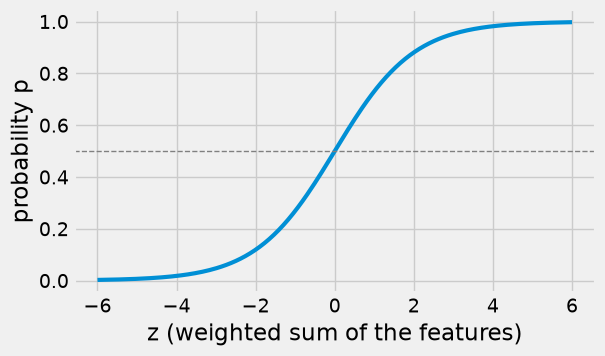
Linear regression predicts a number by adding up the features, each multiplied by a slope: \(z = b_0 + b_1 x_1 + b_2 x_2 + \cdots\). That number can be anything, such as \(-3\) or \(250\), but a probability must lie between 0 and 1. Logistic regression fixes this by passing \(z\) through the logistic function, also called the sigmoid:
The logistic function turns any number into a value between 0 and 1. When \(z = 0\), \(p = 0.5\); large positive \(z\) gives \(p\) close to 1, and large negative \(z\) gives \(p\) close to 0.
def logistic(z):
    return 1 / (1 + np.exp(-z))

z = np.linspace(-6, 6, 200)

fig, ax = plt.subplots(figsize=(6, 3.5))
ax.plot(z, logistic(z), lw=3)
ax.axhline(0.5, color='gray', lw=1, ls='--')
ax.set_xlabel('z (weighted sum of the features)')
ax.set_ylabel('probability p')
plt.show()
Here is the curve in action with a single feature. We fit logistic regression to predict churn from the number of support calls alone, and compare its predicted probabilities with the actual churn rate among training customers with each number of calls.
calls_model = LogisticRegression()
calls_model.fit(X_train[['support_calls']], y_train)

calls = pd.DataFrame({'support_calls': np.arange(0, 7)})
calls['predicted probability'] = calls_model.predict_proba(calls[['support_calls']])[:, 1].round(3)

actual_rate = y_train.groupby(X_train['support_calls']).mean().round(3)
calls['actual churn rate (training)'] = calls['support_calls'].map(actual_rate)
calls['customers (training)'] = calls['support_calls'].map(X_train['support_calls'].value_counts())
calls
| support_calls | predicted probability | actual churn rate (training) | customers (training) | |
|---|---|---|---|---|
| 0 | 0 | 0.113 | 0.124 | 170 |
| 1 | 1 | 0.204 | 0.190 | 232 |
| 2 | 2 | 0.339 | 0.364 | 165 |
| 3 | 3 | 0.508 | 0.440 | 84 |
| 4 | 4 | 0.674 | 0.757 | 37 |
| 5 | 5 | 0.806 | 0.778 | 9 |
| 6 | 6 | 0.893 | 1.000 | 3 |
grid = pd.DataFrame({'support_calls': np.linspace(0, 6, 100)})

fig, ax = plt.subplots(figsize=(6, 3.5))
ax.plot(grid['support_calls'], calls_model.predict_proba(grid)[:, 1], lw=3, label='logistic regression')
ax.scatter(calls['support_calls'], calls['actual churn rate (training)'], s=60, color='darkorange',
           zorder=5, label='actual churn rate')
ax.set_xlabel('support calls last quarter')
ax.set_ylabel('probability of churn')
ax.legend(loc='upper left')
plt.show()
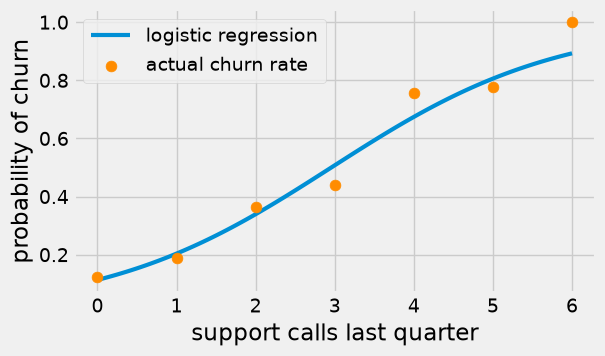
The predicted probability rises along an S-shaped curve, from about 0.11 for customers who made no support calls to about 0.67 at 4 calls and 0.89 at 6. The actual churn rates follow the same pattern; they bounce around more at 5 and 6 calls because only a handful of training customers made that many calls.
### Exercise: The Logistic Function
#   1. Write logistic(z) = 1 / (1 + e^(-z)) using np.exp.
#   2. Apply it to the array z_values and print the results rounded to 3 decimals.
# Print exactly:
# [0.018 0.269 0.5   0.731 0.982]
z_values = np.array([-4, -1, 0, 1, 4])
### Your code starts here.


### Your code ends here.
[0.018 0.269 0.5 0.731 0.982]
14.6.2. Fitting LogisticRegression#
Fitting logistic regression with all three features follows the same fit pattern as every other scikit-learn model. Behind the scenes, fit searches for the intercept and coefficients that make the observed churn outcomes in the training set as likely as possible.
logit = LogisticRegression()
logit.fit(X_train, y_train)

coefficients = pd.DataFrame({'coefficient': logit.coef_[0].round(3)}, index=features)
print('Intercept:', logit.intercept_.round(3))
coefficients
Intercept: [-3.533]
| coefficient | |
|---|---|
| tenure_months | -0.073 |
| monthly_charges | 0.045 |
| support_calls | 1.053 |
Reading the coefficients. Each coefficient multiplies its feature inside \(z\), so its sign tells the direction of the effect, holding the other features fixed:
A positive coefficient means that larger values of the feature raise \(z\) and therefore raise the predicted probability of churn.
A negative coefficient means that larger values lower the probability.
Here tenure has a negative coefficient (customers who have stayed longer are less likely to churn), while monthly charges and support calls have positive coefficients (higher bills and more support calls go with more churn). These directions match the group averages in Section 1404.
The size of a coefficient is harder to read than in linear regression, because the logistic curve is not a straight line: the same change in \(z\) moves the probability a lot near 50% and only a little near 0% or 100%. (Statisticians translate coefficients into changes in the odds of churning; that is beyond this introduction.) The coefficients also depend on each feature’s units, so do not compare their sizes across features unless the features have been scaled.
The clearest way to see what the model says is to compare predicted probabilities for customers who differ in one feature. Here is the new customer from Section 1404 (6 months, $95 a month, 4 support calls), and the same customer with fewer support calls.
what_if = pd.DataFrame({'tenure_months': [6, 6, 6],
                        'monthly_charges': [95.0, 95.0, 95.0],
                        'support_calls': [4, 2, 0]})
what_if['probability of churn'] = logit.predict_proba(what_if[features])[:, 1].round(3)
what_if
| tenure_months | monthly_charges | support_calls | probability of churn | |
|---|---|---|---|---|
| 0 | 6 | 95.0 | 4 | 0.989 |
| 1 | 6 | 95.0 | 2 | 0.917 |
| 2 | 6 | 95.0 | 0 | 0.572 |
With 4 support calls, this new, high-paying customer has a 99% predicted chance of churning. With 2 calls the probability is still 92%, and with no calls it drops to 57%. Going from 4 calls to 2 moves the probability only 7 points, while going from 2 to 0 moves it 35 points: how much a feature changes the probability depends on where the customer sits on the curve.
### Exercise: A Two-Feature Model
#   1. Fit a LogisticRegression on X_train[['tenure_months', 'support_calls']] and y_train.
#   2. Print the two coefficients rounded to 3 decimals.
#   3. Print whether each one raises or lowers the probability of churn.
# Print exactly:
# tenure_months: -0.067 (lowers churn probability)
# support_calls: 0.944 (raises churn probability)
### Your code starts here.


### Your code ends here.
tenure_months: -0.067 (lowers churn probability)
support_calls: 0.944 (raises churn probability)
14.6.3. Predicted Probabilities#
predict_proba returns one column per class: the probability of class 0 (stays) and of class 1 (churns). Each row adds up to 1. We usually keep the second column, the probability of the positive class.
proba = logit.predict_proba(X_test)
print(proba[:5].round(3))

p_churn = proba[:, 1]
[[0.973 0.027]
 [0.674 0.326]
 [0.948 0.052]
 [0.938 0.062]
 [0.261 0.739]]
test_view = X_test.copy()
test_view['p_churn'] = p_churn.round(3)
test_view['predicted'] = logit.predict(X_test)
test_view['actual'] = y_test
test_view.head(8)
| tenure_months | monthly_charges | support_calls | p_churn | predicted | actual | |
|---|---|---|---|---|---|---|
| 366 | 31 | 49.05 | 0 | 0.027 | 0 | 0 |
| 536 | 32 | 44.00 | 3 | 0.326 | 0 | 1 |
| 455 | 44 | 61.69 | 1 | 0.052 | 0 | 0 |
| 837 | 52 | 78.84 | 1 | 0.062 | 0 | 0 |
| 504 | 1 | 80.18 | 1 | 0.739 | 1 | 1 |
| 764 | 9 | 44.31 | 1 | 0.241 | 0 | 0 |
| 210 | 20 | 70.35 | 2 | 0.568 | 1 | 1 |
| 189 | 21 | 76.16 | 1 | 0.357 | 0 | 1 |
The predict method turns each probability into a label using a cutoff of 0.5: “churn” when the probability is at least 0.5, otherwise “stays”. We can check that this is exactly what it does.
print('predict matches p_churn >= 0.5:', np.array_equal(logit.predict(X_test), (p_churn >= 0.5).astype(int)))
print('Test accuracy:', round(logit.score(X_test, y_test), 3))
predict matches p_churn >= 0.5: True
Test accuracy: 0.843
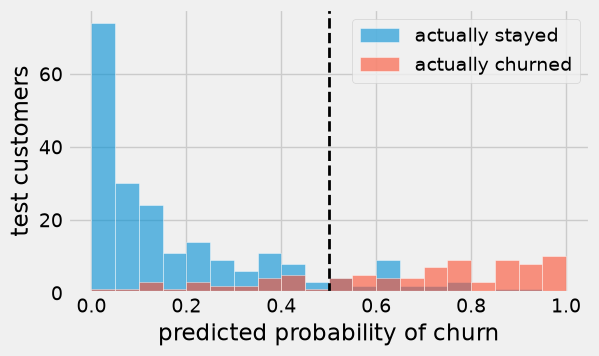
A histogram of the predicted probabilities, split by what actually happened, shows how well the model separates the two groups. Customers who stayed mostly get low probabilities; churners are spread out, with many above 0.5 but a fair number below.
fig, ax = plt.subplots(figsize=(6, 3.5))
bins = np.arange(0, 1.05, 0.05)
ax.hist(p_churn[y_test == 0], bins=bins, alpha=0.6, label='actually stayed', ec='white')
ax.hist(p_churn[y_test == 1], bins=bins, alpha=0.6, label='actually churned', ec='white')
ax.axvline(0.5, color='k', lw=2, ls='--')
ax.set_xlabel('predicted probability of churn')
ax.set_ylabel('test customers')
ax.legend()
plt.show()
### Exercise: High-Risk Customers
#   1. Using p_churn (the test-set churn probabilities), count the test customers
#      whose predicted probability of churn is above 0.8.
#   2. Among those customers, compute the share who actually churned
#      (use y_test), rounded to 3 decimals.
# Print exactly:
# High-risk customers: 32
# Share who churned: 0.938
### Your code starts here.


### Your code ends here.
High-risk customers: 32
Share who churned: 0.938
14.6.4. Changing the Decision Threshold#
The cutoff of 0.5 is called the decision threshold. Nothing forces us to use 0.5. Lowering the threshold flags more customers: recall goes up (we catch more churners) and precision usually goes down (more false alarms). Raising it does the opposite. Which threshold is best depends on the costs from Section 1405: a missed churner costs $400 and a false alarm $50.
rows = []
for threshold in [0.1, 0.2, 0.3, 0.4, 0.5, 0.6, 0.7]:
    flagged = (p_churn >= threshold).astype(int)
    tn, fp, fn, tp = confusion_matrix(y_test, flagged).ravel()
    rows.append({'threshold': threshold,
                 'flagged': tp + fp,
                 'FP': fp, 'FN': fn,
                 'accuracy': round(accuracy_score(y_test, flagged), 3),
                 'precision': round(precision_score(y_test, flagged), 3),
                 'recall': round(recall_score(y_test, flagged), 3),
                 'error cost ($)': error_cost(y_test, flagged)})

thresholds = pd.DataFrame(rows)
thresholds
| threshold | flagged | FP | FN | accuracy | precision | recall | error cost ($) | |
|---|---|---|---|---|---|---|---|---|
| 0 | 0.1 | 194 | 110 | 2 | 0.627 | 0.433 | 0.977 | 6300 |
| 1 | 0.2 | 155 | 75 | 6 | 0.730 | 0.516 | 0.930 | 6150 |
| 2 | 0.3 | 127 | 52 | 11 | 0.790 | 0.591 | 0.872 | 7000 |
| 3 | 0.4 | 104 | 35 | 17 | 0.827 | 0.663 | 0.802 | 8550 |
| 4 | 0.5 | 87 | 24 | 23 | 0.843 | 0.724 | 0.733 | 10400 |
| 5 | 0.6 | 72 | 18 | 32 | 0.833 | 0.750 | 0.628 | 13700 |
| 6 | 0.7 | 53 | 7 | 40 | 0.843 | 0.868 | 0.535 | 16350 |
fig, ax = plt.subplots(figsize=(6, 3.5))
ax.plot(thresholds['threshold'], thresholds['error cost ($)'], marker='o', lw=2)
ax.set_xlabel('decision threshold')
ax.set_ylabel('total error cost ($)')
plt.show()
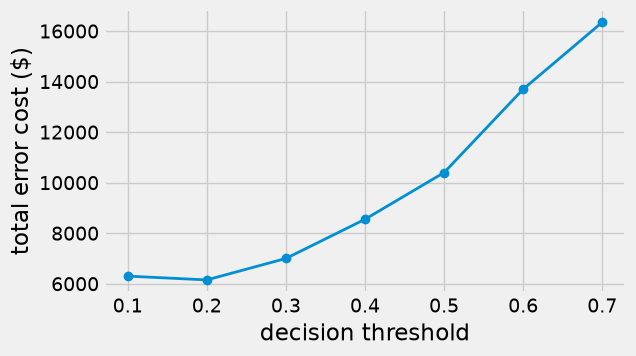
At the default threshold of 0.5, the errors cost $10,400. Lowering the threshold to 0.2 flags 155 customers instead of 87, raises recall from 0.73 to 0.93, and cuts the error cost to $6,150, a saving of more than $4,000 on 300 customers, even though accuracy falls from 0.84 to 0.73. The retention team makes more calls that turn out to be unnecessary, but each one is cheap compared with a lost customer. Notice also that the most accurate thresholds (0.5 and 0.7) are among the most expensive.
There is a simple rule of thumb behind this. Flag a customer when the expected cost of not flagging is larger than the cost of flagging:
If the probabilities are accurate, the cost-minimizing threshold is the false-alarm cost divided by the sum of the two costs, about 0.11 here, which is close to what the table shows. As before, a careful analysis would choose the threshold on a validation set and confirm it on the test set.
### Exercise: A Threshold of 0.25
#   1. Flag the test customers whose p_churn is at least 0.25.
#   2. Print the number flagged, the recall rounded to 3 decimals, and the
#      total error cost with error_cost(y_test, flagged).
# Print exactly:
# Flagged: 138
# Recall: 0.895
# Error cost: 6650
### Your code starts here.


### Your code ends here.
Flagged: 138
Recall: 0.895
Error cost: 6650
14.6.5. Comparing with Nearest Neighbors#
A nearest neighbor classifier can also report a probability: predict_proba gives the share of the \(k\) neighbors in each class. With \(k = 11\), the possible probabilities are \(0/11, 1/11, \ldots, 11/11\). So we can compare the two classifiers on the same test set, both at the usual threshold of 0.5 and at a lower threshold suited to the costs.
knn = make_pipeline(StandardScaler(), KNeighborsClassifier(n_neighbors=11))
knn.fit(X_train, y_train)
p_churn_knn = knn.predict_proba(X_test)[:, 1]

def summarize(name, probabilities, threshold):
    flagged = (probabilities >= threshold).astype(int)
    return {'classifier': name, 'threshold': threshold,
            'accuracy': round(accuracy_score(y_test, flagged), 3),
            'precision': round(precision_score(y_test, flagged), 3),
            'recall': round(recall_score(y_test, flagged), 3),
            'error cost ($)': error_cost(y_test, flagged)}

pd.DataFrame([summarize('kNN (k = 11)', p_churn_knn, 0.5),
              summarize('logistic regression', p_churn, 0.5),
              summarize('kNN (k = 11)', p_churn_knn, 0.15),
              summarize('logistic regression', p_churn, 0.15)])
| classifier | threshold | accuracy | precision | recall | error cost ($) | |
|---|---|---|---|---|---|---|
| 0 | kNN (k = 11) | 0.50 | 0.853 | 0.762 | 0.709 | 10950 |
| 1 | logistic regression | 0.50 | 0.843 | 0.724 | 0.733 | 10400 |
| 2 | kNN (k = 11) | 0.15 | 0.653 | 0.449 | 0.930 | 7300 |
| 3 | logistic regression | 0.15 | 0.697 | 0.485 | 0.942 | 6300 |
At the usual threshold of 0.5 the two classifiers are close: nearest neighbors is slightly more accurate (0.853 against 0.843), while logistic regression has slightly higher recall and a lower error cost ($10,400 against $10,950). At a threshold of 0.15 both become much cheaper, and logistic regression is the cheaper of the two ($6,300 against $7,300). Once the threshold is lowered, both also beat the $10,700 of flagging every customer (Section 1405). Logistic regression fits this data set well, which is not surprising: the synthetic data were generated from a logistic model (see the chapter’s MATERIALS.md). On real data either method may win.
Beyond the numbers, the two methods have different strengths:
Logistic regression gives smooth probabilities, coefficients whose signs explain the direction of each feature’s effect, and fast predictions. It assumes that the probability changes smoothly and in one direction as each feature grows.
Nearest neighbors makes no such assumption and can follow irregular patterns, but it offers no coefficients to explain its predictions, needs scaled features, and must search the whole training set for every prediction.
In practice, analysts often try both, compare them on validation data with the measure that matters to the business, and choose a threshold to match the costs.
### Exercise: Compare at a Threshold of 0.3
#   1. Flag test customers at a threshold of 0.3, once with p_churn (logistic regression)
#      and once with p_churn_knn (11-nearest neighbors).
#   2. Print the error cost of each with error_cost(y_test, flagged), and the name
#      of the cheaper classifier.
# Print exactly:
# logistic regression cost: 7000
# kNN cost: 8650
# Cheaper: logistic regression
### Your code starts here.


### Your code ends here.
logistic regression cost: 7000
kNN cost: 8650
Cheaper: logistic regression
14.6.6. Summary#
Logistic regression predicts a probability by passing a weighted sum of the features through the logistic (sigmoid) curve, which always gives a value between 0 and 1.
LogisticRegressionis fitted withfit;predict_probareturns the predicted probabilities, andpredictapplies a threshold of 0.5.The sign of a coefficient tells whether a larger value of that feature raises or lowers the predicted probability, holding the other features fixed.
Moving the decision threshold trades precision against recall; with known error costs, choose the threshold with the lowest total cost.
Logistic regression and nearest neighbors can be compared on the same test set with the same measures and costs.