
14.5. Evaluating Classifiers#
So far we have judged classifiers by one number, accuracy. Accuracy treats every mistake the same, but in business the two kinds of mistakes rarely cost the same. A bank that misses a fraudulent transaction loses the money; a bank that wrongly freezes a good customer’s card loses some goodwill and an hour of an analyst’s time. A subscription company that fails to spot a customer about to leave loses that customer’s future payments; one that sends a retention discount to a customer who was going to stay anyway loses only the discount.
This section introduces the standard tools for looking past accuracy: a baseline to compare against, the confusion matrix, precision and recall, and the cost of each kind of error. We continue with the customer churn data and the same training and test sets as Section 1404 (the setup cell above recreates them), using the 11-nearest neighbor classifier chosen there.
knn = make_pipeline(StandardScaler(), KNeighborsClassifier(n_neighbors=11))
knn.fit(X_train, y_train)
y_pred = knn.predict(X_test)

print('Test accuracy:', round(accuracy_score(y_test, y_pred), 3))
Test accuracy: 0.853
14.5.1. Why Accuracy Is Not Enough#
When one class is much more common than the other, the classes are imbalanced, and accuracy can look good even for a useless classifier. The simplest comparison is a baseline classifier that ignores the features and always predicts the majority class, the most common label in the training set. scikit-learn provides one as DummyClassifier.
baseline = DummyClassifier(strategy='most_frequent')
baseline.fit(X_train, y_train)
y_base = baseline.predict(X_test)

print('Baseline predicts:', y_base[0], 'for every customer')
print('Baseline accuracy:', round(accuracy_score(y_test, y_base), 3))
print('kNN accuracy:     ', round(accuracy_score(y_test, y_pred), 3))
Baseline predicts: 0 for every customer
Baseline accuracy: 0.713
kNN accuracy:      0.853
The baseline predicts “stays” (0) for everyone and is right about 71% of the time, because about 71% of the test customers stay. Our classifier’s 85% accuracy is a real improvement, but the honest gain is the difference between the two, not the distance from 0%.
With rarer events the problem gets worse. Suppose a card issuer reviews 1,000 transactions, of which 20 (2%) are fraudulent. A “classifier” that approves everything is 98% accurate and catches no fraud at all.
actual_fraud = np.array([1] * 20 + [0] * 980)     # 1 = fraud, 0 = legitimate
approve_all = np.zeros(1000, dtype=int)           # predict "legitimate" for every transaction

print('Accuracy of approving everything:', accuracy_score(actual_fraud, approve_all))
print('Fraud cases caught:', np.sum((approve_all == 1) & (actual_fraud == 1)))
Accuracy of approving everything: 0.98
Fraud cases caught: 0
Accuracy alone cannot tell this useless rule apart from a good fraud detector. We need to count the two kinds of errors separately.
### Exercise: Baseline for Loan Defaults
# A lender's test set has 400 loans, of which 48 defaulted (label 1).
# A classifier's predictions are summarized below.
#   1. Compute the accuracy of always predicting "repaid" (0).
#   2. Compute the classifier's accuracy: it was right on 362 of the 400 loans.
#   3. Print how many percentage points the classifier beats the baseline by,
#      rounded to 1 decimal.
# Print exactly:
# Baseline accuracy: 0.88
# Classifier accuracy: 0.905
# Improvement (points): 2.5
n_loans = 400
n_default = 48
n_correct = 362
### Your code starts here.


### Your code ends here.
Baseline accuracy: 0.88
Classifier accuracy: 0.905
Improvement (points): 2.5
14.5.2. The Confusion Matrix#
In a binary classification problem we call one class the positive class, usually the event we are trying to detect: churn, default, fraud. “Positive” does not mean good; it means “the thing we are looking for”. Every prediction then falls into one of four groups:
Predicted positive (churn) |
Predicted negative (stays) |
|
|---|---|---|
Actually positive (churned) |
True positive (TP): churner correctly flagged |
False negative (FN): churner missed |
Actually negative (stayed) |
False positive (FP): loyal customer flagged by mistake |
True negative (TN): loyal customer correctly left alone |
A table of these four counts is called a confusion matrix, because it shows which classes the classifier confuses with each other. The correct predictions are on the diagonal (TN and TP); the two kinds of errors are off the diagonal.
We can count the groups ourselves with pandas, using crosstab to cross-tabulate actual and predicted labels.
pd.crosstab(y_test, y_pred, rownames=['actual'], colnames=['predicted'])
| predicted | 0 | 1 |
|---|---|---|
| actual | ||
| 0 | 195 | 19 |
| 1 | 25 | 61 |
scikit-learn’s confusion_matrix returns the same counts as an array, with actual classes as rows and predicted classes as columns, in the order 0, 1. For two classes, .ravel() flattens it into the four counts in the order TN, FP, FN, TP.
cm = confusion_matrix(y_test, y_pred)
print(cm)

tn, fp, fn, tp = cm.ravel()
print('TN:', tn, ' FP:', fp, ' FN:', fn, ' TP:', tp)
[[195  19]
 [ 25  61]]
TN: 195  FP: 19  FN: 25  TP: 61
ConfusionMatrixDisplay draws the matrix as a labeled picture, which is how it usually appears in reports.
fig, ax = plt.subplots(figsize=(4, 4))
ConfusionMatrixDisplay.from_predictions(
    y_test, y_pred, display_labels=['stays', 'churns'], cmap='Blues', colorbar=False, ax=ax)
ax.grid(False)
plt.show()
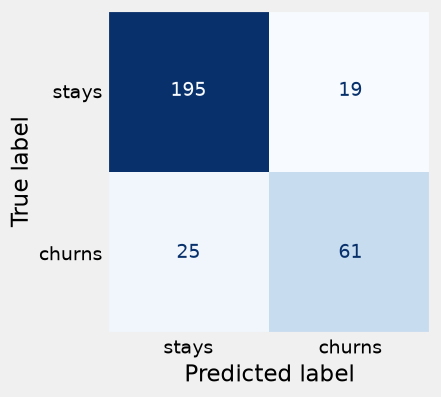
Of the 86 churners in the test set, the classifier caught 61 (true positives) and missed 25 (false negatives). Of the 214 customers who stayed, it correctly left 195 alone (true negatives) and flagged 19 by mistake (false positives).
Accuracy is just the diagonal divided by the total:
print('Accuracy from the matrix:', round((tp + tn) / (tp + tn + fp + fn), 3))
Accuracy from the matrix: 0.853
### Exercise: Count the Four Outcomes
# A fraud model was checked on ten transactions (1 = fraud, the positive class).
#   1. Count the true positives, false positives, false negatives, and true negatives
#      by comparing actual and predicted.
#   2. Check your counts with confusion_matrix(actual, predicted).ravel().
# Print exactly:
# TP: 2 FP: 1 FN: 1 TN: 6
# sklearn: [6 1 1 2]
actual = np.array([0, 0, 1, 0, 1, 0, 0, 1, 0, 0])
predicted = np.array([0, 1, 1, 0, 0, 0, 0, 1, 0, 0])
### Your code starts here.


### Your code ends here.
TP: 2 FP: 1 FN: 1 TN: 6
sklearn: [6 1 1 2]
14.5.3. Precision, Recall, and F1#
Two summary rates answer the questions a manager actually asks about a flagging system.
Precision answers: of the customers we flagged, what fraction really were going to churn?
Recall (also called sensitivity) answers: of the customers who really churned, what fraction did we catch?
Low precision means the retention team wastes time and discounts on customers who were never going to leave. Low recall means many customers walk out the door without anyone calling them. The two usually pull against each other: flagging more customers raises recall but tends to lower precision.
tn, fp, fn, tp = confusion_matrix(y_test, y_pred).ravel()

precision = tp / (tp + fp)
recall = tp / (tp + fn)

print('Precision:', round(precision, 3))
print('Recall:   ', round(recall, 3))
print('sklearn precision:', round(precision_score(y_test, y_pred), 3))
print('sklearn recall:   ', round(recall_score(y_test, y_pred), 3))
Precision: 0.762
Recall:    0.709
sklearn precision: 0.762
sklearn recall:    0.709
Precision is about 0.76: roughly three out of every four customers the retention team calls really were about to leave. Recall is about 0.71: the classifier catches about 71% of the churners and misses the other 29%.
The always-“stays” baseline flags no one, so its recall is 0: it catches none of the churners, which accuracy completely hid. (Its precision is undefined, since it makes no positive predictions; scikit-learn reports 0 and, with zero_division=0, does so without a warning.)
print('Baseline recall:   ', recall_score(y_test, y_base))
print('Baseline precision:', precision_score(y_test, y_base, zero_division=0))
Baseline recall:    0.0
Baseline precision: 0.0
When a single number is needed, the F1 score combines precision and recall. It is their harmonic mean, which is high only when both are high:
print('F1 by formula:', round(2 * precision * recall / (precision + recall), 3))
print('sklearn F1:   ', round(f1_score(y_test, y_pred), 3))
F1 by formula: 0.735
sklearn F1:    0.735
F1 is a convenient summary, but like accuracy it treats the two kinds of errors as equally important. When the costs of the errors are known, it is better to use them directly, as in the next subsection.
### Exercise: Precision and Recall for a Fraud Model
# A fraud model was checked on a month of transactions:
# it flagged 50 transactions, of which 30 were really fraud,
# and there were 40 fraudulent transactions in total.
#   1. Work out TP, FP, and FN from these facts.
#   2. Compute precision, recall, and F1, each rounded to 3 decimals.
# Print exactly:
# Precision: 0.6
# Recall: 0.75
# F1: 0.667
flagged = 50
flagged_and_fraud = 30
total_fraud = 40
### Your code starts here.


### Your code ends here.
Precision: 0.6
Recall: 0.75
F1: 0.667
14.5.4. The Business Cost of Errors#
To decide whether a classifier is worth using, put a dollar value on each kind of error. For the churn case, suppose the company’s finance team estimates:
False negative (a churner we miss): $400. The customer leaves, and the company loses about $400 of profit over the following year.
False positive (a loyal customer we flag): $50. The retention team calls and gives a $50 discount to someone who would have stayed anyway.
To keep the arithmetic simple, we assume that the offer always keeps a correctly flagged churner, and we count only the cost of the errors. (A fuller analysis would also count the cost of the offers given to true positives; the comparisons below would come out the same way, only with different totals.)
The total cost of the errors on the test set is
COST_FN = 400    # dollars lost for each churner we miss
COST_FP = 50     # dollars wasted for each loyal customer we flag

def error_cost(actual, predicted):
    """Total dollar cost of the false negatives and false positives."""
    tn, fp, fn, tp = confusion_matrix(actual, predicted).ravel()
    return COST_FN * fn + COST_FP * fp

print('kNN cost:              $', error_cost(y_test, y_pred))
print('Baseline (flag no one): $', error_cost(y_test, y_base))
print('Flag everyone:          $', error_cost(y_test, np.ones(len(y_test), dtype=int)))
kNN cost:              $ 10950
Baseline (flag no one): $ 34400
Flag everyone:          $ 10700
The kNN classifier’s errors cost $10,950 on the 300 test customers, far less than the $34,400 lost by flagging no one, the baseline that looked 71% accurate. But look at the third line: flagging every customer costs only $10,700, slightly less than the classifier. Flagging everyone has terrible accuracy (29%), yet because a missed churner costs eight times as much as a false alarm, its 214 cheap false alarms cost less than the classifier’s 25 expensive misses plus 19 false alarms. Accuracy and cost can point in opposite directions.
The same reasoning applies to fraud. If a missed fraudulent transaction costs a bank an average of $500 and a false alarm costs $20 of an analyst’s review time, a classifier that catches more fraud can be worth many false alarms. The costs, not the accuracy, decide.
### Exercise: The Cost of a Fraud Model
# On 1,000 test transactions, a fraud model had TP = 15, FP = 40, FN = 5, TN = 940.
# A missed fraud (FN) costs $500 and a false alarm (FP) costs $20.
#   1. Compute the total error cost of the model.
#   2. Compute the error cost of approving everything (every fraud is missed: FN = 20, FP = 0).
# Print exactly:
# Model cost: 3300
# Approve-all cost: 10000
tp, fp, fn, tn = 15, 40, 5, 940
### Your code starts here.


### Your code ends here.
Model cost: 3300
Approve-all cost: 10000
14.5.5. Choosing Between Classifiers by Cost#
Once each error has a price, we can compare classifiers on the measure the business cares about. The table below evaluates nearest neighbor classifiers with several values of \(k\), plus the baseline, on accuracy, precision, recall, and total error cost.
(As in Section 1404, a careful analyst would make this comparison on a validation set and use the test set only for the final report. We use the test set here to keep the example short.)
def evaluate(name, predicted):
    return {'classifier': name,
            'accuracy': round(accuracy_score(y_test, predicted), 3),
            'precision': round(precision_score(y_test, predicted, zero_division=0), 3),
            'recall': round(recall_score(y_test, predicted), 3),
            'error cost ($)': error_cost(y_test, predicted)}

rows = [evaluate('baseline (all stay)', y_base),
        evaluate('flag everyone', np.ones(len(y_test), dtype=int))]
for k in [1, 5, 11, 21]:
    model = make_pipeline(StandardScaler(), KNeighborsClassifier(n_neighbors=k))
    model.fit(X_train, y_train)
    rows.append(evaluate(f'kNN, k = {k}', model.predict(X_test)))

comparison = pd.DataFrame(rows)
comparison
| classifier | accuracy | precision | recall | error cost ($) | |
|---|---|---|---|---|---|
| 0 | baseline (all stay) | 0.713 | 0.000 | 0.000 | 34400 |
| 1 | flag everyone | 0.287 | 0.287 | 1.000 | 10700 |
| 2 | kNN, k = 1 | 0.767 | 0.587 | 0.628 | 14700 |
| 3 | kNN, k = 5 | 0.830 | 0.706 | 0.698 | 11650 |
| 4 | kNN, k = 11 | 0.853 | 0.762 | 0.709 | 10950 |
| 5 | kNN, k = 21 | 0.823 | 0.720 | 0.628 | 13850 |
Among the nearest neighbor classifiers, \(k = 11\) has both the highest accuracy and the lowest cost, but that agreement is not guaranteed; the exercise below gives a case where the more accurate model is the more expensive one. And none of the nearest neighbor classifiers beats simply flagging everyone on cost.
All of these classifiers predict “churn” only when most of the neighbors churned. Because a missed churner costs eight times as much as a false alarm, it may pay to flag a customer even when only a minority of similar customers churned. Changing that cutoff requires a classifier that reports a probability of churn, which is where the next section begins.
### Exercise: Which Model Is Cheaper?
# Two churn models were checked on the same 300 test customers.
#   Model A: FN = 30, FP = 10
#   Model B: FN = 12, FP = 60
#   1. Compute each model's accuracy (300 customers in total) and error cost,
#      with a missed churner costing $400 and a false alarm costing $50.
#   2. Print the name of the cheaper model.
# Print exactly:
# Model A: accuracy 0.867, cost 12500
# Model B: accuracy 0.76, cost 7800
# Cheaper: Model B
### Your code starts here.


### Your code ends here.
Model A: accuracy 0.867, cost 12500
Model B: accuracy 0.76, cost 7800
Cheaper: Model B
14.5.6. Summary#
Always compare accuracy with a baseline that predicts the majority class; with imbalanced classes, a high accuracy can hide a useless classifier.
The confusion matrix counts true positives, false positives, false negatives, and true negatives;
confusion_matrixandConfusionMatrixDisplayproduce it.Precision is the share of flagged cases that are real; recall is the share of real cases that are flagged. F1 combines the two.
When the errors have different business costs, compute the total cost of each classifier’s errors and choose the cheapest, which is not always the most accurate.