
15.4. Principal Component Analysis#
Note
Optional section. This section goes beyond the core clustering material in this chapter. The lab and homework do not use it. Read it if you want a tool for looking at customer data with many columns at once.
The customer data in the previous section had only two features, annual_spend and orders_per_year, so we could see every customer on one scatter plot. Real customer and product tables usually have many more columns. Principal component analysis (PCA) is a way to summarize many correlated columns with a few new ones, so that we can plot the data, see its main patterns, and check what a clustering found.
15.4.1. Too Many Columns#
The online store from the previous section now keeps a fuller profile of each customer. The file customer_profiles.csv has 300 customers and seven features:
Feature |
Meaning |
|---|---|
|
Dollars spent in the last year |
|
Number of orders in the last year |
|
Average dollars per order |
|
Days since the most recent purchase |
|
Share of ordered items that were returned |
|
Average visits to the store’s website per month |
|
Share of orders that used a discount code |
Note
customer_profiles.csv is a synthetic data set generated for this book from four built-in customer types, so the patterns are cleaner than in real data.
profiles = pd.read_csv(path_data + 'customer_profiles.csv')
profiles.head()
| customer_id | annual_spend | orders_per_year | avg_order_value | days_since_last | return_rate | web_visits_per_month | discount_share | |
|---|---|---|---|---|---|---|---|---|
| 0 | P001 | 236 | 4 | 58.88 | 216 | 0.065 | 3 | 0.32 |
| 1 | P002 | 2132 | 5 | 426.40 | 73 | 0.097 | 3 | 0.04 |
| 2 | P003 | 134 | 2 | 66.95 | 193 | 0.072 | 2 | 0.38 |
| 3 | P004 | 639 | 18 | 35.49 | 24 | 0.105 | 23 | 0.76 |
| 4 | P005 | 2103 | 4 | 525.65 | 97 | 0.106 | 2 | 0.20 |
Each customer is now a point in seven dimensions. The number of features is the data’s dimensionality. We cannot draw a seven-dimensional scatter plot. We could draw a scatter plot for every pair of features, but seven features give 21 pairs, and none of them shows the whole picture.
The features also overlap. Customers who order often tend to visit the website often, and customers who use many discount codes tend to buy cheaper items. The correlation table (correlation was introduced in Chapter 12) shows how strongly each pair of features moves together:
features = ['annual_spend', 'orders_per_year', 'avg_order_value', 'days_since_last',
            'return_rate', 'web_visits_per_month', 'discount_share']
X = profiles[features]

plt.figure(figsize=(7, 5.5))
sns.heatmap(X.corr(), annot=True, fmt='.2f', cmap='RdBu_r', vmin=-1, vmax=1)
plt.title('Correlations Between Customer Features')
plt.show()
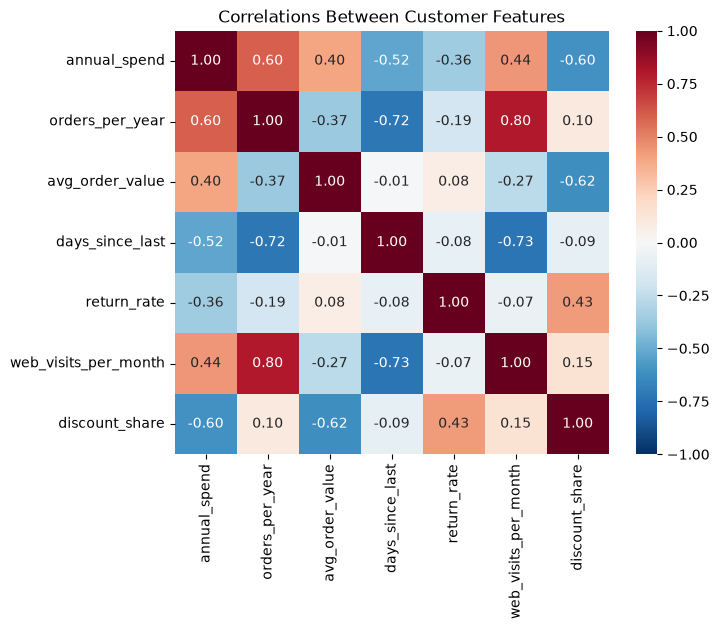
Orders and web visits have a correlation of 0.80, so they carry much of the same information: knowing one tells us a lot about the other. Average order value and discount share have a correlation of -0.62. When columns overlap like this, the data have fewer independent patterns than they have columns.
Dimensionality reduction means replacing many features with a few new ones that keep most of the information. PCA is the most common method for numeric data.
### Exercise: Find the Most Correlated Pair
# Use the customer profiles data.
#   1. Compute the correlation table of the seven features.
#   2. Find the correlation between annual_spend and orders_per_year.
#   3. Find the correlation between annual_spend and discount_share.
# Print each correlation rounded to 2 decimal places, for example:
# spend vs orders: 0.6
# spend vs discount: -0.6
import pandas as pd

profiles = pd.read_csv(path_data + 'customer_profiles.csv')
features = ['annual_spend', 'orders_per_year', 'avg_order_value', 'days_since_last',
            'return_rate', 'web_visits_per_month', 'discount_share']
### Your code starts here.


### Your code ends here.
spend vs orders: 0.6
spend vs discount: -0.6
15.4.2. Principal Components as New Axes#
Start with just two features that move together, orders and web visits. We put both in standard units first (Chapter 12), so that each is measured in standard deviations from its mean, as we did for clustering in the previous section.
two = profiles[['orders_per_year', 'web_visits_per_month']]
two_su = (two - two.mean()) / two.std(ddof=0)      # standard units

pca_two = PCA(n_components=2)
pca_two.fit(two_su)

direction = pca_two.components_[0]     # direction of the first component
direction
array([0.70710678, 0.70710678])
A principal component is a new axis through the data. The first principal component, PC1, points in the direction in which the data are most spread out. components_[0] holds that direction: it moves about 0.71 standard units in orders for every 0.71 standard units in visits, so it runs diagonally through the cloud of points. The second component, PC2, is at a right angle to PC1 and picks up the spread that is left over.
The plot on the left draws both axes on the scatter plot. The plot on the right shows the same customers measured on the new axes: PCA has simply rotated the axes so that the long direction of the cloud lies along the horizontal axis.
scores_two = pca_two.transform(two_su)     # each customer's position on PC1 and PC2

fig, axes = plt.subplots(1, 2, figsize=(11, 4.5))

axes[0].scatter(two_su['orders_per_year'], two_su['web_visits_per_month'], alpha=0.5)
for i, name in enumerate(['PC1', 'PC2']):
    d = pca_two.components_[i] * 1.6
    axes[0].annotate('', xy=d, xytext=(0, 0),
                     arrowprops=dict(arrowstyle='->', color='crimson', lw=2))
    axes[0].text(d[0] * 1.1, d[1] * 1.1, name, color='crimson', fontsize=12)
axes[0].set_xlabel('Orders per year (standard units)')
axes[0].set_ylabel('Web visits per month (standard units)')
axes[0].set_title('Original axes')
axes[0].set_xlim(-1.8, 3.3)
axes[0].set_ylim(-1.8, 3.3)
axes[0].set_aspect('equal')

axes[1].scatter(scores_two[:, 0], scores_two[:, 1], alpha=0.5)
axes[1].set_xlabel('PC1')
axes[1].set_ylabel('PC2')
axes[1].set_title('Rotated axes')
axes[1].set_aspect('equal')

plt.tight_layout()
plt.show()
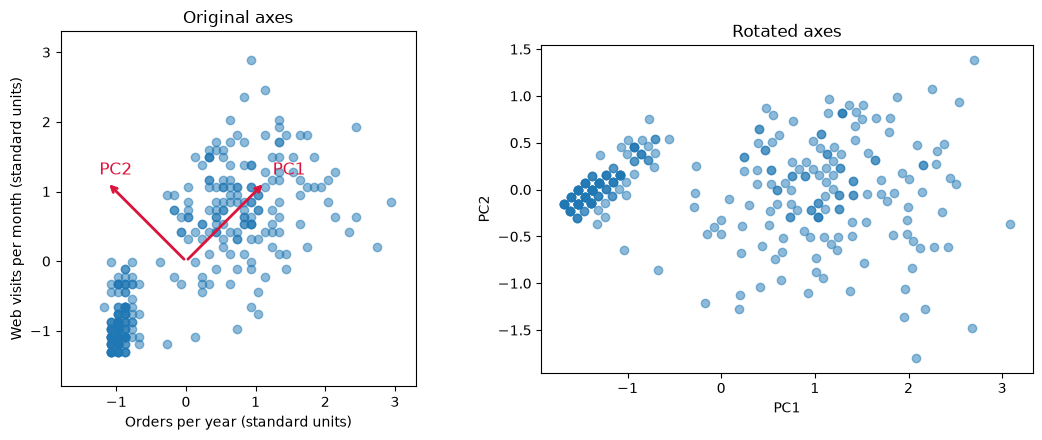
Most of the spread now runs along PC1, and the points vary only a little along PC2. The model reports how much of the total spread each component captures:
pca_two.explained_variance_ratio_
array([0.89894022, 0.10105978])
PC1 captures about 90% of the variation in the two features, and PC2 only about 10%. One number per customer, the PC1 score, which we could call “activity”, keeps almost all of what orders and visits tell us. That is the idea of PCA: when features overlap, a few well-chosen directions can replace many columns.
### Exercise: PCA on Two Features
# A manager wants one "basket size" measure built from annual_spend and avg_order_value.
#   1. Put the two columns in standard units.
#   2. Fit PCA with 2 components.
#   3. Print the share of variation captured by PC1, rounded to 2 decimal places.
# Print exactly:
# PC1 share: 0.7
import pandas as pd
from sklearn.decomposition import PCA

profiles = pd.read_csv(path_data + 'customer_profiles.csv')
pair = profiles[['annual_spend', 'avg_order_value']]
### Your code starts here.


### Your code ends here.
PC1 share: 0.7
15.4.3. Standardize, Then Fit PCA#
PCA looks for the directions with the most spread, so, like k-means, it depends on the units of the features. Spend is measured in dollars and has a standard deviation of about $1,000, while the return rate is a share with a standard deviation of about 0.04. Here is PCA on the raw features:
pca_raw = PCA().fit(X)
pd.Series(pca_raw.components_[0], index=features).round(3)
annual_spend            0.997
orders_per_year         0.006
avg_order_value         0.062
days_since_last        -0.044
return_rate            -0.000
web_visits_per_month    0.004
discount_share         -0.000
dtype: float64
pca_raw.explained_variance_ratio_[0]
np.float64(0.9755988446977628)
On the raw features, PC1 is almost exactly annual_spend (weight about 1.0, the others near 0) and claims about 98% of the variation, only because dollars are big numbers. As with k-means, put the features in standard units first so that each feature starts with the same spread:
X_scaled = (X - X.mean()) / X.std(ddof=0)      # standard units

pca = PCA()            # keep all 7 components for now
pca.fit(X_scaled)

pca.explained_variance_ratio_.round(3)
array([0.425, 0.312, 0.162, 0.041, 0.033, 0.021, 0.005])
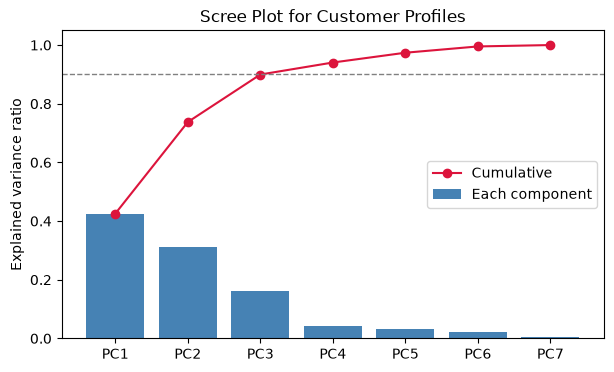
The explained variance ratio of a component is the share of the total variation in the scaled data that the component captures. The ratios are in order from largest to smallest and add up to 1. A scree plot shows them as bars, often with the running (cumulative) total as a line:
ratios = pca.explained_variance_ratio_
pcs = [f'PC{i}' for i in range(1, len(ratios) + 1)]

plt.figure(figsize=(7, 4))
plt.bar(pcs, ratios, color='steelblue', label='Each component')
plt.plot(pcs, ratios.cumsum(), color='crimson', marker='o', label='Cumulative')
plt.axhline(0.9, color='gray', linestyle='--', linewidth=1)
plt.ylim(0, 1.05)
plt.ylabel('Explained variance ratio')
plt.title('Scree Plot for Customer Profiles')
plt.legend()
plt.show()
pd.DataFrame({'component': pcs,
              'explained': ratios.round(3),
              'cumulative': ratios.cumsum().round(3)})
| component | explained | cumulative | |
|---|---|---|---|
| 0 | PC1 | 0.425 | 0.425 |
| 1 | PC2 | 0.312 | 0.738 |
| 2 | PC3 | 0.162 | 0.900 |
| 3 | PC4 | 0.041 | 0.940 |
| 4 | PC5 | 0.033 | 0.974 |
| 5 | PC6 | 0.021 | 0.995 |
| 6 | PC7 | 0.005 | 1.000 |
Choosing how many components to keep. PC1 captures about 43% of the variation, PC2 about 31%, and PC3 about 16%. After PC3 the bars are small: PC4 to PC7 together hold about 10%. Three common rules of thumb:
Keep the components before the scree plot levels off (the “elbow”, as with choosing k in the previous section). Here, that is three.
Keep enough components to reach a target share, such as 80% or 90%. Here, three components reach about 90%.
For a picture, keep two. PC1 and PC2 together hold about 74% of the variation, enough to show the main patterns on one scatter plot.
As with choosing k, these are guides. The right number depends on what the components will be used for.
### Exercise: How Many Components?
# Use X_scaled, the seven customer features in standard units.
#   1. Fit PCA with all components.
#   2. Compute the cumulative explained variance ratio.
#   3. Find the smallest number of components whose cumulative share is at least 0.85.
# Print exactly:
# Components needed: 3
import numpy as np
import pandas as pd
from sklearn.decomposition import PCA

profiles = pd.read_csv(path_data + 'customer_profiles.csv')
X = profiles.drop(columns='customer_id')
X_scaled = (X - X.mean()) / X.std(ddof=0)
### Your code starts here.


### Your code ends here.
Components needed: 3
15.4.4. Reading the Loadings#
A component is a weighted combination of the original features. The weights are called loadings, and they are stored in components_, one row per component. A large positive loading means the feature rises with the component; a large negative loading means it falls; a loading near 0 means the feature has little to do with that component.
loadings = pd.DataFrame(pca.components_[:3].T, index=features,
                        columns=['PC1', 'PC2', 'PC3'])
loadings.round(2)
| PC1 | PC2 | PC3 | |
|---|---|---|---|
| annual_spend | 0.43 | -0.41 | 0.05 |
| orders_per_year | 0.54 | 0.15 | -0.12 |
| avg_order_value | -0.07 | -0.54 | 0.51 |
| days_since_last | -0.49 | -0.09 | -0.35 |
| return_rate | -0.14 | 0.29 | 0.77 |
| web_visits_per_month | 0.51 | 0.19 | 0.04 |
| discount_share | -0.06 | 0.63 | 0.08 |
fig, axes = plt.subplots(1, 2, figsize=(11, 4), sharey=True)
for ax, pc in zip(axes, ['PC1', 'PC2']):
    sns.barplot(x=loadings[pc], y=loadings.index, ax=ax, color='steelblue')
    ax.axvline(0, color='black', linewidth=0.8)
    ax.set_title(f'Loadings on {pc}')
    ax.set_xlabel('Loading')
plt.tight_layout()
plt.show()
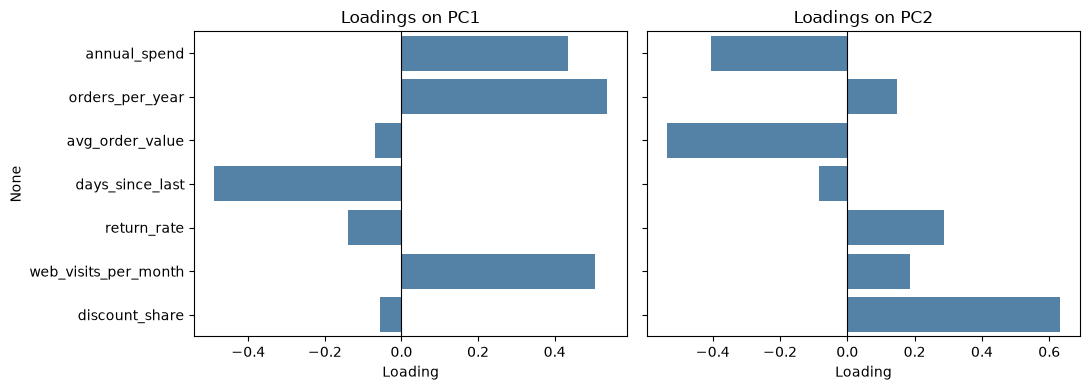
Read each component by looking for the features with the largest loadings, positive and negative:
PC1: orders (0.54), web visits (0.51), and spend (0.43) are high, and days since the last purchase is strongly negative (-0.49). A customer scores high on PC1 by buying often, visiting often, and having bought recently. We might name PC1 overall engagement.
PC2: discount share is high (0.63) and return rate is positive (0.29), while average order value (-0.54) and spend (-0.41) are negative. A customer scores high on PC2 by using discount codes on small orders. We might name PC2 price sensitivity.
PC3 is mostly return rate (0.77), with some average order value: a returns dimension that the first two components do not cover.
Caution
The names are our interpretation, not something PCA computes. Two analysts can read the same loadings and choose different names. The sign of a component is also arbitrary: another version of scikit-learn could flip PC1 so that all its loadings change sign, which would turn “engagement” into “disengagement” without changing anything about the data. Always check the loadings before you name a component, and say which features drive it when you present it.
### Exercise: Read the Loadings
# Use the loadings table for the seven scaled customer features.
#   1. Fit PCA on X_scaled and build a table of loadings for PC1 and PC2 (features as rows).
#   2. Find the feature with the largest absolute loading on PC2.
# Print exactly:
# Largest PC2 loading: discount_share
import pandas as pd
from sklearn.decomposition import PCA

profiles = pd.read_csv(path_data + 'customer_profiles.csv')
X = profiles.drop(columns='customer_id')
X_scaled = (X - X.mean()) / X.std(ddof=0)
### Your code starts here.


### Your code ends here.
Largest PC2 loading: discount_share
15.4.5. PCA with Clustering#
PCA and k-means work well together. We cluster the customers on all seven scaled features, exactly as in the previous section, and then use PCA to draw the result. First, a quick silhouette check for the number of clusters:
for k in range(2, 8):
    labels = KMeans(n_clusters=k, n_init=10, random_state=101).fit_predict(X_scaled)
    print(k, round(silhouette_score(X_scaled, labels), 3))
2 0.383
3 0.467
4 0.582
5 0.49
6 0.404
7 0.296
The silhouette score is highest at k = 4 (about 0.58). We fit k-means with 4 clusters and plot each customer at its PC1 and PC2 scores, colored by cluster:
kmeans = KMeans(n_clusters=4, n_init=10, random_state=101)
profiles['cluster'] = kmeans.fit_predict(X_scaled)

scores = pca.transform(X_scaled)          # PC scores for every customer
profiles['PC1'] = scores[:, 0]
profiles['PC2'] = scores[:, 1]

sns.scatterplot(data=profiles, x='PC1', y='PC2', hue='cluster', palette='tab10')
plt.xlabel('PC1: overall engagement')
plt.ylabel('PC2: price sensitivity')
plt.title('Customer Segments on the First Two Components')
plt.show()
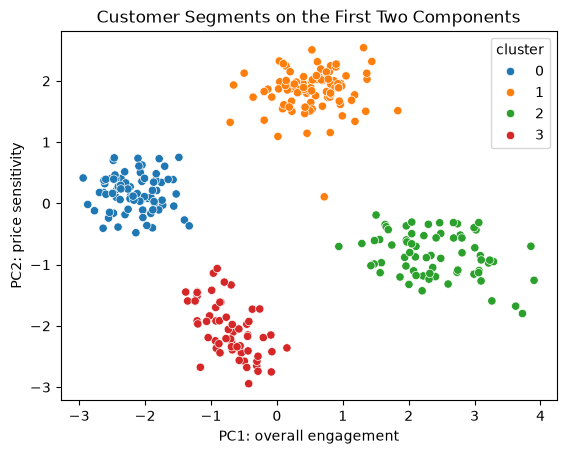
Seven features are now one picture, and the four segments are clearly separated. The axis names come from the loadings, so the picture already suggests what each segment is: high or low engagement, high or low price sensitivity. To describe the segments, though, go back to the original units, as in the previous section. A manager can act on dollars and days, not on PC scores.
profile = profiles.groupby('cluster')[features].mean().round(2)
profile['customers'] = profiles['cluster'].value_counts().sort_index()
profile
| annual_spend | orders_per_year | avg_order_value | days_since_last | return_rate | web_visits_per_month | discount_share | customers | |
|---|---|---|---|---|---|---|---|---|
| cluster | ||||||||
| 0 | 167.32 | 2.88 | 57.91 | 201.09 | 0.08 | 1.94 | 0.39 | 80 |
| 1 | 622.63 | 17.31 | 36.14 | 20.38 | 0.12 | 17.99 | 0.70 | 91 |
| 2 | 2560.13 | 25.80 | 99.72 | 11.81 | 0.05 | 21.22 | 0.16 | 69 |
| 3 | 1682.42 | 3.85 | 436.75 | 80.03 | 0.10 | 6.23 | 0.10 | 60 |
The profiles match the picture. One cluster buys often, spends the most, and rarely uses discounts (loyal high-value, high on PC1). One orders often but in small, discounted baskets (bargain hunters, high on PC2). One places a few large orders at full price (big-ticket buyers, low on PC2). One has barely bought in months (lapsed customers, low on PC1). As before, the cluster numbers themselves are arbitrary.
PCA for visualization vs. PCA before clustering. Above, k-means used all seven features, and PCA only drew the result. Another option is to reduce the data first and cluster the PC scores. This can help when there are many noisy or overlapping features, and it makes the clusters easier to plot. But the clusters then ignore whatever the dropped components held; here, clustering only PC1 and PC2 would ignore most of the return-rate information in PC3. Let’s compare:
labels_2pc = KMeans(n_clusters=4, n_init=10, random_state=101).fit_predict(scores[:, :2])
pd.crosstab(profiles['cluster'], labels_2pc, rownames=['all 7 features'], colnames=['first 2 PCs'])
| first 2 PCs | 0 | 1 | 2 | 3 |
|---|---|---|---|---|
| all 7 features | ||||
| 0 | 80 | 0 | 0 | 0 |
| 1 | 0 | 91 | 0 | 0 |
| 2 | 0 | 0 | 69 | 0 |
| 3 | 0 | 0 | 0 | 60 |
Each row has one nonzero count, so the two approaches put every customer in the same group (the cluster numbers differ, but the groups are the same). That is because these synthetic segments differ mostly in engagement and price sensitivity. In real data the two approaches often disagree, so report which one you used.
### Exercise: Cluster the PC Scores
# Use the PC scores of the seven scaled customer features.
#   1. Fit PCA on X_scaled and keep the first 3 components' scores.
#   2. Fit KMeans with 4 clusters (n_init=10, random_state=101) on those scores.
#   3. Print the cluster sizes sorted from smallest to largest, as a list.
# Print exactly:
# Cluster sizes: [60, 69, 80, 91]
import numpy as np
import pandas as pd
from sklearn.decomposition import PCA
from sklearn.cluster import KMeans

profiles = pd.read_csv(path_data + 'customer_profiles.csv')
X = profiles.drop(columns='customer_id')
X_scaled = (X - X.mean()) / X.std(ddof=0)
### Your code starts here.


### Your code ends here.
Cluster sizes: [60, 69, 80, 91]
15.4.6. Limits of PCA#
PCA is a useful first look at data with many columns, but keep its limits in mind:
Linear only. Each component is a straight-line direction, a weighted sum of the features. Curved or more complex patterns may not show up in the first few components.
Sensitive to scaling. As we saw, PCA on raw features is dominated by whichever feature has the biggest numbers. Standardize first unless the features already share a unit.
Harder to explain. “PC1 score of 1.8” means nothing to a manager until you translate it into the features that drive it. Original columns such as spend and orders are easier to explain, so present results in the original units and use components as a summary or a map.
Spread is not importance. PCA keeps the directions with the most variation, which are not always the ones that matter for a decision. A small component can still hold the signal that predicts churn or profit.
Numeric features. PCA works with numeric columns. Categories such as region or product line need other methods.