
12.5. Inference for the Slope#
A regional manager at a retail chain wants to know whether advertising pays off. She has one month of records for 40 stores: each store’s average weekly advertising spend and its average weekly sales, both in thousands of dollars. In Regression Line and Least Squares you learned how to fit the least squares line, and its slope tells the manager how much sales rise, on average, with each extra $1,000 of advertising.
But the 40 stores are a sample. A different month, or a different set of stores, would give a different scatter plot and a different slope. Before the manager moves budget, she needs to know how much the slope could change. This section answers that question with the tools of Chapters 9 to 11: resample the data with the bootstrap, build a confidence interval for the slope, and use the interval to test whether there is any linear association at all.
The data are in store_ad_sales.csv. The file is a teaching data set simulated to look like store records (see the chapter’s materials file); the columns are the store ID, its region, weekly ad spend (ad_spend, $1,000s), number of staff (staff), years the store has been open (store_age), and weekly sales (sales, $1,000s).
stores = pd.read_csv(path_data + 'store_ad_sales.csv')
stores.head()
| store | region | ad_spend | staff | store_age | sales | |
|---|---|---|---|---|---|---|
| 0 | S01 | North | 6.0 | 12 | 4 | 77.3 |
| 1 | S02 | South | 7.2 | 13 | 11 | 85.3 |
| 2 | S03 | North | 2.0 | 9 | 9 | 50.2 |
| 3 | S04 | North | 3.4 | 7 | 24 | 69.8 |
| 4 | S05 | North | 10.0 | 10 | 1 | 91.4 |
We use the slope and intercept functions from Regression Line. They are repeated here (and in the hidden setup cell, so the exercises can use them).
def standard_units(any_numbers):
    "Convert any array of numbers to standard units."
    return (any_numbers - np.mean(any_numbers)) / np.std(any_numbers)

def correlation(table, x, y):
    return np.mean(standard_units(table[x]) * standard_units(table[y]))

def slope(table, x, y):
    r = correlation(table, x, y)
    return r * np.std(table[y]) / np.std(table[x])

def intercept(table, x, y):
    return np.mean(table[y]) - slope(table, x, y) * np.mean(table[x])
12.5.1. The Slope Varies from Sample to Sample#
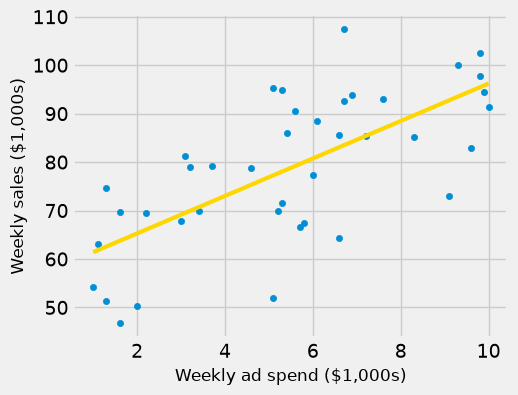
Here is the scatter plot of sales against ad spend, with the least squares line.
observed_slope = slope(stores, 'ad_spend', 'sales')
observed_intercept = intercept(stores, 'ad_spend', 'sales')

fig, ax = plt.subplots(figsize=(5, 4))
ax.scatter(stores['ad_spend'], stores['sales'], s=20)
xs = np.array([1, 10])
ax.plot(xs, observed_slope * xs + observed_intercept, color='gold', lw=3)
ax.set_xlabel('Weekly ad spend ($1,000s)', fontsize=12)
ax.set_ylabel('Weekly sales ($1,000s)', fontsize=12)
plt.show()

print('Slope:    ', round(observed_slope, 2))
print('Intercept:', round(observed_intercept, 2))
Slope:     3.87
Intercept: 57.54
The slope is about 3.87: in these 40 stores, each extra $1,000 of weekly ad spend goes with about $3,870 more in weekly sales, on average.
That number describes this sample. Imagine the line we would get from all stores and weeks the chain could have recorded. Its slope is the true slope, a population parameter. We do not know it. The slope from our sample is an estimate of it, just as a sample median was an estimate of a population median in The Bootstrap.
To see that the estimate depends on which stores happen to be in the sample, split the 40 stores into two groups of 20 and fit a line to each.
first_20 = stores.iloc[:20]
last_20 = stores.iloc[20:]

print('Slope from the first 20 stores:', round(slope(first_20, 'ad_spend', 'sales'), 2))
print('Slope from the last 20 stores: ', round(slope(last_20, 'ad_spend', 'sales'), 2))
Slope from the first 20 stores: 5.04
Slope from the last 20 stores:  3.39
The two halves give slopes of about 5.04 and 3.39. Neither is wrong; each is a fair estimate from a smaller sample. A fitted slope has sampling variability, and a manager who reads only one slope does not know whether the true slope might be 3, 4, or 5.
### Exercise: Slope by Region
#   1. Split stores into North and South stores using the region column.
#   2. Compute the slope of sales on ad_spend for each region with the slope function.
#   3. Print both slopes and the slope for all 40 stores, rounded to 2 decimals.
#      Do the regional slopes match the overall slope?
### Your code starts here.


### Your code ends here.
North: 4.41
South: 2.92
All:   3.87
12.5.2. Bootstrapping the Slope#
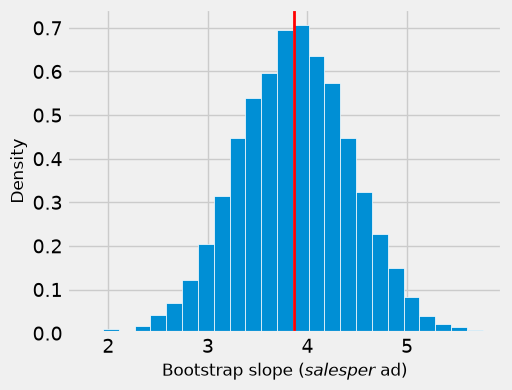
We cannot go back and collect many new samples of stores. As in The Bootstrap, we resample the sample: draw 40 rows from stores at random with replacement, and fit a line to the resample. The slope of that line is a bootstrap slope.
One detail matters for regression: resample whole rows. Each row keeps a store’s ad spend and sales together, so the resample keeps the relationship between the two variables. Resampling the two columns separately would break every pair and destroy the association we want to measure.
def one_bootstrap_slope():
    resample = stores.sample(len(stores), replace=True)
    return slope(resample, 'ad_spend', 'sales')
Run the cell below a few times. Each run gives a slightly different slope.
one_bootstrap_slope().item()
3.681877780322064
Now repeat the process 5,000 times and collect the slopes, as we collected medians and means in Chapter 11.
# Seed once so the example is reproducible; do not reset inside the loop.
np.random.seed(42)

num_repetitions = 5000
bstrap_slopes = np.array([])
for i in np.arange(num_repetitions):
    bstrap_slopes = np.append(bstrap_slopes, one_bootstrap_slope())

len(bstrap_slopes)
5000
The 5,000 bootstrap slopes form the empirical distribution of the slope. The histogram shows how much the slope moves from resample to resample; the red line marks the slope of the original sample.
fig, ax = plt.subplots(figsize=(5, 4))
ax.hist(bstrap_slopes, bins=25, density=True, ec='white')
ax.axvline(observed_slope, color='red', lw=2)
ax.set_xlabel('Bootstrap slope ($ sales per $ ad)', fontsize=12)
ax.set_ylabel('Density', fontsize=12)
plt.show()
Another way to see the same variability is to draw some of the bootstrap lines on the scatter plot. Each gray line comes from one resample.
np.random.seed(7)

fig, ax = plt.subplots(figsize=(5, 4))
ax.scatter(stores['ad_spend'], stores['sales'], s=20, zorder=3)
xs = np.array([1, 10])
for i in range(20):
    resample = stores.sample(len(stores), replace=True)
    a = slope(resample, 'ad_spend', 'sales')
    b = intercept(resample, 'ad_spend', 'sales')
    ax.plot(xs, a * xs + b, color='gray', lw=1, alpha=0.6)
ax.plot(xs, observed_slope * xs + observed_intercept, color='gold', lw=3)
ax.set_xlabel('Weekly ad spend ($1,000s)', fontsize=12)
ax.set_ylabel('Weekly sales ($1,000s)', fontsize=12)
plt.show()
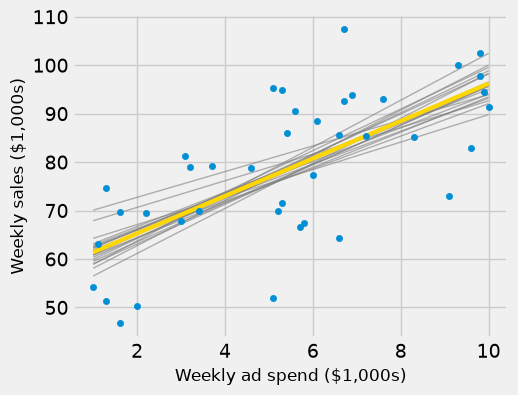
The bootstrap lines fan out most at the two ends of the ad-spend range and cross near the middle, where the data are densest. The slope is uncertain, but every line still rises.
### Exercise: Bootstrap the Staffing Slope
# Does sales rise with the number of staff?
#   1. Write a function that resamples the rows of stores with replacement,
#      using stores.sample(len(stores), replace=True, random_state=seed),
#      and returns the slope of sales on staff.
#   2. Collect 1,000 bootstrap slopes with seed = 0, 1, ..., 999.
#   3. Print the observed slope, the number of bootstrap slopes, and the smallest
#      and largest bootstrap slopes, rounded to 2 decimals.
### Your code starts here.


### Your code ends here.
Observed slope: 1.95
Number of bootstrap slopes: 1000
Smallest and largest: -0.04 3.98
12.5.3. A Confidence Interval for the True Slope#
The bootstrap percentile method from Confidence Intervals works for slopes exactly as it did for medians and means. For a 95% confidence interval, take the 2.5th and 97.5th percentiles of the bootstrap slopes.
left = np.percentile(bstrap_slopes, 2.5, method='nearest')
right = np.percentile(bstrap_slopes, 97.5, method='nearest')

np.array([left, right]).round(2)
array([2.79, 4.98])
fig, ax = plt.subplots(figsize=(5, 4))
ax.hist(bstrap_slopes, bins=25, density=True, ec='white')
ax.plot([left, right], [0, 0], color='yellow', lw=8)
ax.set_xlabel('Bootstrap slope ($ sales per $ ad)', fontsize=12)
ax.set_ylabel('Density', fontsize=12)
plt.show()
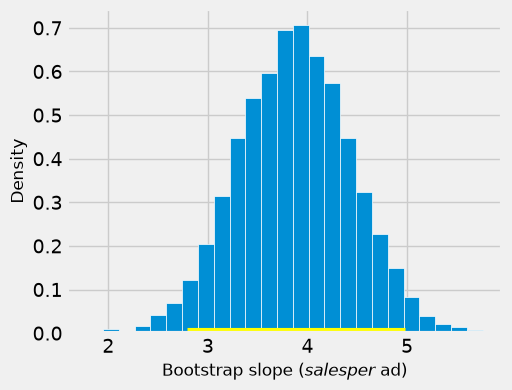
The approximate 95% confidence interval for the true slope runs from about 2.79 to 4.98.
Business interpretation. Across the chain’s stores, each extra $1,000 of weekly ad spend is associated with somewhere between about $2,790 and $4,980 more in weekly sales, at 95% confidence. As in Chapter 11, the 95% describes the method: intervals built this way from fresh samples would contain the true slope about 95% of the time. This particular interval either contains it or not.
The interval is far more useful to the manager than the single slope. Suppose each dollar of sales brings 30 cents of gross profit. Then a dollar of advertising pays for itself only if the true slope is above \(1/0.30 \approx 3.33\). The interval reaches below 3.33, so the data do not show that advertising pays for itself: the manager should not expand the ad budget on these data alone.
Two cautions carry over from Chapter 12:
The interval estimates the slope of an association. Stores that spend more on ads may also differ in location or size (Correlation). The interval does not show that ads cause the extra sales.
The interval applies to the range of ad spend in the data, about $1,000 to $10,000 a week. It says nothing about what would happen at $30,000.
### Exercise: A 90% Interval for the Ad Slope
#   1. Collect 1,000 bootstrap slopes of sales on ad_spend, using
#      stores.sample(len(stores), replace=True, random_state=i) for i = 0, ..., 999.
#   2. Compute a 90% confidence interval with np.percentile(..., method='nearest').
#      (Which percentiles leave 5% in each tail?)
#   3. Print the interval rounded to 2 decimals. In a comment, interpret it for the manager.
### Your code starts here.


### Your code ends here.
90% interval: 2.96 to 4.82
12.5.4. Testing Whether the True Slope Is 0#
A slope of 0 means a flat line: knowing \(x\) tells you nothing about the average of \(y\). So a natural first question about any regression is whether the true slope could be 0. In the language of Hypotheses and p-Value:
Null hypothesis: the true slope is 0. There is no linear association in the population, and the slope in the sample is not 0 only because of chance.
Alternative hypothesis: the true slope is not 0.
A confidence interval gives a quick way to run this test. If 0 is outside the 95% confidence interval, reject the null hypothesis at the 5% cutoff: 0 is not among the plausible values of the true slope. If 0 is inside the interval, the data are consistent with no linear association.
For ad spend, the 95% interval is about 2.79 to 4.98. Zero is far outside it, so we reject the null hypothesis: in the chain’s stores, sales and ad spend are linearly associated.
Now consider a different question. Do older stores sell more? Here is the slope of sales on store_age.
age_slope = slope(stores, 'store_age', 'sales')
round(age_slope.item(), 2)
-0.28
In the sample, each extra year open goes with about $280 less in weekly sales. Is that a real pattern, or chance? Bootstrap the slope and check whether 0 is in the interval.
def one_bootstrap_age_slope():
    resample = stores.sample(len(stores), replace=True)
    return slope(resample, 'store_age', 'sales')

np.random.seed(42)
age_slopes = np.array([])
for i in np.arange(5000):
    age_slopes = np.append(age_slopes, one_bootstrap_age_slope())

age_left = np.percentile(age_slopes, 2.5, method='nearest')
age_right = np.percentile(age_slopes, 97.5, method='nearest')
np.array([age_left, age_right]).round(2)
array([-0.97, 0.37])
fig, ax = plt.subplots(figsize=(5, 4))
ax.hist(age_slopes, bins=25, density=True, ec='white')
ax.plot([age_left, age_right], [0, 0], color='yellow', lw=8)
ax.axvline(0, color='red', lw=2)
ax.set_xlabel('Bootstrap slope (sales on store age)', fontsize=12)
ax.set_ylabel('Density', fontsize=12)
plt.show()
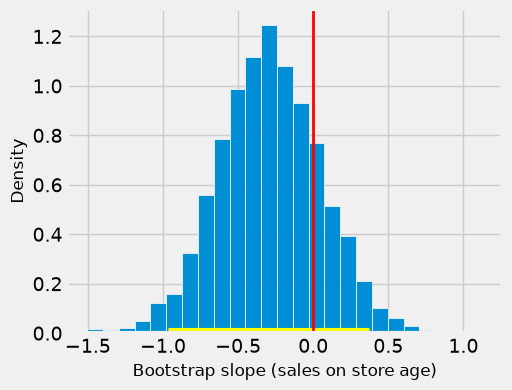
The interval runs from about -0.97 to 0.37, and it contains 0 (the red line). The data are consistent with a true slope of 0, so we do not reject the null hypothesis. The manager should not conclude that older stores sell less.
Not rejecting the null hypothesis is not the same as proving it. The interval also includes slopes such as -0.8, a loss of $800 a week for each year open. With only 40 stores, the data cannot rule that out either.
### Exercise: Is Staffing Associated with Sales?
#   1. Collect 1,000 bootstrap slopes of sales on staff, using
#      stores.sample(len(stores), replace=True, random_state=i) for i = 0, ..., 999.
#   2. Compute the 95% confidence interval with np.percentile(..., method='nearest').
#   3. Print the interval and whether 0 is inside it. In a comment, state the
#      conclusion of the test of "true slope = 0" at the 5% cutoff.
### Your code starts here.


### Your code ends here.
95% interval: 0.86 to 3.05
0 inside the interval: False
12.5.5. Predictions and Cautions#
12.5.5.1. The Height of the Line at a Given Ad Spend#
The manager also wants to know: for stores that spend $8,000 a week on ads, what are average weekly sales? The fitted line gives one answer. To see how much that answer could vary, compute the height of each bootstrap line at \(x = 8\) and take the middle 95%.
def one_bootstrap_height(x_value):
    resample = stores.sample(len(stores), replace=True)
    a = slope(resample, 'ad_spend', 'sales')
    b = intercept(resample, 'ad_spend', 'sales')
    return a * x_value + b

np.random.seed(42)
heights_at_8 = np.array([])
for i in np.arange(5000):
    heights_at_8 = np.append(heights_at_8, one_bootstrap_height(8))

fitted_at_8 = observed_slope * 8 + observed_intercept
print('Fitted value at $8,000:', round(fitted_at_8, 1))
print('95% interval:', np.percentile(heights_at_8, [2.5, 97.5], method='nearest').round(1))
Fitted value at $8,000: 88.5
95% interval: [84.2 93.2]
The fitted value is about $88,500 in weekly sales, and the 95% interval runs from about $84,200 to $93,200. This interval is for the average sales of stores that spend $8,000 on ads, the height of the true line. A single store varies much more around that average: the points in the scatter plot sit well above and below the line. An interval for one store’s sales would have to be wider.
### Exercise: Average Sales at a $5,000 Ad Budget
#   1. Collect 1,000 bootstrap heights of the regression line at ad_spend = 5,
#      using stores.sample(len(stores), replace=True, random_state=i) for i = 0, ..., 999.
#   2. Print the fitted value at 5 from the original sample and the 95% interval,
#      rounded to 1 decimal.
#   3. In a comment, compare the width of this interval with the one at 8.
### Your code starts here.


### Your code ends here.
Fitted value at $5,000: 76.9
95% interval: [73.4 80.6]
12.5.5.2. When the Bootstrap Results Are Not Trustworthy#
The bootstrap interval is only as good as the sample and the line. Check these before you report one:
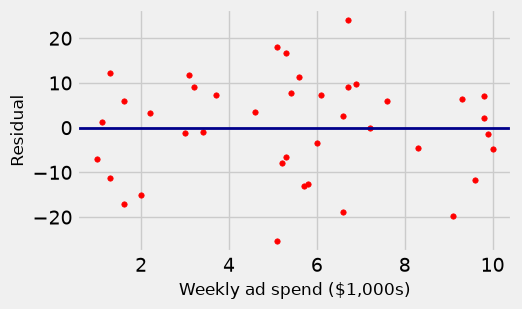
Nonlinearity. If the residual plot shows a curve (Visual Diagnostics), the slope summarizes the wrong shape. An interval for it is precise about the wrong thing.
Outliers and influential points. One unusual store can pull the line. Resamples that include it several times and resamples that leave it out give very different slopes, and the interval reflects that one store more than the chain.
Uneven spread. Fan-shaped residuals mean predictions are more accurate in some parts of the range than in others; one interval for the line hides that.
Small samples. The bootstrap treats the sample as a stand-in for the population. With only a handful of rows, the sample is a poor stand-in and the interval can be misleading.
How the data were collected. As in Confidence Intervals, the bootstrap assumes a random sample. Stores the manager chose because they were doing well are not one.
The first check is always the residual plot. For the store data, the residuals show no curve and no fan, so the bootstrap interval is reasonable.
residuals = stores['sales'] - (observed_slope * stores['ad_spend'] + observed_intercept)

fig, ax = plt.subplots(figsize=(5, 3))
ax.scatter(stores['ad_spend'], residuals, color='r', s=15)
ax.axhline(0, color='darkblue', lw=2)
ax.set_xlabel('Weekly ad spend ($1,000s)', fontsize=12)
ax.set_ylabel('Residual', fontsize=12)
plt.show()
To see the small-sample problem, bootstrap the slope from only the first 8 stores.
few_stores = stores.iloc[:8]

np.random.seed(42)
few_slopes = np.array([])
for i in np.arange(5000):
    resample = few_stores.sample(len(few_stores), replace=True)
    few_slopes = np.append(few_slopes, slope(resample, 'ad_spend', 'sales'))

print('Slope from 8 stores:', round(slope(few_stores, 'ad_spend', 'sales'), 2))
print('95% interval, 8 stores: ', np.percentile(few_slopes, [2.5, 97.5], method='nearest').round(2))
print('95% interval, 40 stores:', np.array([left, right]).round(2))
Slope from 8 stores: 4.81
95% interval, 8 stores:  [2.12 6.35]
95% interval, 40 stores: [2.79 4.98]
With 8 stores the interval is much wider than with 40, and with so few rows even its width is not reliable: some resamples repeat the same two or three stores. More bootstrap repetitions do not help, because they add no new stores. Only more data does.
### Exercise: How Sample Size Changes the Interval
#   1. Take the first 20 stores: stores.iloc[:20].
#   2. Collect 1,000 bootstrap slopes of sales on ad_spend from these 20 stores,
#      using .sample(20, replace=True, random_state=i) for i = 0, ..., 999.
#   3. Print the 95% interval and its width (right minus left), rounded to 2 decimals.
#      In a comment, compare the width with the 40-store interval (about 2.79 to 4.98).
### Your code starts here.


### Your code ends here.
95% interval, 20 stores: 3.63 to 6.35
Width: 2.72